
关于netty的多个handler链式模式
1. 老规矩, 引入我们喜闻乐见的maven依赖
 <dependency>

     <groupId>io.netty</groupId>

     <artifactId>netty-all</artifactId>

     <version>4.1.6.Final</version>

 </dependency>
2. 服务端
2.1: 服务端引导类:
 public class EchoServer {

     private int port;

     private EchoServer(int port) {

         this.port = port;

     }

     private void start() throws Exception {

         System.out.println("Echo Server Start");

         EventLoopGroup group = new NioEventLoopGroup();

         try {

             ServerBootstrap b = new ServerBootstrap();

             b.group(group)

                     .channel(NioServerSocketChannel.class)

                     .localAddress(new InetSocketAddress(port))

                     .childHandler(new ChannelInitializer<SocketChannel>() {

                         @Override

                         public void initChannel(SocketChannel ch) throws Exception {

                             ch.pipeline().addLast(new EchoOutboundHandler1());

                             ch.pipeline().addLast(new EchoOutboundHandler2());

                             ch.pipeline().addLast(new EchoInboundHandler1());

                             ch.pipeline().addLast(new EchoInboundHandler2());

                         }

                     });

             ChannelFuture f = b.bind().sync();

             System.out.println("Server Start Listen At: " + port);

             f.channel().closeFuture().sync();

         } finally {

             group.shutdownGracefully();

         }

     }

     public static void main(String[] args) throws Exception {

         int port;

         if (args.length > 0) {

             port = Integer.parseInt(args[0]);

         } else {

             port = 8080;

         }

         new EchoServer(port).start();

     }

 }
2.2 EchoOutboundHandler1
 public class EchoInboundHandler1 extends ChannelInboundHandlerAdapter {

     @Override

     public void channelRead(ChannelHandlerContext ctx, Object msg) {

         // 读取msg中的数据

         ByteBuf result = (ByteBuf) msg;

         byte[] bytes = new byte[result.readableBytes()];

         result.readBytes(bytes);

         String resultStr = new String(bytes);

         System.out.println("Server Received: " + resultStr + ": Inbound 1 Is OK");

         // 处理完msg中的数据后往msg中重新存放新的数据继续传递

         result.writeBytes(resultStr.getBytes());

         ctx.fireChannelRead(result);

     }

 }
2.3 EchoInboundHandler2
 public class EchoInboundHandler2 extends ChannelInboundHandlerAdapter {

     @Override

     public void channelRead(ChannelHandlerContext ctx, Object msg) {

         // 读取msg中的数据

         ByteBuf result = (ByteBuf) msg;

         byte[] bytes = new byte[result.readableBytes()];

         result.readBytes(bytes);

         String resultStr = new String(bytes);

         System.out.println("Server Received: " + resultStr + ": Inbound 2 Is OK");

         // 处理完msg中的数据后往msg中重新存放新的数据继续传递

         result.writeBytes(resultStr.getBytes());

         ctx.write(result);

     }

 }
2.4 EchoOutboundHandler2
 public class EchoOutboundHandler2 extends ChannelOutboundHandlerAdapter {

     @Override

     public void write(ChannelHandlerContext ctx, Object msg, ChannelPromise promise) throws Exception {

         // 读取msg中的数据

         ByteBuf result = (ByteBuf) msg;

         byte[] bytes = new byte[result.readableBytes()];

         result.readBytes(bytes);

         String resultStr = new String(bytes);

         System.out.println("Server Received: " + resultStr + ": Outbound 2 Is OK");

         // 处理完msg中的数据后往msg中重新存放新的数据继续传递

         result.writeBytes(resultStr.getBytes());

         ctx.write(result);

     }

 }
2.5 EchoOutboundHandler1
 public class EchoOutboundHandler1 extends ChannelOutboundHandlerAdapter {

     @Override

     public void write(ChannelHandlerContext ctx, Object msg, ChannelPromise promise) throws Exception {

         // 读取msg中的数据

         ByteBuf result = (ByteBuf) msg;

         byte[] bytes = new byte[result.readableBytes()];

         result.readBytes(bytes);

         String resultStr = new String(bytes);

         System.out.println("Server Received: " + resultStr + ": Outbound 1 Is OK");

         // 处理完msg中的数据后往msg中重新存放新的数据继续传递

         result.writeBytes(resultStr.getBytes());

         ctx.write(result);

         ctx.flush();

     }

 }
3. 客户端
 public class EchoClient {

     private String host;

     private int port;

     private EchoClient(String host, int port) {

         this.host = host;

         this.port = port;

     }

     private void start() throws Exception {

         System.out.println("Echo Client Start");

         EventLoopGroup group = new NioEventLoopGroup();

         try {

             Bootstrap b = new Bootstrap();

             b.group(group)

                     .channel(NioSocketChannel.class)

                     .remoteAddress(new InetSocketAddress(host, port))

                     .handler(new ChannelInitializer<SocketChannel>() {

                         @Override

                         public void initChannel(SocketChannel ch) throws Exception {

                             ch.pipeline().addLast(new EchoClientHandler());

                         }

                     });

             ChannelFuture f = b.connect().sync();

             System.out.println("Server Client Listen IP: [" + host + ":" + port + "]");

             f.channel().closeFuture().sync();

         } finally {

             group.shutdownGracefully();

         }

     }

     public static void main(String[] args) throws Exception {

         String host = "127.0.0.1";

         int port = 8080;

         int len = 2;

         if (args.length == len) {

             host = args[0];

             port = Integer.parseInt(args[1]);

         }

         new EchoClient(host, port).start();

     }

 }
 public class EchoClientHandler extends ChannelInboundHandlerAdapter {

     @Override

     public void channelActive(ChannelHandlerContext ctx) {

         ctx.writeAndFlush(Unpooled.copiedBuffer("Netty Rocks!", CharsetUtil.UTF_8));

     }

     @Override

     public void channelRead(ChannelHandlerContext ctx, Object msg) {

         // 读取msg中的数据

         ByteBuf result = (ByteBuf) msg;

         byte[] bytes = new byte[result.readableBytes()];

         result.readBytes(bytes);

         String resultStr = new String(bytes);

         System.out.println("Echo Client Received Is OK: " + resultStr);

         ctx.close();

     }

     @Override

     public void exceptionCaught(ChannelHandlerContext ctx, Throwable cause) {

         cause.printStackTrace();

         ctx.close();

     }

 }
4. 结果:
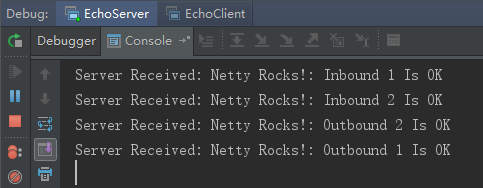
服务端:
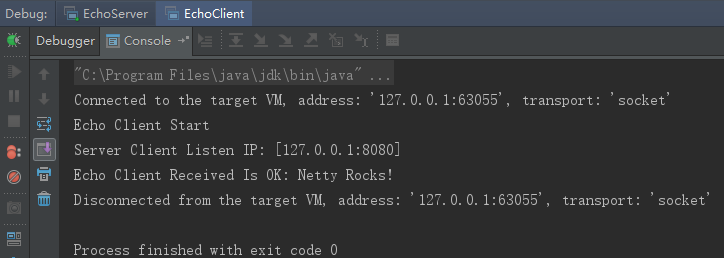
客户端:
5. 注意事项:
5.1. ChannelInboundHandler之间的传递, 通过调用 ctx.fireChannelRead(msg) 实现; 调用ctx.write(msg) 将传递到ChannelOutboundHandler
5.2. ctx.write()方法执行后, 需要调用flush()方法才能令它立即执行
5.3. ChannelOutboundHandler 在注册的时候需要放在最后一个ChannelInboundHandler之前, 否则将无法传递到ChannelOutboundHandler
关于netty的多个handler链式模式的更多相关文章
- JavaScript 链式结构序列化详解
一.概述 在JavaScript中,链式模式代码,太多太多,如下: if_else: if(...){ //TODO }else if(...){ //TODO }else{ //TODO } swi ...
- jQuery链式操作[转]
用过jQuery的朋友都知道他强大的链式操作,方便,简洁,易于理解,如下 $("has_children").click(function(){ $(this).addClass( ...
- javascript实现数据结构:线性表--线性链表(链式存储结构)
上一节中, 线性表的顺序存储结构的特点是逻辑关系上相邻的两个元素在物理位置上也相邻,因此可以随机存取表中任一元素,它的存储位置可用一个简单,直观的公式来表示.然后,另一方面来看,这个特点也造成这种存储 ...
- 用php实现一个简单的链式操作
最近在读<php核心技术与最佳实践>这本书,书中第一章提到用__call()方法可以实现一个简单的字符串链式操作,比如,下面这个过滤字符串然后再求长度的操作,一般要这么写: strlen( ...
- C#用链式方法表达循环嵌套
情节故事得有情节,不喜欢情节的朋友可看第1版代码,然后直接跳至“三.想要链式写法” 一.起缘 故事缘于一位朋友的一道题: 朋友四人玩LOL游戏.第一局,分别选择位置:中单,上单,ADC,辅助:第二局新 ...
- 由表单验证说起,关于在C#中尝试链式编程的实践
在web开发中必不可少的会遇到表单验证的问题,为避免数据在写入到数据库时出现异常,一般比较安全的做法是前端会先做一次验证,通过后把数据提交到后端再验证一次,因为仅仅靠前端验证是不安全的,有太多的htt ...
- 如何写 JS 的链式调用 ---》JS 设计模式《----方法的链式调用
1.以$ 函数为例.通常返回一个HTML元素或一个元素集合. 代码如下: function $(){ var elements = []; ;i<arguments.length;i++){ v ...
- iOS 链式编程探索(Masonry)
看了几篇关于链式编程的文章,还是理解的不透彻,我想这可能是因为我自己对block掌握的不熟练. 我已经明白了,所以,和大家分享一下我的理解!如有问题,麻烦大家指出! 直接看代码吧!关键的注释都有. 我 ...
- jQuery插件编写及链式编程模型小结
JQuery极大的提高了我们编写JavaScript的效率,让我们可以愉快的编写代码,做出各种特效.大多数情况下,我们都是使用别人开发的JQuery插件,今天我们就来看看如何把我们常用的功能做出JQu ...
随机推荐
- 《effective C++》:条款37——绝不重新定义继承而来的缺省参数值
引子: 阿里的一道题: #include <IOSTREAM> using namespace std; class A{ public: ) { cout<<"a~ ...
- 跨多种环境部署 Gearman -改善应用程序性能和降低服务器负载
您可能想要将工作扩散到一个大型机器群体中,或者想要在不同语言和环境之间共享功能,那么开放源码的 Gearman 服务可以让您轻松地将工作分布到网络中的其他机器.本文将介绍 Gearman 的一些典型应 ...
- PHP中的魔术方法【转载】
__construct, __destruct , __call, __callStatic,__get, __set, __isset, __unset , __sleep, __wakeup, _ ...
- django学习之- Models笔记
1:创建数据库表 #单表# app01_user 生成的表明为 tb1class User(models.Model): name = models.CharField(max_length=32,d ...
- [Bzoj1009][HNOI2008]GT考试(KMP)(矩乘优化DP)
1009: [HNOI2008]GT考试 Time Limit: 1 Sec Memory Limit: 162 MBSubmit: 4309 Solved: 2640[Submit][Statu ...
- Eureka 简介
Eureka 简介
- 使用Base64进行string的加密和解密 公钥加密—私钥签名
使用Base64进行string的加密和解密 //字符串转bytesvar ebytes = System.Text.Encoding.Default.GetBytes(keyWord);//by ...
- superCleanMaster
https://github.com/eltld/superCleanMaster
- Servlet学习总结,为理解SpringMVC底层做准备
Servlet 一句话概括 :处理web浏览器,其他HTTP客户端与服务器上数据库或其他应用交互的中间层 Servlet 生命周期 : 1.类加载, 2.实例化并调用init()方法初始化该 Serv ...
- 代理ip proxy
import requestsimport timefrom selenium import webdriverfrom selenium.webdriver.chrome.options impor ...