
Vue父子组件传值之——访问根组件$root、$parent、$children和$refs
Vue组件传值除了prop和$emit,我们还可以直接获取组件对象:
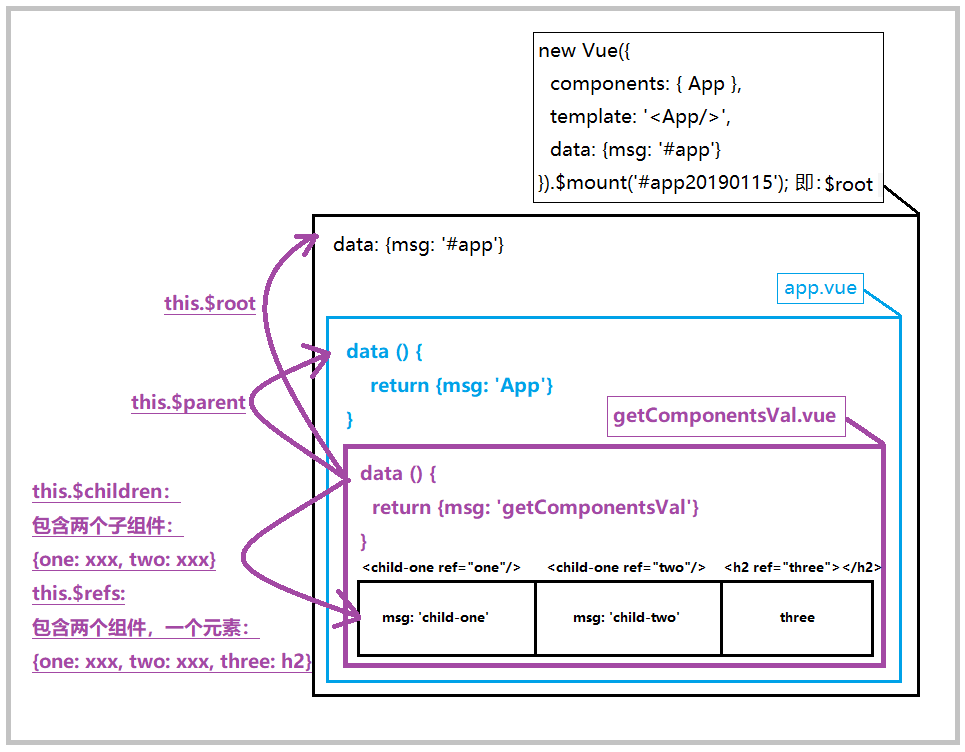
根组件: $root // 单一对象
表示当前组件树的根 Vue 实例,即new Vue({...根组件内容})。
如果当前实例没有父实例,此实例将会是其自己。
Vue子组件可以通过$root属性访问父组件实例的属性和方法
父组件:$parent // 单一对象
$parent表示父组件的实例,该属性只读
子组件:$children // 数组
$children表示当前实例的直接子组件。需要注意$children并不保证顺序,也不是响应式的。如果正在尝试使用$children来进行数据绑定,考虑使用一个数组配合v-for来生成子组件,并且使用Array作为真正的来源
其他获取组件方法: $refs
$refs
栗子:
组件顺序:new Vue > app.vue > getComponentsVal.vue > (child-one.vue + child-tow.vue + <h2>three</h2>)
1分析配图:
2代码实现:
首先我们列出根组件和父组件:
根组件:(可以看到,这里引入了组件App)
new Vue({

  components: { App },

  template: '<App/>',

  data: {msg: '#app'} // #app

}).$mount('#app20190124')
父组件:(这里只列出了msg内容,它就是上图中的App.vue组件块;并且引入了getComponentsVal.vue组件)
data () {

    return {

      msg: 'App' // App

    }

}
然后我们着重分析当前测试本身和它的子组件:
当前测试的组件——template:当前组件”getComponentsVal.vue”包含了两个子组件和一个h2标签
<template>

    <div>

        <h2>我是"App"的子组件,我的根组件Vue#app20190124</h2>

        <child-one ref="one"/>

        <child-two ref="two"/>

        <h2 ref="three">three</h2>

    </div>

</template>
当前测试的组件——的两个子组件(这里没有import,而是直接写在components里):
  components: {

    childOne: {

      name: 'child-one',

      template: '<h2>{{msg}}</h2>',

      data () {

        return {

          msg: 'child-one'

        }

      },

      mounted () {

        console.log(this.$parent.msg)

      }

    },

    childTwo: {

      name: 'child-two',

      template: '<h2>{{msg}}</h2>',

      data () {

        return {

          msg: 'child-two'

        }

      },

      mounted () {

        console.log(this.$parent.msg)

      }

    }

  },
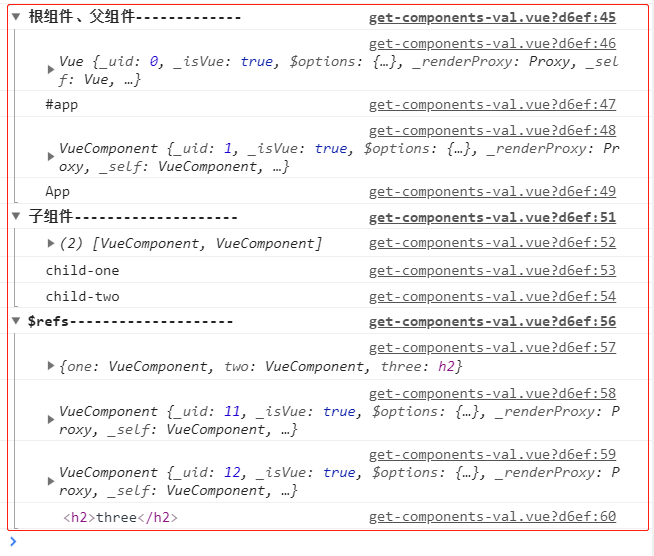
当前测试的组件——的测试结果:
  mounted () {

    console.group('根组件、父组件-------------')

    console.log(this.$root) // 根实例对象: {Vue#app}

    console.log(this.$root.msg) // #app

    console.log(this.$parent) // 父组件实例对象: {Vue父}

    console.log(this.$parent.msg) // App

    console.groupEnd()

    console.group('子组件--------------------')

    console.log(this.$children) // 所有子级数组: [VueComponent, VueComponent]

    console.log(this.$children[0].msg) // 获取第一个子级msg: child-one

    console.log(this.$children[1].msg) // 获取第二个子级msg: child-two

    console.groupEnd()

    console.group('$refs--------------------')

    console.log(this.$refs) // 包含所有refs的对象:{one: VueComponent, two: VueComponent, three: h2}

    console.log(this.$refs.one) // 子级组件: child-one

    console.log(this.$refs.two) // 子级组件: child-two

    console.log(this.$refs.three) // dom元素: <h2>three</h2>

    console.groupEnd()

  }
3执行结果图:
4当前测试的组件——的全部代码:
<template>

    <div>

        <h2>我是"App"的子组件,我的根组件Vue#app20190124</h2>

        <child-one ref="one"/>

        <child-two ref="two"/>

        <h2 ref="three">three</h2>

    </div>

</template>

<script>

export default {

  name: 'getComponentsVal',

  data () {

    return {

      msg: 'getComponentsVal'

    }

  },

  components: {

    childOne: {

      name: 'child-one',

      template: '<h2>{{msg}}</h2>',

      data () {

        return {

          msg: 'child-one'

        }

      },

      mounted () {

        console.log(this.$parent.msg)

      }

    },

    childTwo: {

      name: 'child-two',

      template: '<h2>{{msg}}</h2>',

      data () {

        return {

          msg: 'child-two'

        }

      },

      mounted () {

        console.log(this.$parent.msg)

      }

    }

  },

  mounted () {

    console.group('根组件、父组件-------------')

    console.log(this.$root) // 根实例对象: {Vue#app}

    console.log(this.$root.msg) // #app

    console.log(this.$parent) // 父组件实例对象: {Vue父}

    console.log(this.$parent.msg) // App

    console.groupEnd()

    console.group('子组件--------------------')

    console.log(this.$children) // 所有子级数组: [VueComponent, VueComponent]

    console.log(this.$children[0].msg) // 获取第一个子级msg: child-one

    console.log(this.$children[1].msg) // 获取第二个子级msg: child-two

    console.groupEnd()

    console.group('$refs--------------------')

    console.log(this.$refs) // 包含所有refs的对象:{one: VueComponent, two: VueComponent, three: h2}

    console.log(this.$refs.one) // 子级组件: child-one

    console.log(this.$refs.two) // 子级组件: child-two

    console.log(this.$refs.three) // dom元素: <h2>three</h2>

    console.groupEnd()

  }

}

</script>
Vue父子组件传值之——访问根组件$root、$parent、$children和$refs的更多相关文章
- vue父子组件传值加例子
例子:http://element-cn.eleme.io/#/zh-CN/component/form 上进行改的 父传子:用prop:子组件能够改变父组件的值,是共享的,和父操作是 ...
- 关于Vue父子组件传值(复杂数据类型的值)的细节点
vue 父子组件传值是很常见的,多数情况下都是父传递给子的值是基础数据类型,如string,number,boolean, 当父组件值被修改时,子组件能够实时的作出改变. 如果父子传值的类型是复杂数据 ...
- 一个故事讲懂vue父子组件传值
作者:李佳明同学链接:https://www.jianshu.com/p/2272b6ca0f0c 一个故事讲懂vue父子组件传值 讲故事前先讲代码 父组件向子组件传值 父组件数据传递给子组件可以通过 ...
- Vue 父子组件传值 props
1.Vue 的渲染周期: vue 如何实现响应式追踪. 父子组件通信有很多方式,今天单独聊下props 的方式.我们通过查找官方文档很容发现,props传值有静态和动态两种传值方式. 当然props ...
- vue 父子组件传值以及方法调用,平行组件之间传值以及方法调用大全
vue项目经常需要组件间的传值以及方法调用,具体场景就不说了,都知道.基本上所有的传值都可以用vuex状态管理来实现,只要在组件内监听vuex就好. vue常用的传值方式以及方法有: 1. 父值传子( ...
- vue 父子组件传值,兄弟组件传值
父子组件中的传值 父向子 v-bind props <!-- 组件使用v-bind传值 --> <router :msg="msg"></rou ...
- Vue父子组件传值以及父调子方法、子调父方法
稍微总结了一下Vue中父子间传值以及相互调方法的问题,非常基础.希望可以帮到你!先来个最常用的,直接上代码: 1.父传值给子组件 父组件: <template> <div> & ...
- VUE父子组件传值问题
一.父组件向子组件传递数据 组件实例的作用域是孤立的.这意味着不能(也不应该)在子组件的模板内直接引用父组件的数据.要让子组件使用父组件的数据,我们需要通过子组件的props选项. 1.静态props ...
- vue父子组件传值
1.父组件向子组件传值 例如app.vue是父组件,v-header.vue是子组件,实现app向v-header传值父组件需要自定义自己的title值, 子组件v-header内容 <temp ...
随机推荐
- FF,chrome与IE的事件处理程序
今天学习了js的事件处理程序,IE与FF,chrome,safari,opera的处理事件方法不同,FF,chrome,safari,opera支持addEventLisener,而addEventL ...
- vmware下centos6.7网络配置
使用NAT方式: 查看/etc/sysconfig/network-script/ 下面没有ifcfg-eth0 新建ifcfg-eth0,内容如下 DEVICE=eth0 BOOTPROTO=dhc ...
- hdoj 2046 骨牌铺方格 【DP】+【斐波那契】
dp果然不是好学的... 第n个,即2*n时,可由第n-1个的竖直排列再加一个,和第n-2个中横着排两个 所以f(n) = 1×f(n-1) + 1×f(n-2): 骨牌铺方格 Time Limit: ...
- Jquery改动页面标题title其他JS失效
Jquery代码 $("title").html("hello"); 后来仅仅好用以下这段js代码来实现 Js代码 document.title=&qu ...
- hdu 3183 A Magic Lamp(给一个n位的数,从中删去m个数字,使得剩下的数字组成的数最小(顺序不能变),然后输出)
1.题目大意是,给你一个1000位的数,要你删掉m个为,求结果最小数. 思路:在n个位里面删除m个位.也就是找出n-m个位组成最小数 所以在区间 [0, m]里面找最小的数.相应的下标标号i 接着找区 ...
- 《鸟哥的Linux私房菜-基础学习篇(第三版)》(六)
第5章 首次登陆与在线求助man page 1. 首次登陆系统 首先谈了首次登陆CentOS 5.x界面.登陆选项中的会话是能够使用不同的图形界面来操作整个Linux系统. ...
- 实战c++中的string系列--指定浮点数有效数字并转为string
上一篇博客讲了好几种方法进行number到string的转换,这里再单独说一下float或是double到string的转换. 还是处于控件显示的原因.比方说要显示文件的大小,我们从server能够获 ...
- linux 【第五篇】特殊权限及定时任务
特殊权限 [root@VM_141_154_centos ~]# ls -ld /tmp drwxrwxrwt. 8 root root 4096 Apr 5 08:11 /tmp /tmp/ 公共目 ...
- Android 封装实现各种样式对话框
先上图 watermark/2/text/aHR0cDovL2Jsb2cuY3Nkbi5uZXQv/font/5a6L5L2T/fontsize/400/fill/I0JBQkFCMA==/disso ...
- net start sshd 发生系统错误1069--cygwin安装过程
net start sshd 发生系统错误1069 解决方法: services.msc调出服务,然后CYGWIN sshd服务->属性,修改账户的名字和密码(win7的登录名和密码) 可能还遇 ...