
GraphQL API In Action
GraphQL API In Action
GraphQL API
express
$ yarn add express express-graphql graphql

# OR

$ npm i -S express express-graphql graphql
https://github.com/graphql/express-graphql
https://www.npmjs.com/package/express-graphql
express-graphq
https://graphql.org/graphql-js/express-graphql/
// import graphqlHTTP from 'express-graphql';

// ES6

// const graphqlHTTP = require('express-graphql');

// CommonJS

// default modue

import { graphqlHTTP } from 'express-graphql';

const { graphqlHTTP } = require('express-graphql');

const { buildSchema } = require('graphql');

// graphqlHTTP

graphqlHTTP({

  schema: GraphQLSchema,

  graphiql?: ?boolean,

  rootValue?: ?any,

  context?: ?any,

  pretty?: ?boolean,

  formatError?: ?Function,

  validationRules?: ?Array<any>,

}): Middleware
demos
https://graphql.org/graphql-js/running-an-express-graphql-server/
"use strict";

/**

 *

 * @author xgqfrms

 * @license MIT

 * @copyright xgqfrms

 * @created 2020-08-0

 * @modified

 *

 * @description

 * @difficulty Easy Medium Hard

 * @complexity O(n)

 * @augments

 * @example

 * @link

 * @solutions

 *

 */

const log = console.log;

// server.js

const express = require('express');

const { graphqlHTTP } = require('express-graphql');

const { buildSchema } = require('graphql');

// Construct a schema, using GraphQL schema language

const schema = buildSchema(`

  type Query {

    hello: String

  }

`);

// The root provides a resolver function for each API endpoint

const root = {

  hello: () => {

    return 'Hello world!';

  },

};

const app = express();

app.use('/graphql', graphqlHTTP({

  schema: schema,

  rootValue: root,

  graphiql: true,// graphiql

}));

app.listen(8888);

console.log('Running a GraphQL API server at http://localhost:8888/graphql');
graphiql: true,
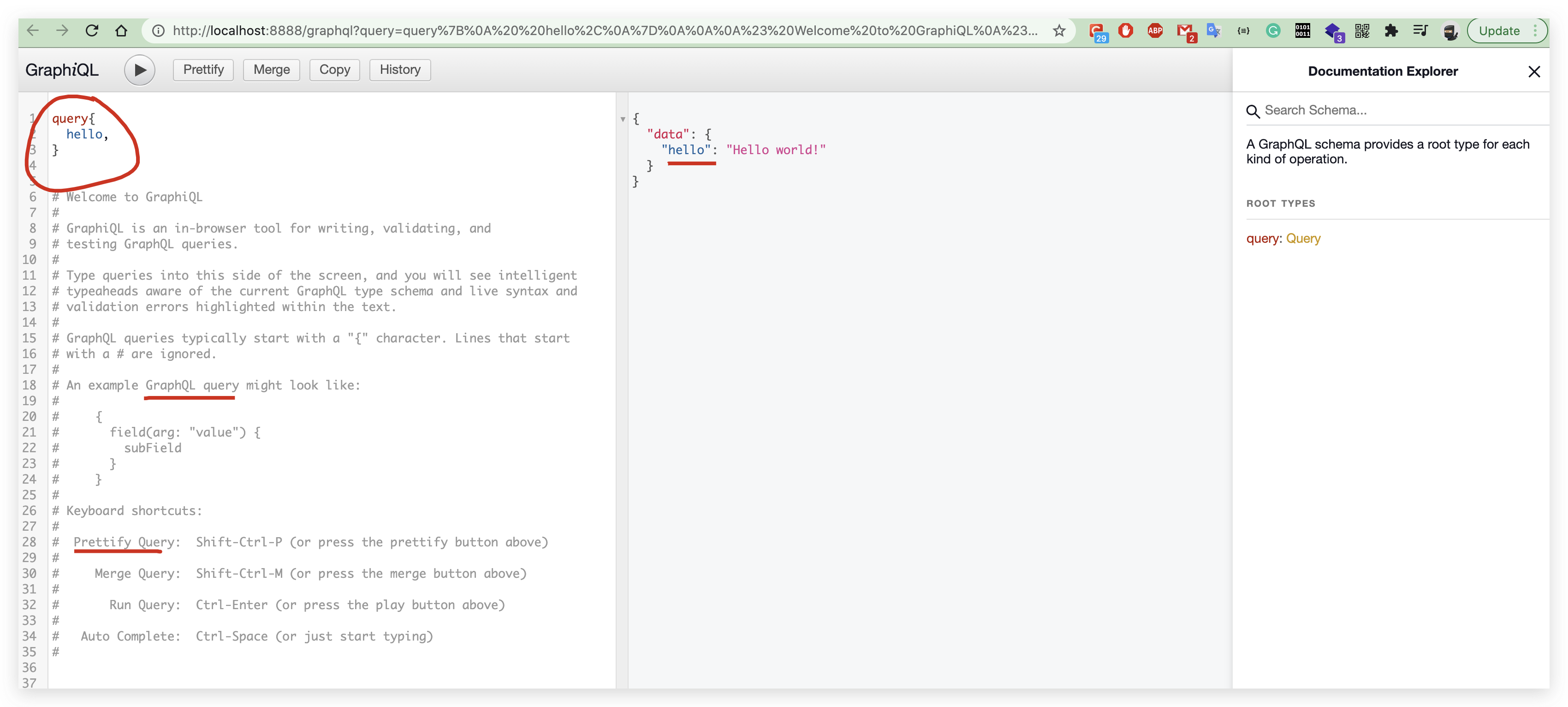
query
query{

  hello,

}

// OR

{

  hello,

}
result
{

  "data": {

    "hello": "Hello world!"

  }

}
refs
GraphQL Landscape
https://www.youtube.com/watch?v=g2LbFPAKQZk
xgqfrms 2012-2020
www.cnblogs.com 发布文章使用:只允许注册用户才可以访问!
GraphQL API In Action的更多相关文章
- Only one complex type allowed as argument to a web api controller action.
错误内容: message":"An error has occurred.","exceptionMessage":"Only one c ...
- 一个方便查看数据库转换rest/graphql api 的开源软件的github 项目
https://github.com/dbohdan/automatic-api 是一个不错的github 知识项目,帮助我们 列出了,常见的的数据库可以直接转换为rest/graphql api 的 ...
- 通过torodb && hasura graphql 让mongodb 快速支持graphql api
torodb 可以方便的将mongo 数据实时同步到pg,hasura graphql 可以方便的将pg 数据暴露为graphql api,集成在一起真的很方便 环境准备 docker-compose ...
- 【Graphql实践】使用 Apollo(iOS) 访问 Github 的 Graphql API
最近在协助调研 Apollo 生成的代码是否有可能跨 Query 共享模型的问题,虽然初步结论是不能,并不是预期的结果,但是在调研过程中积累的一些经验,有必要记录下.如果你也对 Graphql 感兴趣 ...
- [GraphQL] Query a GraphQL API with graphql-request
To query a GraphQL API, all you need to do is send an HTTP request that includes the query operation ...
- GitHub GraphQL API v4 & GitHub REST API v3
GitHub, GraphQL API, v4 ,REST API, v3, GraphQL, https://developer.github.com/v4/ https://developer.g ...
- GitHub & GraphQL API
GitHub & GraphQL API https://gist.github.com/xgqfrms/15559e7545f558d85c5efdea79171a3d refs xgqfr ...
- 如何让ASP.NET Web API的Action方法在希望的Culture下执行
在今天编辑推荐的<Hello Web API系列教程--Web API与国际化>一文中,作者通过自定义的HttpMessageHandler的方式根据请求的Accep-Language报头 ...
- Android开发-API指南-<action>
<action> 英文原文:http://developer.android.com/guide/topics/manifest/action-element.html 采集(更新)日期: ...
随机推荐
- vue-router实现路由懒加载( 动态加载路由 )
三种方式第一种:vue异步组件技术 ==== 异步加载,vue-router配置路由 , 使用vue的异步组件技术 , 可以实现按需加载 .但是,这种情况下一个组件生成一个js文件.第二种:路由懒加载 ...
- LOJ10013曲线
题目描述 明明做作业的时候遇到了n 个二次函数s_i(x)=ax^2+bx+c ,他突发奇想设计了一个新的函数 f(x)=max{s_i(x)},i=1,2,...,n. 明明现在想求这个函数在 [ ...
- 分布式缓存 — memcache
MemCache是一个自由.源码开放.高性能.分布式的分布式内存对象缓存系统,用于动态Web应用以减轻数据库的负载.它通过在内存中缓存数据和对象来减少读取数据库的次数,从而提高了网站访问的速度.Mem ...
- PowerQuery合并查询原理
PowerQuery的合并查询比Excel中的VLOOKUP更加强大,下面对查询的类型做一个梳理, 1.左外部(第一个中的所有行,第二个中的匹配行):用左边表内的所有行去右边找它的匹配项 2.右外部( ...
- Docker+Prometheus+Alertmanager+Webhook钉钉告警
Docker+Prometheus+Alertmanager+Webhook钉钉告警 1.环境部署 1.1 二进制部署 1.2 docker部署 1.2.1 webhook 1.2.2 alertma ...
- 将字符串进行md5加密
import java.security.MessageDigest; public class MD5Tools { /** * 将字符串进行md5加密 */ public static Strin ...
- (10)Linux挂载详解
1.在 Linux 看来,任何硬件设备也都是文件,它们各有自己的一套文件系统(文件目录结构). 因此产生的问题是,当在 Linux 系统中使用这些硬件设备时,只有将Linux本身的文件目录与硬件设备的 ...
- 昨晚12点,女朋友突然问我:你会RabbitMQ吗?我竟然愣住了。
01为什么要用消息队列? 1.1 同步调用和异步调用 在说起消息队列之前,必须要先说一下同步调用和异步调用. 同步调用:A服务去调用B服务,需要一直等着B服务,直到B服务执行完毕并把执行结果返回给A之 ...
- git的几种实用操作(合并代码与暂存复原代码)
总述 git工具也用了很久,自己也写了几篇使用教程,今天继续给大家分享一些我工作中使用过的git操作. 1.git合并远程仓库的代码 2.git stash保存当前的修改 这两种情况大家应该都 ...
- CCF计算机软件能力认证试题练习:201912-5 魔数
CCF计算机软件能力认证试题练习:201912-5 魔数 前置知识:BFS,线段树等 \(f(x) = (x\%A)\%B\) 这个函数值的和直接用线段树维护是不太行的(也可能是我不知道),后来想了很 ...