
Android作业10/07
1.多个Activity界面实现数据的传递
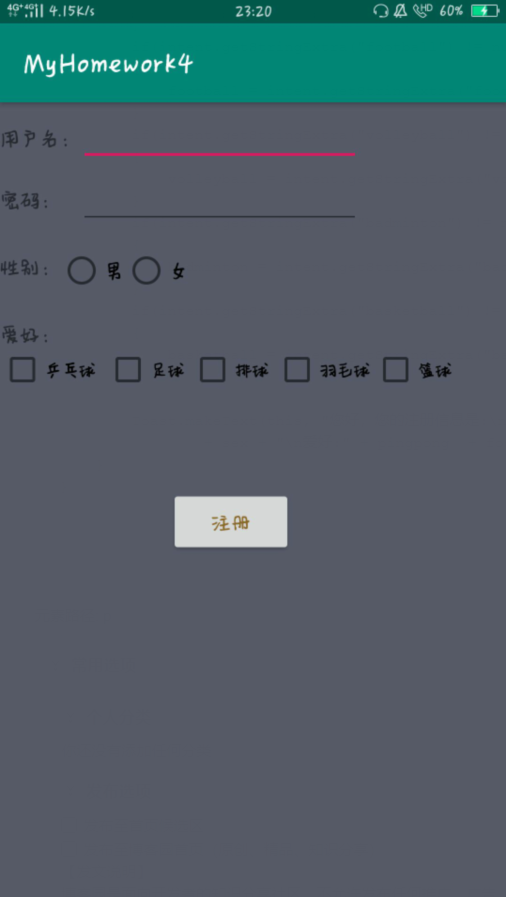
<?xml version="1.0" encoding="utf-8"?>

<androidx.constraintlayout.widget.ConstraintLayout xmlns:android="http://schemas.android.com/apk/res/android"

    xmlns:app="http://schemas.android.com/apk/res-auto"

    xmlns:tools="http://schemas.android.com/tools"

    android:layout_width="match_parent"

    android:layout_height="match_parent"

    tools:context=".MainActivity"

    android:background="#565968">

    <RelativeLayout

        android:layout_width="match_parent"

        android:layout_height="match_parent">

        <TextView

            android:id="@+id/tv1"

            android:layout_width="wrap_content"

            android:layout_height="wrap_content"

            android:layout_marginTop="16dp"

            android:text="用户名:"/>

        <EditText

            android:id="@+id/et1"

            android:layout_width="200dp"

            android:layout_height="wrap_content"

            android:layout_toRightOf="@id/tv1"

            />

        <TextView

            android:id="@+id/tv2"

            android:layout_width="wrap_content"

            android:layout_height="wrap_content"

            android:layout_marginTop="25dp"

            android:text="密码:"

            android:layout_below="@id/tv1"/>

        <EditText

            android:id="@+id/et2"

            android:layout_width="200dp"

            android:layout_height="wrap_content"

            android:layout_below="@id/tv1"

            android:layout_toRightOf="@id/tv1"

            android:layout_marginTop="10dp"

            />

        <TextView

            android:id="@+id/tv3"

            android:layout_width="wrap_content"

            android:layout_height="wrap_content"

            android:text="性别:"

            android:layout_below="@id/tv2"

            android:layout_marginTop="29dp"/>

        <RadioGroup

            android:id="@+id/rg1"

            android:layout_width="wrap_content"

            android:layout_height="wrap_content"

            android:orientation="horizontal"

            android:layout_below="@id/tv2"

            android:layout_toRightOf="@id/tv3"

            android:layout_marginTop="25dp">

            <RadioButton

                android:id="@+id/boy"

                android:layout_width="wrap_content"

                android:layout_height="wrap_content"

                android:text="男"/>

            <RadioButton

                android:layout_width="wrap_content"

                android:layout_height="wrap_content"

                android:text="女"/>

        </RadioGroup>

        <TextView

            android:id="@+id/tv4"

            android:layout_width="wrap_content"

            android:layout_height="wrap_content"

            android:text="爱好:"

            android:layout_below="@id/tv3"

            android:layout_marginTop="29dp"/>

        <CheckBox

            android:id="@+id/ping-pong"

            android:layout_width="wrap_content"

            android:layout_height="wrap_content"

            android:text="乒乓球"

            android:textSize="12dp"

            android:layout_below="@id/tv4"

            />

        <CheckBox

            android:id="@+id/football"

            android:layout_width="wrap_content"

            android:layout_height="wrap_content"

            android:text="足球"

            android:textSize="12dp"

            android:layout_marginLeft="75dp"

            android:layout_below="@id/tv4"

            />

        <CheckBox

            android:id="@+id/volleyball"

            android:layout_width="wrap_content"

            android:layout_height="wrap_content"

            android:text="排球"

            android:textSize="12dp"

            android:layout_marginLeft="135dp"

            android:layout_below="@id/tv4"

            />

        <CheckBox

            android:id="@+id/badminton"

            android:layout_width="wrap_content"

            android:layout_height="wrap_content"

            android:text="羽毛球"

            android:textSize="12dp"

            android:layout_marginLeft="195dp"

            android:layout_below="@id/tv4"

            />

        <CheckBox

            android:id="@+id/basketball"

            android:layout_width="wrap_content"

            android:layout_height="wrap_content"

            android:text="篮球"

            android:textSize="12dp"

            android:layout_marginLeft="265dp"

            android:layout_below="@id/tv4"

            />

        <Button

            android:id="@+id/btn1"

            android:layout_width="wrap_content"

            android:layout_height="wrap_content"

            android:text="注册"

            android:textColor="#896526"

            android:layout_below="@id/tv4"

            android:layout_marginTop="100dp"

            android:layout_marginLeft="120dp"

            android:onClick="click"/>

    </RelativeLayout>

</androidx.constraintlayout.widget.ConstraintLayout>
package com.example.myhomework4;

import androidx.appcompat.app.AppCompatActivity;

import android.content.Intent;

import android.os.Bundle;

import android.view.View;

import android.widget.CheckBox;

import android.widget.EditText;

import android.widget.RadioButton;

import android.widget.RadioGroup;

public class MainActivity extends AppCompatActivity {

    @Override

    protected void onCreate(Bundle savedInstanceState) {

        super.onCreate(savedInstanceState);

        setContentView(R.layout.activity_main);

    }

    public void click(View view){

                Intent it1=new Intent(this,SecondActivity.class);

                String username = ((EditText)findViewById(R.id.et1)).getText().toString();

                String password = ((EditText)findViewById(R.id.et2)).getText().toString();

                it1.putExtra("username", username);

                it1.putExtra("password", password);

        RadioGroup radioGroup = (RadioGroup) findViewById(R.id.rg1);

        int id = radioGroup.getCheckedRadioButtonId();

        if(id == R.id.boy)

        {

            it1.putExtra("sex","男");

        }

        else

        {

            it1.putExtra("sex","女");

        }

        CheckBox checkBox1 = (CheckBox)findViewById(R.id.ping_pong);

        CheckBox checkBox2 = (CheckBox)findViewById(R.id.football);

        CheckBox checkBox3 = (CheckBox)findViewById(R.id.volleyball);

        CheckBox checkBox4 = (CheckBox)findViewById(R.id.badminton);

        CheckBox checkBox5 = (CheckBox)findViewById(R.id.basketball);

        if(checkBox1.isChecked()) {

            it1.putExtra("ping-pong","乒乓球");

        }

        if (checkBox2.isChecked()) {

            it1.putExtra("football","足球");

        }

        if(checkBox3.isChecked()) {

            it1.putExtra("volleyball", "排球");

        }

        if(checkBox4.isChecked()) {

            it1.putExtra("badminton", "羽毛球");

        }

        if (checkBox5.isChecked()){

            it1.putExtra("basketball","篮球");

        }

        startActivity(it1);

    }

}
package com.example.myhomework4;

import android.app.Activity;

import android.content.Intent;

import android.widget.Toast;

public class SecondActivity extends Activity {

    @Override

    protected void onStart() {

        super.onStart();

        Intent intent = getIntent();

        String username = intent.getStringExtra("username");

        String password = intent.getStringExtra("password");

        String sex = intent.getStringExtra("sex");

        String pingpong ="";

        String football ="";

        String volleyball ="";

        String badminton ="";

        String basketball ="";

        if(intent.getStringExtra("ping-pong") != null)

        {

            pingpong = intent.getStringExtra("ping-pong");

        }

        if(intent.getStringExtra("football") != null)

        {

            football = intent.getStringExtra("football");

        }

        if(intent.getStringExtra("volleyball") != null)

        {

            volleyball = intent.getStringExtra("volleyball");

        }

        if(intent.getStringExtra("badminton") != null)

        {

            badminton = intent.getStringExtra("badminton");

        }

        if(intent.getStringExtra("basketball") != null)

        {

            basketball = intent.getStringExtra("basketball");

        }

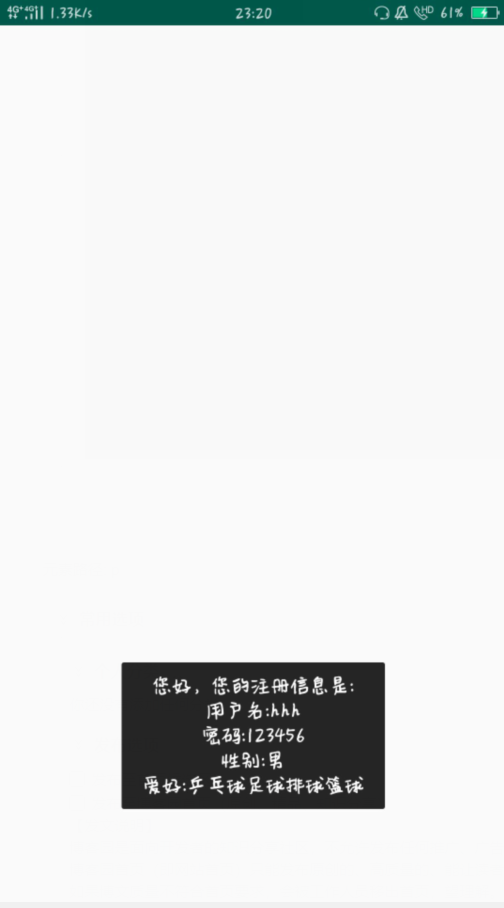
        Toast.makeText(this, "您好,您的注册信息是:\n\n" + "用户名:" + username + "\n密码:" + password + "\n性别:"

                + sex + "\n爱好:" + pingpong  + football + volleyball + badminton +  basketball, Toast.LENGTH_SHORT).show();

    }

}
Android作业10/07的更多相关文章
- 团队作业10——事后分析(Beta版本)
团队作业10--事后分析(Beta版本) 目录 一.设想与目标 二.计划 三.资源 四.变更管理 五.设计与实现 六.测试与发布 七.总结 八.图片和贡献分分配 一.设想和目标 1.我们的软件要解决什 ...
- 【2017集美大学1412软工实践_助教博客】团队作业10——项目复审与事后分析(Beta版本)
写在前面的话 转眼轰轰烈烈本学期的软工实践就结束了,这个过程中想必在熬夜敲代码,激烈讨论中留下诸多回忆的同时,也收获了不少.恭喜所有团队完成了本阶段冲刺,此外,由于大家的贡献分给的都很平均,将个人贡献 ...
- 【1414软工助教】团队作业10——复审与事后分析(Beta版本) 得分榜
题目 团队作业10--复审与事后分析(Beta版本) 往期成绩 个人作业1:四则运算控制台 结对项目1:GUI 个人作业2:案例分析 结对项目2:单元测试 团队作业1:团队展示 团队作业2:需求分析& ...
- 简单计算器 安卓 Android 作业
Android老师布置的课程作业——简单计算器 功能要求实现四则运算,参考界面见下图: 首先给各位老铁提供apk安装包以及项目压缩包,略表诚意~ github地址:https://github.com ...
- Xamarin.Android 4.10.01068 & Xamarin.iOS 1.8.361
Xamarin.Android 4.10.01068 & Xamarin.iOS 1.8.361 NEW support for Visual Studio 2013 & Portab ...
- 【集美大学1411_助教博客】团队作业10——项目复审与事后分析(Beta版本)
写在前面的话 软件工程课结束了,大家开心吗?是不是再也不用熬夜写代码了?如果这门课你真的熬夜写代码了,相信你一定有收获,如果这门课结束了你觉得是自己一个全新的开始,那么这门课的意义就实现了.团队作业全 ...
- 团队作业10——项目复审与事后分析(Beta版本)
油炸咸鱼24点APP 团队作业10--事后诸葛亮分析; 团队作业10--Beta阶段项目复审;
- 团队作业10——复审和事后分析(Beta版本)
团队作业10--事后分析(Beta版本) http://www.cnblogs.com/newteam6/p/6953992.html 团队作业10--复审(Beta版本) http://www.cn ...
- C语言|博客作业10
问题 回答 C语言 博客作业10 这个作业要求在哪里 作业要求 我在这个课程的目标是 熟练循环语句的用法 这个作业在哪个具体方面帮助我实现目标 pta作业 参考文献 <C语言程序设计> 1 ...
随机推荐
- Transform与Vector3 的API
Transform.InverseTransformDirection(Vector3 direction) Vector3.ProjectOnPlane(Vector3 vector, Vector ...
- Spring security OAuth2.0认证授权学习第三天(认证流程)
本来之前打算把第三天写基于Session认证授权的,但是后来视屏看完后感觉意义不大,而且内容简单,就不单独写成文章了; 简单说一下吧,就是通过Servlet的SessionApi 通过实现拦截器的前置 ...
- Spring security OAuth2.0认证授权学习第一天(基础概念-认证授权会话)
这段时间没有学习,可能是因为最近工作比较忙,每天回来都晚上11点多了,但是还是要学习的,进过和我的领导确认,在当前公司的技术架构方面,将持续使用Spring security,暂不做Shiro的考虑, ...
- Linux:apache安装
1.查询是否已安装 rpm -qa httpd 如果已安装,先卸载 发现有依赖包,先把依赖卸载 或者加上--nodeps参数,不考虑依赖,直接卸载 rpm -e --nodeps httpd-2. ...
- java 求水仙花数
package com.yc.bean; public class ShuiXianHua { public static void main(String[] args) { /** * 题目:打印 ...
- List和Dictionary的使用技巧总结
List和Dictionary想必是我们平常用到最多的C#容器了,他们使用起来都很简单,所以很多人就可能就没去深究,其实在使用过程中有很多的小技巧能让我们写的代码变得更高效也更安全. 1·合理的指定初 ...
- FFmpeg开发笔记(四):ffmpeg解码的基本流程详解
若该文为原创文章,未经允许不得转载原博主博客地址:https://blog.csdn.net/qq21497936原博主博客导航:https://blog.csdn.net/qq21497936/ar ...
- Redis单机安装以及集群搭建
今天主要来看一下Redis的安装以及集群搭建(我也是第一次搭建). 环境:CentOS 7.1,redis-5.0.7 一.单机安装 1.将Redis安装包放置服务器并解压 2.进入redis安装目录 ...
- 14个Spring MVC顶级技巧,随时用随时爽,一直用一直爽~
通常,在Spring MVC中,我们编写一个控制器类来处理来自客户端的请求.然后,控制器调用业务类来处理与业务相关的任务,然后将客户端重定向到逻辑视图名称,该名称由Spring的调度程序Servlet ...
- ASP.NET Core 3.x启动时运行异步任务(二)
这一篇是接着前一篇在写的.如果没有看过前一篇文章,建议先去看一下前一篇,这儿是传送门 一.前言 前一篇文章,我们从应用启动时异步运行任务开始,说到了必要性,也说到了几种解决方法,及各自的优缺点.最 ...