
NetCore微服务实战体系:日志管理
一. 起始
进入NetCore时代,日志的使用有了很大的变化,因为跨平台以及虚拟化技术的使用,日志不能够再像Framework的方式直接记录在文本,文本其实也可以,但是日志的管理以及查看都不太方便。Linux都是指令化,对于开发来说并不友好。
后来Exceptionless进入了视线,选择这个组件的原因很简单,可视化、数据统计、实时性以及对于.net开发人员相当友好。在当前网络上,有很多关于Exceptionless的使用文档,但是个人觉得并不友好,在使用上并不方便。
在微软体系中,Microsoft.Extesions.Logging是官方日志框架,它允许我们自己去实现ILoggerProvider / ILogging,那么根据这两者得特性,由此开发了组件 Overt.Core.Logging
二. 组件Overt.Core.Logging
https://github.com/overtly/logging
三. 简单介绍使用
1. Nuget包引用
- Nuget版本:V 1.0.4.1
- 框架支持: NetStandard 2.0
Install-Package Overt.Core.Logging -Version 1.0.4.1
2. 配置信息
- NetCore配置案例 appsettings.json
{
"Exceptionless": {
"ServerUrl": "http://exless.g.lan", // 私有化域名(Exceptionless私有化的文档网上很多)
"ApiKey": "ugGFmeeriaj1BG12itWWURfiJjwqiyi2o71ll4mm", // 项目Key 如何创建网上文档也很多
"Tags": "Local" // 日志所属项目环境
}
}
3. 具体使用
(1)服务注入
- Web服务使用
        // This method gets called by the runtime. Use this method to configure the HTTP request pipeline.

        public void Configure(IApplicationBuilder app, IHostingEnvironment env)

        {// Logging

            app.AddExlessLogging();

        }
- IHost 普通服务使用
        static void Main(string[] args)

        {

            var host = new HostBuilder()

               .UseConsoleLifetime() //使用控制台生命周期

               .ConfigureAppConfiguration((context, configuration) =>

               {

                   configuration

                   .AddJsonFile("appsettings.json", optional: true)

                   .AddEnvironmentVariables();

               })

               .ConfigureLogging(logger =>

               {

               })

               .ConfigureServices(ConfigureServices)

               .Build();

            host.Services.AddExlessLogging();

            ThreadPool.SetMinThreads(100, 100);

            AppDomain.CurrentDomain.UnhandledException += (sender, e) =>

            {

                var logFactory = host.Services.GetService<ILoggerFactory>();

                var logger = logFactory.CreateLogger<Program>();

                logger.LogError(e.ExceptionObject as Exception, $"UnhandledException");

            };

            host.Run();

        }
(2)日志使用
using Microsoft.Extensions.Logging;

private readonly ILogger _logger;

public Test(ILogger<Test> logger)

{

  _logger = logger;

}

_logger.LogInformation("你好");
4. 源码详解
(1)实现ILogger
using Exceptionless;

using Microsoft.Extensions.Logging;

using System;

namespace Overt.Core.Logging

{

    /// <summary>

    /// Logger实现

    /// </summary>

    public class ExlessLogger : ILogger

    {

        private readonly string _categoryName;

        public ExlessLogger(string categoryName)

        {

            _categoryName = categoryName;

        }

        /// <summary>

        ///

        /// </summary>

        /// <typeparam name="TState"></typeparam>

        /// <param name="state"></param>

        /// <returns></returns>

        public IDisposable BeginScope<TState>(TState state)

        {

            return new NoopDisposable();

        }

        /// <summary>

        /// 是否可用

        /// </summary>

        /// <param name="logLevel"></param>

        /// <returns></returns>

        public bool IsEnabled(LogLevel logLevel)

        {

            return true;

        }

        /// <summary>

        /// 记录日志

        /// </summary>

        /// <typeparam name="TState"></typeparam>

        /// <param name="logLevel"></param>

        /// <param name="eventId"></param>

        /// <param name="state"></param>

        /// <param name="exception"></param>

        /// <param name="formatter"></param>

        public void Log<TState>(LogLevel logLevel, EventId eventId, TState state, Exception exception, Func<TState, Exception, string> formatter)

        {

            try

            {

                var message = formatter(state, exception);

                var source = $"{_categoryName}";

                var exlessLogLevel = Exceptionless.Logging.LogLevel.Trace;

                switch (logLevel)

                {

                    case LogLevel.Trace:

                        exlessLogLevel = Exceptionless.Logging.LogLevel.Trace;

                        break;

                    case LogLevel.Information:

                        exlessLogLevel = Exceptionless.Logging.LogLevel.Info;

                        break;

                    case LogLevel.Warning:

                        exlessLogLevel = Exceptionless.Logging.LogLevel.Warn;

                        break;

                    case LogLevel.Error:

                        exlessLogLevel = Exceptionless.Logging.LogLevel.Error;

                        break;

                    case LogLevel.Critical:

                        exlessLogLevel = Exceptionless.Logging.LogLevel.Fatal;

                        break;

                    default:

                        exlessLogLevel = Exceptionless.Logging.LogLevel.Debug;

                        break;

                }

                var eventBuilder = ExceptionlessClient.Default

                               .CreateLog(message, exlessLogLevel)

                               .SetSource(source)

                               .SetException(exception);

                if (eventId != null)

                    eventBuilder.SetProperty("Event", $"{eventId.ToString()}");

                var serverAndPoint = LoggingUtility.GetAddressIP();

                if (!string.IsNullOrEmpty(serverAndPoint))

                    eventBuilder.SetProperty("ServerEndPoint", serverAndPoint);

                eventBuilder.Submit();

            }

            catch { }

        }

        private class NoopDisposable : IDisposable

        {

            public void Dispose()

            {

            }

        }

    }

}
(2)实现ILoggerProvider
using Microsoft.Extensions.Logging;

namespace Overt.Core.Logging

{

    /// <summary>

    /// LoggerProvider

    /// </summary>

    public class ExlessLoggerProvider : ILoggerProvider

    {

        /// <summary>

        /// Contructor

        /// </summary>

        /// <param name="categoryName"></param>

        /// <returns></returns>

        public ILogger CreateLogger(string categoryName)

        {

            return new ExlessLogger(categoryName);

        }

        /// <summary>

        ///

        /// </summary>

        public void Dispose()

        {

        }

    }

}
(3)依赖注入
using Exceptionless;

using Microsoft.AspNetCore.Builder;

using Microsoft.Extensions.Configuration;

using Microsoft.Extensions.Logging;

using NLog.Extensions.Logging;

using Overt.Core.Logging;

using System;

using System.Collections.Generic;

using System.IO;

using System.Linq;

namespace Microsoft.Extensions.DependencyInjection

{

    public static class ServiceCollectionExtensions

    {

        #region ExLess

        /// <summary>

        /// 注入

        /// </summary>

        /// <param name="loggingBuilder"></param>

        /// <param name="configFile"></param>

        public static void AddExlessLogging(this IServiceProvider provider)

        {

            var configuration = provider.GetService<IConfiguration>();

            var loggerFactory = provider.GetService<ILoggerFactory>();

            var client = ExceptionlessClient.Default;

            client.InitExlessTags(configuration);

            client.Configuration.ReadFromConfiguration(configuration);

            client.Configuration.ReadFromEnvironmentalVariables();

            client.Configuration.UseInMemoryStorage();

            client.Startup();

            loggerFactory.AddProvider(new ExlessLoggerProvider());

        }

        /// <summary>

        /// 注入

        /// </summary>

        /// <param name="loggingBuilder"></param>

        /// <param name="configFile"></param>

        public static void AddExlessLogging(this IApplicationBuilder app)

        {

            var provider = app.ApplicationServices;

            var configuration = provider.GetService<IConfiguration>();

            var loggerFactory = provider.GetService<ILoggerFactory>();

            app.UseExceptionless(configuration);

            var client = ExceptionlessClient.Default;

            client.InitExlessTags(configuration);

            client.Configuration.UseInMemoryStorage();

            loggerFactory.AddProvider(new ExlessLoggerProvider());

        }

        /// <summary>

        /// tags

        /// </summary>

        /// <param name="client"></param>

        /// <param name="configuration"></param>

        private static void InitExlessTags(this ExceptionlessClient client, IConfiguration configuration)

        {

            var tags = configuration?["Exceptionless:Tags"]?.Split(",", StringSplitOptions.RemoveEmptyEntries)?.ToList();

            foreach (var tag in tags ?? new List<string>())

            {

                client.Configuration.DefaultTags.Add(tag);

            }

        }

        #endregion

    }

}
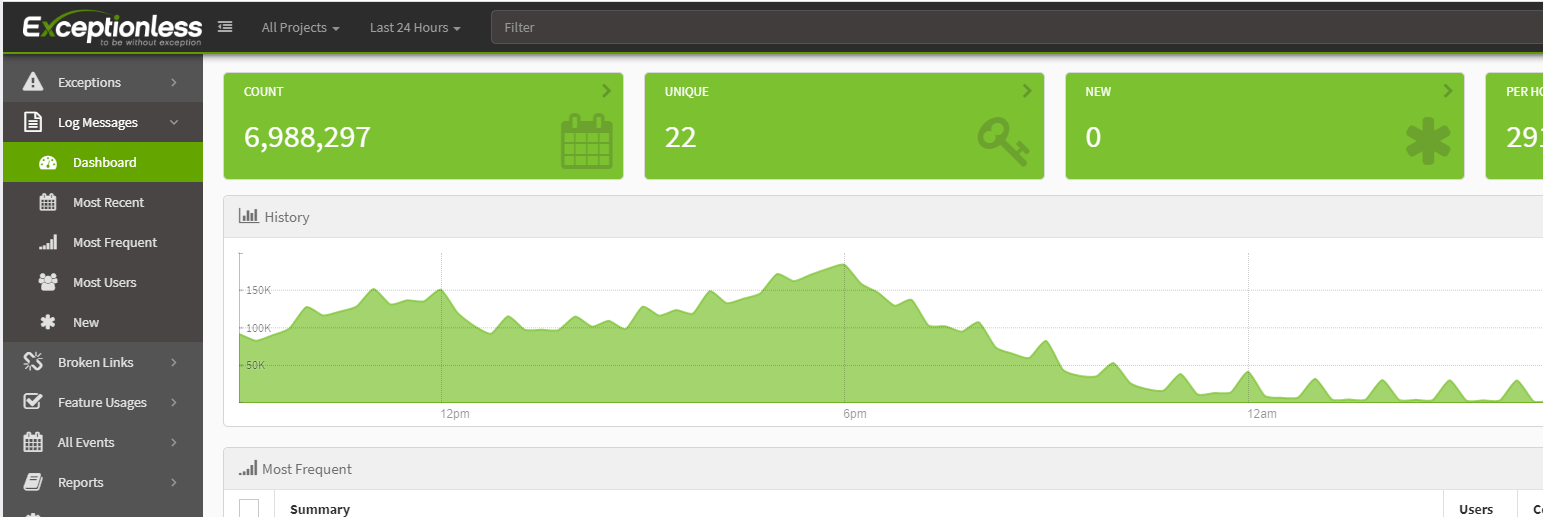
5. 最终效果
可实时查看日志信息
NetCore微服务实战体系:日志管理的更多相关文章
- ASP.NET Core微服务实战系列
希望给你3-5分钟的碎片化学习,可能是坐地铁.等公交,积少成多,水滴石穿,码字辛苦,如果你吃了蛋觉得味道不错,希望点个赞,谢谢关注. 前言 这里记录的是个人奋斗和成长的地方,该篇只是一个系列目录和构想 ...
- 微服务实战(二):使用API Gateway - DockOne.io
原文:微服务实战(二):使用API Gateway - DockOne.io [编者的话]本系列的第一篇介绍了微服务架构模式.它讨论了采用微服务的优点和缺点,除了一些复杂的微服务,这种模式还是复杂应用 ...
- 微服务实战(一):微服务架构的优势与不足 - DockOne.io
原文:微服务实战(一):微服务架构的优势与不足 - DockOne.io [编者的话]本文来自Nginx官方博客,是微服务系列文章的第一篇,主要探讨了传统的单体式应用的不足,以及微服务架构的优势与挑战 ...
- Spring Cloud 微服务实战笔记
Spring Cloud 微服务实战笔记 微服务知识 传统开发所有业务逻辑都在一个应用中, 开发,测试,部署随着需求增加会不断为单个项目增加不同业务模块:前端展现也不局限于html视图模板的形式,后端 ...
- .Net微服务实战之可观测性
系列文章 .Net微服务实战之技术选型篇 .Net微服务实战之技术架构分层篇 .Net微服务实战之DevOps篇 .Net微服务实战之负载均衡(上) .Net微服务实战之CI/CD .Net微服务实战 ...
- go-zero微服务实战系列(三、API定义和表结构设计)
前两篇文章分别介绍了本系列文章的背景以及根据业务职能对商城系统做了服务的拆分,其中每个服务又可分为如下三类: api服务 - BFF层,对外提供HTTP接口 rpc服务 - 内部依赖的微服务,实现单一 ...
- 微服务实战(三):落地微服务架构到直销系统(构建基于RabbitMq的消息总线)
从前面文章可以看出,消息总线是EDA(事件驱动架构)与微服务架构的核心部件,没有消息总线,就无法很好的实现微服务之间的解耦与通讯.通常我们可以利用现有成熟的消息代理产品或云平台提供的消息服务来构建自己 ...
- 微服务实战(二):使用API Gateway
微服务实战(一):微服务架构的优势与不足 微服务实战(二):使用API Gateway 微服务实战(三):深入微服务架构的进程间通信 微服务实战(四):服务发现的可行方案以及实践案例 微服务实践(五) ...
- Spring Cloud微服务实战阅读笔记(一) 基础知识
本文系<Spring Cloud微服务实战>作者:翟永超,一书的阅读笔记. 一:基础知识 1:什么是微服务架构 是一种架构设计风格,主旨是将一个原本独立的系统拆分成多个小型服务 ...
随机推荐
- Vue 给子组件绑定v-model
父组件使用子组件时,使用v-model指令,在子组件中使用value获取props的值 父组件 <template> <div style="margin:20px;dis ...
- DRF内置权限组件之自定义权限管理类
DRF内置权限组件permissions 权限控制可以限制用户对于视图的访问和对于具体数据对象的访问. 在执行视图的dispatch()方法前,会先进行视图访问权限的判断 在通过get_object( ...
- JS的数据属性和访问器属性
ECMA-262第5版在定义只有内部才用的特性(attribute)时,描述了属性(property)的各种特征.ECMA-262定义这些特性是为了实现javascript引擎用的,因此在javasc ...
- 《Java从入门到失业》第二章:Java环境(一):Java SE安装
从这一章开始,终于我们可以开始正式进入Java世界了.前面我们提到过,Java分三个版本,我们这里只讨论Java SE. 2.1Java SE安装 所谓工欲善其事,必先利其器.第一步,我们当然是要下载 ...
- 深入理解k8s中的访问控制(认证、鉴权、审计)流程
Kubernetes自身并没有用户管理能力,无法像操作Pod一样,通过API的方式创建/删除一个用户实例,也无法在etcd中找到用户对应的存储对象. 在Kubernetes的访问控制流程中,用户模型是 ...
- php最好的开发工具合集
欲先攻其事必先利其器,新接触pphp的小伙伴们,你们可要注意阅读本文了哦! 常见好用的php开发工具汇总 1.SublimeText3 工具简介: Sublime Text是一款目前非常流行的代码编辑 ...
- GA教程:使用自定义变量来扩展高级细分
http://www.wocaoseo.com/thread-64-1-1.html 您可以使用自定义变量来扩展高级细分的范围. 高级细分依据的标准是用户的会话(访问)数据.如果某个访问者在指定日期范 ...
- WebRTC的VAD 过程解读
摘要: 在上一篇的文档中,分析unimrcp中vad算法的诸多弊端,但是有没有一种更好的算法来取代呢.目前有两种方式 1. GMM 2. DNN. 其中鼎鼎大名的WebRTC VAD就是采用了GM ...
- 关于js中循环遍历中顺序执行ajax的问题(vue)
js里的循环,每次都是自顾自的走,它不等ajax执行好走完到success代码,就继续循环下一条数据了,这样数据就全乱了. 后来,想到试试ajax里async这个属性,async默认是true,即为异 ...
- 从后端到前端之Vue(六)表单组件
表单组件 做项目的时候会遇到一个比较头疼的问题,一个大表单里面有好多控件,一个一个做设置太麻烦,更头疼的是,需求还总在变化,一会多选.一会单选.一会下拉的,变来变去的烦死宝宝了. 那么怎么解决这个问题 ...