
SpringBoot自定义注解
1.注解的概念
注解是一种能被添加到java代码中的元数据,类、方法、变量、参数和包都可以用注解来修饰。注解对于它所修饰的代码并没有直接的影响。
2.注解的使用范围
1)为编译器提供信息:注解能被编译器检测到错误或抑制警告。
2)编译时和部署时的处理: 软件工具能处理注解信息从而生成代码,XML文件等等。
3)运行时的处理:有些注解在运行时能被检测到。
3.自定义注解的步骤
第一步:定义注解
第二步:配置注解
第三步:解析注解
4.注解的基本语法
4.1最基本的注解定义
package com.example.demo.config;

public @interface MyAnnotation {

    public String name();

    int age();

    String sex() default "女";

}
在自定义注解中,其实现部分只能定义注解类型元素!
说明:
a.访问修饰符必须为public,不写默认为public;
b.该元素的类型只能是基本数据类型、String、Class、枚举类型、注解类型以及一维数组;
c.该元素的名称一般定义为名词,如果注解中只有一个元素,名字起为value最好;
d.()不是定义方法参数的地方,也不能在括号中定义任何参数,仅仅只是一个特殊的语法;
e.default代表默认值,值必须定义的类型一致;
f.如果没有默认值,代表后续使用注解时必须给该类型元素赋值。
4.2常用的元注解
元注解:专门修饰注解的注解。
4.2.1@Target
@Target是专门用来限定某个自定义注解能够被应用在哪些Java元素上面的。其注解的源码如下:
@Documented

@Retention(RetentionPolicy.RUNTIME)

@Target(ElementType.ANNOTATION_TYPE)

public @interface Target {

    /**

     * Returns an array of the kinds of elements an annotation type

     * can be applied to.

     * @return an array of the kinds of elements an annotation type

     * can be applied to

     */

    ElementType[] value();

}
从源码可以看出它使用一个枚举类型元素,接下来看这个枚举类型的源码:
public enum ElementType {

    /** Class, interface (including annotation type), or enum declaration */

    TYPE,

    /** Field declaration (includes enum constants) */

    FIELD,

    /** Method declaration */

    METHOD,

    /** Formal parameter declaration */

    PARAMETER,

    /** Constructor declaration */

    CONSTRUCTOR,

    /** Local variable declaration */

    LOCAL_VARIABLE,

    /** Annotation type declaration */

    ANNOTATION_TYPE,

    /** Package declaration */

    PACKAGE,

    /**

     * Type parameter declaration

     *

     * @since 1.8

     */

    TYPE_PARAMETER,

    /**

     * Use of a type

     *

     * @since 1.8

     */

    TYPE_USE

}
因此,我们可以在使用@Target时指定注解的使用范围,示例如下:
//@MyAnnotation被限定只能使用在类、接口或方法上面

@Target(value = {ElementType.METHOD,ElementType.TYPE})

public @interface MyAnnotation {

    public String name();

    int age();

    String sex() default "女";

}
4.2.2@Retention
@Retention注解,用来修饰自定义注解的生命力。
a.如果一个注解被定义为RetentionPolicy.SOURCE,则它将被限定在Java源文件中,那么这个注解即不会参与编译也不会在运行期起任何作用,这个注解就和一个注释是一样的效果,只能被阅读Java文件的人看到;
b.如果一个注解被定义为RetentionPolicy.CLASS,则它将被编译到Class文件中,那么编译器可以在编译时根据注解做一些处理动作,但是运行时JVM(Java虚拟机)会忽略它,我们在运行期也不能读取到,是默认的;
c.如果一个注解被定义为RetentionPolicy.RUNTIME,那么这个注解可以在运行期的加载阶段被加载到Class对象中。那么在程序运行阶段,我们可以通过反射得到这个注解,并通过判断是否有这个注解或这个注解中属性的值,从而执行不同的程序代码段。我们实际开发中的自定义注解几乎都是使用的RetentionPolicy.RUNTIME。
@Retention注解源码如下:
@Documented

@Retention(RetentionPolicy.RUNTIME)

@Target(ElementType.ANNOTATION_TYPE)

public @interface Retention {

    /**

     * Returns the retention policy.

     * @return the retention policy

     */

    RetentionPolicy value();

}
里面也是一个枚举类型元素,其源码如下:
public enum RetentionPolicy {

    /**

     * Annotations are to be discarded by the compiler.

     */

    SOURCE,

    /**

     * Annotations are to be recorded in the class file by the compiler

     * but need not be retained by the VM at run time.  This is the default

     * behavior.

     */

    CLASS,

    /**

     * Annotations are to be recorded in the class file by the compiler and

     * retained by the VM at run time, so they may be read reflectively.

     *

     * @see java.lang.reflect.AnnotatedElement

     */

    RUNTIME

}
使用此注解修饰自定义注解生命力的示例如下:
//设置注解的生命力在运行期

@Retention(RetentionPolicy.RUNTIME)

public @interface MyAnnotation {

    public String name();

    int age();

    String sex() default "女";

}
4.2.3@Documented
@Documented注解,是被用来指定自定义注解是否能随着被定义的java文件生成到JavaDoc文档当中。源码如下:
@Documented

@Retention(RetentionPolicy.RUNTIME)

@Target(ElementType.ANNOTATION_TYPE)

public @interface Documented {

}
4.2.4@Inherited
@Inherited注解,是指定某个自定义注解如果写在了父类的声明部分,那么子类(继承关系)的声明部分也能自动拥有该注解。该注解只对@Target被定义为ElementType.TYPE的自定义注解起作用。
5.自定义注解举例
第一步:自定义的注解如下
package com.example.demo.config;

import java.lang.annotation.*;

@Target(value={ElementType.METHOD})

@Retention(RetentionPolicy.RUNTIME)

@Documented

public @interface MyAnnotation {

    public String name();

    int age();

    String sex() default "女";

    String[] hobby();

}
第二步:创建一个类,新建方法使用该注解
package com.example.demo.controller;

import com.example.demo.config.MyAnnotation;

public class UserController {

    @MyAnnotation(name = "张三",age = 18,hobby = {"跑步,打游戏"})

    public String get(){

        return "Hello Annotation";

    }

}
第三步:利用反射获取注解。创建一个类,代码如下:
package com.example.demo.test;

import com.example.demo.config.MyAnnotation;

import java.lang.annotation.Annotation;

import java.lang.reflect.Method;

public class Test {

    public static void main(String[] args) {

        try {

            //获取Class对象

            Class mylass = Class.forName("com.example.demo.controller.UserController");

            //获得该对象身上配置的所有的注解

            Annotation[] annotations = mylass.getAnnotations();

            System.out.println(annotations.toString());

            //获取里面的一个方法

            Method method = mylass.getMethod("get");

            //判断该元素上是否配置有某个指定的注解

            if(method.isAnnotationPresent(MyAnnotation.class)){

                System.out.println("UserController类的get方法上配置了MyAnnotation注解!");

                //获取该元素上指定类型的注解

                MyAnnotation myAnnotation = method.getAnnotation(MyAnnotation.class);

                System.out.println("name: " + myAnnotation.name() + ", age: " + myAnnotation.age()

                        + ",sex:"+myAnnotation.sex()+", hobby: " + myAnnotation.hobby()[0]);

            }else{

                System.out.println("UserController类的get方法上没有配置MyAnnotation注解!");

            }

        } catch (Exception e) {

            e.printStackTrace();

        }

    }

}
打印结果如下:
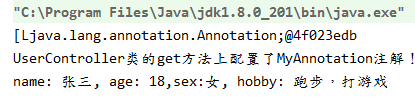
如果要获得的注解是配置在方法上的,从Method对象上获取;如果是配置在属性上,就需要从该属性对应的Field对象上去获取,如果是配置在类型上,需要从Class对象上去获取。
6.注解的特殊语法
特殊的语法是基于5的,这里就直接讲述特殊的定义和使用。
1)如果注解没有注解类型元素,那么在使用注解时可省略(),直接写为:@注解名。
定义如下:
@Target(value={ElementType.METHOD})

@Retention(RetentionPolicy.RUNTIME)

@Documented

public @interface MyAnnotation {

}
使用如下:
public class UserController {

    @MyAnnotation

    public String get(){

        return "Hello Annotation";

    }

}
2)如果注解只有一个注解类型元素,且命名为value,那么在使用注解时可直接写为:@注解名(注解值)。
定义如下:
@Target(value={ElementType.METHOD})

@Retention(RetentionPolicy.RUNTIME)

@Documented

public @interface MyAnnotation {

    String value();

}
使用如下:
public class UserController {

    @MyAnnotation("hello")

    public String get(){

        return "Hello Annotation";

    }

}
3)如果注解中的某个注解类型元素是一个数组类型,在使用时又出现只需要填入一个值的情况,那么在使用注解时可直接写为:@注解名(类型名 = 类型值),和标准的@注解名(类型名 = {类型值})等效!
定义如下:
@Target(value={ElementType.METHOD})

@Retention(RetentionPolicy.RUNTIME)

@Documented

public @interface MyAnnotation {

    String[] arr();

}
使用如下:
public class UserController {

    @MyAnnotation(arr = "hello")

    public String get(){

        return "Hello Annotation";

    }

}
4)如果注解的@Target定义为Element.PACKAGE,那么这个注解是配置在package-info.java中的,而不能直接在某个类的package代码上面配置。
7.在项目中使用自定义的注解
源代码:https://github.com/zhongyushi-git/annotation-demo.git
7.1环境搭建
1)新建一个SpringBoot的项目,导入jar座标
 <dependency>

            <groupId>org.springframework.boot</groupId>

            <artifactId>spring-boot-starter-web</artifactId>

        </dependency>

        <dependency>

            <groupId>org.springframework.boot</groupId>

            <artifactId>spring-boot-starter-aop</artifactId>

        </dependency>

        <dependency>

            <groupId>org.mybatis.spring.boot</groupId>

            <artifactId>mybatis-spring-boot-starter</artifactId>

            <version>1.3.2</version>

        </dependency>

        <dependency>

            <groupId>org.springframework.boot</groupId>

            <artifactId>spring-boot-starter-jdbc</artifactId>

        </dependency>

        <dependency>

            <groupId>mysql</groupId>

            <artifactId>mysql-connector-java</artifactId>

            <scope>runtime</scope>

        </dependency>

        <dependency>

            <groupId>com.alibaba</groupId>

            <artifactId>druid</artifactId>

            <version>1.1.9</version>

        </dependency>

        <dependency>

            <groupId>org.projectlombok</groupId>

            <artifactId>lombok</artifactId>

            <version>1.18.8</version>

        </dependency>
2)配置application.yml
#数据源配置

spring:

  datasource:

    #使用阿里巴巴的druid

    type: com.alibaba.druid.pool.DruidDataSource

    #配置数据库的路径和用户名密码

    url: jdbc:mysql://127.0.0.1:3306/annotation?useUnicode=true&characterEncoding=UTF-8&serverTimezone=CTT&zeroDateTimeBehavior=convertToNull&useSSL=false&allowMultiQueries=true

    username: root

    password: 123456

mybatis:

  mapperLocations: classpath*:mapper/*Mapper.xml

#开启日志打印

logging:

  level:

    com.zys.training: debug
3)执行sql脚本
create database annotation;

use annotation;

CREATE TABLE `systemlog`  (

  `id` varchar(200) CHARACTER SET utf8 COLLATE utf8_general_ci NOT NULL COMMENT '日志主键',

  `title` varchar(200) CHARACTER SET utf8 COLLATE utf8_general_ci NULL DEFAULT NULL COMMENT '标题',

  `describe` varchar(200) CHARACTER SET utf8 COLLATE utf8_general_ci NULL DEFAULT NULL COMMENT '模块描述',

  `create_time` datetime NULL DEFAULT NULL COMMENT '记录时间',

  `method` varchar(200) CHARACTER SET utf8 COLLATE utf8_general_ci NULL DEFAULT NULL COMMENT '调用方法',

  `error` longtext CHARACTER SET utf8 COLLATE utf8_general_ci NULL COMMENT '错误信息',

  PRIMARY KEY (`id`) USING BTREE

) ENGINE = InnoDB CHARACTER SET = utf8 COLLATE = utf8_general_ci ROW_FORMAT = Compact;
7.2创建日志的MVC
1)创建日志类
package com.zys.springboot.annotationdemo.entity;

import lombok.Getter;

import lombok.Setter;

import lombok.ToString;

import java.util.Date;

@Getter

@Setter

@ToString

public class SystemLog {

    private String id;

    private String title;

    private String describe;

    private Date create_time;

    private String method;

    private String error;

}
2)创建service
package com.zys.springboot.annotationdemo.service;

import com.zys.springboot.annotationdemo.entity.SystemLog;

public interface SystemLogService {

    int createLog(SystemLog log);

}
3)创建impl
package com.zys.springboot.annotationdemo.service.impl;

import com.zys.springboot.annotationdemo.dao.SystemLogDao;

import com.zys.springboot.annotationdemo.entity.SystemLog;

import com.zys.springboot.annotationdemo.service.SystemLogService;

import org.springframework.beans.factory.annotation.Autowired;

import org.springframework.stereotype.Service;

@Service

public class SystemLogServiceImpl implements SystemLogService {

    @Autowired

    private SystemLogDao systemLogDao;

    @Override

    public int createLog(SystemLog log) {

        return systemLogDao.createLog(log);

    }

}
4)创建dao
package com.zys.springboot.annotationdemo.dao;

import com.zys.springboot.annotationdemo.entity.SystemLog;

import org.apache.ibatis.annotations.Mapper;

@Mapper

public interface SystemLogDao {

    int createLog(SystemLog log);

}
5)创建mapper
在resources目录下新建mapper目录,然后创建文件SystemLogMapper.xml
<?xml version="1.0" encoding="uTF-8" ?>

<!DOCTYPE mapper PUBLIC "-//mybatis.org//DTD Mapper 3.0//EN"

        "http://mybatis.org/dtd/mybatis-3-mapper.dtd">

<mapper namespace="com.zys.springboot.annotationdemo.dao.SystemLogDao">

    <!--插入系统日志-->

    <insert id="createLog" parameterType="com.zys.springboot.annotationdemo.entity.SystemLog">

        insert into systemLog values(#{id},#{title},#{describe},sysdate(),#{method},#{error})

    </insert>

</mapper>
7.3自定义注解
1)创建注解
package com.zys.springboot.annotationdemo.config;

import java.lang.annotation.*;

/**

 * 自定义日志注解

 */

@Target(ElementType.METHOD)

@Retention(RetentionPolicy.RUNTIME)

@Documented

public @interface Log {

    String title() default "";//模块名称

    String describe() default "";//描述

}
2)创建aop切面
package com.zys.springboot.annotationdemo.config;

import com.zys.springboot.annotationdemo.entity.SystemLog;

import com.zys.springboot.annotationdemo.service.SystemLogService;

import org.aspectj.lang.JoinPoint;

import org.aspectj.lang.Signature;

import org.aspectj.lang.annotation.AfterReturning;

import org.aspectj.lang.annotation.AfterThrowing;

import org.aspectj.lang.annotation.Aspect;

import org.aspectj.lang.annotation.Pointcut;

import org.aspectj.lang.reflect.MethodSignature;

import org.slf4j.Logger;

import org.slf4j.LoggerFactory;

import org.springframework.beans.factory.annotation.Autowired;

import org.springframework.stereotype.Component;

import java.lang.reflect.Method;

import java.util.UUID;

@Aspect

@Component("logAspect")

public class LogAspect {

    @Autowired

    private SystemLogService logService;

    private static final Logger log = LoggerFactory.getLogger(LogAspect.class);

    // 配置织入点

    @Pointcut("@annotation(com.zys.springboot.annotationdemo.config.Log)")

    public void logPointCut() {

    }

    /**

     * 前置通知 用于拦截操作,在方法返回后执行

     *

     * @param joinPoint 切点

     */

    @AfterReturning(pointcut = "logPointCut()")

    public void doBefore(JoinPoint joinPoint) {

        handleLog(joinPoint, null);

    }

    /**

     * 拦截异常操作,有异常时执行

     *

     * @param joinPoint

     * @param e

     */

    @AfterThrowing(value = "logPointCut()", throwing = "e")

    public void doAfter(JoinPoint joinPoint, Exception e) {

        handleLog(joinPoint, e);

    }

    private void handleLog(JoinPoint joinPoint, Exception e) {

        MethodSignature signature = (MethodSignature) joinPoint.getSignature();

        SystemLog systemLog = new SystemLog();

        //获取方法名

        String functionName = signature.getDeclaringTypeName() + "." + signature.getName() + "()";

        //获取注解对象

        Log annotation = signature.getMethod().getAnnotation(Log.class);

        if (annotation != null) {

            systemLog.setId(UUID.randomUUID().toString().replace("-", ""));

            systemLog.setMethod(functionName);

            //获取注解中对方法的描述信息

            systemLog.setTitle(annotation.title());

            systemLog.setDescribe(annotation.describe());

            if (e != null) {

                String err = e.getMessage();

                if (err != null && err.length() > 4000) {

                    err = err.substring(0, 4000);

                }

                systemLog.setError(err);

            }

        }

        //记录到数据库

        logService.createLog(systemLog);

    }

    /**

     * 是否存在注解,如果存在就获取

     */

    private static Log getAnnotationLog(JoinPoint joinPoint) throws Exception {

        Signature signature = joinPoint.getSignature();

        MethodSignature methodSignature = (MethodSignature) signature;

        Method method = methodSignature.getMethod();

        if (method != null) {

            return method.getAnnotation(Log.class);

        }

        return null;

    }

}
7.4创建测试接口
在controller包下创建UserController类,用于测试注解。
package com.zys.springboot.annotationdemo.controller;

import com.zys.springboot.annotationdemo.config.Log;

import org.springframework.web.bind.annotation.GetMapping;

import org.springframework.web.bind.annotation.RestController;

@RestController

public class UserController {

    //使用日志注解

    @Log(title = "用户模块",describe = "获取用户列表")

    @GetMapping("/get")

    public String get(){

        return "Hello word!";

    }

    @Log(title = "用户模块",describe = "测试接口")

    @GetMapping("/test")

    public String test(){

        return "Hello Test!";

    }

}
7.5测试
启动项目,访问http://localhost:8080/get,然后查询数据库,发现日志已经记录了,如下图,同理访问http://localhost:8080/test。

SpringBoot自定义注解的更多相关文章
- [技术博客] SPRINGBOOT自定义注解
SPRINGBOOT自定义注解 在springboot中,有各种各样的注解,这些注解能够简化我们的配置,提高开发效率.一般来说,springboot提供的注解已经佷丰富了,但如果我们想针对某个特定情景 ...
- SpringBoot 自定义注解 实现多数据源
SpringBoot自定义注解实现多数据源 前置学习 需要了解 注解.Aop.SpringBoot整合Mybatis的使用. 数据准备 基础项目代码:https://gitee.com/J_look/ ...
- java/springboot自定义注解实现AOP
java注解 即是注释了,百度解释:也叫元数据.一种代码级别的说明. 个人理解:就是内容可以被代码理解的注释,一般是一个类. 元数据 也叫元注解,是放在被定义的一个注解类的前面 ,是对注解一种限制. ...
- 使用IDEA创建SpringBoot自定义注解
创建SpringBoot项目 添加组织名 选择web 输入项目名称 创建后目录结构为 使用Spring的AOP先加入Maven依赖 <dependency> <groupId> ...
- springboot+自定义注解实现灵活的切面配置
利用aop我们可以实现业务代码与系统级服务例如日志记录.事务及安全相关业务的解耦,使我们的业务代码更加干净整洁. 最近在做数据权限方面的东西,考虑使用切面对用户访问进行拦截,进而确认用户是否对当前数据 ...
- SpringBoot自定义注解、AOP打印日志
前言 在SpringBoot中使用自定义注解.aop切面打印web请求日志.主要是想把controller的每个request请求日志收集起来,调用接口.执行时间.返回值这几个重要的信息存储到数据库里 ...
- SpringBoot 自定义注解
新增注解类 NotRepeatSubmit.java package com.example.demo.annotation; import java.lang.annotation.ElementT ...
- SpringBoot自定义注解+异步+观察者模式实现业务日志保存
一.前言 我们在企业级的开发中,必不可少的是对日志的记录,实现有很多种方式,常见的就是基于AOP+注解进行保存,但是考虑到程序的流畅和效率,我们可以使用异步进行保存,小编最近在spring和sprin ...
- SpringBoot自定义注解@YamlPropertySource加载yml或者yaml文件(扩展了@PropertySource)
1:概述 SpringBoot的@PropertySource注解只支持加载 properties结尾的文件.当使用@ConfigurationProperties 注解配合@EnableConfig ...
随机推荐
- Java 复习整理day07
package com.it.demo05_innerclass; /* 案例: 演示内部类入门. 概述: 所谓的内部类指的是类里边还有一个类, 里边那个类叫: 内部类, 外边那个类, 叫外部类. 分 ...
- 思维导图整理Java并发基础
话不多说,先上图. 1.基本概念 欲说线程,必先说进程. 进程:进程是代码在数据集合上的一次运行活动,是系统进行资源分配和调度的基本单位. 线程:线程是进程的一个执行路径,一个进程中至少有一个线程,进 ...
- rockchip的yocto编译环境搭建
作者:良知犹存 转载授权以及围观:欢迎添加微信公众号:Conscience_Remains 总述 嵌入式的朋友们,应该知道Linux驱动开发过程中,需要进行搭建交叉编译工具链环境.移植u-boot ...
- 灯光照射,圆形探测类问题(解题报告)<分层差分><cmath取整>
题目描述 一个n*n的网格图上有m个探测器,每个探测器有个探测半径r,问这n*n个点中有多少个点能被探测到. 输入输出格式 输入格式: (1<=r<n<=5000) (1<=m ...
- UVA 796 - Critical Links 无向图字典序输出桥
题目:传送门 题意:给你一个无向图,你需要找出里面的桥,并把所有桥按字典序输出 这一道题就是用无向图求桥的模板就可以了. 我一直错就是因为我在输入路径的时候少考虑一点 错误代码+原因: 1 #incl ...
- Codeforces Round #515 (Div. 3) E. Binary Numbers AND Sum (二进制,前缀和)
题意:有两个\(01\)字符串\(a\)和\(b\),每次让\(a\)和\(b\)进行与运算,将值贡献给答案,然后将\(b\)右移一位,直到\(b=0\). 题解:因为\(a\)不变,而\(b\)每次 ...
- k8s二进制部署 - 总结
镜像仓库: 安装软件:docker.docker-compose.harbor.nginx 1.下载cfssl.cfssljson.cfssl-certinfo,增加执行权限并放在PATH环境变量路径 ...
- MHA 高可用介绍
目录 MHA 介绍 MHA 简介(Master High Availability) MHA 工作原理(转载) MHA 架构 MHA 工具 Manager 节点 Node 节点 MHA 优点 MHA ...
- Kubernets二进制安装(15)之安装部署coredns
在运维主机上(mfyxw50.mfyxw.com)准备Coredns镜像文件,以docker镜像文件的方式部署到Kubernetes集群中去. 1.下载coredns镜像 [root@mfyxw50 ...
- 数字千万别用puts!
为了图省事我好几次都习惯的用puts输出一些确定答案,比如直接puts("-1"); 每次都wa到心态崩溃才想起来数字不能用puts...