
Android学习之CoordinatorLayout+AppBarLayout
•AppBarLayout
简介
AppbarLayout 是一种支持响应滚动手势的 app bar 布局;
基本使用
新建一个项目,命名为 TestAppBarLayout;
修改 activity_main.xml 中的代码;
activity_main.xml
<?xml version="1.0" encoding="utf-8"?>

<androidx.coordinatorlayout.widget.CoordinatorLayout xmlns:android="http://schemas.android.com/apk/res/android"

    android:layout_width="match_parent"

    android:layout_height="match_parent"

    xmlns:app="http://schemas.android.com/apk/res-auto">

    <com.google.android.material.appbar.AppBarLayout

        android:layout_width="match_parent"

        android:layout_height="wrap_content">

        <androidx.appcompat.widget.Toolbar

            android:layout_width="match_parent"

            android:layout_height="?attr/actionBarSize"

            app:layout_scrollFlags="scroll"

            app:title="Title"

            />

    </com.google.android.material.appbar.AppBarLayout>

    <androidx.core.widget.NestedScrollView

        android:layout_width="match_parent"

        android:layout_height="match_parent"

        app:layout_behavior="@string/appbar_scrolling_view_behavior">

        <LinearLayout

            android:layout_width="match_parent"

            android:layout_height="match_parent"

            android:orientation="vertical">

            <TextView

                android:layout_width="match_parent"

                android:layout_height="wrap_content"

                android:padding="30dp"

                android:text="测试数据1"

                android:textSize="20sp" />

            <TextView

                android:layout_width="match_parent"

                android:layout_height="wrap_content"

                android:padding="30dp"

                android:text="测试数据2"

                android:textSize="20sp" />

            <TextView

                android:layout_width="match_parent"

                android:layout_height="wrap_content"

                android:padding="30dp"

                android:text="测试数据3"

                android:textSize="20sp" />

            <TextView

                android:layout_width="match_parent"

                android:layout_height="wrap_content"

                android:padding="30dp"

                android:text="测试数据4"

                android:textSize="20sp" />

            <TextView

                android:layout_width="match_parent"

                android:layout_height="wrap_content"

                android:padding="30dp"

                android:text="测试数据5"

                android:textSize="20sp" />

            <TextView

                android:layout_width="match_parent"

                android:layout_height="wrap_content"

                android:padding="30dp"

                android:text="测试数据6"

                android:textSize="20sp" />

            <TextView

                android:layout_width="match_parent"

                android:layout_height="wrap_content"

                android:padding="30dp"

                android:text="测试数据7"

                android:textSize="20sp" />

            <TextView

                android:layout_width="match_parent"

                android:layout_height="wrap_content"

                android:padding="30dp"

                android:text="测试数据8"

                android:textSize="20sp" />

            <TextView

                android:layout_width="match_parent"

                android:layout_height="wrap_content"

                android:padding="30dp"

                android:text="测试数据9"

                android:textSize="20sp" />

            <TextView

                android:layout_width="match_parent"

                android:layout_height="wrap_content"

                android:padding="30dp"

                android:text="测试数据10"

                android:textSize="20sp" />

        </LinearLayout>

    </androidx.core.widget.NestedScrollView>

</androidx.coordinatorlayout.widget.CoordinatorLayout>
AppbarLayout 继承了 LinearLayout(默认的 AppBarLayout 是垂直方向),它的作用是把 AppBarLayout 包裹的内容都作为 AppBar;
说白了它的出现就是为了和 CoordinatorLayout 搭配使用,实现一些炫酷的效果的;
没有CoordinatorLayout,它和Linearlayout没区别;
细心的你会发现,Toolbar 多了一个属性 app:layout_scrollFlags="scroll" ,
该属性是 AppBarLayout 的直接子控件可以设置,有多个取值:
app:layout_scrollFlags="scroll"
- 值设为 scroll 的 View 会跟随滚动事件一起发生移动
- 就是当指定的 NestedScrollView 发生滚动时,该 View 也跟随一起滚动
- 就好像这个 View 也是属于这个 NestedScrollView 一样
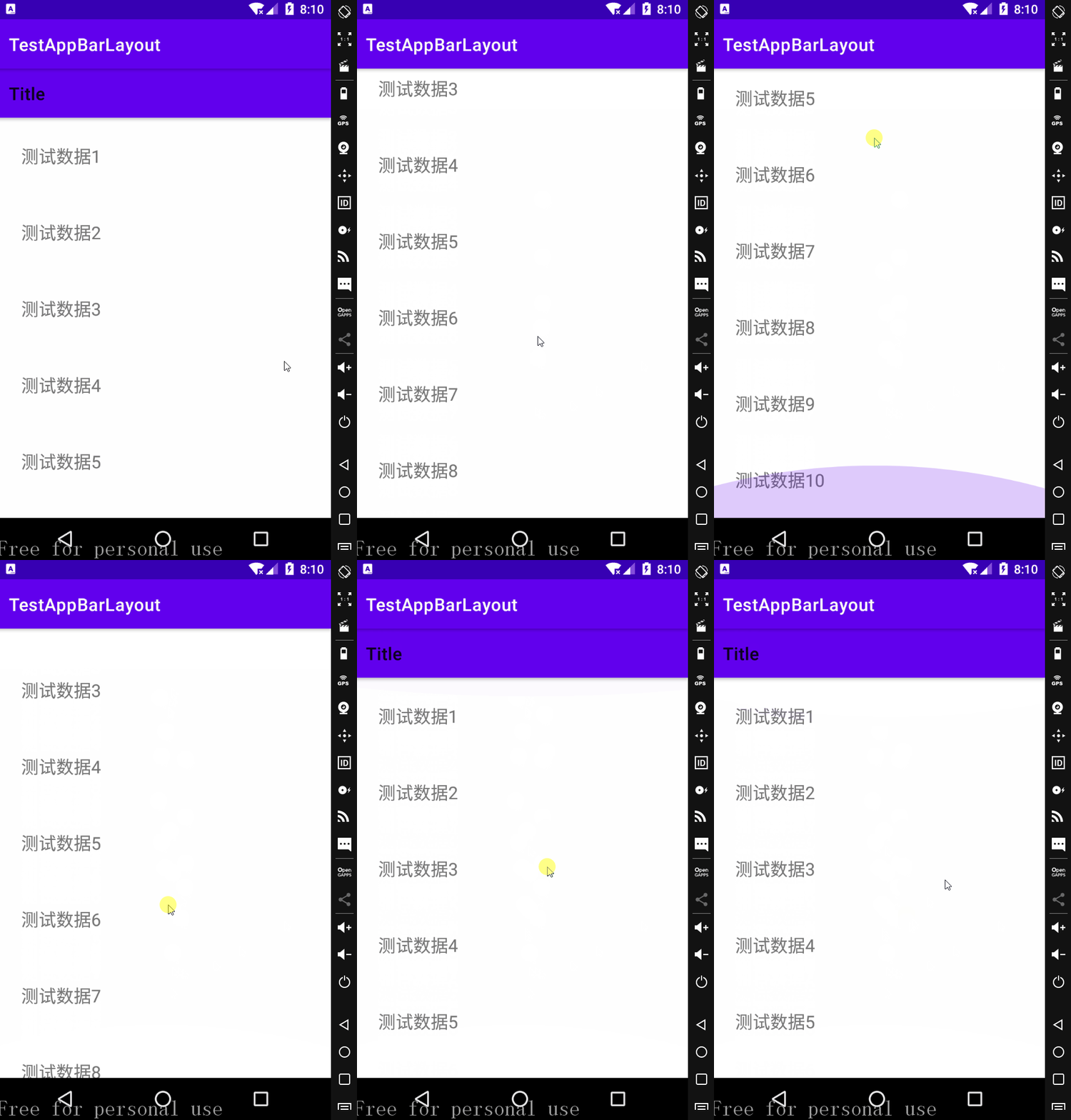
app:layout_scrollFlags="scroll|enterAlways"
- 当任何时候 NestedScrollView 往下滚动时,Toolbar 会直接往下滚动
- 而不用考虑 NestedScrollView 是否滚动到最顶部
- 也就是说只要向下滚动 Toolbar 就会显示出来,只要向上滑动 Toolbar 就会向上收缩
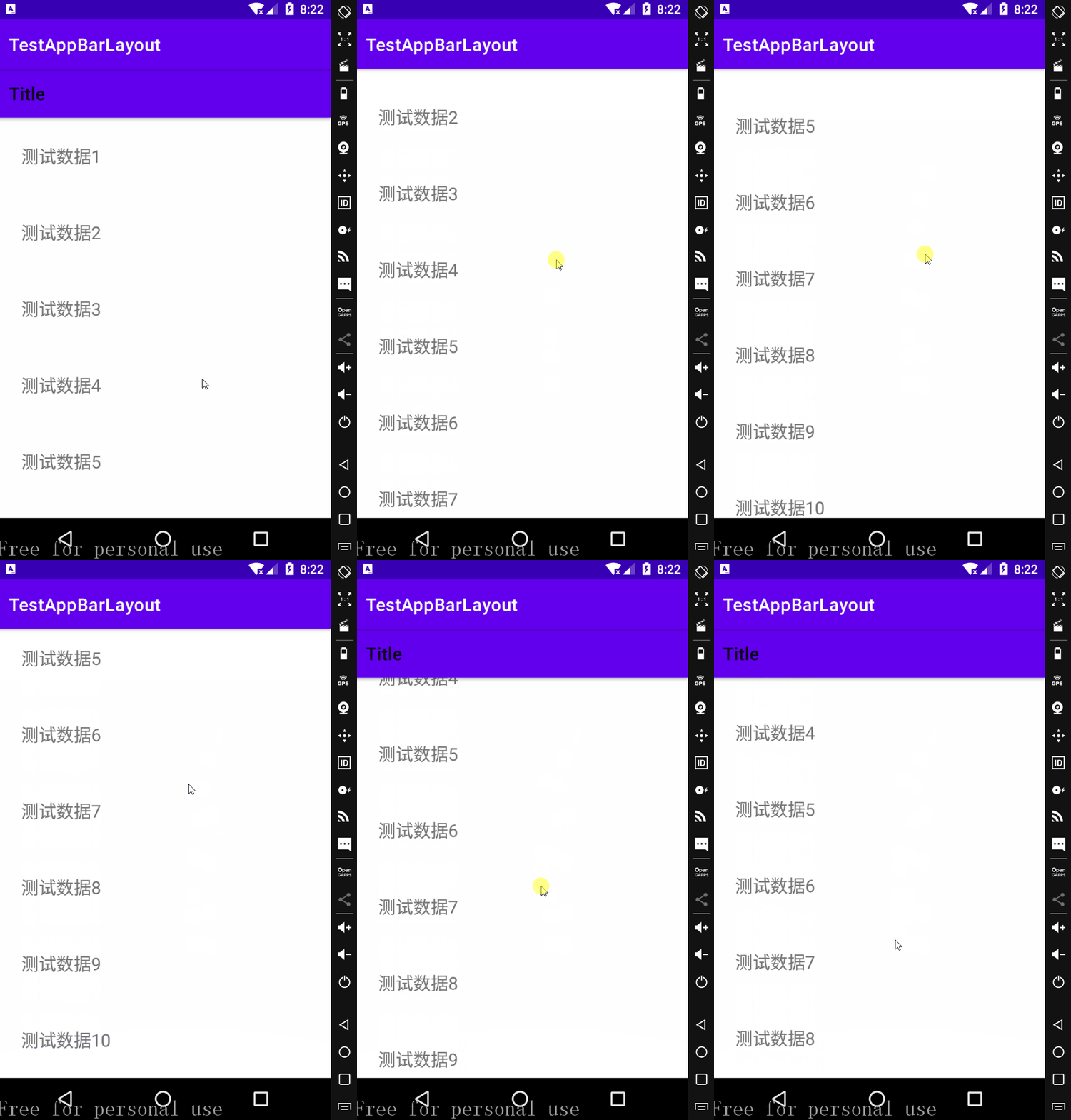
app:layout_scrollFlags="scroll|enterAlwaysCollapsed"
- 向下滚动 NestedScrollView 到最底端时 Toolbar 才会显示出来
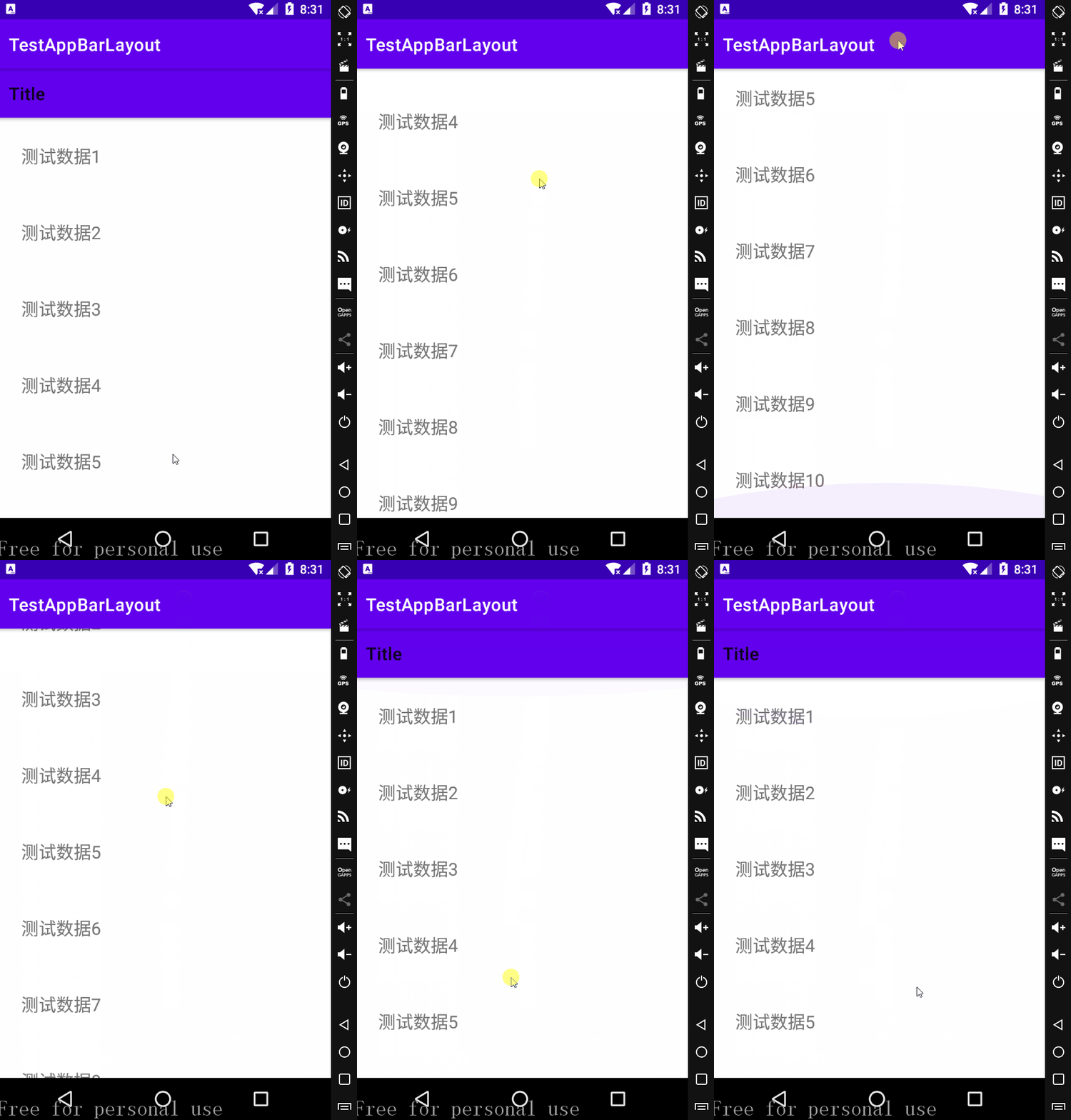
app:layout_scrollFlags="scroll|exitUntilCollapsed"
- Toolbar 往上逐渐 “消失” 时,会一直往上滑动
- 直到剩下的的高度达到它的最小高度后,再响应 NestedScrollView 的内部滑动事件
- 修改 Toolbar 的 android:layout_height="100dp"
需要注意的是与 AppBarLayout 组合的滚动布局(RecyclerView, NestedScrollView等),
需要设置 app:layout_behavior="@string/appbar_scrolling_view_behavior" ;
@string/appbar_scrolling_view_behavior 是一个系统字符串,
值为 android.support.design.widget.AppBarLayout$ScrollingViewBehavior ;
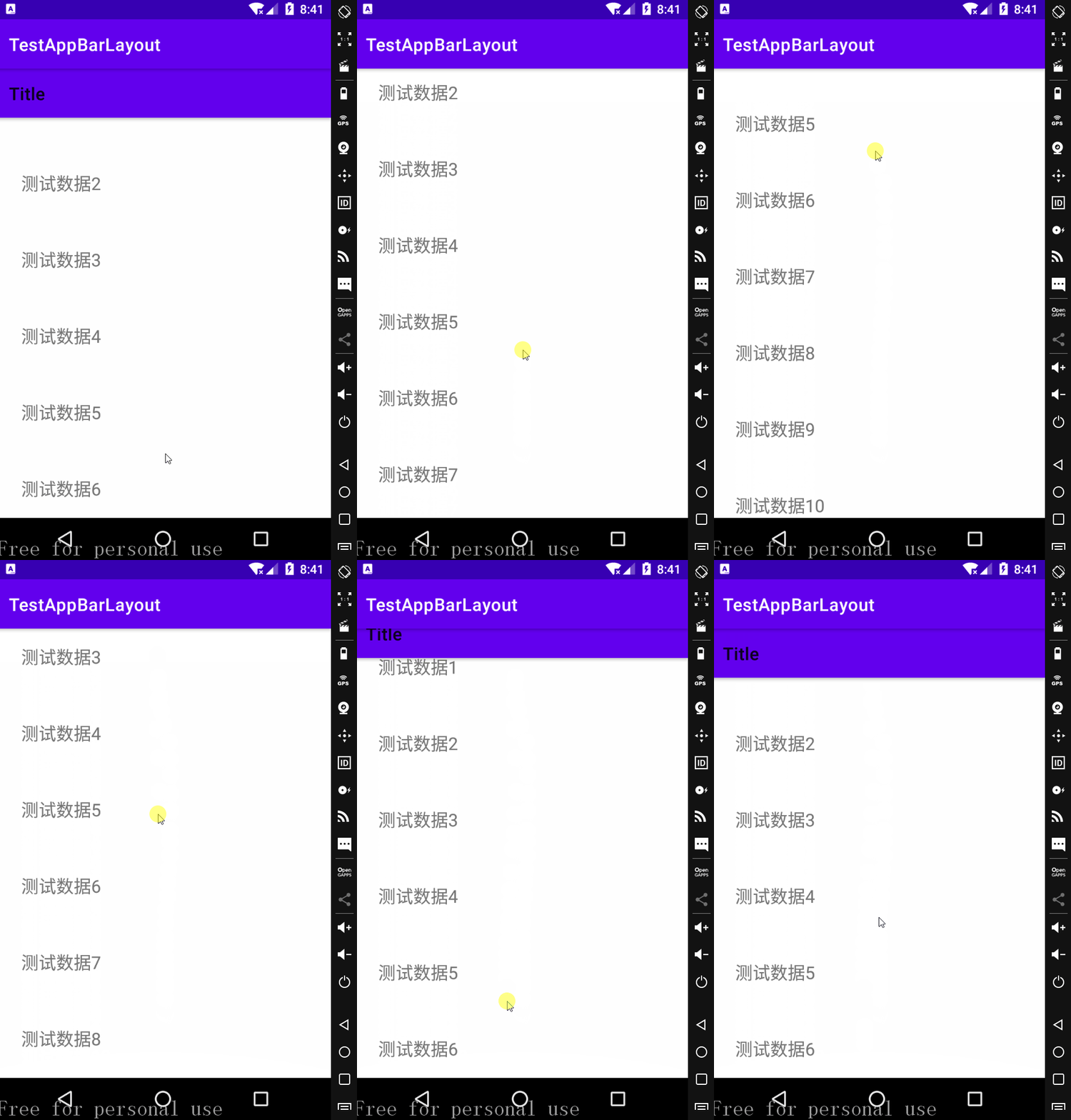
唯一的作用是把自己(使用者)放到 AppBarLayout 的下面,你可以尝试去掉这句话看看效果如何;
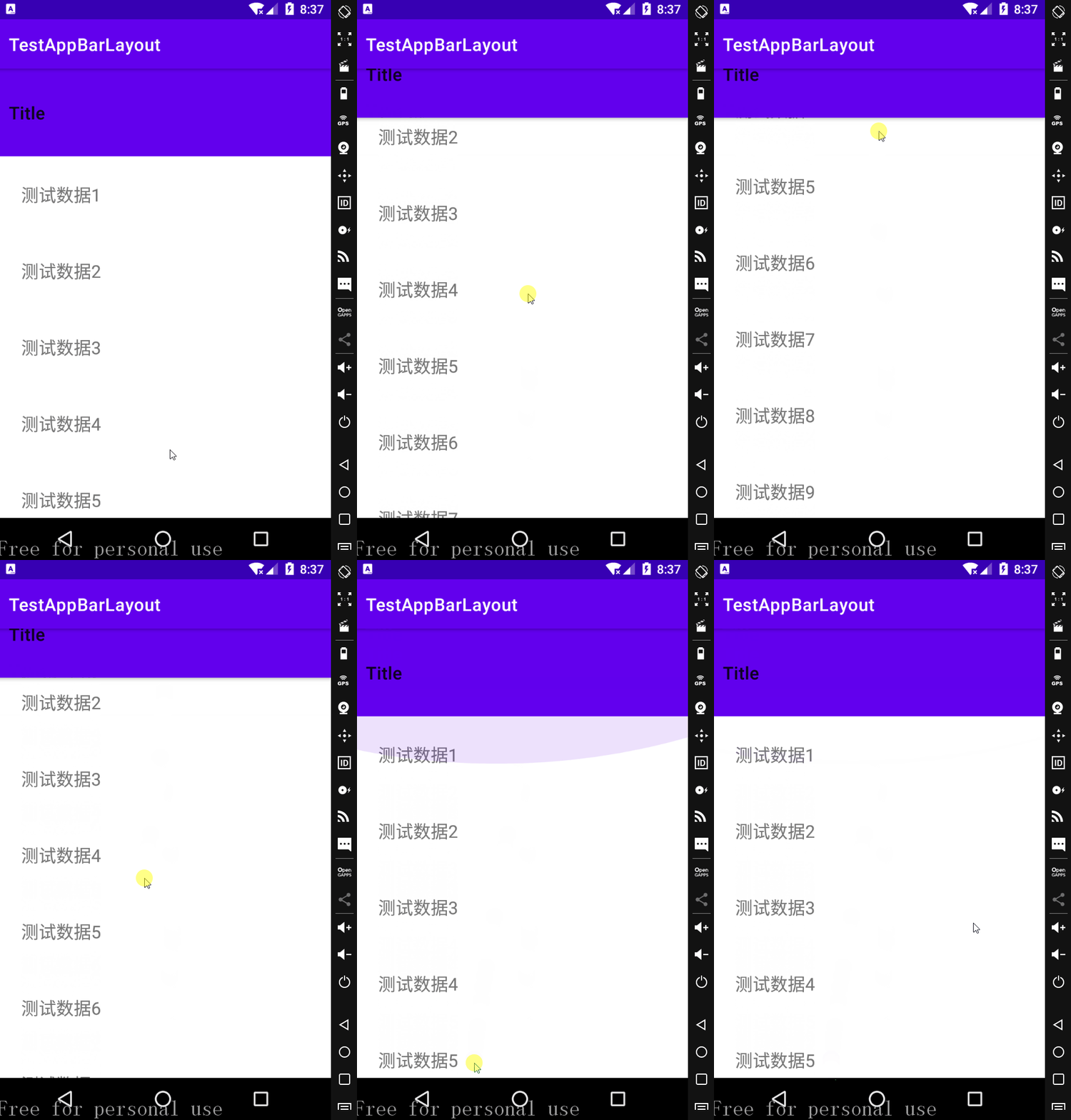
去掉该属性,并设置 app:layout_scrollFlags="scroll" ,android:layout_height="?attr/actionBarSize"
运行效果
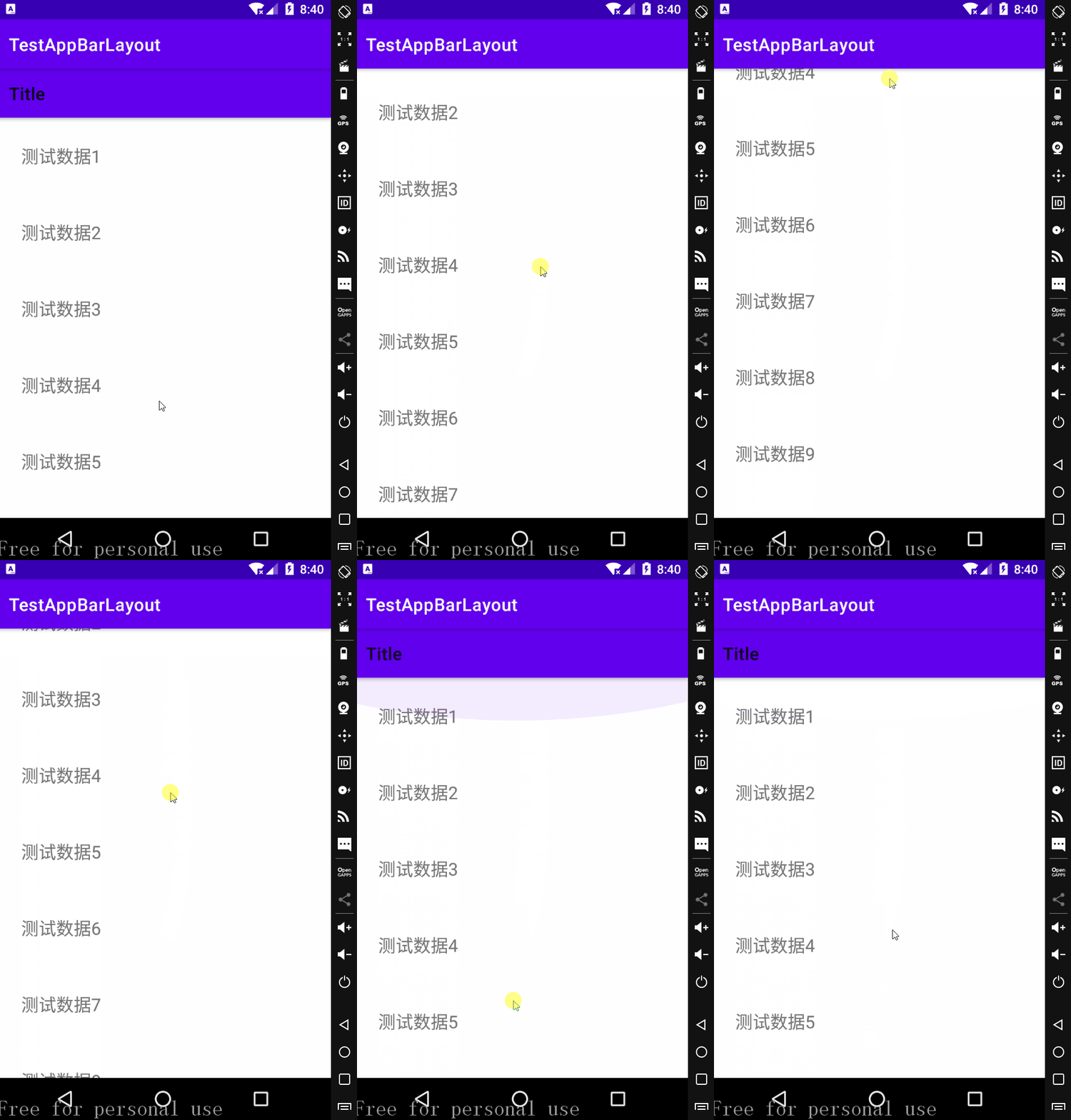
设置 $app:layout\_behavior$ 属性 不设置 $app:layout\_behavior$ 属性
•扩展
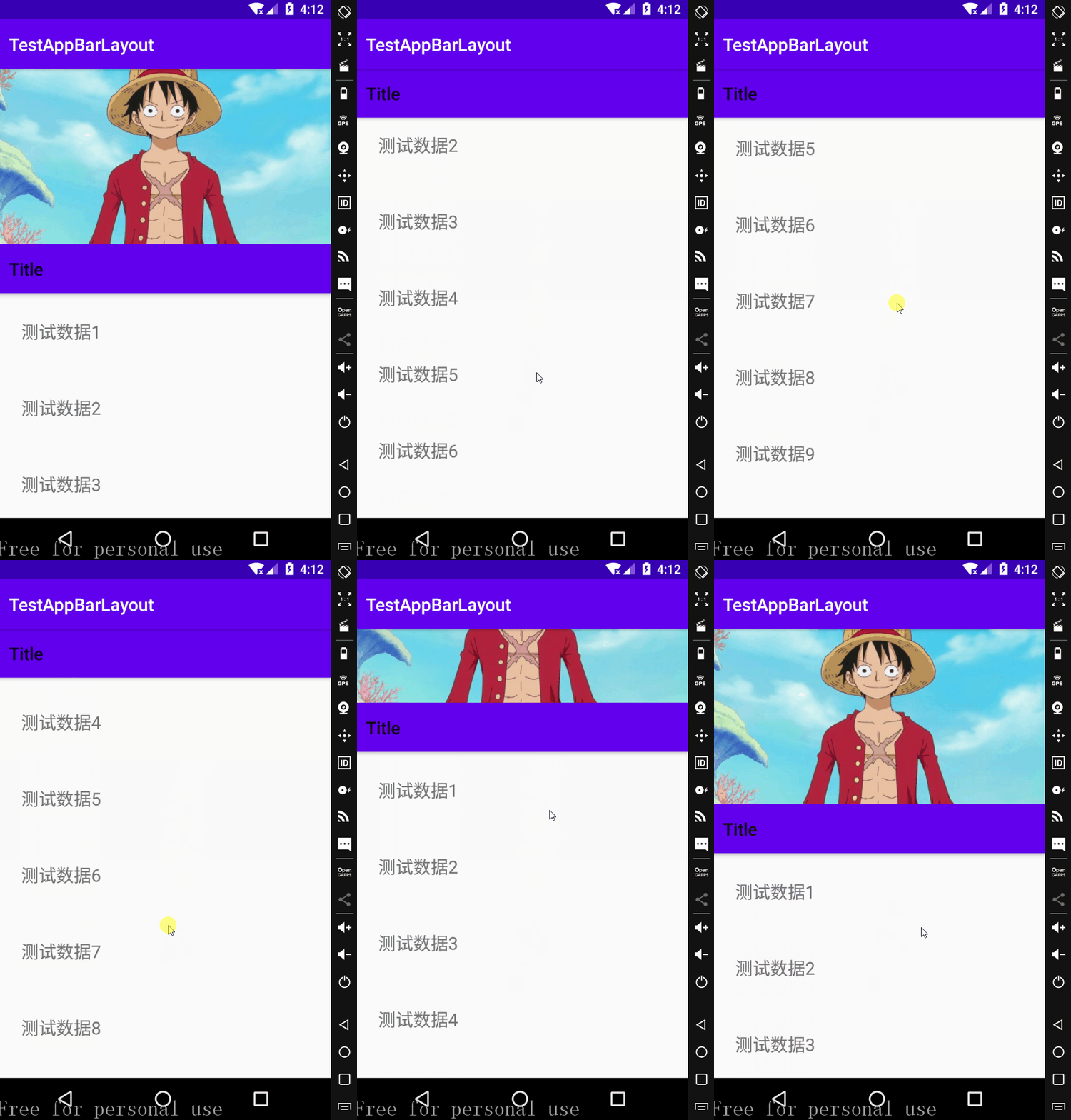
我们可以在 AppBarLayout 中包含 Toolbar 和 ImageView;
然后只给 ImageView 设置 app:layout_scrollFlags=”scroll” 属性,Toolbar 不设置;
修改 activity_main.xml 中的代码;
activity_main.xml
<?xml version="1.0" encoding="utf-8"?>

<androidx.coordinatorlayout.widget.CoordinatorLayout xmlns:android="http://schemas.android.com/apk/res/android"

    android:layout_width="match_parent"

    android:layout_height="match_parent"

    xmlns:app="http://schemas.android.com/apk/res-auto">

    <com.google.android.material.appbar.AppBarLayout

        android:layout_width="match_parent"

        android:layout_height="wrap_content">

        <ImageView

            android:layout_width="match_parent"

            android:layout_height="200dp"

            app:layout_scrollFlags="scroll"

            android:src="@drawable/luffy"

            android:scaleType="centerCrop"

            />

        <androidx.appcompat.widget.Toolbar

            android:layout_width="match_parent"

            android:layout_height="?attr/actionBarSize"

            app:title="Title"

            />

    </com.google.android.material.appbar.AppBarLayout>

    <androidx.core.widget.NestedScrollView

        android:layout_width="match_parent"

        android:layout_height="match_parent"

        app:layout_behavior="@string/appbar_scrolling_view_behavior">

        <LinearLayout

            ......

        </LinearLayout>

    </androidx.core.widget.NestedScrollView>

</androidx.coordinatorlayout.widget.CoordinatorLayout>
运行效果
•声明
参考资料
Android学习之CoordinatorLayout+AppBarLayout的更多相关文章
- Android学习之CoordinatorLayout+FloatingActionButton+Snackbar
CoordinatorLayout •简介 CoordinatorLayout 协调布局,可以理解为功能更强大的 FrameLayout 布局: 它在普通情况下作用和 FrameLayout 基本一致 ...
- Android CoordinatorLayout + AppBarLayout(向上滚动隐藏指定的View)
在新的Android Support Library里面,新增了CoordinatorLayout, AppBarLayout等. 实现的效果: 向下滚动RecylerView,Tab会被隐藏,向上滚 ...
- [Android] Android利用Coordinatorlayout+AppbarLayout实现折叠式布局
折叠式布局在App中相当常见,给人一种科技感,充满良好的用户体验. 本文就以两个简单的例子,来举例说明基本折叠式布局: 首先需要在app/build.gradle下添加如下依赖: compile 'c ...
- CoordinatorLayout, AppBarLayout, CollapsingToolbarLayout使用
本文介绍Design Support Library中CoordinatorLayout, AppBarLayout, CollapsingToolbarLayout的使用. 先列出了Design S ...
- android.support.design.widget.AppBarLayout 在android5.0+底部显示空白条问题
在最外层使用 RelativeLayout作为根节点,同时设置 android:fitsSystemWindows="true"问题解决. <?xml version=&qu ...
- Material Design之CoordinatorLayout+AppBarLayout实现上滑隐藏ToolBar
ok,今天继续更新Material Design系列!!! 废话不说,先看看效果图吧: 好了,现在来讲讲上图是怎么实现的吧!讲之前先讲讲几个控件: CoordinatorLayout 该控件也是De ...
- Android学习路线总结,绝对干货
title: Android学习路线总结,绝对干货 tags: Android学习路线,Android学习资料,怎么学习android grammar_cjkRuby: true --- 一.前言 不 ...
- Android 学习资源
下面这些资源对Android开发来说是很有帮助的! 最常用的: Android开发官方网站:http://developer.android.com/index.html 这个网站应该是Android ...
- Android学习资料收集
1.Android 学习之路 http://stormzhang.com/android/2014/07/07/learn-android-from-rookie/
随机推荐
- js console.log color all in one
js console.log color all in one console.log color Chrome console.log 语法 / grammar %c, %s, css style ...
- 高级数据结构之 BloomFilter
高级数据结构之 BloomFilter 布隆过滤器 https://en.wikipedia.org/wiki/Bloom_filter A Bloom filter is a space-effic ...
- Chrome V8 系统架构
Chrome V8 系统架构 Chromium 多进程多线程架构 design-documents https://www.chromium.org/developers/design-documen ...
- Github & DMCA Takedown & git remove history
Github & DMCA Takedown & git remove history Github & DMCA Takedown Policy Removing files ...
- c++ 动态设置函数
#include <iostream> #include <Windows.h> #include <TlHelp32.h> using namespace std ...
- Flutter: provider 使用小部件的小部件构建的依赖注入系统
文档 dependencies: provider: import 'package:dart_printf/dart_printf.dart'; import 'package:flutter/ma ...
- PAUL ADAMS ARCHITECT:澳大利亚楼市保持涨势
澳大利亚最新房价变化显示,住宅价格指数连续第10周上涨,包括五个主要首府城市的上涨了0.29%. 12月截至24日,布里斯班以1.03%涨幅领跑,五个首府城市平均涨幅0.78%. 在过去3个月里,悉尼 ...
- MySQL学习04(DQL查询)
DQL查询 DQL语言 DQL( Data Query Language 数据查询语言 ) 查询数据库数据 , 如SELECT语句 简单的单表查询或多表的复杂查询和嵌套查询 是数据库语言中最核心,最重 ...
- uni-app小白入门自学笔记(一)
码文不易啊,转载请带上本文链接呀,感谢感谢 https://www.cnblogs.com/echoyya/p/14427845.html 目录 码文不易啊,转载请带上本文链接呀,感谢感谢 https ...
- Java线程池 ExecutorService了解一下
本篇主要涉及到的是java.util.concurrent包中的ExecutorService.ExecutorService就是Java中对线程池的实现. 一.ExecutorService介绍 E ...