
Android测试工具 UIAutomator介绍
UI Automator 测试工具定义以及用途
UI Automator 测试框架提供了一组 API,用于构建在用户应用和系统应用上执行交互的界面测试。通过 UI Automator API,您可以执行在测试设备中打开“设置”菜单或应用启动器等操作。UI Automator 测试框架非常适合编写黑盒式自动化测试,此类测试的测试代码不依赖于目标应用的内部实现细节。
优点:可以对所有的操作来进行自动化,操作简单(eg:点击事件 ,侧滑事件,上拉事件,以及模拟键盘输入测试用例)。可以测试所有设备的程序。
缺点:必须要Android4.0以上才能使用。
UI Automator 的执行呢,需要我们编写完毕打成jar包,直接上传到/data/local/tmp/ 目录下面,然后用adb 命令执行即可。由于是安卓原生的,比较稳定,运行的速度也比较快。
我们下载了安卓的环境变量后,然后下载任意大于4.0的安卓版本sdk即可。
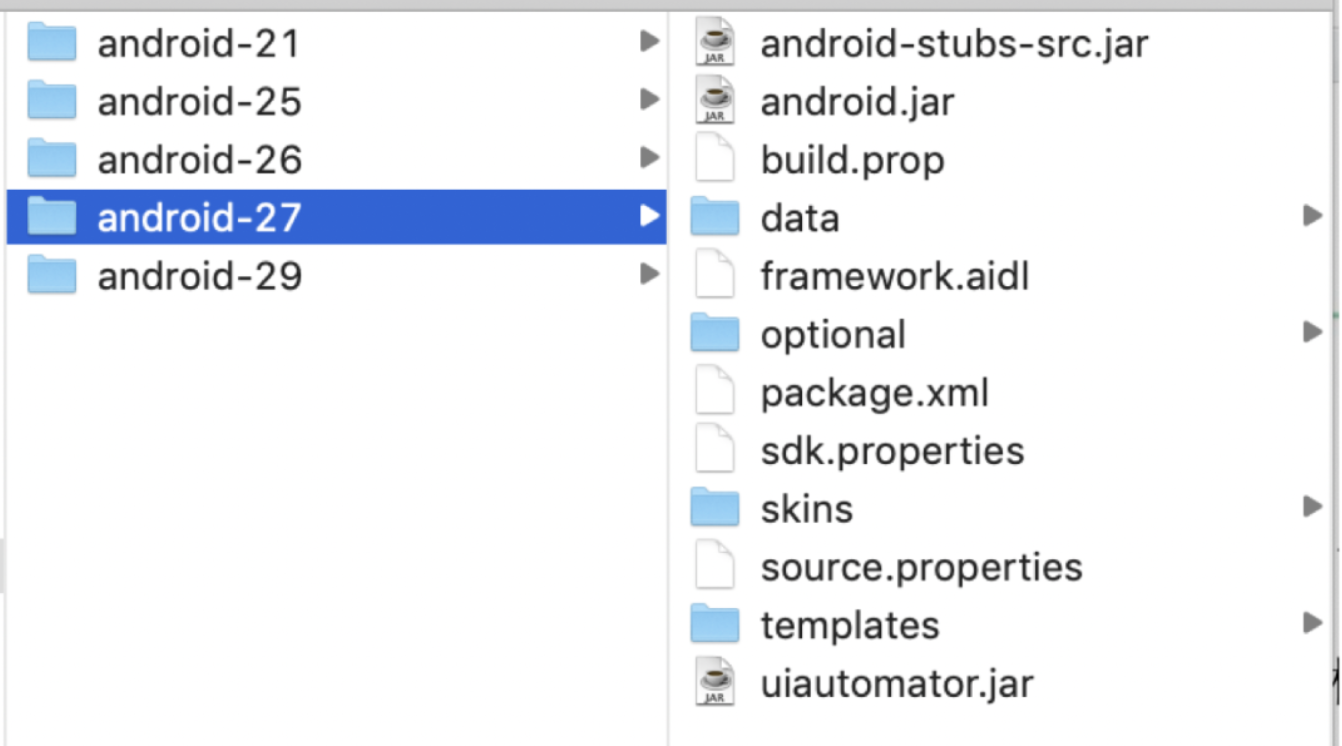
都会有这个jar包,我们在写代码,创建工程的时候,直接引入即可。
如何获取定位呢,我们可以uiautomatorviewer。
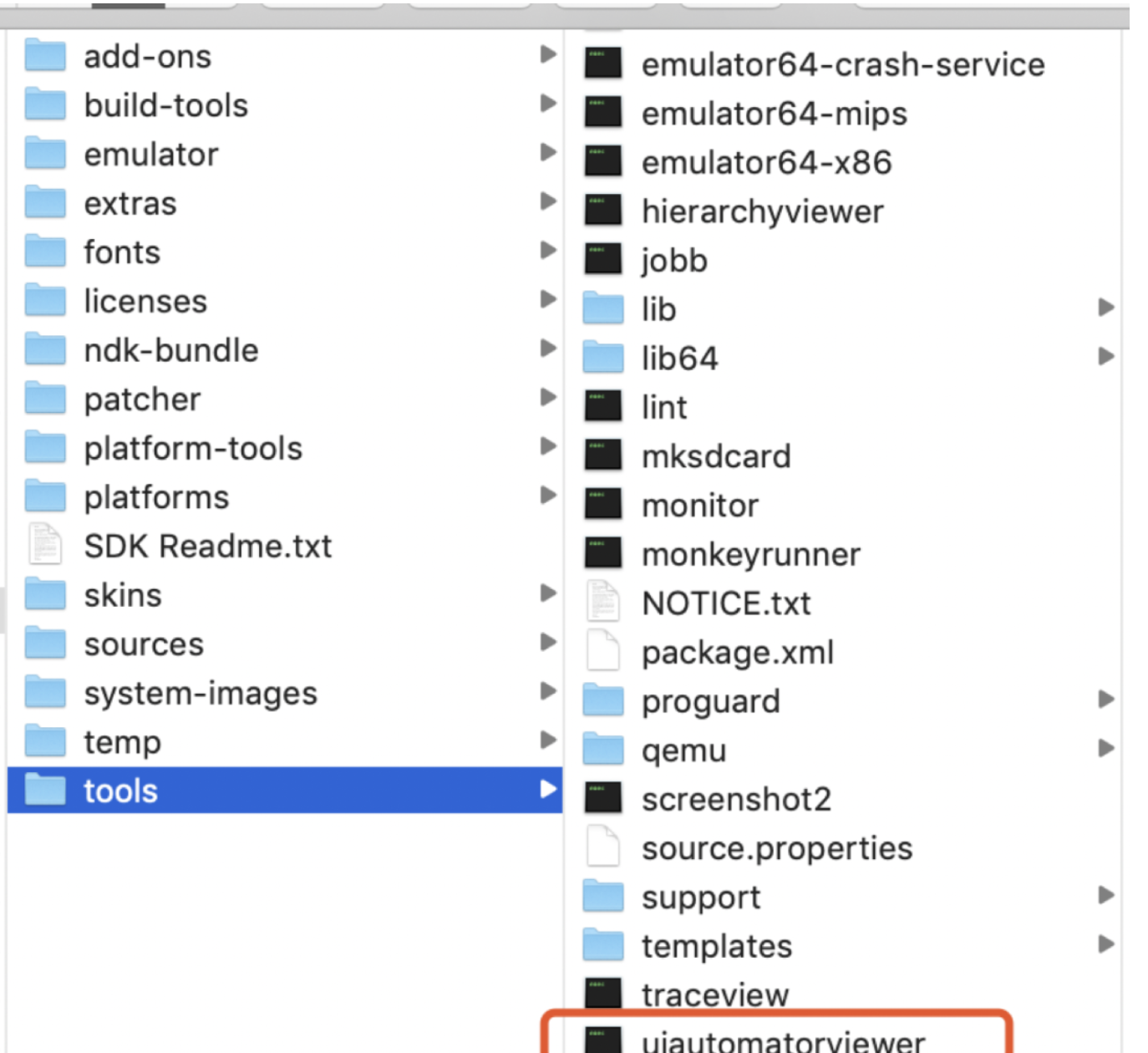
UI Automator 测试框架的主要功能包括:
用于检查布局层次结构的查看器。
用于检索状态信息并在目标设备上执行操作的 API。
支持跨应用界面测试的 API。
UI Automator 测试框架提供了一个 UiDevice 类,用于在运行目标应用的设备上访问和执行操作。您可以调用其方法以访问设备属性,如当前屏幕方向或显示屏尺寸。UiDevice 类还可用于执行以下操作:
改变设备的旋转。
按硬件键,如“音量调高按钮”。
按返回、主屏幕或菜单按钮。
打开通知栏。
截取当前窗口的屏幕截图。
UI Automator API
通过 UI Automator API,您可以编写可靠的测试,而无需了解目标应用的实现细节。您可以使用这些 API 在多个应用间捕获和操纵界面组件:
UiCollection:枚举容器的界面元素,目的是为了计数,或者按可见文本或内容说明属性来定位子元素。
UiObject:表示设备上可见的界面元素。
UiScrollable:支持搜索可滚动界面容器中的项目。
UiSelector:表示对设备上的一个或多个目标界面元素的查询。
Configurator:可让您设置用于运行 UI Automator 测试的关键参数。
官方文档
https://developer.android.com/reference/androidx/test/uiautomator/package-summary
官方文档有着详细的介绍

正常的我们加入后,在后可以看到,有什么类,方式是什么,里面有什么api。
我们可以在引入后查看。
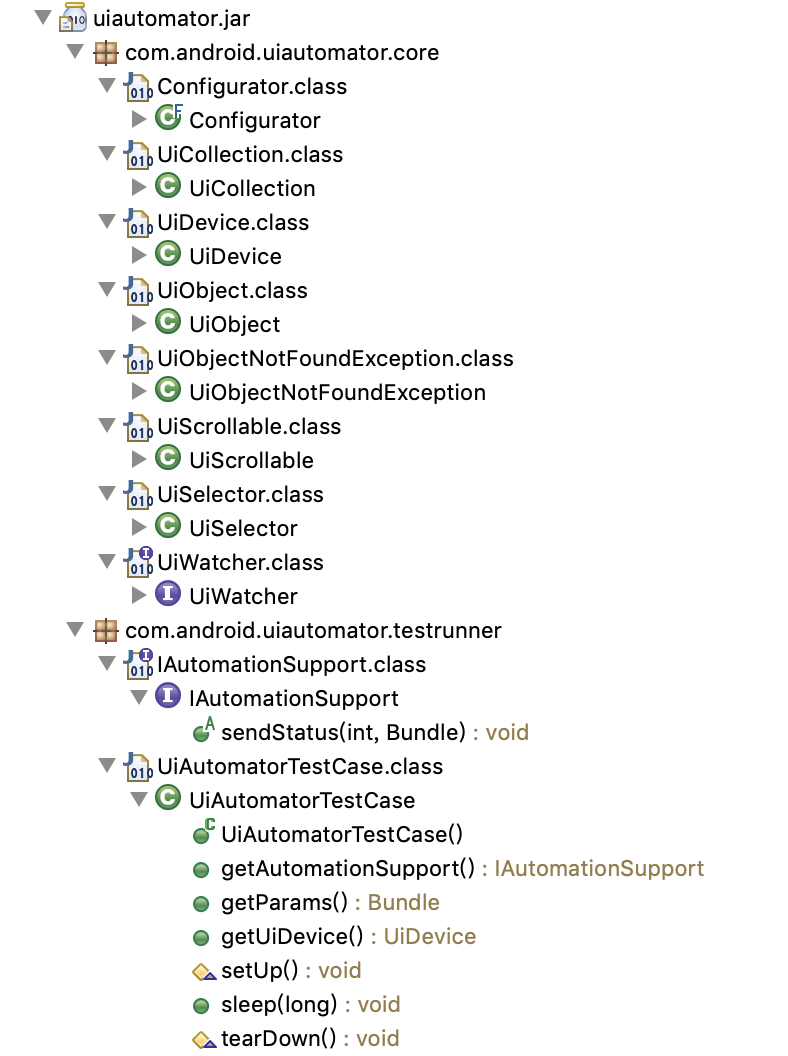
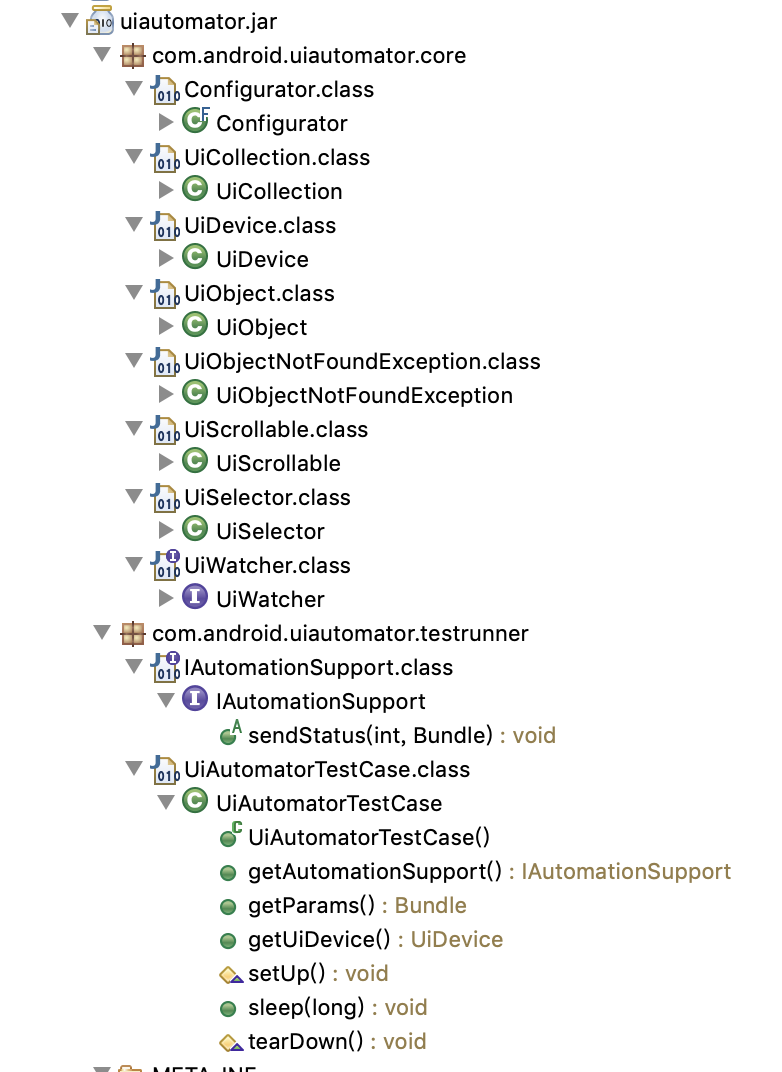
下面列举几个类的方法
UiDevice
void    clearLastTraversedText()

// 清除上次UI遍历的事件

boolean click(int x, int y)

// 根据坐标点击

boolean drag(int startX, int startY, int endX, int endY, int steps)

// 拖动

void    dumpWindowHierarchy(File dest)

// dump当前的层次化结构到文件中

void    dumpWindowHierarchy(OutputStream out)

// dump当前的层次化结构到流中

void    dumpWindowHierarchy(String fileName)

// dump当前的层次化结构到文件中

UiObject2   findObject(BySelector selector)

// 根据BySelector查找

UiObject    findObject(UiSelector selector)

// 根据UiSelector 查找

List<UiObject2> findObjects(BySelector selector)

// 根据BySelector查找

void    freezeRotation()

// 冻结旋转的状态

String  getCurrentActivityName()

// 获取当前Activity的名字,已经被废弃

String  getCurrentPackageName()

// 获取当前package

int getDisplayHeight()

// Gets the height of the display, in pixels.

int getDisplayRotation()

// Returns the current rotation of the display, as defined in Surface

Point   getDisplaySizeDp()

// Returns the display size in dp (device-independent pixel) The returned display size is adjusted per screen rotation.

int getDisplayWidth()

// Gets the width of the display, in pixels.

static UiDevice getInstance()

// 获取一个对象

static UiDevice getInstance(Instrumentation instrumentation)

// Retrieves a singleton instance of UiDevice

String  getLastTraversedText()

// 获取上一次遍历的文本

String  getLauncherPackageName()

// 获取运行的packagename

String  getProductName()

// Retrieves the product name of the device.

boolean hasAnyWatcherTriggered()

// 检查是否有触发器触发

boolean hasObject(BySelector selector)

// 是否有符合的条件的

boolean hasWatcherTriggered(String watcherName)

// Checks if a specific registered UiWatcher has triggered.

boolean isNaturalOrientation()

// Check if the device is in its natural orientation.

boolean isScreenOn()

// Checks the power manager if the screen is ON.

boolean openNotification()

// Opens the notification shade.

// 打开通知

boolean openQuickSettings()

// 打开设置

<R> R   performActionAndWait(Runnable action, EventCondition<R> condition, long timeout)

// Performs the provided action and waits for the condition to be met.

boolean pressBack()

// Simulates a short press on the BACK button.

boolean pressDPadCenter()

// Simulates a short press on the CENTER button.

boolean pressDPadDown()

// Simulates a short press on the DOWN button.

boolean pressDPadLeft()

// Simulates a short press on the LEFT button.

boolean pressDPadRight()

// Simulates a short press on the RIGHT button.

boolean pressDPadUp()

// Simulates a short press on the UP button.

boolean pressDelete()

// Simulates a short press on the DELETE key.

boolean pressEnter()

// Simulates a short press on the ENTER key.

boolean pressHome()

// Simulates a short press on the HOME button.

boolean pressKeyCode(int keyCode)

// Simulates a short press using a key code.

boolean pressKeyCode(int keyCode, int metaState)

// Simulates a short press using a key code.

boolean pressMenu()

// Simulates a short press on the MENU button.

boolean pressRecentApps()

// Simulates a short press on the Recent Apps button.

boolean pressSearch()

// Simulates a short press on the SEARCH button.

void    registerWatcher(String name, UiWatcher watcher)

// Registers a UiWatcher to run automatically when the testing framework is unable to find a match using a UiSelector.

void    removeWatcher(String name)

// Removes a previously registered UiWatcher.

void    resetWatcherTriggers()

// Resets a UiWatcher that has been triggered.

void    runWatchers()

// This method forces all registered watchers to run.

void    setCompressedLayoutHeirarchy(boolean compressed)

// Enables or disables layout hierarchy compression.

void    setOrientationLeft()

// 设置旋转方向

void    setOrientationNatural()

// Simulates orienting the device into its natural orientation and also freezes rotation by disabling the sensors.

void    setOrientationRight()

// Simulates orienting the device to the right and also freezes rotation by disabling the sensors.

void    sleep()

// 关闭屏幕

boolean swipe(int startX, int startY, int endX, int endY, int steps)

// Performs a swipe from one coordinate to another using the number of steps to determine smoothness and speed.

boolean swipe(Point[] segments, int segmentSteps)

// Performs a swipe between points in the Point array.

boolean takeScreenshot(File storePath, float scale, int quality)

// 截屏

boolean takeScreenshot(File storePath)

// Take a screenshot of current window and store it as PNG Default scale of 1.0f (original size) and 90% quality is used The screenshot is adjusted per screen rotation

void    unfreezeRotation()

// Re-enables the sensors and un-freezes the device rotation allowing its contents to rotate with the device physical rotation.

<R> R   wait(SearchCondition<R> condition, long timeout)

// Waits for given the condition to be met.

void    waitForIdle(long timeout)

// Waits for the current application to idle.

void    waitForIdle()

// Waits for the current application to idle.

boolean waitForWindowUpdate(String packageName, long timeout)

// Waits for a window content update event to occur.

void    wakeUp()

// 点亮屏幕
void    clearTextField()

// 清空输入接口

boolean click()

// 点击

boolean clickAndWaitForNewWindow()

// 点击并等待新界面

boolean clickAndWaitForNewWindow(long timeout)

// 点击并等待新界面,设置等待时间

boolean clickBottomRight()

// 点击右下边

boolean clickTopLeft()

// Clicks the top and left corner of the UI element

boolean dragTo(UiObject destObj, int steps)

// 拖动

boolean dragTo(int destX, int destY, int steps)

// Drags this object to arbitrary coordinates.

boolean exists()

// 判断是否存在

Rect    getBounds()

// 返回边界

UiObject    getChild(UiSelector selector)

// 根据条件获取子元素

int getChildCount()

// 获取子元素数量

String  getClassName()

// 获取当前元素的class name

String  getContentDescription()

// Reads the content_desc property of the UI element

UiObject    getFromParent(UiSelector selector)

// Creates a new UiObject for a sibling view or a child of the sibling view, relative to the present UiObject.

String  getPackageName()

// Reads the view's package property

final UiSelector    getSelector()

// Debugging helper.

String  getText()

// Reads the text property of the UI element

Rect    getVisibleBounds()

// 获取可见边界

boolean isCheckable()

// 是否可以点击

boolean isChecked()

// 是否已经选中

boolean isClickable()

// Checks if the UI element's clickable property is currently true.

boolean isEnabled()

// Checks if the UI element's enabled property is currently true.

boolean isFocusable()

// Check if the UI element's focusable property is currently true.

boolean isFocused()

// Check if the UI element's focused property is currently true

boolean isLongClickable()

// Check if the view's long-clickable property is currently true

boolean isScrollable()

// Check if the view's scrollable property is currently true

boolean isSelected()

// Checks if the UI element's selected property is currently true.

boolean longClick()

// 长按

boolean longClickBottomRight()

// Long clicks bottom and right corner of the UI element

boolean longClickTopLeft()

// Long clicks on the top and left corner of the UI element

boolean performMultiPointerGesture(PointerCoords... touches)

// Performs a multi-touch gesture.

boolean performTwoPointerGesture(Point startPoint1, Point startPoint2, Point endPoint1, Point endPoint2, int steps)

// Generates a two-pointer gesture with arbitrary starting and ending points.

boolean pinchIn(int percent, int steps)

// Performs a two-pointer gesture, where each pointer moves diagonally toward the other, from the edges to the center of this UiObject .

boolean pinchOut(int percent, int steps)

// Performs a two-pointer gesture, where each pointer moves diagonally opposite across the other, from the center out towards the edges of the this UiObject.

boolean setText(String text)

// 设置输入内容

boolean swipeDown(int steps)

// Performs the swipe down action on the UiObject.

boolean swipeLeft(int steps)

// Performs the swipe left action on the UiObject.

boolean swipeRight(int steps)

// Performs the swipe right action on the UiObject.

boolean swipeUp(int steps)

// Performs the swipe up action on the UiObject.

boolean waitForExists(long timeout)

// Waits a specified length of time for a view to become visible.

boolean waitUntilGone(long timeout)

// Waits a specified length of time for a view to become undetectable.
package cn.cool;

import com.android.uiautomator.testrunner.UiAutomatorTestCase;

import android.os.RemoteException;

public class Testone extends UiAutomatorTestCase {

   @Override

    protected void setUp() throws Exception {

        super.setUp();

    }

    public void testCool() throws RemoteException, InterruptedException {

    }

    @Override

    protected void tearDown() throws Exception {

    }

}
Android测试工具 UIAutomator介绍的更多相关文章
- [原创]Android Monkey测试工具使用介绍
[原创]Android Monkey测试工具使用介绍 1 Android Monkey介绍 Monkey是Android中的一个命令行工具,可以运行在模拟器里或实际设备中.它向系统发送伪随机的用户事件 ...
- 2014 非常好用的开源 Android 测试工具
http://www.php100.com/html/it/mobile/2014/1015/7495.html 当前有很大的趋势是转向移动应用平台,Android 是最广泛使用的移动操作系统,201 ...
- 常见Android测试工具简介
在进行android设备测试过程中,在进行系统测试时候,往往需要关注到很多方面,导致一个崩溃或者运行一段时间自动重启或者停止的问题很多.最简单来看,影响因素就有:底层硬件设备.OS层.上层app层.另 ...
- Android 测试工具集01
Appium是一个支持原生,混合和移动web apps的开源的跨平台测试框架工具. ANDROID依赖 Android SDK API >= 17 (Additional features re ...
- 测试工具Wiremock介绍
WireMock是一个开源的测试工具,支持HTTP响应存根.请求验证.代理/拦截.记录和回放.最直接的用法: 为Web/移动应用构建Mock Service 快速创建Web API原型 模拟Web S ...
- monkey测试===Android测试工具Monkey用法简介(转载)
Monkey是Android中的一个命令行工具,可以运行在模拟器里或实际设备中.它向系统发送伪随机的用户事件流(如按键输入.触摸屏输入.手势输入等),实现对正在开发的应用程序进行压力测试.Monkey ...
- Android性能测试工具Emmagee介绍
Emmagee介绍 Emmagee是监控指定被测应用在使用过程中占用机器的CPU.内存.流量资源的性能测试小工具.该工具的优势在于如同windows系统性能监视器类似,它提供的是数据采集的功能,而行为 ...
- Android 测试工具集02
User scenario testing for Android(功能性测试框架) Robotium is an Android test automation framework that has ...
- 【Android测试工具】Android抓包解析全过程
需求原因 在android开发中,遇到socket编程,无法从log日志中查看到与之通讯的socket发送和返回的数据包是什么,这里介绍一个工具,tcpdump工具和wireshark工具查看抓到的内 ...
随机推荐
- hystrix(8) 插件
上一节讲到HystrixCommand的执行流程. Hystrix内部将一些模块实现成了插件,并且提供了用户提供自己的实现,通过配置来替换插件.Hystrix提供了5个插件,分别为并发相关插件(Hys ...
- 基本的PID算法整理(水缸的例子有问题!!)
一,先谈关于水缸漏水的问题 谈到PID原理入门的时候,大家经常会举的一个例子就是水缸漏水的例子.这里把一个解释水缸漏水的帖子放在这里:https://blog.csdn.net/qq_41736609 ...
- VUE开发(一)Spring Boot整合Vue并实现前后端贯穿调用
文章更新时间:2020/03/14 一.前言 作为一个后端程序员,前端知识多少还是要了解一些的,vue能很好的实现前后端分离,且更便于我们日常中的调试,还具备了轻量.低侵入性的特点,所以我觉得是很有必 ...
- [BJDCTF 2nd]文件探测
[BJDCTF 2nd]文件探测 这两天刷题碰到了一道稍微有难度的题,记录一下,有一些点是未被掌握到的. home.php: <?php setcookie("y1ng", ...
- 需要完成PAT作业和微博作业的具体方法
http://www.cnblogs.com/c-programing-language/p/6703508.html
- 浅谈Vue中计算属性computed的实现原理
虽然目前的技术栈已由Vue转到了React,但从之前使用Vue开发的多个项目实际经历来看还是非常愉悦的,Vue文档清晰规范,api设计简洁高效,对前端开发人员友好,上手快,甚至个人认为在很多场景使用V ...
- cookie、session和md5加密
cookie Http无状态协议,只能在同一个网站(包括多个页面)下获取,存储在客户端本地的一段信息,帮助我们存储信息获取信息.但是同样有风险:我们自己在浏览器上可以操作或者设置Cookie. con ...
- PageRank算法(网页排名)
Google用它来体现网页的相关性和重要性
- JavaFX ComboBox的选中事项
参考1:https://blog.csdn.net/mexel310/article/details/37909205 参考2:https://blog.csdn.net/maosijunzi/art ...
- 098 01 Android 零基础入门 02 Java面向对象 03 综合案例(学生信息管理) 02 案例分析及实现 02 编写并测试Subject类
098 01 Android 零基础入门 02 Java面向对象 03 综合案例(学生信息管理) 02 案例分析及实现 02 编写并测试Subject类 本文知识点:编写并测试Subject类 说明: ...