
SVG-1

<rect>矩形

<circle>圆
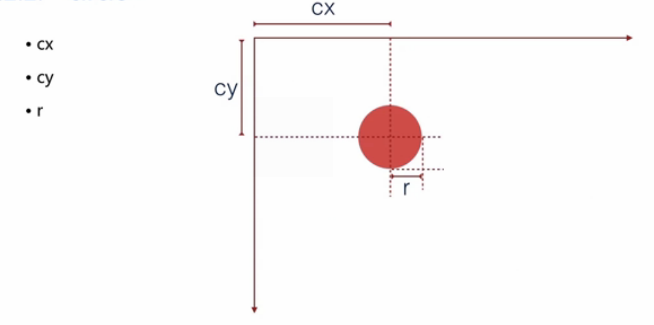
<ellipse>椭圆

<line>直线

<polyline>折线

<polygon>标签用来创建含有不少于三个边的图形


stroke:描边的颜色
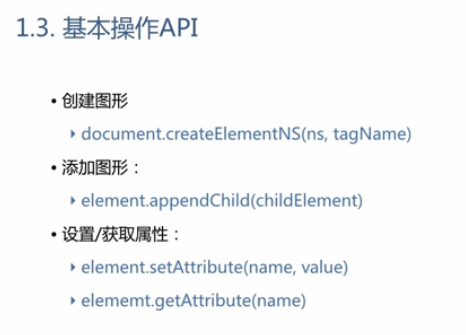
写好的一个编辑器:
<!DOCTYPE HTML>
<html>
<head>
<meta http-equiv="Content-Type" content="text/html; charset=utf-8" />
    <title>SVG 编辑器</title>
    <style>
        #toolbox {
            position: absolute;
            top: 0;
            bottom: 0;
            left: 0;
            width: 250px;
            border-right: 1px solid #CCC;
        }

        #toolbox h2 {
            margin: 0;
            padding: 0;
            background: #EEE;
            font-size: 16px;
            height: 24px;
            line-height: 24px;
            padding: 5px 10px;
        }

        #toolbox form {
            padding: 10px;
        }

        #canvas {
            position: absolute;
            left: 260px;
            top: 10px;
            bottom: 10px;
            right: 10px;
            box-shadow: 2px 2px 10px rgba(0,0,0,.4);
            border-radius: 5px;
        }

        label {
            display: inline-block;
            width: 80px;
            text-align: right;
        }
    </style>
</head>
<body>
    <div id="toolbox">
        <h2>创建</h2>
        <form id="create-shape">
            <button type="button" create="rect">Rect</button>
            <button type="button" create="circle">Circle</button>
            <button type="button" create="ellipse">Ellipse</button>
            <button type="button" create="line">Line</button>
        </form>
        <h2>形状</h2>
        <form id="shape-attrs">
            请先创建图形
        </form>
        <h2>外观和变换</h2>
        <form id="look-and-transform" disabled="disabled">
            <p>
                <label style="display: inline;">填充</label>
                <input id="fill" type="color" value="#ffffff" />
            </p>
            <p>
                <label style="display: inline;">描边</label>
                <input id="stroke" type="color" value="#ff0000" />
                <input id="strokeWidth" type="range" value="1" />
            </p>
            <p>
                <label>translateX</label>
                <input id="translateX" type="range" min="-400" max="400" value="0" />

                <label>translateY</label>
                <input id="translateY" type="range" min="-400" max="400" value="0" />

                <label>rotate</label>
                <input id="rotate" type="range" min="-180" max="180" value="0" />

                <label>scale</label>
                <input id="scale" type="range" min="-1" max="2" step="0.01" value="1" />
            </p>
        </form>
    </div>
    <div id="canvas"></div>
</body>
<script>
    var SVG_NS = 'http://www.w3.org/2000/svg';

    // 图形及对应默认属性
    var shapeInfo = {
        rect: 'x:10,y:10,width:200,height:100,rx:0,ry:0',
        circle: 'cx:200,cy:200,r:50',
        ellipse: 'cx:200,cy:200,rx:80,ry:30',
        line: 'x1:10,y1:10,x2:100,y2:100'
    };

    // 默认公共属性
    var defaultAttrs = {
        fill: '#ffffff',
        stroke: '#ff0000'
    };

    var createForm = document.getElementById('create-shape');
    var attrForm = document.getElementById('shape-attrs');
    var lookForm = document.getElementById('look-and-transform');

    var svg = createSVG();
    var selected = null;

    createForm.addEventListener('click', function(e) {
        if (e.target.tagName.toLowerCase() == 'button') {
            create(e.target.getAttribute('create'));
        }
    });

    attrForm.addEventListener('input', function(e) {
        if (e.target.tagName.toLowerCase() != 'input') return;
        var handle = e.target;
        selected.setAttribute(handle.name, handle.value);
    });

    lookForm.addEventListener('input', function(e) {
        if (e.target.tagName.toLowerCase() != 'input') return;
        if (!selected) return;
        selected.setAttribute('fill', fill.value);
        selected.setAttribute('stroke', stroke.value);
        selected.setAttribute('stroke-width', strokeWidth.value);
        selected.setAttribute('transform', encodeTranform({
            tx: translateX.value,
            ty: translateY.value,
            scale: scale.value,
            rotate: rotate.value
        }));
    });

    function createSVG() {
        var svg = document.createElementNS(SVG_NS, 'svg');
        svg.setAttribute('width', '100%');
        svg.setAttribute('height', '100%');
        canvas.appendChild(svg);

        svg.addEventListener('click', function(e) {
            if (e.target.tagName.toLowerCase() in shapeInfo) {    //判断图形是否在shapeInfo里
                select(e.target);     //选中这个图形
            }
        });
        return svg;
    }

    function create(name) {
        var shape = document.createElementNS(SVG_NS, name);
        svg.appendChild(shape);
        select(shape);
    }

    function select(shape) {
        var attrs = shapeInfo[shape.tagName].split(',');  //在shapeInfo里拿到该图形的属性用','隔开
        var attr, name, value;

        attrForm.innerHTML = "";

        while(attrs.length) {
            attr = attrs.shift().split(':');
            name = attr[0];
            value = shape.getAttribute(name) || attr[1];  //是否是才生成的,不是就拿以前的属性
            createHandle(shape, name, value);
            shape.setAttribute(name, value);
        }

        for (name in defaultAttrs) {
            value = shape.getAttribute(name) || defaultAttrs[name];
            shape.setAttribute(name, value);
        }
        selected = shape;

        updateLookHandle();
    }

    function createHandle(shape, name, value) {

        var label = document.createElement('label');
        label.textContent = name;

        var handle = document.createElement('input');
        handle.setAttribute('name', name);
        handle.setAttribute('type', 'range');
        handle.setAttribute('value', value);
        handle.setAttribute('min', 0);
        handle.setAttribute('max', 800);

        attrForm.appendChild(label);
        attrForm.appendChild(handle);
    }

    function updateLookHandle() {
        fill.value = selected.getAttribute('fill');  //selected就是当前选中的图形
        stroke.value = selected.getAttribute('stroke');
        var t = decodeTransform(selected.getAttribute('transform'));
        translateX.value = t ? t.tx : 0;
        translateY.value = t ? t.ty : 0;
        rotate.value = t ? t.rotate : 0;
        scale.value = t ? t.scale : 1;
    }

    function decodeTransform(transString) {
        var match = /translate\((\d+),(\d+)\)\srotate\((\d+)\)\sscale\((\d+)\)/.exec(transString);
        return match ? {
            tx: +match[1],
            ty: +match[2],
            rotate: +match[3],
            scale: +match[4]
        } : null;
    }

    function encodeTranform(transObject) {
        return ['translate(', transObject.tx, ',', transObject.ty, ') ',
            'rotate(', transObject.rotate, ') ',
            'scale(', transObject.scale, ')'].join('');
    }

</script>
</html>
SVG-1的更多相关文章
- 【Web动画】SVG 实现复杂线条动画
在上一篇文章中,我们初步实现了一些利用基本图形就能完成的线条动画: [Web动画]SVG 线条动画入门 当然,事物都是朝着熵增焓减的方向发展的,复杂线条也肯定比有序线条要多. 很多时候,我们无法人工去 ...
- 【Web动画】SVG 线条动画入门
通常我们说的 Web 动画,包含了三大类. CSS3 动画 javascript 动画(canvas) html 动画(SVG) 个人认为 3 种动画各有优劣,实际应用中根据掌握情况作出取舍,本文讨论 ...
- SVG:textPath深入理解
SVG的文本可以沿着一条自定义的Path来排布,比如曲线.圆形等等,使用方式如下所示(来源MDN): <svg viewBox="0 0 1000 300" xmlns=&q ...
- SVG:linearGradient渐变在直线上失效的问题解决方案
SVG开发里有个较为少见的问题. 对x1=x2或者y1=y2的直线(line以及path),比如: <path d="M200,10 200,100" stroke=&quo ...
- HTML5_05之SVG扩展、地理定位、拖放
1.SVG绘图总结: ①方法一:已有svg文件,<img src="x.svg"> 方法二:<body><svg></svg>&l ...
- HTML5_04之SVG绘图
1.关于Canvas绘制图像: 问题:需要绘制多张图片时,必须等待所有图片加载完成才能开始绘制:而每张图片都是异步请求,彼此没有先后顺序,哪一张先加载完成完全无法预测: 方案: var progres ...
- 关于SVG的viewBox
在SVG中,通过svg标记的 width和height可以规定这段SVG代码所表达的数据在绘制时所占用的空间大小 如下代码svg设置了宽度与高度,rect同样,所以结果自然是全屏 <svg wi ...
- JavaScript权威设计--jQuery,Ajax.animate,SVG(简要学习笔记二十)[完结篇]
1.$和jquery在全局命名空间中定义的唯一两个变量. 2.jquery是工厂函数,不是构造函数.他返回一个新创建的对象. 3.jquery的四种调用方式: <1>传递C ...
- Notes:SVG(4)基于stroke-dasharray和stroke-dashoffset圆形进度条
stroke-dasharray:定义描边的虚线长度,如果提供奇数个,则会自动复制该值成偶数 stroke-dashoffset:定义虚线描边的偏移量(在路径开始的前面,看不到) 实现如下所示 svg ...
- Notes:SVG(3)---滤镜和渐变
SVG滤镜使用filter标签来定义,该标签必须嵌套在defs元素里面,并且必须指定一个ID,以供引用. 在 SVG 中,可用的滤镜有: feBlend feColorMatrix feCompone ...
随机推荐
- ChromiumFX中js调用C#方法
server端代码: ChromiumWebBrowser wb; wb.AddGlobalJSFunction("CfxHelloWorld").Execute += CfxHe ...
- CMD下用csc.exe编译.cs 代码
用惯了VS来写C#代码,要是用记事本写会不会觉得很好玩,然后再CMD窗口下编译运行,当然写一些简单的Console代码还是可以这么玩玩的,如果你觉得打开VS太麻烦的话. 把后缀名改成.cs,test. ...
- C#获取mac
验证计算机MAC地址进行软件授权是一种通用的方法,C#可以轻松获取计算机的MAC地址,本文采用实际的源代码讲述了两种获取网卡的方式,第一种 方法使用ManagementClass类,只能获取本机的计算 ...
- C#的Socket编程
Microsoft.Net Framework为应用程序访问Internet提供了分层的.可扩展的以及受管辖的网络服务,其名字空间System.Net和System.Net.Sockets包含丰富的类 ...
- Sql Server相关的性能计数器
OS Memory and Paging 性能计数器: 1.Memory\Availability Mbytes 未使用的物理内存(非页面文件),通常情况下它应该大于100MB 2.Memory\ ...
- 时间的获取和转换,C#和Sql
我们可以通过使用DataTime这个类来获取当前的时间.通过调用类中的各种方法我们可以获取不同的时间:如:日期(2008-09-04).时间(12:12:12).日期+时间(2008-09-04 12 ...
- react tab选项卡切换
Tab选项卡切换是个很常见也很简单的小功能,用原生js和jq去写的话可能不到20行代码就搞定so easy.但是用react去实现就没那么容易了(是自己react比较菜).由于最近在重新学习react ...
- Uva 10652 Board Wrapping(计算几何之凸包+点旋转)
题目大意:给出平面上许多矩形的中心点和倾斜角度,计算这些矩形面积占这个矩形点形成的最大凸包的面积比. 算法:GRAHAM,ANDREW. 题目非常的简单,就是裸的凸包 + 点旋转.这题自己不会的地方就 ...
- Go语言中怎样判断数据类型_不懂的木匠_新浪博客
要判断数据类型,可以用Go的空接口: 建一个函数t 设置参数i 的类型为空接口,空接口可以接受任何数据类型 func t(i interface{}) { //函数t有一个参数i switch i ...
- Eclipse运行Tomcat7源码
1. 各环境版本: jdk1.6.0_45 (亲测jdk1.7.0_07会有问题,不要用1.7版本的) apache-ant-1.9.4 apache-tomcat-7.0.61-src 2. 安装a ...