
[Redux] React Todo List Example (Toggling a Todo)
/**

 * A reducer for a single todo

 * @param state

 * @param action

 * @returns {*}

 */

const todo = ( state, action ) => {

    switch ( action.type ) {

        case 'ADD_TODO':

            return {

                id: action.id,

                text: action.text,

                completed: false

            };

        case 'TOGGLE_TODO':

            if ( state.id !== action.id ) {

                return state;

            }

            return {

                ...state,

                completed: !state.completed

            };

        default:

            return state;

    }

};

/**

 * The reducer for the todos

 * @param state

 * @param action

 * @returns {*}

 */

const todos = ( state = [], action ) => {

    switch ( action.type ) {

        case 'ADD_TODO':

            return [

                ...state,

                todo( undefined, action )

            ];

        case 'TOGGLE_TODO':

            return state.map( t => todo( t, action ) );

        default:

            return state;

    }

};

/**

 * Reducer for the visibilityFilter

 * @param state

 * @param action

 * @returns {*}

 */

const visibilityFilter = ( state = 'SHOW_ALL',

                           action ) => {

    switch ( action.type ) {

        case 'SET_VISIBILITY_FILTER':

            return action.filter;

        default:

            return state;

    }

};

/**

 * combineReducers: used for merge reducers togethger

 * createStore: create a redux store

 */

const { combineReducers, createStore } = Redux;

const todoApp = combineReducers( {

    todos,

    visibilityFilter

} );

const store = createStore( todoApp );

/**

 * For generate todo's id

 * @type {number}

 */

let nextTodoId = 0;

/**

 * React related

 */

const {Component} = React;

class TodoApp extends Component {

    render() {

        return (

            <div>

                <input ref={

        (node)=>{

            this.input = node

        }

    }/>

                <button onClick={

        ()=>{

        //After clicking the button, dispatch a add todo action

            store.dispatch({

                type: 'ADD_TODO',

                id: nextTodoId++,

                text: this.input.value

            })

            this.input.value = "";

        }

    }>ADD todo

                </button>

                <ul>

                    //loop thought the todo list

                    {this.props.todos.map( ( todo )=> {

                        return (

                            <li key={todo.id}

                                style={{

                                 textDecoration: todo.completed ?

                                 'line-through' : 'none'

                                }}

                                onClick={ ()=>{

                                   store.dispatch({

                                   type: 'TOGGLE_TODO',

                                   id: todo.id

                                  })

                                }}

                            >

                                {todo.text}

                            </li>

                        )

                    } )}

                </ul>

            </div>

        );

    }

}

const render = () => {

    ReactDOM.render(

        <TodoApp todos={store.getState().todos}/>,

        document.getElementById( 'root' )

    );

};

//Every time, store updated, also fire the render() function

store.subscribe( render );

render();
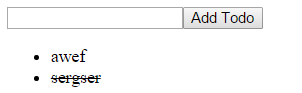
[Redux] React Todo List Example (Toggling a Todo)的更多相关文章
- [Redux] Writing a Todo List Reducer (Toggling a Todo)
Learn how to implement toggling a todo in a todo list application reducer. let todo = (state = [], a ...
- [Redux] React Todo List Example (Filtering Todos)
/** * A reducer for a single todo * @param state * @param action * @returns {*} */ const todo = ( st ...
- [Redux] Writing a Todo List Reducer (Adding a Todo)
Learn how to implement adding a todo in a todo list application reducer. let todo = (state = [], act ...
- RxJS + Redux + React = Amazing!(译一)
今天,我将Youtube上的<RxJS + Redux + React = Amazing!>翻译(+机译)了下来,以供国内的同学学习,英文听力好的同学可以直接看原版视频: https:/ ...
- RxJS + Redux + React = Amazing!(译二)
今天,我将Youtube上的<RxJS + Redux + React = Amazing!>的后半部分翻译(+机译)了下来,以供国内的同学学习,英文听力好的同学可以直接看原版视频: ht ...
- Redux & React & react-redux
Redux Redux & React & react-redux https://redux.js.org/ https://redux.js.org/api https://red ...
- Redux React & Online Video Tutorials
Redux React & Online Video Tutorials https://scrimba.com/@xgqfrms https://scrimba.com/c/cEwvKNud ...
- [Redux] React Todo List Example (Adding a Todo)
Learn how to create a React todo list application using the reducers we wrote before. /** * A reduce ...
- React开发入门:以开发Todo List为例
目录 概述 React基本概念 JSX是什么? 设置React APP 初始化APP 应用结构 探索第一个React组件 index.js 变量和props JSX中的变量 组件props props ...
随机推荐
- 底层restful接口修改分析
记录接口调用次数,接口调用时间需求. 需要修改公共的类,就是restful接口,可以认为是底层的代码,具体的实现有哪些?插入数据库肯定不能影响性能.
- ASP.NET实现省市区三级联动(局部刷新)
跟前一篇ASP.NET实现年月日三级联动(局部刷新)一样,没什么技术含量,直接上代码 <asp:ScriptManager ID="ScriptManager1" runat ...
- c - 统计字符串"字母,空格,数字,其他字符"的个数和行数.
#include <stdio.h> #include <ctype.h> using namespace std; /* 题目:输入一行字符,分别统计出其中英文字母.空格.数 ...
- div边框阴影的实现【转载】
box-shadow:阴影水平偏移值(可取正负值): 阴影垂直偏移值(可取正负值):阴影模糊值:阴影颜色: Firefox支持Box Shadow(阴影):-moz-box-shadow:2px 2p ...
- ios nslog 打印字典为中文
#import <Foundation/Foundation.h> @implementation NSDictionary (Log) - (NSString *)description ...
- angular启动过程分析
启动过程 步骤一 用自执行函数在代码完成加载后立即执行 function(window, document, undefined) 在window上暴露一个唯一的全局对象angular,Line250 ...
- 转 jQuery(图片、相册)插件代码实例
jQuery想必大部分前端er都知道甚至很熟悉了,网上有数以万计的优秀的jQuery插件以及教程,今天收集了一些关于图片.相册的jQuery插件代码,希望会对你有所帮助. 1. 3D Gallery ...
- JBPM4.4GPD设计器中文乱码问题的另一种解决方法
在eclipse中使用JBPM4.4的设计器时,输入中文后直接查看Source发现xml里中文全都乱码了,这时候大约整个人都不好了!赶紧百度.谷歌,搜到的多数结果都是要你在eclipse.ini或my ...
- WebStorm 的使用(一)
WebStorm是一个捷克公司开发的,功能虽然很强大,但UI貌似一直不是东欧人的强项.WebStorm默认的编辑器颜色搭配不算讲究,我看习惯了VS2012的Dark Theme,再看这个顿觉由奢入俭难 ...
- quartz2.2.1-测试01
工程列表: (1)web.xml <?xml version="1.0" encoding="UTF-8"?> <web-app versio ...