
Putty使用公钥认证时,报错:Disconnected: No supported authentication methods available(server sent:public key) 问题的解决
Putty使用公钥认证时,按照常规方法设置,一直报错:Disconnected: No supported authentication methods available (server sent:public key)。
如截图:
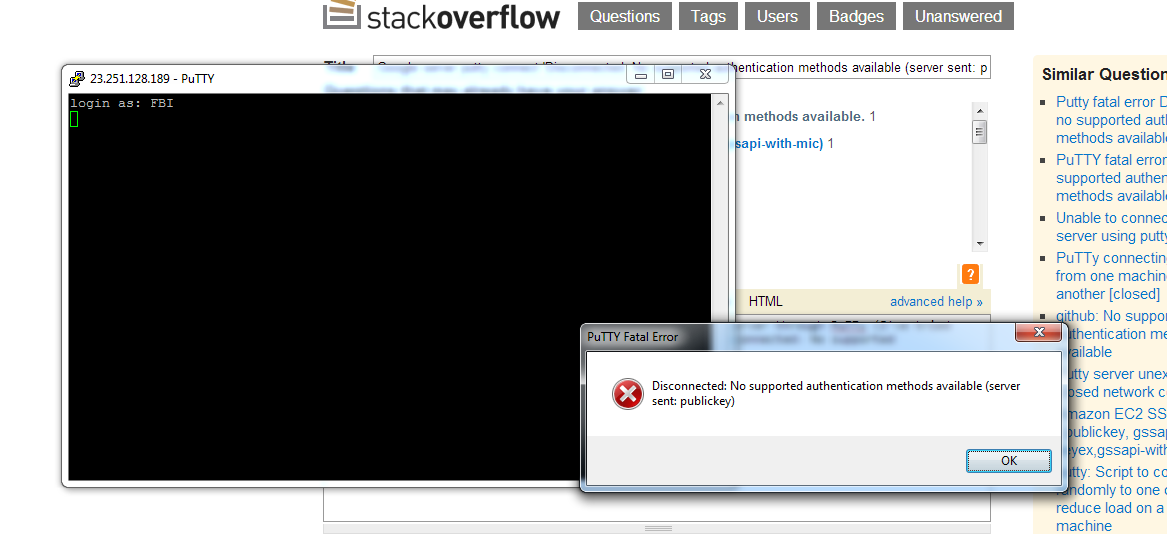
找了半天没找到问题出在哪里,sshd的设置一切正常。这个做过多次居然也能错????
最后发现原来是 ~/.ssh/authorized_keys 文件的内容有问题,putty生成的pub文件的格式如下:
---- BEGIN SSH2 PUBLIC KEY ----
Comment: "rsa-key"
AAAAB3NzaC1yc2EAAAABJQAAAQEAvifBFJzxK0PGJVNV9ZdDGOYWvytwnFDKoaZv
Djdt7rEK+zeFzR6eU7ERhOjMPb7GfoFU/1JPwXqSN2p57T4xdtR/Qi9/XAhmQ9SY
XnfA1yNOhHXoQuoCEjOmIbOo+NmZCoKPeBob7fXV8Ar7MmJ0vUpZ+79Usm9lsvQF
zEfI/Q1NuaVoOb7s6CFyj9WcmX7Yzc3cXpIHeFzLfLTFFROohw==
---- END SSH2 PUBLIC KEY ----
而原来设置的都是在一行的格式,所以openssh不支持putty生成的此格式,需要把这些合并成一行即可:
ssh-rsa AAAAB3NzaC1yc2EAAAABJQAAAQEAvifBFJzxK0PGJVNV9ZdDGOYWvytwnFDKoaZvDjdt7rEK+zeFzR6eU7ERhOjMPb7GfoFU/1JPwXqSN2p57T4xdtR/Qi9/XAhmQ9SYXnfA1yNOhHXoQuoCEjOmIbOo+NmZCoKPeBob7fXV8Ar7MmJ0vUpZ+79Usm9lsvQFzEfI/1NuaVoOb7s6CFyj9WcmX7Yzc3cXpIHeFzLfLTFFROohw== rsa-key
Putty使用公钥认证时,报错:Disconnected: No supported authentication methods available(server sent:public key) 问题的解决的更多相关文章
- TortoiseGit做push时提示Disconnected: No supported authentication methods available (server sent: publickey)错误
通过Git从远程服务器上获得到自己的项目,但是通过TortoiseGit做push时提示Disconnected: No supported authentication methods availa ...
- Disconnected: No supported authentication methods available (server sent: publickey)
安装Git客户端后,进行PULL时报如下错误 disconnected no supported authentication methods available(server sent: publi ...
- TortoiseGit disconnected: no supported authentication methods available(server sent:publickey)
之前一直用命令行,现在想用图形工具,TortoiseGit,安装后遇到错误 TortoiseGit disconnected: no supported authentication methods ...
- disconnected no supported authentication methods available(server sent: publickey,keyboard interae)
因为乌龟Git和Git的冲突 我们需要把乌龟Git设置改正如下. 找到TortoiseGit -> Settings -> Network 将SSH client指向~\Git\bin\s ...
- tortoisegit 常见错误disconnected no supported authentication methods available(server sent: publickey)
按如图操作 如果不能应用,Enable Proxy Server选中,再点击下面的应用及确定. 操作完上一部,用tortoisegit 下拉一次(git pull),即可解决
- tortoisegit错误: disconnected - no supported authentication methods available(server sent: publickey)
修改小乌龟的 SSH客户端:
- git Disconnected:No supported authentication methods available问题解决
在本地克隆gitlab上的项目,报如下错误:Disconnected:No supported authentication methods available(server sent:publick ...
- SSH 登录时出现如下错误:Disconnected:No supported authentication methods available
SSH 登录时出现如下错误:Disconnected:No supported authentication methods available 更新时间:2017-06-07 13:26:11 ...
- puttdy连接服务器报错No supported authentication methods available (server sent:publickey,gassapi-keyex,gassapi-with-mic)
No supported authentication methods available (server sent:publickey,gassapi-keyex,gassapi-with-mic) ...
随机推荐
- c++ 指针的简单用法
对于指针,其实只需要明白几点就可以. 1.指针,是一个数值为地址的变量,这里尤其注意,指针变量的值是地址!就是例如40002这种像门牌号的地址值,其实就是内存中的一个编号. 2.&,该符号的意 ...
- javascript 实现禁止右键,复制,选取文本 (兼容firefox,IE,chrome等主流浏览器)
1. JS 禁止右键 <script type="text/javascript">document.oncontextmenu=function(e){return ...
- gulp压缩js
1.安装nodejs -> 全局安装gulp -> 项目安装gulp以及gulp插件 -> 配置gulpfile.js -> 运行任务 2.查看nodejs的版本号 3.npm ...
- Parallel并行编程
Parallel并行编程 Parallel并行编程可以让我们使用极致的使用CPU.并行编程与多线程编程不同,多线程编程无论怎样开启线程,也是在同一个CPU上切换时间片.而并行编程则是多CPU核心同时工 ...
- 十五、命令(Command)模式--行为型模式(Behavioral Pattern)
命令模式又称为行动(Action)模 式或交易(Transaction)模式.命令模式把一个请求或者操作封装到一个对象中. 命令模式是对命令的封装.命令模式把发出命令的责任和执行命令的责任分割开,委派 ...
- Android IntentService 与Alarm开启任务关闭任务
1:MyService public class MyService extends IntentService{ AlarmManager alarmManager = null; PendingI ...
- WPF笔记(2.7 文字布局)——Layout
原文:WPF笔记(2.7 文字布局)--Layout 这一节介绍的是文字布局的几个控件:1.TextBlock 最基本的文字控件可以配置5个Font属性.TextWraping属性,&quo ...
- MVC 模型绑定
在WebForm,获取提交表单的值一般都是Request.Form["Title"]这样的方式.在MVC中,提供了模型绑定机制.让后台获取表单或Url中的参数变得更加简单. 一.基 ...
- C# is 与 as 运算符
as运算符有一定的适用范围,它只适用于引用类型或可以为null的类型,而无法执行其他的转换,如值类型的转换以及用户自定义的类型转换,这类转换应该适用强制转换表达式来执行.as当转换不了的时候返回nul ...
- BufferedStream类 - 缓冲流
BufferedStream常用于对其他流的一个封装,它必须和其他流结合一起使用.MemoryStream将所有的内容都放入内存中,而BufferedStream不是.BufferedStream在基 ...