
NPOI的使用Excel模板导出
Excel模版建议把需要添加数据行的样式设置好
模版样式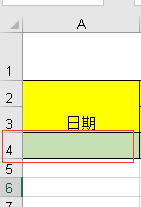 ,导出后效果
【2017-11-22 对获取需插入数据的首行样式有时为空报错修改】
        /// <summary>

        /// 根据模版导出Excel

        /// </summary>

        /// <param name="templateFile">模版路径(包含后缀)  例:"~/Template/Exceltest.xls"</param>

        /// <param name="strFileName">文件名称(不包含后缀)  例:"Excel测试"</param>

        /// <param name="source">源DataTable</param>

        /// <param name="cellKes">需要导出的对应的列字段  例:string[] cellKes = { "Date","Remarks" };</param>

        /// <param name="rowIndex">从第几行开始创建数据行,第一行为0</param>

        /// <returns>是否导出成功</returns>

        public static string ExportScMeeting(string templateFile, string strFileName, DataTable source, string[] cellKes, int rowIndex)

        {

            templateFile = HttpContext.Current.Server.MapPath(templateFile);

            int cellCount = cellKes.Length;//总列数,第一列为0

            IWorkbook workbook = null;

            try

            {

                using (FileStream file = new FileStream(templateFile, FileMode.Open, FileAccess.Read))

                {

                    if (Path.GetExtension(templateFile) == ".xls")

                        workbook = new HSSFWorkbook(file);

                    else if (Path.GetExtension(templateFile) == ".xlsx")

                        workbook = new XSSFWorkbook(file);

                }

                ISheet sheet = workbook.GetSheetAt();

                if (sheet != null && source != null && source.Rows.Count > )

                {

                    IRow row; ICell cell;

                    //获取需插入数据的首行样式

                    IRow styleRow = sheet.GetRow(rowIndex);

                    if (styleRow == null)

                    {

                        for (int i = , len = source.Rows.Count; i < len; i++)

                        {

                            row = sheet.CreateRow(rowIndex);

                            //创建列并插入数据

                            for (int index = ; index < cellCount; index++)

                            {

                                row.CreateCell(index)

                                    .SetCellValue(!(source.Rows[i][cellKes[index]] is DBNull) ? source.Rows[i][cellKes[index]].ToString() : string.Empty);

                            }

                            rowIndex++;

                        }

                    }

                    else

                    {

                        for (int i = , len = source.Rows.Count; i < len; i++)

                        {

                            row = sheet.CreateRow(rowIndex);

                            row.HeightInPoints = styleRow.HeightInPoints;

                            row.Height = styleRow.Height;

                            //创建列并插入数据

                            for (int index = ; index < cellCount; index++)

                            {

                                cell = row.CreateCell(index, styleRow.GetCell(index).CellType);

                                cell.CellStyle = styleRow.GetCell(index).CellStyle;

                                cell.SetCellValue(!(source.Rows[i][cellKes[index]] is DBNull) ? source.Rows[i][cellKes[index]].ToString() : string.Empty);

                            }

                            rowIndex++;

                        }

                    }

                }

                return NPOIExport(strFileName + "." + templateFile.Split('.')[templateFile.Split('.').Length - ], workbook);

            }

            catch (Exception ex)

            {

                return ex.Message;

            }

        }
附属方法
        public static string NPOIExport(string fileName, IWorkbook workbook)

        {

            try

            {

                System.IO.MemoryStream ms = new System.IO.MemoryStream();

                workbook.Write(ms);

                HttpContext.Current.Response.Clear();

                HttpContext.Current.Response.ClearHeaders();

                HttpContext.Current.Response.Cache.SetCacheability(System.Web.HttpCacheability.Private);

                HttpContext.Current.Response.Buffer = true;

                HttpContext.Current.Response.ContentEncoding = System.Text.Encoding.UTF8;

                HttpContext.Current.Response.AddHeader("Content-Disposition", string.Format("attachment; filename={0}", fileName));

                HttpContext.Current.Response.ContentType = "application/ms-excel";

                HttpContext.Current.Response.BinaryWrite(ms.ToArray());

                HttpContext.Current.Response.Flush();

                HttpContext.Current.Response.End();

                ms.Close();

                ms.Dispose();

                return "导出成功";

            }

            catch (Exception ex)

            {

                return "导出失败";

            }

        }
调用方法
    /// <summary>

    /// 后台调用方法

    /// </summary>

    /// <returns></returns>

    public string Exc()

    {

        return ExcelUtil.ExportScMeeting("~/Template/MonthlyRepair.xls", "ExcelName", new DataTable(), new string[] { "name1", "name2" }, );

    }

    //前台js调用 window.open('@Url.Action("Exc")');
注:需要在指定行插入数据的话请使用NPOI自带的方法对Excel进行操作
sheet.ShiftRows(0/*开始行*/, sheet.LastRowNum/*结束行*/, 10/*插入总行数,移动大小(行数)--往下移动*/, true/*是否复制行高*/, false/*是否重置行高*/);
示例方法代码
    /// <summary>

    /// 根据模版导出Excel

    /// </summary>

    /// <param name="templateFile">模版路径(包含后缀)  例:"~/Template/Exceltest.xls"</param>

    /// <param name="strFileName">文件名称(不包含后缀)  例:"Excel测试"</param>

    /// <param name="isCover">是否向下覆盖,不覆盖则在rowIndex行插入数据</param>

    /// <param name="source">源DataTable</param>

    /// <param name="cellKes">需要导出的对应的列字段  例:string[] cellKes = { "Date","Remarks" };</param>

    /// <param name="rowIndex">从第几行开始创建数据行,第一行为0</param>

    /// <returns>是否导出成功</returns>

    public static string ExportScMeeting(string templateFile, string strFileName, bool isCover, DataTable source, string[] cellKes, int rowIndex)

    {

        templateFile = HttpContext.Current.Server.MapPath(templateFile);

        int cellCount = cellKes.Length;//总列数,第一列为0

        IWorkbook workbook = null;

        try

        {

            using (FileStream file = new FileStream(templateFile, FileMode.Open, FileAccess.Read))

            {

                workbook = new HSSFWorkbook(file);

            }

            ISheet sheet = workbook.GetSheetAt();

            if (sheet != null && source != null && source.Rows.Count > )

            {

                IRow row;

                //是否向下覆盖

                if (!isCover) sheet.ShiftRows(rowIndex, sheet.LastRowNum, source.Rows.Count, true, false);

                //获取需插入数据的首行样式

                IRow styleRow = sheet.GetRow(isCover ? rowIndex : (rowIndex + source.Rows.Count));

                for (int i = , len = source.Rows.Count; i < len; i++)

                {

                    row = sheet.CreateRow(rowIndex);

                    //创建列并插入数据

                    for (int index = ; index < cellCount; index++)

                    {

                        row.CreateCell(index)

                            .SetCellValue(!(source.Rows[i][cellKes[index]] is DBNull) ? source.Rows[i][cellKes[index]].ToString() : string.Empty);

                    }

                    rowIndex++;

                }

            }

            return NPOIExport(strFileName + ".xls", workbook);

        }

        catch (Exception ex)

        {

            return ex.Message;

        }

    }
NPOI的使用Excel模板导出的更多相关文章
- NPOI的使用Excel模板导出 可插入到指定行
Excel模版建议把需要添加数据行的样式设置好 模版样式,导出后效果 [2017-11-22 对获取需插入数据的首行样式有时为空报错修改] /// <summary> /// 根据模版导出 ...
- .Net NPOI 根据excel模板导出excel、直接生成excel
一.根据Excel模板导出excel 1.导入NPOI.dll 2.DAL中添加类ExportExcel.cs using NPOI.SS.UserModel; using System; usin ...
- ASP.NET Core 2.2 : 十六.扒一扒新的Endpoint路由方案 try.dot.net 的正确使用姿势 .Net NPOI 根据excel模板导出excel、直接生成excel .Net NPOI 上传excel文件、提交后台获取excel里的数据
ASP.NET Core 2.2 : 十六.扒一扒新的Endpoint路由方案 ASP.NET Core 从2.2版本开始,采用了一个新的名为Endpoint的路由方案,与原来的方案在使用上差别不 ...
- 基于EPPlus和NPOI实现的Excel导入导出
基于EPPlus和NPOI实现的Excel导入导出 CollapseNav.Net.Tool.Excel(NuGet地址) 太长不看 导入 excel 文件流将会转为 ExcelTestDto 类型的 ...
- java实现excel模板导出
一. 准备工作 1. 点击此下载相关开发工具 2. 将poi-3.8.jxls-core-1.0两个jar包放到工程中,并引用 3. 将excel模板runRecord.xls放到RunRecordB ...
- kettle 使用excel模板导出数据
通过excel进行高速开发报表: 建设思路: 1.首先制订相关的execl模板. 2.通过etl工具(kettle)能够高速的 将数据库中的数据按excel模板导出成新的excel就可以. 当中ket ...
- Magicodes.IE之Excel模板导出教材订购表
说明 本教程主要说明如果使用Magicodes.IE.Excel完成教材订购表的Excel模板导出. 要点 本教程使用Magicodes.IE.Excel来完成Excel模板导出 需要通过创建Dto来 ...
- Excel模板导出之动态导出
说明 目前Magicodes.IE已支持Excel模板导出时使用JObject.Dictionary和ExpandoObject来进行动态导出,具体使用请看本篇教程. 本功能的想法.部分实现初步源于a ...
- C#实现Excel模板导出和从Excel导入数据
午休时间写了一个Demo关于Excel导入导出的简单练习 1.窗体 2.引用office命名空间 添加引用-程序集-扩展-Microsoft.Office.Interop.Excel 3.封装的Exc ...
随机推荐
- Android 资源(resource详解(转)
本文介绍在Android开发中关于资源文件的存储操作.对于Android资源也是非常重要的,主要包括文本字符串(strings).颜色(colors).数组(arrays).动画(anim).布局(l ...
- Android -- 思考 -- 为什么要在项目中使用MVP模式
1,其实有时候一直在找借口不去思考这个问题,总是以赶项目为由,没有很认真的思考这个问题,为什么我们要在项目中使用MVP模式,自己也用MVP也已经做了两个项目,而且在网上也看了不少的文章,但是感觉在高层 ...
- Java被忽略的基本知识(一)
工作一段时间发现Java的基本知识不是一般的重要,基本知识好项目理解快.特此看java的基本知识书本<Java项目实战开发>李兴华版,看完此书准备再看一下java更深一点的书--<J ...
- 当display=none时,元素和子元素高度为0的解决办法
在前端中为了某种需要,我们需要获取display=none的元素或者子元素的实际高度来进行某些处理,然而html对display=none的元素和子元素是不进行渲染的,如果我们没有规定这些元素的高度那 ...
- XP 安装Oralce 10g 数据库
今天使用XP新建一个新数据库,下面是自己的操作方法, 电脑版本型号:Microsoft Windows XP Professional 版本 2002 Service Pack 3 Oracle版本型 ...
- app开发方式大汇总
1.原生方式.android平台使用java方式.IOS平台使用object-c或者swift方式.优点:可以将app的性能做到极致.缺点:开发效率低.维护成本高. 2.纯前端方式.比如用jquery ...
- DragRow-GYF
<%@ Page Language="C#" AutoEventWireup="true" CodeBehind="DragRowDemo.as ...
- 提供在线制作icon的网站
http://www.ico.la/ http://www.makeico.com/ http://free.logomaker.cn/tools/icoMaker.aspx http://ico.5 ...
- hadoop是什么
Hadoop一直是我想学习的技术,正巧最近项目组要做电子商城,我就开始研究Hadoop,虽然最后鉴定Hadoop不适用我们的项目,但是我会继续研究下去,技多不压身. <Hadoop基础教程> ...
- Node包管理工具
Node包管理工具 只是简单的介绍一些工具的使用,有利于开发过程.除了介绍Node包管理工具,还介绍了前端打包工具,前端模块管理工具 Node包管理工具: --npm --cnpm ...