
NPOI的使用Excel模板导出
Excel模版建议把需要添加数据行的样式设置好
模版样式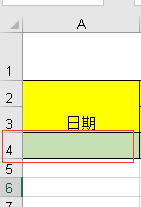 ,导出后效果
【2017-11-22 对获取需插入数据的首行样式有时为空报错修改】
        /// <summary>

        /// 根据模版导出Excel

        /// </summary>

        /// <param name="templateFile">模版路径(包含后缀)  例:"~/Template/Exceltest.xls"</param>

        /// <param name="strFileName">文件名称(不包含后缀)  例:"Excel测试"</param>

        /// <param name="source">源DataTable</param>

        /// <param name="cellKes">需要导出的对应的列字段  例:string[] cellKes = { "Date","Remarks" };</param>

        /// <param name="rowIndex">从第几行开始创建数据行,第一行为0</param>

        /// <returns>是否导出成功</returns>

        public static string ExportScMeeting(string templateFile, string strFileName, DataTable source, string[] cellKes, int rowIndex)

        {

            templateFile = HttpContext.Current.Server.MapPath(templateFile);

            int cellCount = cellKes.Length;//总列数,第一列为0

            IWorkbook workbook = null;

            try

            {

                using (FileStream file = new FileStream(templateFile, FileMode.Open, FileAccess.Read))

                {

                    if (Path.GetExtension(templateFile) == ".xls")

                        workbook = new HSSFWorkbook(file);

                    else if (Path.GetExtension(templateFile) == ".xlsx")

                        workbook = new XSSFWorkbook(file);

                }

                ISheet sheet = workbook.GetSheetAt();

                if (sheet != null && source != null && source.Rows.Count > )

                {

                    IRow row; ICell cell;

                    //获取需插入数据的首行样式

                    IRow styleRow = sheet.GetRow(rowIndex);

                    if (styleRow == null)

                    {

                        for (int i = , len = source.Rows.Count; i < len; i++)

                        {

                            row = sheet.CreateRow(rowIndex);

                            //创建列并插入数据

                            for (int index = ; index < cellCount; index++)

                            {

                                row.CreateCell(index)

                                    .SetCellValue(!(source.Rows[i][cellKes[index]] is DBNull) ? source.Rows[i][cellKes[index]].ToString() : string.Empty);

                            }

                            rowIndex++;

                        }

                    }

                    else

                    {

                        for (int i = , len = source.Rows.Count; i < len; i++)

                        {

                            row = sheet.CreateRow(rowIndex);

                            row.HeightInPoints = styleRow.HeightInPoints;

                            row.Height = styleRow.Height;

                            //创建列并插入数据

                            for (int index = ; index < cellCount; index++)

                            {

                                cell = row.CreateCell(index, styleRow.GetCell(index).CellType);

                                cell.CellStyle = styleRow.GetCell(index).CellStyle;

                                cell.SetCellValue(!(source.Rows[i][cellKes[index]] is DBNull) ? source.Rows[i][cellKes[index]].ToString() : string.Empty);

                            }

                            rowIndex++;

                        }

                    }

                }

                return NPOIExport(strFileName + "." + templateFile.Split('.')[templateFile.Split('.').Length - ], workbook);

            }

            catch (Exception ex)

            {

                return ex.Message;

            }

        }
附属方法
        public static string NPOIExport(string fileName, IWorkbook workbook)

        {

            try

            {

                System.IO.MemoryStream ms = new System.IO.MemoryStream();

                workbook.Write(ms);

                HttpContext.Current.Response.Clear();

                HttpContext.Current.Response.ClearHeaders();

                HttpContext.Current.Response.Cache.SetCacheability(System.Web.HttpCacheability.Private);

                HttpContext.Current.Response.Buffer = true;

                HttpContext.Current.Response.ContentEncoding = System.Text.Encoding.UTF8;

                HttpContext.Current.Response.AddHeader("Content-Disposition", string.Format("attachment; filename={0}", fileName));

                HttpContext.Current.Response.ContentType = "application/ms-excel";

                HttpContext.Current.Response.BinaryWrite(ms.ToArray());

                HttpContext.Current.Response.Flush();

                HttpContext.Current.Response.End();

                ms.Close();

                ms.Dispose();

                return "导出成功";

            }

            catch (Exception ex)

            {

                return "导出失败";

            }

        }
调用方法
    /// <summary>

    /// 后台调用方法

    /// </summary>

    /// <returns></returns>

    public string Exc()

    {

        return ExcelUtil.ExportScMeeting("~/Template/MonthlyRepair.xls", "ExcelName", new DataTable(), new string[] { "name1", "name2" }, );

    }

    //前台js调用 window.open('@Url.Action("Exc")');
注:需要在指定行插入数据的话请使用NPOI自带的方法对Excel进行操作
sheet.ShiftRows(0/*开始行*/, sheet.LastRowNum/*结束行*/, 10/*插入总行数,移动大小(行数)--往下移动*/, true/*是否复制行高*/, false/*是否重置行高*/);
示例方法代码
    /// <summary>

    /// 根据模版导出Excel

    /// </summary>

    /// <param name="templateFile">模版路径(包含后缀)  例:"~/Template/Exceltest.xls"</param>

    /// <param name="strFileName">文件名称(不包含后缀)  例:"Excel测试"</param>

    /// <param name="isCover">是否向下覆盖,不覆盖则在rowIndex行插入数据</param>

    /// <param name="source">源DataTable</param>

    /// <param name="cellKes">需要导出的对应的列字段  例:string[] cellKes = { "Date","Remarks" };</param>

    /// <param name="rowIndex">从第几行开始创建数据行,第一行为0</param>

    /// <returns>是否导出成功</returns>

    public static string ExportScMeeting(string templateFile, string strFileName, bool isCover, DataTable source, string[] cellKes, int rowIndex)

    {

        templateFile = HttpContext.Current.Server.MapPath(templateFile);

        int cellCount = cellKes.Length;//总列数,第一列为0

        IWorkbook workbook = null;

        try

        {

            using (FileStream file = new FileStream(templateFile, FileMode.Open, FileAccess.Read))

            {

                workbook = new HSSFWorkbook(file);

            }

            ISheet sheet = workbook.GetSheetAt();

            if (sheet != null && source != null && source.Rows.Count > )

            {

                IRow row;

                //是否向下覆盖

                if (!isCover) sheet.ShiftRows(rowIndex, sheet.LastRowNum, source.Rows.Count, true, false);

                //获取需插入数据的首行样式

                IRow styleRow = sheet.GetRow(isCover ? rowIndex : (rowIndex + source.Rows.Count));

                for (int i = , len = source.Rows.Count; i < len; i++)

                {

                    row = sheet.CreateRow(rowIndex);

                    //创建列并插入数据

                    for (int index = ; index < cellCount; index++)

                    {

                        row.CreateCell(index)

                            .SetCellValue(!(source.Rows[i][cellKes[index]] is DBNull) ? source.Rows[i][cellKes[index]].ToString() : string.Empty);

                    }

                    rowIndex++;

                }

            }

            return NPOIExport(strFileName + ".xls", workbook);

        }

        catch (Exception ex)

        {

            return ex.Message;

        }

    }
NPOI的使用Excel模板导出的更多相关文章
- NPOI的使用Excel模板导出 可插入到指定行
Excel模版建议把需要添加数据行的样式设置好 模版样式,导出后效果 [2017-11-22 对获取需插入数据的首行样式有时为空报错修改] /// <summary> /// 根据模版导出 ...
- .Net NPOI 根据excel模板导出excel、直接生成excel
一.根据Excel模板导出excel 1.导入NPOI.dll 2.DAL中添加类ExportExcel.cs using NPOI.SS.UserModel; using System; usin ...
- ASP.NET Core 2.2 : 十六.扒一扒新的Endpoint路由方案 try.dot.net 的正确使用姿势 .Net NPOI 根据excel模板导出excel、直接生成excel .Net NPOI 上传excel文件、提交后台获取excel里的数据
ASP.NET Core 2.2 : 十六.扒一扒新的Endpoint路由方案 ASP.NET Core 从2.2版本开始,采用了一个新的名为Endpoint的路由方案,与原来的方案在使用上差别不 ...
- 基于EPPlus和NPOI实现的Excel导入导出
基于EPPlus和NPOI实现的Excel导入导出 CollapseNav.Net.Tool.Excel(NuGet地址) 太长不看 导入 excel 文件流将会转为 ExcelTestDto 类型的 ...
- java实现excel模板导出
一. 准备工作 1. 点击此下载相关开发工具 2. 将poi-3.8.jxls-core-1.0两个jar包放到工程中,并引用 3. 将excel模板runRecord.xls放到RunRecordB ...
- kettle 使用excel模板导出数据
通过excel进行高速开发报表: 建设思路: 1.首先制订相关的execl模板. 2.通过etl工具(kettle)能够高速的 将数据库中的数据按excel模板导出成新的excel就可以. 当中ket ...
- Magicodes.IE之Excel模板导出教材订购表
说明 本教程主要说明如果使用Magicodes.IE.Excel完成教材订购表的Excel模板导出. 要点 本教程使用Magicodes.IE.Excel来完成Excel模板导出 需要通过创建Dto来 ...
- Excel模板导出之动态导出
说明 目前Magicodes.IE已支持Excel模板导出时使用JObject.Dictionary和ExpandoObject来进行动态导出,具体使用请看本篇教程. 本功能的想法.部分实现初步源于a ...
- C#实现Excel模板导出和从Excel导入数据
午休时间写了一个Demo关于Excel导入导出的简单练习 1.窗体 2.引用office命名空间 添加引用-程序集-扩展-Microsoft.Office.Interop.Excel 3.封装的Exc ...
随机推荐
- HDU - 1232 畅通工程
Problem Description 某省调查城镇交通状况,得到现有城镇道路统计表,表中列出了每条道路直接连通的城镇.省政府“畅通工程”的目标是使全省任何两个城镇间都可以实现交通(但不一定有直接的道 ...
- 用Windows+VirtualBox搭建嵌入式Linux开发环境
Windows+VirtualBox的嵌入式Linux开发环境的搭建 最近一直在学习Linux的设备驱动编写,一直是在物理机上安装的Ubuntu进行的,但是在Ubuntu12.04的系统中,已经不能用 ...
- Dev用于界面按选中列进行分组统计数据源(实用技巧)
如果有用U8的可以明白这个功能就是模仿他的统计功能.我不过是把他造成通用的与适应于DEV的. (效率为6000条数据分组统计时间为3秒左右分组列过多5秒.1000条以下0.几秒,500条下0.00几秒 ...
- Ubuntu14.04运行行roscore错误
错误提示: 网络配置有问题,ping不同自己(ping localhost). vim ~/.bashrc 在底部加入: export ROS_HOSTNAME=localhostexport ROS ...
- CheckBox 半选中状态
<input type='checkbox' />可以半选中,这个特性,很多浏览器都支持,包括Firefox,Chrome和IE 用 input.indeterminate 这个属性来获取 ...
- tcp连接listen的backlog剖析
TCP连接中,最重要的是连接TCP连接上,两个方向之间的各个状态及各个系统调用与状态之间的关系.往往可以以两种图表示,第一种是状态转换图,第二种是连接时序图.如下: 状态图: 时序图: ...
- 用node.js给图片加水印
一.准备工作: 首先,确保你本地已经安装好了node环境.然后,我们进行图像编辑操作需要用到一个Node.js的库:images.这个库的地址是:https://github.com/zhangyua ...
- Gap Buffer
From codeproject: http://www.codeproject.com/Articles/20910/Generic-Gap-Buffer
- java.lang.ClassNotFoundException: org.springframework.web.context.ContextLoaderListener
参考: http://www.cnblogs.com/sunxucool/archive/2013/06/07/3124380.html ---------------------------&g ...
- 怎么计算一个具体InnoDB的索引大小
一般情况下,我们看表信息可以用这个命令show table status: mysql> show table status like 't'\G . row ***************** ...