
zabbix3.2安装graphtree3.0.4
下载graphtree3.0.4
wget https://raw.githubusercontent.com/OneOaaS/graphtrees/master/graphtree3-0-1.patch –P /usr/local/nginx/html/zabbix/
安装patch:
yum –y install patch
进入zabbix web根目录:
[root@zabbixserver ~]# cd /usr/local/nginx/html/zabbix/

[root@zabbixserver zabbix]# patch -Np0 < graphtree3.0.4.patch  //导入graphtree

patching file ./oneoaas/libs/sysplugins/smarty_internal_testinstall.php

patching file ./oneoaas/libs/sysplugins/smarty_internal_undefined.php

patching file ./oneoaas/libs/sysplugins/smarty_resource.php

patching file ./oneoaas/libs/sysplugins/smarty_resource_custom.php

patching file ./oneoaas/libs/sysplugins/smarty_resource_recompiled.php

patching file ./oneoaas/libs/sysplugins/smarty_resource_uncompiled.php

patching file ./oneoaas/libs/sysplugins/smarty_security.php

patching file ./oneoaas/libs/sysplugins/smarty_template_cached.php

patching file ./oneoaas/libs/sysplugins/smarty_template_compiled.php

patching file ./oneoaas/libs/sysplugins/smarty_template_config.php

patching file ./oneoaas/libs/sysplugins/smarty_template_resource_base.php

patching file ./oneoaas/libs/sysplugins/smarty_template_source.php

patching file ./oneoaas/libs/sysplugins/smarty_undefined_variable.php

patching file ./oneoaas/libs/sysplugins/smarty_variable.php

patching file ./oneoaas/libs/sysplugins/smartycompilerexception.php

patching file ./oneoaas/libs/sysplugins/smartyexception.php

patching file ./oneoaas/templates/graphtree/graphtree.tpl

patching file ./oneoaas/templates/header.tpl
[root@zabbixserver zabbix]# chown -R nginx.nginx oneoaas/ 权限设置为nginx访问
重启nginx:
[root@zabbixserver zabbix]# service nginx restart

Restarting nginx (via systemctl):                          [  OK  ]
查看:
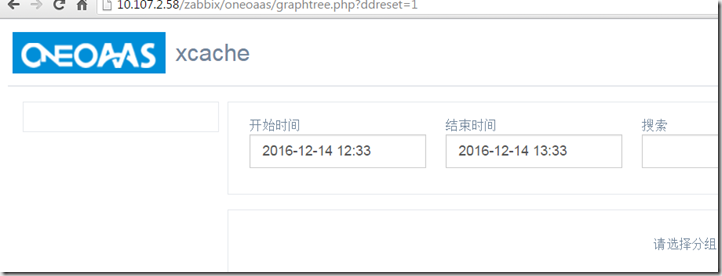
删除3.0.4广告信息:
[root@zabbixserver zabbix]#cd /usr/local/nginx/html/zabbix/oneoaas/templates/graphtree
[root@zabbixserver graphtree]# vim graphtree.tpl
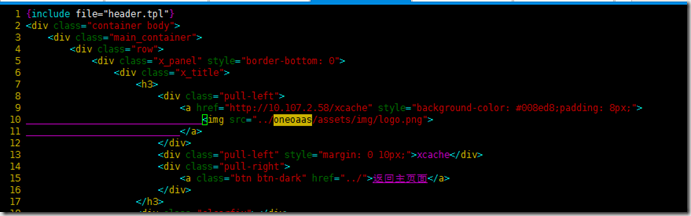
删除63行下的广告信息即可.当然也可以通过编辑成自己的访问方式.
zabbix3.2安装graphtree3.0.4的更多相关文章
- centos7 安装zabbix3.0 安装zabbix4.0 yum安装zabbix 国内源安装zabbix 阿里云服务器安装zabbix
首先,此篇文章是有原因的. 刚开始也和大家一样来学习安装zabbix 奈何网上的教程和现实出现不一样的情况 在安装zabbix过程中,因为zabbix下载源是在国外,下载途中会出现终止下载的情况 tr ...
- Zabbix3.x安装图解教程
准备知识: Zabbix3.x比较之前的2.0界面有了很大的变化,但是安装部署过程与2.x基本完全一样. 1.Zabbix2.x安装图解教程 http://www.osyunwei.com/archi ...
- Centos7下Zabbix3.4至Zabbix4.0的升级步骤
点击返回:自学Zabbix之路 点击返回:自学Zabbix4.0之路 点击返回:自学zabbix集锦 Centos7下Zabbix3.4至Zabbix4.0的升级步骤 查看现在centos版本和zab ...
- 实战:CentOS 7.2 / Zabbix3.4安装graphtrees
众所周知的 Zabbix图形显示问题,决定使用graphtrees 插件. 环境:CentOS7.2 + Zabbix 3.4 1)首先切换到root用户以获得足够的权限将资源下载到 /usr/sha ...
- Zabbix3.4安装部署
Zabbix3.4安装部署 一.系统环境 cat /etc/redhat-release CentOS Linux release 7.3.1611 (Core) 关闭防火墙及selinux sy ...
- 编译安装 varnish-4.1.2和yum 安装 varnish-4.0.3
vanish可以让用户自己选择缓存数据是存于内存还是硬盘,存于内存一般基于二八法则即常访问的数据是磁盘存储的总数据五分之一,因此内存也应该是硬盘文件大概五分之一.如果有多台vanish则,总内存满足即 ...
- Ubuntu14.04 64位机上安装cuda8.0 cudnn5.0操作步骤 - 网络资源是无限的
查看Ubuntu14.04 64位上显卡信息,执行: lspci | grep -i vga lspci -v -s 01:00.0 nvidia-smi 第一条此命令可以显示一些显卡的相关信息:如果 ...
- win7中VS2010中安装CSS3.0问题解决方法
win7中VS2010中安装CSS3.0问题解决方法 在安装Standards Update for VS2010 SP1后,VS2010中没有CSS3.0问题,以下是我的解决方法 1.首先去官网 ...
- CentOS_7.2安装Redis_3.0
一.安装依赖包和开发工具: yum install vim vim-enhanced wget zip unzip telnet ntsysv compat* apr* nasm* gcc gcc* ...
随机推荐
- PHP读取CSV数据写入数据库
/*读取csv文件*/ public function testCsv(){ $fileName = "tel.csv"; $fp=fopen($fileName,"r& ...
- easyui treegrid逐步加载
$("#bomStructureTable").treegrid({ url : "systemcontroller?id=10007",//首次查询路径 qu ...
- 全栈开发必备的10款Sublime Text 插件
Sublime Text 具有漂亮的用户界面和强大的功能,例如代码缩略图,多重选择,快捷命令等.Sublime Text 更妙的是它的可扩展性.所以,这里挑选了全栈开发必备的10款 Sublime T ...
- Ubuntu 15.10 x64 安装 Android SDK
操作系统:Ubuntu 15.10 x64 目标:安装 Android SDK 本文最后更新时间:2015-11-3 安装32位库文件 2013年9月的iPhone 5s是第一款64位手机,而Andr ...
- iOS Xcode添加ios10.0的路径
/Applications/Xcode.app/Contents/Developer/Platforms/iPhoneOS.platform/DeviceSupport
- shell---变量自增
我所知道的,bash中,目前有五种方法:1. i=`expr $i + 1`;2. let i+=1;3. (( i++ ));4. i=$[ $i+1 ];5. i=$(( $i + 1 ))
- dp、px、dpi、ppi
概念: dpi(Dots Per Inch):每英寸上的点数,最初用于衡量打印物上每英寸的点数密度,打印机在一英寸内打多少个点.DPI值越小越不精细. ppi(Pixels Per Inch):每英寸 ...
- Python的包管理工具Pip (zz )
Python的包管理工具Pip 接触了Ruby,发现它有个包管理工具RubyGem很好用,并且有很完备的文档系统http://rdoc.info 发现Python下也有同样的工具,包括easy_ins ...
- HTML字体及颜色设置
字体(FONT)标记(TAGS) 标题字体(Header) <h#> ... </h#> #=1, 2, 3, 4, 5, 6<h1>今天天气真好!</h1& ...
- 记录Gzip函数
仅仅作个日志而与 public static function compress(param1:ByteArray) : ByteArray { var _loc_2:ByteArray; var _ ...