
STM32 Timer : Base Timer, Input Capture, PWM, Output Compare
http://www.cs.indiana.edu/~geobrown/book.pdf

An example of a basic timer is illustrated in Figure 10.1.
This timer has four components – a controller, a prescaler (PSC), an “auto-reload” register (ARR) and a counter (CNT).
The function of the prescaler is to divide a reference clock to lower frequency.
The STM32 timers have 16-bit prescaler registers and can divide the reference clock by any value 1..65535.
For example, the 24Mhz system clock of the STM32 VL Discovery
could be used to generate a 1 Mhz count frequency with a prescaler of 23 (0..23 == 24 values). T
he counter register can be configured to count up, down, or up/down and to be reloaded from the auto reload register
whenever it wraps around (an “update event”) or to stop when it wraps around.
The basic timer generates an output event (TGRO) which can be configured
to occur on an update event or when the counter is enabled (for example on a GPIO input).
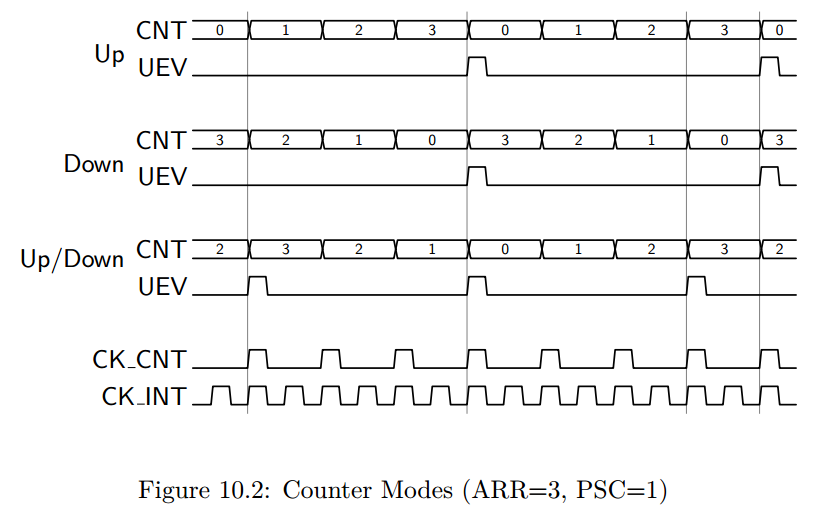
To understand the three counter modes consider Figure 10.2.
In these examples, we assume a prescaler of 1 (counter clock is half the internal clock), and a auto reload value of 3.
Notice that in “Up” mode, the counter increments from 0 to 3 (ARR) and then is reset to 0.
When the reset occurs, an “update event” is generated.
This update event may be tied to TRGO, or in more complex timers with capture/compare channels
it may have additional effects (described below).
Similarly, in “Down” mode, the counter decrements from 3 to 0 and then is reset to 3 (ARR).
In Down mode, an update “event” (UEV) is generated when the counter is reset to ARR.
Finally, in Up/Down mode, the counter increments to ARR, then decrements to 0, and repeats.
A UEV is generated before each reversal with the effect that the period in Up/Down mode
is one shorter than in either Up or Down mode.
Many timers extend this basic module with the addition of counter channels such as the one illustrated in Figure 10.3.
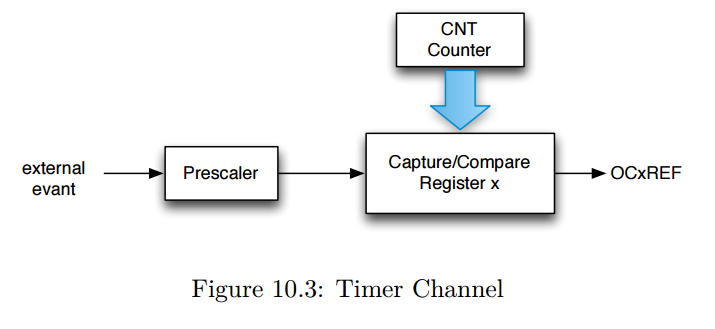
The “x” refers to the channel number – frequently, timers support multiple channels.
With this modest additional hardware, an output can be generated whenever the count register reaches a specific value
or the counter register can be captured when a specific input event occurs (possibly a prescaled input clock).
An important use of counter channels is the generation of precisely timed pulses.
There are two variations of this use – “one-pulse” pulses,
in which a single pulse is generated, and pulse width modulation, in which a series of pulses is generated with the counter UEV period.
The pulse width is controlled by the Capture/Compare Register (CCR).
For example, the channel output (OCxREF) may tied to whether the CNT register is greater (or less) than the Compare register.
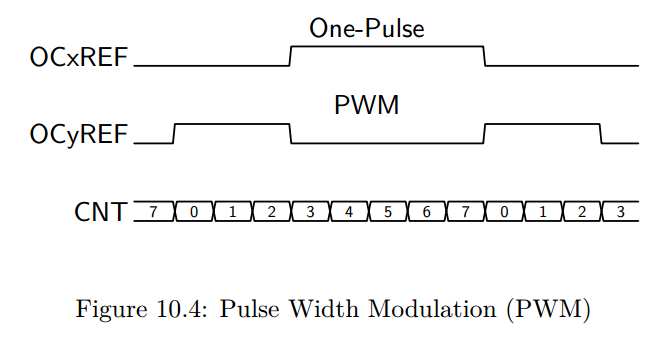
In Figure 10.4 we illustrate the use of two channels for one-pulse and PWM outputs.
Here we assume that the ARR is 7 and the CCR is 3.
In PWM mode, ARR controls the period, and CCR controls the pulse width (and hence the duty cycle).
In one-pulse mode, the pulse begins CCR cycles after an initial trigger event, and has a width of ARR-CRR.
It is possible to use multiple channels to create a set of synchronized, pulses beginning at precise delays from each other.
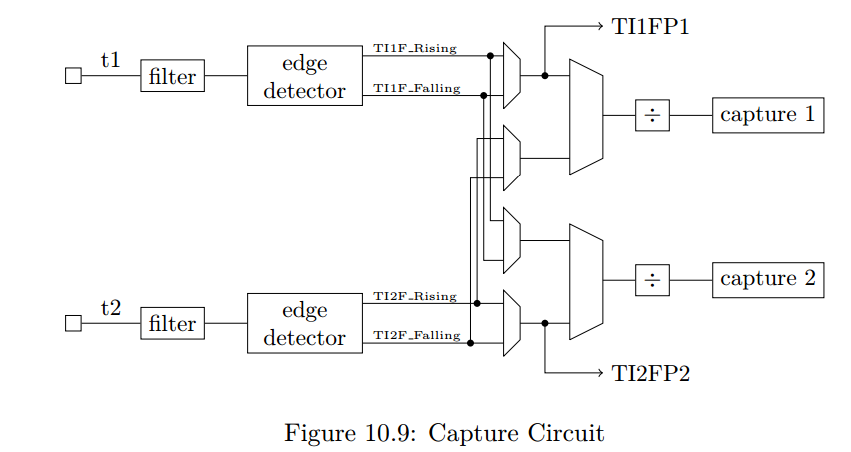
A timer channel may also be used to measure pulse widths – in effect decoding pwm signals.
There are many other configuration options for the STM32 timers including mechanisms
to synchronize multiple timers both to each other and to external signals.
In the remainder of this chapter we consider two timer applications including PWM output (Section 10.1),
input pulse measurement (Section 10.2).
In Chapter 13 we show how to use a timer to control DMA transfers for an audio player and
in Chapter 14 we use a timer to sample and analog input at regular intervals.
STM32 Timer : Base Timer, Input Capture, PWM, Output Compare的更多相关文章
- PIC32MZ tutorial -- Output Compare
Output Compare is a powerful feature of embedded world. The PIC32 Output Compare module compares the ...
- STM32 System and Timer Clock Configurations
STM32 System and Timer Clock Configurations I've started writing some software to drive a series of ...
- TIMER门控模式控制PWM输出长度
TIMER门控模式控制PWM输出长度 参照一些网友代码做了些修改,由TIM4来控制TIM2的PWM输出长度, 采用主从的门控模式,即TIM4输出高时候TIM2使能输出 //TIM2 PWM输出,由TI ...
- PIC32MZ tutorial -- Input Capture
Today I accomplish a simple application for PIC32MZ EC Starter Kit. This application uses Input Capt ...
- An Isolated DAC Using PWM Output
An Isolated DAC Using PWM Output Arduino‘s (ATmega328P) PWM outputs via analogWrite can be convenien ...
- 深入比特币原理(三)——交易的输入(input)与输出(output)
本节内容非常重要,如果你不能很好的掌握本节内容,你无法真正理解比特币的运行原理,请务必要学习清楚. 比特币的交易模型为UTXO(unspend transaction output),即只记录未花费的 ...
- Linux部署Django:报错 nohup: ignoring input and appending output to ‘nohup.out’
一.部署 Django 到远程 Linux 服务器 利用 xshell 通过 ssh 连接到 Linux服务器,常规的启动命令是 python3 manage.py runserver 但是,关闭 x ...
- STM32: TIMER门控模式控制PWM输出长度
搞了两天单脉冲没搞定,无意中发现,这个利用主从模式的门控方式来控制一路PWM的输出长度很有效. //TIM2 PWM输出,由TIM4来控制其输出与停止 //frequency_tim2:TIM2 PW ...
- STM32 Seminar 2007 -- Timer
随机推荐
- Linux - seq 预设外部命令
seq 是Linux 中一个预设的外部命令,一般用作一堆数字的简化写法. 常用参数: # 不指定起始数值,则默认为 1 -s # 选项主要改变输出的分格符, 预设是 \n -w # 等位补全,就是宽度 ...
- laravel一个页面两个表格分页处理
关键是看懂laravel自带的 paginate() 方法. 在Builder.php文件(项目名称/laravel/vendor/laravel/framework/src/Illuminate/D ...
- 第11月第3天 直播 rtmp yuv
1. LiveVideoCoreSDK AudioUnitRender ==> MicSource::inputCallback ==> GenericAudioMixer::pushBu ...
- 上传插件dropzone.js实例
dropzone.js默认是Ajax上传图片给服务器,那么如何获取到图片名呢?其实我们是可以通过dropzone的success函数获取到服务器返回的数据 dropzone.js在HTML的配置如下: ...
- CTEX windedt 打开中文tex乱码问题
% !TEX encoding = System % !TEX program = pdflatex % !TEX encoding = System% !TEX program = pdflatex ...
- 网页排版的时候不要忘了table标签
[概况] DIV+CSS是WEB设计标准,它是一种网页的布局方法.与传统中通过表格(table)布局定位的方式不同,它可以实现网页页面内容与表现相分离.但有时候在布局的时候,纯粹的用div感觉嵌套的太 ...
- 如何将java项目转化为web项目
1.修改工程文件 找到项目工作空间目录,打开.project文件,找到:<natures> </natures>代码段,在代码段中加入如下内容并保存:<nature> ...
- hadoop-2.7.2-HA安装笔记
配置方案如图 NN DN ZK ZKFC JN RM NM(任务管理器) HMaster Region Server Node1 1 1 1 1 1 Node2 1 1 1 1 1 1 1 Nod ...
- Asp.Net Mvc5 结合 SignalR2.0+ 实现消息交互简单例子
Nuget添加 SignalR包 1.构建一个MyHubServer服务端类 定义类的特性标签为 [HubName("chatHub")] public class MyHubSe ...
- js 判断移动端是否安装应用
var u = navigator.userAgent; var isAndroid = u.indexOf('Android') > -1 || u.indexOf('Linux') > ...