
Cisco N3K VPC+HSRP+ospf 配置
VPC概念
VPC:vpc是指vpc对等体设备和下游设备之间的组合PortChannel。
vpc对等交换:就是组成vpc功能的两个nexus系列交换机,一个设备为主,一个为备。
vpc对等连接:用于同步vpc对等设备之间状态的连接。vpc对等链路在两个vpc交换机之间携带控制通信量,还有组播、广播数据通信量。在某些链路故障场景中,还携带单播通信量。对等链路至少是两个10GE接口。
vpc域:该域包括vpc对等设备、vpc对等保持活动连接和连接到下游设备的vpc中的所有PortChannels。同时,所有关于vpc的全局配置都关联到vpc域下。
vpc对等保持活动连接(心跳线):对等保持活动连接监视vpc对等交换机的生命力。在vpc对等设备之间发送周期性的保持活动连接。vpc对等活动连接可以是管理接口(MGMT)或交换机虚拟接口(SVI),但不可以使用物理接口。没有数据或同步流量在vpc登对保持活动连接上移动;该连接上的唯一通信量是表明交换机正在操作和运行vpc的消息。
一、背景需求
Cisco 两台交换机需要虚拟成一台交换机使用(类似 交换机堆叠),去链接二层接入交换机,提供网络链路高可用。如下图:
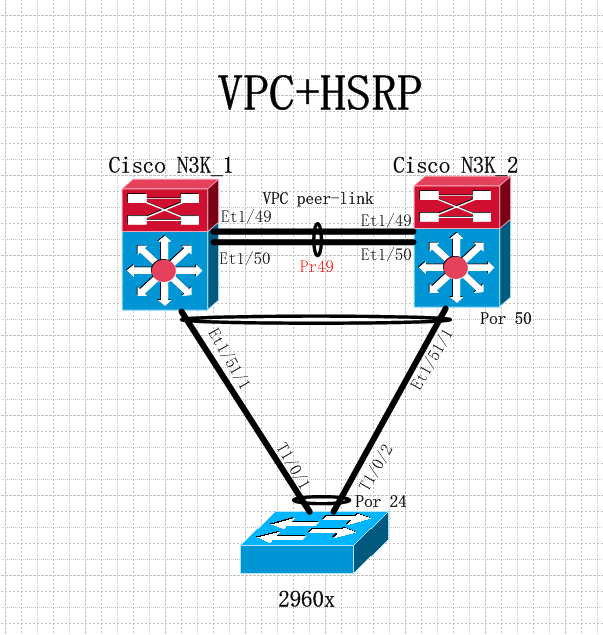
对于二层交换 2960x 需要看到 上层的两台 N3k 交换为一台设备,中间连接链路做链路聚合。
二、配置详解
N3K_1和 N3K2 配置保持一致
1、全局下开启 VPC + HSRP+ospf
feature vpc

feature hsrp

feature ospf
2、配置 VPC 域ID
vpc domain 30

  role priority 8192      # N3K_1:8192    N3K_2:16384   设置角色优先级

  peer-keepalive destination 10.8.240.21 source 10.8.240.20    #IP 为MGMT地址

  peer-gateway

  auto-recovery
3、VPC peer-link 接口配置
interface Ethernet1/

  switchport mode trunk

  channel-group  mode active

interface Ethernet1/

  switchport mode trunk

  channel-group  mode active

interface port-channel49

  speed

  description vPc peer-link

  switchport mode trunk

  spanning-tree port type network

  vpc peer-link
4、下联接口配置
interface Ethernet1//

  speed

  switchport mode trunk

  channel-group  mode active

  no shutdown

interface port-channel50

  speed

  switchport mode trunk

  vpc    #两台N3K 的VPC ID 必须一致
2960X交换机配置
1:、接口配置(和普通链路聚合配置一样)
interface TenGigabitEthernet1//

 switchport mode trunk

 channel-group  mode active

interface TenGigabitEthernet1//

 switchport mode trunk

 channel-group  mode active

interface Port-channel24

 switchport mode trunk
三、hsrp+ospf 配置
N3k_1:

interface Vlan10

  no shutdown

  ip address 192.168.0.2/

  ip router ospf  area 0.0.0.20    #ospf 路由发布

  hsrp version

  hsrp

    preempt

    priority

    ip 192.168.0.1

    track

track  interface Ethernet1/ line-protocol

N3k_2:

interface Vlan10

  no shutdown

  ip address 192.168.0.3/

  ip router ospf  area 0.0.0.20

  hsrp version

  hsrp

    ip 192.168.0.1

    track

track  interface Ethernet1/ line-protocol
四、查看配置
N3k-core-# show vpc

Legend:

                (*) - local vPC is down, forwarding via vPC peer-link

vPC domain id                     :

Peer status                       : peer adjacency formed ok

vPC keep-alive status             : peer is alive

Configuration consistency status  : success

Per-vlan consistency status       : success

Type- consistency status         : success

vPC role                          : primary, operational secondary

Number of vPCs configured         :

Peer Gateway                      : Enabled

Peer gateway excluded VLANs     : -

Dual-active excluded VLANs        : -

Graceful Consistency Check        : Enabled

Auto-recovery status              : Enabled (timeout =  seconds)

vPC Peer-link status

---------------------------------------------------------------------

id   Port   Status Active vlans

--   ----   ------ --------------------------------------------------

    Po49   up     all

vPC status

----------------------------------------------------------------------------

id     Port        Status Consistency Reason                     Active vlans

------ ----------- ------ ----------- -------------------------- -----------

     Po50        up     success     success                    all

     Po51        up     success     success                    all

     Po52        up     success     success                    all

     Po53        up     success     success                    all
N3k-core-# show vpc statistics peer-link

port-channel49 is up

  Hardware: Port-Channel, address: .ecef.8e5c (bia .ecef.8e5c)

  Description: vPc peer-link

  MTU  bytes, BW  Kbit, DLY  usec

  reliability /, txload /, rxload /

  Encapsulation ARPA

  Port mode is trunk

  full-duplex,  Gb/s

  Input flow-control is off, output flow-control is off

  Switchport monitor is off

  EtherType is 0x8100

  Members in this channel: Eth1/, Eth1/

  Last clearing of "show interface" counters never

   interface resets

  Load-Interval #:  seconds

   seconds input rate  bits/sec,  packets/sec

   seconds output rate  bits/sec,  packets/sec

  Load-Interval #:  minute ( seconds)

    input rate 11.66 Mbps, 5.24 Kpps; output rate 1.49 Mbps,  pps

  RX

     unicast packets   multicast packets   broadcast packets

     input packets   bytes

     jumbo packets   storm suppression packets

     runts   giants   CRC   no buffer

     input error   short frame   overrun    underrun   ignored

     watchdog   bad etype drop   bad proto drop   if down drop

     input with dribble   input discard

     Rx pause

  TX

     unicast packets   multicast packets   broadcast packets

     output packets   bytes

     jumbo packets

     output errors   collision   deferred   late collision

     lost carrier   no carrier   babble  output discard

     Tx pause
N3k-core-# show hsrp brief

                     P indicates configured to preempt.

                     |

Interface   Grp Prio P State    Active addr      Standby addr     Group addr

Vlan10         P Active   local            192.168.0.3        192.168.0.1       (conf)

Vlan11         P Active   local            1921.68.1.3        192.168.1.1       (conf)

。。。。。。
此篇博客为本人个人工作总结,仅供参看。谢谢
Cisco N3K VPC+HSRP+ospf 配置的更多相关文章
- OSPF配置实验(一)
单区域OSPF 命令: R1(config)#router ospf 1 //启动OSPF进程 R1(config-router)#router-id 1.1.1.1 // ...
- 自制OSPF配置实验大全
OSPF综合实验(gns模拟器) 注意点: Ospf实验推荐用gns制作 //图中的交换机可以视觉忽略或缩小成一个点.(^ v^) Ospf 实验拓扑图 目录 OSPF综合实验... 1 Os ...
- 神州数码多区域OSPF配置
实验要求:掌握多区域OSPF配置 拓扑如下 R1 enable 进入特权模式 config 进入全局模式 hostname R1 修改名称 interface s0/1 进入端口 ip address ...
- cisco路由器 三层交换机简单环境配置实例(图)
出处:http://www.jb51.NET/softjc/56600.html cisco路由器&三层交换机简单环境配置实例 一.网络拓扑图: 二.配置命令: 1.路由器的配置: inter ...
- 动态OSPF配置路由表
动态ospf设置路由表 以Rourer1为例子 (1)首先设置路由器端口ip Router(config)#inter f0/0 Router(config-if)#ip add 192.168.1. ...
- Cisco PIX防火墙PPPoE拨号配置视频教学
Cisco PIX防火墙PPPoE拨号配置视频教学 本文出自 "李晨光原创技术博客" 博客,请务必保留此出处http://chenguang.blog.51cto.com/35 ...
- CISCO系列交换机如何清空配置
今天刚好要还原一台CISCO配置的命令,这个毕竟属于我的专业小编就献丑一回,望大家见谅! 工具/原料 CISCO系列交换 方法/步骤 1 首先备份之前的配置信息 copy flash:conf ...
- cisco(思科)交换机配置篇【两】
上一页大家津津乐道cisco基本操作命令开关,而端午假期,该cisco简单的开关配置,并希望请您分享"端午节快乐"!Ok,配置交换机,首先,你必须进入全局配置模式Switch,在成 ...
- CISCO 动态路由(OSPF)
OSPF(开放式最短路径优先):是一个内部网关协议(Interior Gateway Protocol,简称IGP),用于在单一自治系统(autonomous system,AS)内决策路由.是对链路 ...
随机推荐
- Android Studio 3.0 新特性
最新Android Studio版本是Android Studio 3.0,本文提供了所有新功能和更改的摘要. 所有这些功能都可以在最新的金丝雀版本中发布,但beta测试版本可能尚未提供. 核心IDE ...
- Flex4学习笔记1---基本语法
<?xml version="1.0" encoding="utf-8"?> <s:Application xmlns:fx="ht ...
- scrapy之downloader执行流程
Agent = client.Agent class ScrapyAgent(object): _Agent = Agent#为twisted的client.Agent类 _ProxyAgent = ...
- PHP下进行XML操作(创建、读取)
PHP下可以使用DOMDocument类对XML或者HTML文件进行读写操作 更为简单的方法使用simpleXML类操作XML DOM节点分为 元素节点 属性节点 值节点 注释节点 根节点(docum ...
- as2 删除层级影片问题
关键要将main的引用赋值,防止被误删,导致加载swf空白 /** * 删除所有对象 * @param standByRemoveMc 影片对象 * @param removeSelf 是否删除自身 ...
- maven的环境变量配置
一: 首先下载maven, 下载地址:http://maven.apache.org/download.html 打开这个连接:选择File下面的apache-maven-3.2.1-bin.zip链 ...
- using关键字在C#中的3种用法
using 关键字有两个主要用途: (一).作为指令,用于为命名空间创建别名或导入其他命名空间中定义的类型. (二).作为语句,用于定义一个范围,在此范围的末尾将释放对象. (一).作为指令 1. ...
- CSS 点击事件
:active 伪类向激活(在鼠标点击与释放之间发生的事件)的元素添加特殊的样式. 这个伪类应用于处于激活状态的元素.最常见的例子就是在 HTML 文档中点击一个超链接:在鼠标按钮按下期间,这个链接是 ...
- Visual SVN Server备份脚本
set tt=%date:~0,4%%date:~5,2%%date:~8,2% mkdir D:\SVN_BACKUP_%tt%\Repositories xcopy C:\Repositories ...
- 灵活控制 Hibernate 的日志或 SQL 输出,以便于诊断
我们在使用 Hibernate 时一般只会关注是否显示生成的 SQL 语句,不过有些时候还不够.默认时 Hibernate 执行的 SQL 语句是打印在控制台上的,它也可以配置为输出给 Log4J 或 ...