
android 相对布局例子代码
<?xml version="1.0" encoding="utf-8"?>

<LinearLayout xmlns:android="http://schemas.android.com/apk/res/android"

    xmlns:app="http://schemas.android.com/apk/res-auto"

    xmlns:tools="http://schemas.android.com/tools"

    android:layout_width="match_parent"

    android:layout_height="match_parent"

    android:orientation="vertical"

    tools:context="com.example.prize.mydemo1.Main3Activity">

    <RelativeLayout

        android:id="@+id/relative1"

        android:layout_width="match_parent"

        android:layout_height="match_parent"

        android:background="#FFFFFF">

        <!--layout_alignParentLeft 控件位置在布局左边-->

        <!--layout_alignParentTop  控件位置在布局上面-->

        <view

            android:id="@+id/view1"

            android:layout_width="match_parent"

            android:layout_height="50dp"

            android:layout_alignParentLeft="true"

            android:layout_alignParentTop="true"

            android:background="#550000"

            />

        <!--layout_below 当前控件在目标控件下面-->

        <!--layout_alignRight 向目标控件右边对齐-->

        <view

            android:id="@+id/view2"

            android:layout_width="50dp"

            android:layout_height="match_parent"

            android:layout_below="@+id/view1"

            android:layout_alignRight="@+id/view1"

            android:background="#FF2222"

            />

        <!--layout_alignParentBottom 控件位置在布局的下面-->

        <!--layout_toLeftOf 当前控件在目标控件的左边-->

        <view

            android:id="@+id/view3"

            android:layout_width="match_parent"

            android:layout_height="50dp"

            android:layout_alignParentBottom="true"

            android:layout_toLeftOf="@id/view2"

            android:background="#FF7777"

            />

        <!--layout_above 当前控件在目标控件的上面-->

        <view

            android:id="@+id/view4"

            android:layout_width="50dp"

            android:layout_height="0dp"

            android:layout_above="@+id/view3"

            android:layout_below="@+id/view1"

            android:background="#FF8F44"/>

        <view

            android:id="@+id/view5"

            android:layout_width="match_parent"

            android:layout_height="50dp"

            android:layout_toLeftOf="@+id/view2"

            android:layout_below="@id/view1"

            android:layout_toRightOf="@id/view4"

            android:background="#FFDA44"/>

        <view

            android:id="@+id/view6"

            android:layout_width="50dp"

            android:layout_height="match_parent"

            android:layout_below="@+id/view5"

            android:layout_above="@+id/view3"

            android:layout_toLeftOf="@+id/view2"

            android:background="#D6FF33"

            />

        <view

            android:id="@+id/view7"

            android:layout_width="match_parent"

            android:layout_height="50dp"

            android:layout_above="@+id/view3"

            android:layout_toLeftOf="@+id/view6"

            android:layout_toRightOf="@+id/view4"

            android:background="#B4FF44"

            />

        <view

            android:id="@+id/view8"

            android:layout_width="50dp"

            android:layout_height="match_parent"

            android:layout_above="@+id/view7"

            android:layout_toRightOf="@+id/view4"

            android:layout_below="@+id/view5"

            android:background="#99FF55"

            />

        <view

            android:id="@+id/view9"

            android:layout_width="match_parent"

            android:layout_height="50dp"

            android:layout_below="@+id/view5"

            android:layout_toLeftOf="@+id/view6"

            android:layout_toRightOf="@+id/view8"

            android:background="#44FF44"

        />

        <view

            android:id="@+id/view10"

            android:layout_width="50dp"

            android:layout_height="match_parent"

            android:layout_toLeftOf="@+id/view6"

            android:layout_below="@+id/view9"

            android:layout_above="@+id/view7"

            android:background="#55FF99"

            />

        <view

            android:id="@+id/view11"

            android:layout_width="match_parent"

            android:layout_height="50dp"

            android:layout_above="@+id/view7"

            android:layout_toLeftOf="@+id/view10"

            android:layout_toRightOf="@+id/view8"

            android:background="#55FFDD"

            />

        <view

            android:id="@+id/view12"

            android:layout_width="50dp"

            android:layout_height="match_parent"

            android:layout_above="@+id/view11"

            android:layout_toRightOf="@+id/view8"

            android:layout_below="@+id/view9"

            android:background="#55DDFF"

            />

        <view

            android:id="@+id/view13"

            android:layout_width="match_parent"

            android:layout_height="50dp"

            android:layout_below="@id/view9"

            android:layout_toRightOf="@+id/view12"

            android:layout_toLeftOf="@+id/view10"

            android:background="#44B4FF"

            />

    </RelativeLayout>

</LinearLayout>
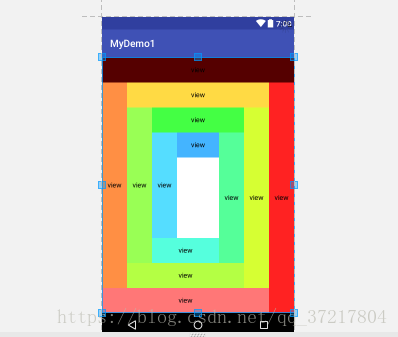
布局样子
android 相对布局例子代码的更多相关文章
- android studio布局文件/XML怎么代码补全
android studio中的布局文件代码补全方式是打第一个字母就提示了,而java代码有时候要按快捷键. 布局文件的话呢,要写在标签开始处才提示,在标签闭合处有时候不提示,有时候在内容里也会有不提 ...
- Android 使用纯Java代码布局
java布局 java代码布局和xml布局的区别 1.Java纯布局更加的灵活,比如自定义控件或一些特殊要求时,使用java代码布局 2.常用的xml布局是所见即所得的编写方式,以及xml本身拥有一些 ...
- 在Android中用纯Java代码布局
感谢大佬:https://www.jianshu.com/p/7aedea560f16 在Android中用纯Java代码布局 本文的完成了参考了一篇国外的教程,在此表示感谢. Android中的界面 ...
- 【腾讯Bugly干货分享】Android动态布局入门及NinePatchChunk解密
本文来自于腾讯bugly开发者社区,非经作者同意,请勿转载,原文地址:http://dev.qq.com/topic/57c7ff5d53bbcffd68c64411 作者:黄进——QQ音乐团队 摆脱 ...
- android的布局管理器
理论上通过setContentView(view)能够把一个view设置到activity中,但当你有很多个view控件的时候,就需要用android的布局管理器来管理view控件了. android ...
- Android 实现布局动态加载
Android 动态加载布局 通过使用LayoutInflater 每次点击按钮时候去读取布局文件,然后找到布局文件里面的各个VIEW 操作完VIEW 后加载进我们setContentView 方面里 ...
- Android相对布局(RelativeLayout)
Android相对布局(RelativeLayout) 备注:这里的视图和元素是等同的概念. RelativeLayout是一个允许子视图相对于其他兄弟视图或是父视图显示的视图组(通过ID指定).每个 ...
- Android的布局优化之include、merge 、viewstub
以前在写布局的时候总是喜欢用自己熟悉的方式去写,从来也没有想过优化怎么的,后来又一次在上班的时候老大拿着我写的一个页面说我这个不行.我说这不是和设计图上的一模一样的么?怎么就不行了?然后他就跟我说了一 ...
- 我的Android进阶之旅------>Android拍照小例子
今天简单的学习了一下android拍照的简单实现. 当然该程序是个小例子,非常简单,没有什么复杂的操作,但是可以学习到Android 拍照API流程. 1.在布局文件中添加一个 surfaceView ...
随机推荐
- 前端学PHP之面向对象系列第四篇-----关键字
public public表示公有,它具有最大的访问权限,被定义为公有的类成员可以在任何地方被访问 如果属性用 var 定义,则被视为公有,如果方法没有设置关键字,则该方法默认为公有 <?php ...
- Python 简说 list,tuple,dict,set
python 是按缩进来识别代码块的 . 缩进请严格按照Python的习惯写法:4个空格,不要使用Tab,更不要混合Tab和空格,否则很容易造成因为缩进引起的语法错误. list 有序集合 访问不 ...
- 直接突破百度网盘,用IDM或者迅雷下载。
直接突破百度网盘,用IDM或者迅雷下载.推荐浏览器: 360 ,CHORME360,: 打开网盘下载页,然后F12→找到CONSOLE→刷新→输入代码“Object.defineProperty(th ...
- what's the difference between grouping and facet in lucene 3.5
I found in lucene 3.5 contrib folder two plugins: one is grouping, the other is facet. In my option ...
- 机器学习-Python中训练模型的保存和再使用
模型保存 BP:model.save(save_dir) SVM: from sklearn.externals import joblib joblib.dump(clf, save_dir) 模型 ...
- 【剑指offer】调整数组数字位置
输入一个整数数组,实现一个函数来调整该数组中数字的顺序,使得所有的奇数位于数组的前半部分,所有的偶数位于数组的后半部分,并保证奇数和奇数,偶数和偶数之间的相对位置不变. *思路:遍历数组,找到第一个偶 ...
- 还原MongoDB dump备份出来的Bson数据
集合名 数据库名 备份文件位置 mongorestore --collection people --db accounts dump/accounts/people.bson
- vo和pojo
pojo直接描述数据库中的表和字段,一一对应 vo的话,可以多添加些属性,比如code对应的name,或者标识符等等 查询列表的时候也可以直接用vo,但是修改或添加记录必须是pojo QueryVo ...
- slice和splice
slice //截取数组或者字符串,返回数组或字符串 //jquery方法截取元素,构成新的对象 splice //增加,修改,删除数组
- hasClass() removeClass() addClass()
//检查第元素是否包含 "intro" 类 $("button").click(function(){ alert($("p:first") ...