
Windows下文件检索的基本姿势
要点
使用FindFirstFile和FindNextFile两个WindowsAPI,并配合链表或队列存储文件夹序列。
C++源码(链表存储)
#include <iostream>

#include <cstdio>

#include <cstdlib>

#include <Windows.h>

using namespace std;

typedef struct DirTable

{

	CHAR dir[255];

	DirTable* next;

}DirTable;

DirTable *g_firstNode = NULL, *g_lastNode = NULL, *g_iterNode = NULL;

int g_reCount = 0;

void AddNode(const CHAR* dirRoad)

{

	DirTable* NewNode = new DirTable;

	ZeroMemory(NewNode->dir, 255);

	strcpy_s(NewNode->dir, 255, dirRoad);

	NewNode->next = NULL;

	if (g_firstNode == NULL)

	{

		g_firstNode = NewNode;

		g_iterNode = NewNode;

		g_lastNode = NewNode;

	}

	else {

		g_iterNode->next = NewNode;

		g_iterNode = g_iterNode->next;

		g_lastNode = NewNode;

	}

	return;

}

void FindFile(const CHAR* rootId, const CHAR* TargetFile)

{

	CHAR dirRoad[255] = { 0 };             //链表中添加的文件夹路径

	CHAR targetFileRoad[255] = { 0 };      //目标文件路径

	CHAR searchRoad[255] = { 0 };          //文件夹搜索路径

	HANDLE h_File = NULL;

	WIN32_FIND_DATA winData;

	strcat_s(searchRoad, 255, rootId);

	strcat_s(searchRoad, 255, "\\*.*");

	h_File = FindFirstFile(searchRoad, &winData);

	do {

		if (winData.dwFileAttributes&FILE_ATTRIBUTE_DIRECTORY)

		{

			if (strcmp(winData.cFileName,".") == 0 || strcmp(winData.cFileName,"..") == 0)

			{

				continue;

			}

			strcpy_s(dirRoad, 255, rootId);

			strcat_s(dirRoad, 255, "\\");

			strcat_s(dirRoad, 255, winData.cFileName);

			AddNode(dirRoad);

			ZeroMemory(dirRoad, 255);

		}

	} while (FindNextFile(h_File, &winData));

	strcat_s(targetFileRoad, 255, rootId);

	strcat_s(targetFileRoad, 255, "\\");

	strcat_s(targetFileRoad, 255, TargetFile);

	h_File = FindFirstFile(targetFileRoad, &winData);

	if (h_File != INVALID_HANDLE_VALUE)

	{

		do

		{

			g_reCount++;

			printf("\nResult %d ==> %s\n", g_reCount, targetFileRoad);

		} while (FindNextFile(h_File, &winData));

	}

	ZeroMemory(targetFileRoad, 255);

	return;

}

void SearchFile(const CHAR* rootId, const CHAR* TargetFile)

{

	FindFile(rootId, TargetFile);

	while (g_firstNode)

	{

		FindFile(g_firstNode->dir, TargetFile);

		g_firstNode = g_firstNode->next;

	}

	if (!g_firstNode) printf("\n\nSearching End >_<...\n\nTotal-Result: ==> Find %d Files...\n\n", g_reCount);

	return;

}

int main(void)

{

	CHAR* strTargetFile = (CHAR*)malloc(255 * sizeof(CHAR));

	CHAR* strrootId = (CHAR*)malloc(255 * sizeof(CHAR));

	printf("Please input TargetFile:");

	scanf_s("%s", strTargetFile, 255);

	printf("Please input rootId:");

	scanf_s("%s", strrootId, 255);

	SearchFile(strrootId, strTargetFile);

	system("pause");

	return 0;

}
C++源码(队列存储)
#include <iostream>

#include <cstdio>

#include <cstdlib>

#include <string>

#include <cstring>

#include <Windows.h>

#include <queue>

using namespace std;

queue<string> g_fileDirectoryQuery;

int g_reCount = 0;

void FindFile(const string rootId, const string &TargetFile)

{

	HANDLE h_File = NULL;

	WIN32_FIND_DATA winData;

	string dirRoad = "";             //添加进队列的文件夹路径

	string targetFileRoad = "";      //目标文件路径

	dirRoad.append(rootId);

	dirRoad.append("\\*.*");

	h_File = FindFirstFile(dirRoad.c_str(), &winData);

	dirRoad = "";

	do {

		if (winData.dwFileAttributes&FILE_ATTRIBUTE_DIRECTORY)

		{

			if (strcmp(winData.cFileName,".") == 0 || strcmp(winData.cFileName,"..") == 0) continue;

			dirRoad.append(rootId);

			dirRoad.append("\\");

			dirRoad.append(winData.cFileName);

			g_fileDirectoryQuery.push(dirRoad);

			dirRoad = "";

		}

	} while (FindNextFile(h_File, &winData));

	targetFileRoad.append(rootId);

	targetFileRoad.append("\\");

	targetFileRoad.append(TargetFile);

	h_File = FindFirstFile(targetFileRoad.c_str(), &winData);

	if (h_File != INVALID_HANDLE_VALUE)

	{

		do

		{

			g_reCount++;

			cout << endl << "Result No." << g_reCount << " ==> " << targetFileRoad << endl;

		} while (FindNextFile(h_File, &winData));

	}

	return;

}

void SearchFile(const string rootId, const string &TargetFile)

{

	FindFile(rootId, TargetFile);

	while (!g_fileDirectoryQuery.empty())

	{

		FindFile(g_fileDirectoryQuery.front(), TargetFile);

		g_fileDirectoryQuery.pop();

	}

	if (g_fileDirectoryQuery.empty()) cout << "\n\nSearching End >_<...\n\nTotal-Result ==> Find " << g_reCount << " Files !\n" << endl;

	return;

}

int main(void)

{

	string strTargetFile = "";

	string strRootId = "";

	printf("Please input TargetFile:");

	cin >> strTargetFile;

	printf("Please input rootId:");

	cin >> strRootId;

	SearchFile(strRootId, strTargetFile);

	system("pause");

	return 0;

}
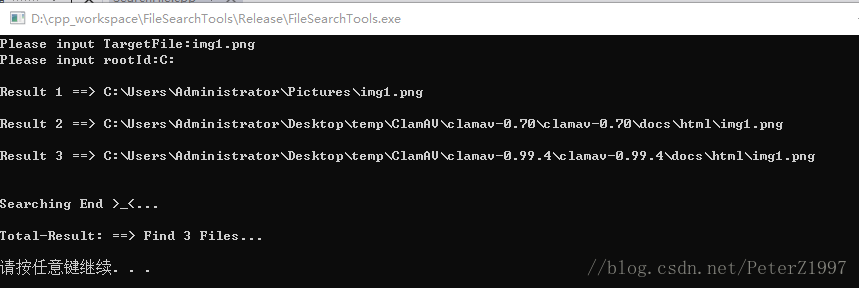
运行截图
Windows下文件检索的基本姿势的更多相关文章
- 转:windows下命令行工具
转自: http://www.cnblogs.com/haochuang/p/5593411.html Windows下CMD不好用,远没有Linux,或者一些SSH工具用起来方便.其实Windows ...
- windows下使用体验更好的控制台——ConsoleZ
转做前端开发以来,每天使用最频繁的工具就是控制台了,git提交代码要用,npm安装node包也要用,grunt task 也要用,可是系统自带的cmd太难用了, 那么问题就来了: "wind ...
- [爬虫]Windows下如何安装python第三方库lxml
lxml是个非常有用的python库,它可以灵活高效地解析xml与BeautifulSoup.requests结合,是编写爬虫的标准姿势. 但是,当lxml遇上Windows,简直是个巨坑.掉在安装陷 ...
- [转]Linux/Windows下脚本对拍程序
[新]简单写法 (转载自:https://blog.csdn.net/ylsoi/article/details/79824655) 要求:文件输入输出,且输入输出文件需要对应 Linux: #inc ...
- windows下sqli-labs的搭建及学习(GET篇)
环境搭建: 源码下载地址:https://github.com/Audi-1/sqli-labs 需要搭建以下环境: apache+mysql+php Tomcat+mysql+java(部分关卡需要 ...
- Windows下如何安装python第三方库lxml
lxml是个非常有用的python库,它可以灵活高效地解析xml,与BeautifulSoup.requests结合,是编写爬虫的标准姿势. 参考 Windows下如何安装python第三方库lxml ...
- 在windows下安装gulp —— 基于 Gulp 的前端集成解决方案(一)
相关连接导航 在windows下安装gulp —— 基于 Gulp 的前端集成解决方案(一) 执行 $Gulp 时发生了什么 —— 基于 Gulp 的前端集成解决方案(二) 常用 Gulp 插件汇总 ...
- 让 windows 下的命令行程序 cmd.exe 用起来更顺手
在 Windows 下使用 Larave 框架做开发,从 Composer 到 artisan 总是避免不了和 cmd.exe 打交道,系统默认的命令行界面却是不怎么好看,且每行显示的字符数是做了限制 ...
- Windows下Visual studio 2013 编译 Audacity
编译的Audacity版本为2.1.2,由于实在windows下编译,其源代码可以从Github上取得 git clone https://github.com/audacity/audacity. ...
随机推荐
- 复刻smartbits的国产网络测试工具minismb-网络连接数测试方法
复刻smartbits的网路性能测试工具MiniSMB,是一款专门用于测试智能路由器,网络交换机的性能和稳定性的软硬件相结合的工具.可以通过此工具测试任何ip网络设备的端口吞吐率,带宽,并发连接数和最 ...
- CentOS MPlayer
.准备软件 mplayer官网:http://www.mplayerhq.hu/design7/news.html RPM Fusion网址:http://rpmfusion.org/ EPEL网址: ...
- JSP 基础(二)
五 注释 5.1 JSP注释 <%--注释内容--%> 5.2 HTML注释 <!--注释内容--> 5.3 Java注释 六 JSP指令 在JSP中有三种类型 ...
- angular $q promise详解
前言 通过本文,你大概能清楚angular promise是个啥,$q又是个啥,以及怎么用它.这里咱们先灌输下promise的思想. 下面写的全是废话,一些看着高逼格其实没什么大作用的概念,想知道$q ...
- 回头再看看babel的实现原理
一.前言 babel在大家的工作中应该没少用,但是为什么它能将ES6转成ES5呢?一个有态度的前端er肯定会想抛开迷雾,看看其中的奥秘. 记得很早前自己有去了解过相关方面的内容,但是时间久远,现在已是 ...
- HashMap底层原理分析(put、get方法)
1.HashMap底层原理分析(put.get方法) HashMap底层是通过数组加链表的结构来实现的.HashMap通过计算key的hashCode来计算hash值,只要hashCode一样,那ha ...
- [转]【mysql监控】查看mysql库大小,表大小,索引大小
本文转自:http://blog.sina.com.cn/s/blog_4c197d420101fbl9.html 查看所有库的大小 mysql> use information_schema; ...
- JS继承实现的几种方式
//继承的几种实现: //解决方案1.通过原型继承 function Parent1(){ this.name = 'Parent1'; } function Child1(){} Child1.pr ...
- 常用正则表达式:手机、电话、邮箱、身份证、IP地址、网址、日期等
转载源:http://blog.csdn.net/lun379292733/article/details/8169807 <script type="text/JavaScript& ...
- [日常] Linux下vim的常用命令总结
vim按d表示剪切按dd剪切一行vim命令:命令模式 /关键字 n继续向下查找 vim的多行注释:1.按ctrl + v进入 visual block模式2.按上下选中要注释的行3.按大写字母I,再插 ...