
RF:win10跑用例过程中有中文日志会显示非中文
问题:RobotFramework在win10跑用例过程中有中文日志会显示非中文,如截图:
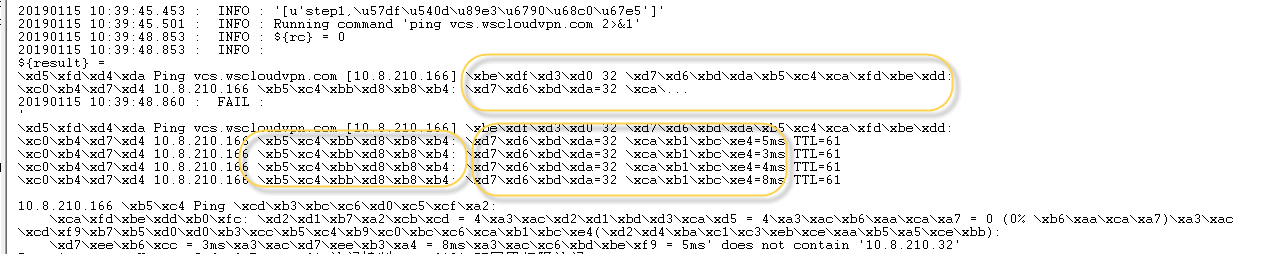
解决:
 unic.py ,用该文件内容替换:
# Copyright 2008-2015 Nokia Networks
# Copyright 2016- Robot Framework Foundation
#
# Licensed under the Apache License, Version 2.0 (the "License");
# you may not use this file except in compliance with the License.
# You may obtain a copy of the License at
#
# http://www.apache.org/licenses/LICENSE-2.0
#
# Unless required by applicable law or agreed to in writing, software
# distributed under the License is distributed on an "AS IS" BASIS,
# WITHOUT WARRANTIES OR CONDITIONS OF ANY KIND, either express or implied.
# See the License for the specific language governing permissions and
# limitations under the License. from pprint import PrettyPrinter from .platform import IRONPYTHON, JYTHON, PY2
from .robottypes import is_bytes, is_unicode
import json if PY2: def unic(item):
if isinstance(item, unicode):
return item
if isinstance(item, (bytes, bytearray)):
try:
return item.decode('ASCII')
except UnicodeError:
return u''.join(chr(b) if b < 128 else '\\x%x' % b
for b in bytearray(item))
if isinstance(item,(list,dict,tuple)):
try:
item = json.dumps(item,ensure_ascii=False,encoding='cp936')
except UnicodeDecodeError:
try:
item = json.dumps(item,ensure_ascii=False,encoding='cp936')
except:
pass
except:
pass
try:
try:
return unicode(item)
except UnicodeError:
return unic(str(item))
except:
return _unrepresentable_object(item) else: def unic(item):
if isinstance(item, str):
return item
if isinstance(item, (bytes, bytearray)):
try:
return item.decode('ASCII')
except UnicodeError:
return ''.join(chr(b) if b < 128 else '\\x%x' % b
for b in item)
try:
return str(item)
except:
return _unrepresentable_object(item) # JVM and .NET seem to handle Unicode normalization automatically. Importing
# unicodedata on Jython also takes some time so it's better to avoid it.
if not (JYTHON or IRONPYTHON): from unicodedata import normalize
_unic = unic def unic(item):
return normalize('NFC', _unic(item)) def prepr(item, width=400):
return unic(PrettyRepr(width=width).pformat(item)) class PrettyRepr(PrettyPrinter): def format(self, object, context, maxlevels, level):
try:
if is_unicode(object):
return repr(object).lstrip('u'), True, False
if is_bytes(object):
return 'b' + repr(object).lstrip('b'), True, False
return PrettyPrinter.format(self, object, context, maxlevels, level)
except:
return _unrepresentable_object(object), True, False def _unrepresentable_object(item):
from .error import get_error_message
return u"<Unrepresentable object %s. Error: %s>" \
% (item.__class__.__name__, get_error_message())
RF:win10跑用例过程中有中文日志会显示非中文的更多相关文章
- JDK13.0.1安装与环境变量的配置(Win10平台为例)
一.下载与安装 Oracle官网下载:https://www.oracle.com/technetwork/java/javase/downloads/index.html,点击右侧下载 接受并下载对 ...
- WiFi无线连接过程中有哪几个主要步骤?
WiFi无线连接过程中有哪几个主要步骤?[1]在使用WIFI功能时,经常性的操作是打开手机上的WiFi设备,搜索到心目中的热点,输入密码,联网成功,成功上网.这个看似简单的过程,背后却是隐藏着大量的无 ...
- python matplotlib plot 数据中的中文无法正常显示的解决办法
转发自:http://blog.csdn.net/laoyaotask/article/details/22117745?utm_source=tuicool python matplotlib pl ...
- 【原创】python中文编码问题深入分析(二):print打印中文异常及显示乱码问题分析与解决
在学习python以及在使用python进行项目开发的过程中,经常会使用print语句打印一些调试信息,这些调试信息中往往会包含中文,如果你使用python版本是python2.7,或许你也会遇到和我 ...
- Android实现中文汉字笔划(笔画)、中文拼音排序、英文排序
发布时间:2018-11-16 技术:Android 概述 最近要做一个类似微信的,在登录界面选择国家地区的功能,微信有中文汉字笔画排序以及中文拼音排序等几种方式,如下所示: 简体中文 拼音排 ...
- ELKF-分布式日志收集分析平台搭建 最小化 配置过程 - 查看收集日志(windows10下搭建)
前言 Elasticsearch是与名为Logstash的数据收集和日志解析引擎以及名为Kibana的分析和可视化平台一起开发的.这三个产品被设计成一个集成解决方案,称为“Elastic Stack” ...
- C语言重定向输入:txt文件内容是中文,重定向输入显示乱码的原因
一.txt文件中的内容是中文,重定向输入显示乱码原因: 是因为文本文件的编码和和编译器的不一致导致的.我文本文件用的编码是UTF-8,而编译器是ANSI,不匹配,所以输出乱码.文本另存为时把编码改为A ...
- Windows server 2012 添加中文语言包(英文转为中文)(离线)
Windows server 2012 添加中文语言包(英文转为中文)(离线) 相关资料: 公司环境:亚马孙aws虚拟机 英文版Windows2012 中文SQL Server2012安装包,需要安装 ...
- JFreechart在linux下不显示及中文乱码问题
一.使用JFreeChart建的报表,在window下能正常显示,但是放到linux下就报错,而且有时候会把tomcat挂掉, 原因是jfreechart的在linux系统中需要访问java awt库 ...
随机推荐
- 关于使用deepin在linux下安装mysql出现Can't connect to local MySQL server through socket '/tmp/mysql/mysql.sock' (2)的解决方法
根据目录/etc/mysql打开文件debain.cnf 此时文本里的内容为 # Automatically generated for Debian scripts. DO NOT TOUCH![c ...
- 构建之法 chapter1 心得
阅读完了<构建之法>第一章后,觉得我们平时使用的软件并不是自己想象中的那样简单,用的时候是觉得很方便,但从来没有考虑过一个软件的背后需要一个团队多少的付出才能换来一个获得用户频频好评的软件 ...
- javascript第一个作业之网页计算器
<!DOCTYPE html> <html lang="en"> <head> <meta charset="UTF-8&quo ...
- HOMEWORD2
开发工具和语言选择 语言 :pyhton3.6 工具 我选择的是 pycharm2019.1.由于之前已经安装好了,这里就不再贴出. 自动单元测试练习 python单元测试框架Unittest.Uni ...
- 学习笔记DL005:线性相关、生成子空间,范数,特殊类型矩阵、向量
线性相关.生成子空间. 逆矩阵A⁽-1⁾存在,Ax=b 每个向量b恰好存在一个解.方程组,向量b某些值,可能不存在解,或者存在无限多个解.x.y是方程组的解,z=αx+(1-α),α取任意实数. A列 ...
- centos7进单用户
当重启linux系统,进入系统选择页面的时候,按e 在linux16那一行最后面添加 init=/bin/sh 按ctrl+c 挂载根分区,可读写 mount / -o rw, remount
- <%@ taglib prefix="c" uri="http://java.sun.com/jsp/jstl/core" %>会报错
有些时候,<%@ taglib prefix="c" uri="http://java.sun.com/jsp/jstl/core" %>会报错,错 ...
- Linux df -h空间显示不正确
今天发现一个测试数据库磁盘空间快满了,准备将几个不再用的表空间删除.通过以下命令删除表空间内容及数据文件. drop tablespace tablespace_name including cont ...
- rust
books--------------Rust 中文教程 RustPrimer http://wiki.jikexueyuan.com/project/rust-primer/any/any.html ...
- 关于mysql自增主键
对于mysql表(其他数据库没测试过) 如果定义了自增主键,并且手动设置了主键的值,那么当再次自增创建数据的时候,回在设置的主键值的基础上进行自增. 如(id是主键): 起始插入(3,1),而后手动插 ...