
[Linux]lnmp一键安装包,访问yii/tp5/laravel的时候,报错500或者空白页面
当你将默认的访问路径改后(nginx.conf中的root 之后的路径),同时应该将/home/wwwroot/default/.user.ini 中的路径也改了!
.user.ini 是隐藏文件,需要 ls -a 查看;
第一步:你先确定你的pathinfo路由开启了,配置如下:
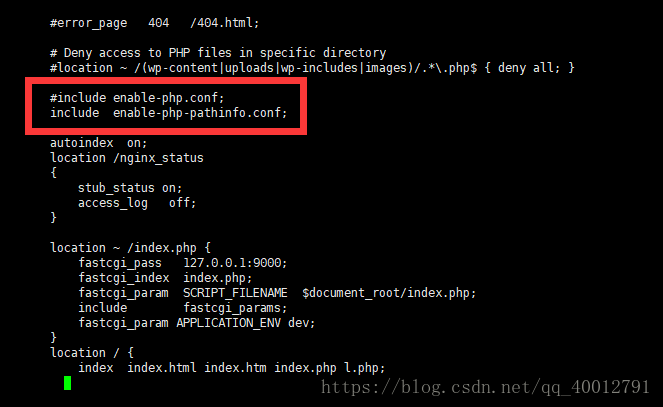
lnmp v1.1上,修改对应虚拟主机的配置文件(/usr/local/nginx/conf/vhost/域名.conf)
去掉#include pathinfo.conf前面的#,把try_files $uri =404; 前面加上# 注释掉。
1.2,1.3上,修改对应虚拟主机的配置文件(/usr/local/nginx/conf/nginx.conf)
将include enable-php.conf;替换为include enable-php-pathinfo.conf;
修改pathinfo需要重启nginx生效。
第二步:路由重写设置成功
 server {

         listen       80;

         server_name  www.aaa.com;

         root   "你的项目路径";

         include  enable-php-pathinfo.conf;//开启pathinfo

       location /nginx_status

         {

             stub_status on;

             access_log   off;

         }

         location ~ .*\.(gif|jpg|jpeg|png|bmp|swf)$

         {

             expires      30d;

         }

        location ~ .*\.(js|css)?$

         {

             expires      12h;

         }

         location ~ /.well-known {

             allow all;

         }

         location ~ /\.

         {

             deny all;

         }

         location ~ /index.php {

             fastcgi_pass   127.0.0.1:9000;

             fastcgi_index  index.php;

             fastcgi_param  SCRIPT_FILENAME  $document_root/index.php;

             include        fastcgi_params;

             fastcgi_param APPLICATION_ENV dev;

         }

         location / {

            index  index.html index.htm index.php l.php;

            autoindex  on;

            if (!-e $request_filename){

               rewrite ^/(.*) /index.php last;

            }

         }

         error_page   500 502 503 504  /50x.html;

         location = /50x.html {

             root   html;

         }

         location ~ \.php(.*)$  {

             fastcgi_pass   127.0.0.1:9000;

             fastcgi_index  index.php;

             fastcgi_split_path_info  ^((?U).+\.php)(/?.+)$;

             fastcgi_param  SCRIPT_FILENAME  $document_root$fastcgi_script_name;

             fastcgi_param  PATH_INFO  $fastcgi_path_info;

             fastcgi_param  PATH_TRANSLATED  $document_root$fastcgi_path_info;

             include        fastcgi_params;

         }

     }
第三步:再次访问,如果是500/空白页面
在你框架index.php开头,打开报错,如下:
error_reporting(E_ALL);
ini_set('display_errors', '1');
默认是没有开启报错的,设置如下:
1、先打开php的错误提示
将 php.ini中的 display_errors = Off 修改为 On;
2、开启nginx的报错
在 /usr/local/php/etc/php-fpm.conf 加上
php_admin_value[error_log] = /usr/local/php/var/log/php_errors.log
php_admin_flag[log_errors] = on
有时可能错误日志文件不自动创建,可以执行:touch /usr/local/php/var/log/php_errors.log && chown www:www /usr/local/php/var/log/php_errors.log
然后你访问,会得到以下的报错:
 PHP Warning: require(): open_basedir restriction in effect. File(/home/wwwroot/default/laravel/bootstrap/autoload.php) is not within the allowed path(s): (/home/wwwroot/default/laravel/public:/tmp/:/var/tmp/:/proc/) in /home/wwwroot/default/laravel/public/index.php on line 22


 PHP Warning: require(/home/wwwroot/default/laravel/bootstrap/autoload.php): failed to open stream: Operation not permitted in /home/wwwroot/default/laravel/public/index.php on line 22


 PHP Fatal error: require(): Failed opening required ‘/home/wwwroot/default/laravel/public/../bootstrap/autoload.php‘ (include_path=‘.:/usr/local/php/lib/php‘) in /home/wwwroot/default/laravel/public/index.php on line 22
解决
(1)检查php.ini的 open_basedir的参数 将其开启,写为自己的项目路径
(2)如果是lnmp(nginx服务器),检查 path/nginx/conf/fastcgi.conf里的 $document_root参数
fastcgi_param PHP_ADMIN_VALUE "open_basedir=$document_root/:/tmp/:/proc/:/home/stone/dsales/"; (/home/stone/dsales/为项目路径)
注意:如果在fastcgi.conf里没有 fastcgi_param PHP_ADMIN_VALUE……自行添加
如果这样还是报错的话,那就改为 fastcgi_param PHP_ADMIN_VALUE "open_basedir=NULL";
这样的话你就应该可以访问到项目了。。。
[Linux]lnmp一键安装包,访问yii/tp5/laravel的时候,报错500或者空白页面的更多相关文章
- lnmp 一键安装包 nginx配置tp5 phpinfo模式 隐藏index.php
tp5 url 线上访问 在nginx 上 出现404错误 那是因为pathinfo没有被支持 修改如下:找到 /usr/local/nginx/config/vhost/项目名.config s ...
- LNMP一键安装包
http://www.aliweihu.com/333.html LNMP一键安装包是什么? LNMP一键安装包是一个用Linux Shell编写的可以为CentOS/RadHat.Debian/Ub ...
- 安装lnmp一键安装包(转)
系统需求: CentOS/RHEL/Fedora/Debian/Ubuntu/Raspbian Linux系统 需要3GB以上硬盘剩余空间 128M以上内存,Xen的需要有SWAP,OpenVZ的另外 ...
- CentOS下Web服务器环境搭建LNMP一键安装包
CentOS下Web服务器环境搭建LNMP一键安装包 时间:2014-09-04 00:50来源:osyunwei.com 作者:osyunwei.com 举报 点击:3797次 最新版本:lnmp- ...
- LNMP一键安装包 V1.1
通告
LNMP一键安装包 是一个用Linux Shell编写的能够为CentOS/RadHat.Debian/Ubuntu VPS(VDS)或独立主机安装LNMP(Nginx.MySQL/MariaDB.P ...
- Linode和DigitalOcean lnmp一键安装包哪个好?
Linode和DigitalOcean都是非常棒的VPS厂商,512MB内存的VPS每月低到5美元,搭建wordpress网站,非常方便,甚至可以多人共用,服务器足够强悍,跑几个wordpress博客 ...
- LNMP一键安装包添加虚拟主机、删除虚拟主机及如何使用伪静态
本文主要介绍LNMP一键安装包添加虚拟主机.删除虚拟主机及如何使用伪静态. 一.添加虚拟主机通俗点就是在VPS/服务商上添加一个网站(域名). 需要执行如下命令:/root/vhost.sh 执行后会 ...
- lnmp 一键安装包
系统需求: CentOS/RHEL/Fedora/Debian/Ubuntu/Raspbian Linux系统 需要5GB以上硬盘剩余空间 需要128MB以上内存(如果为128MB的小内存VPS,Xe ...
- 安装 - LNMP一键安装包
https://lnmp.org/ 系统需求: CentOS/RHEL/Fedora/Debian/Ubuntu/Raspbian Linux系统 需要5GB以上硬盘剩余空间 需要128MB以上内存( ...
随机推荐
- Tomcat 的 ManagerApp 简单使用
当启动Tomcat的时候,直接访问http://localhost:8080会直接进入下面页面,原因是Tomcat的默认项目是部署在webapps目录下的ROOT目录下的,这个manager项目就在R ...
- Tomcat 部署项目无法加载静态资源
首先,我的Eclipse是引用外部的Tomcat 引用外部Tomcat会在左侧生成一个Server文件夹,相当于复制了一份Tomcat到Eclipse的安装目录里 具体Tomcat所在目录可以在这进行 ...
- 第45节:Java当中的变量,面向对象
Java当中的变量 01 Java当中的实例变量和类变量 什么是实例变量和类变量呢? 实例变量为没有用static修饰符修饰的变量,而类变量为用static修饰符修饰的变量. public class ...
- 配置MapReduce时遇到的问题记录
1.左边栏的Project Explorer里一直不出现DFS Locations. 发现在把hadoop-eclipse-plugin-2.6.0.jar放到eclipse下的pluins文件夹下并 ...
- Tools - 正版Windows7系统的下载与安装
下载 微软原版系统下载地址:https://msdn.itellyou.cn/ 根据系统类型.语言和版本,下载合适的系统ISO文件. 例如: Windows 7 Professional with S ...
- Spring Boot(八):RabbitMQ 详解
RabbitMQ 即一个消息队列,主要是用来实现应用程序的异步和解耦,同时也能起到消息缓冲,消息分发的作用. 消息中间件在互联网公司的使用中越来越多,刚才还看到新闻阿里将 RocketMQ 捐献给了 ...
- 200 行代码使用 C# 实现区块链
文章原文来自:Code your own blockchain in less than 200 lines of Go!,原始文章是通过 Go 语言来实现自己的区块链的,这里我们参照该文章来使用 C ...
- springMVC(2)---获取前段数据
springMVC(1)---获取前段数据 首先说明,如果你学过Struts2,那么在学springMVC就会简单很多,我也不最基础的开始写了,我前篇文章搭建了个ssm框架,算是springmvc入门 ...
- 有关 Azure 机器学习的 Net# 神经网络规范语言的指南
Net# 是由 Microsoft 开发的一种用于定义神经网络体系结构的语言. 使用 Net# 定义神经网络的结构使定义复杂结构(如深层神经网络或任意维度的卷积)变得可能,这些复杂结构被认为可提高对数 ...
- Web中的积累:外观模式 Facade
摘要: 原创出处: http://www.cnblogs.com/Alandre/ 泥沙砖瓦浆木匠 希望转载,保留摘要,谢谢! 壹 前言 目测好久没写文章了,距离上一篇文章也有二十多天.我是怎么了?哈 ...