
SpringBoot2.1整合finereport10(帆软报表)
最近,公司采购了帆软的系统,领导安排要与公司的SpringBoot框架进行整合。费了一番牛劲,终于整合成功,下面分享一下我的经验。
首先,我的开发环境是Intellij IDEA,使用的SpringBoot版本是2.1.1,整合的finereport版本是10.0。
一、根据帆软官方教程 http://help.finereport.com/ 高级教程->部署集成->服务器部署->报表部署流程->嵌入式部署的介绍,
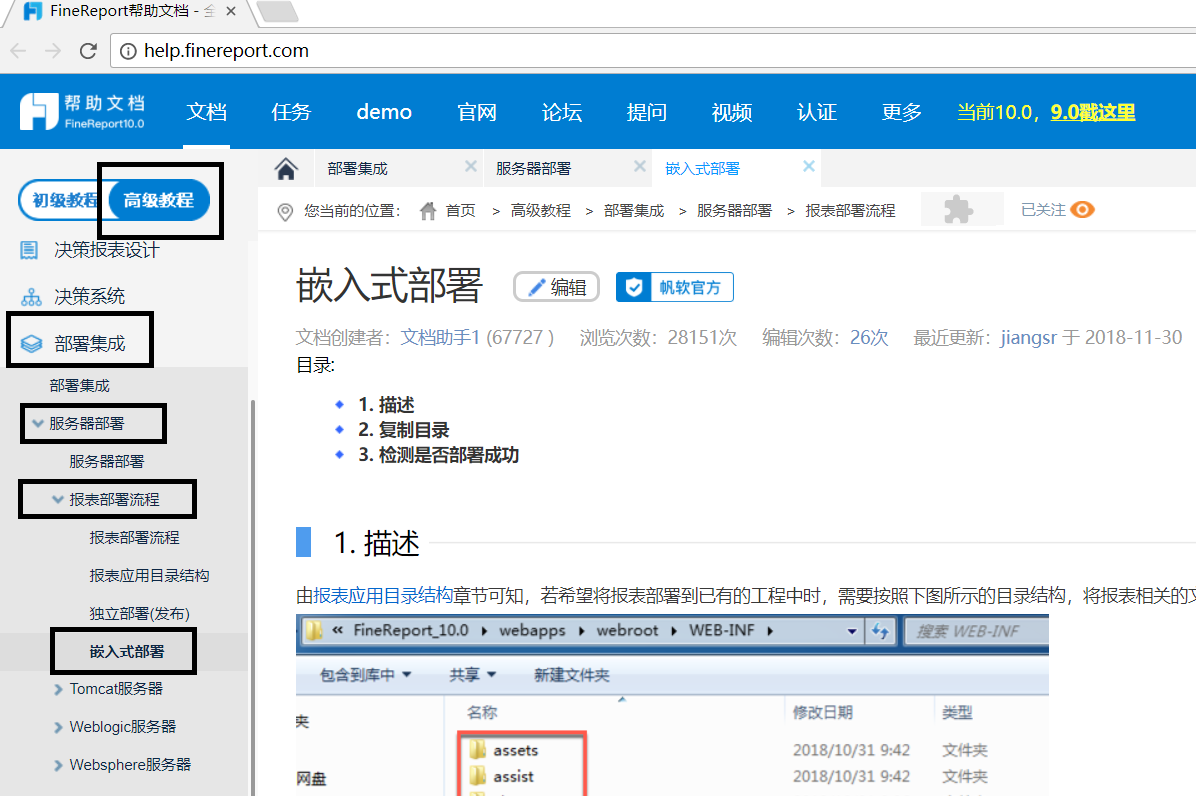
将%FineReport_HOME%\webapps\webroot\WEB-INF目录下面的assets、assist、classes、embed、lib、plugins、reportlets七个文件夹复制到你的项目的webapp的WEB-INF文件夹下,再将%JAVA_HOME%/jdk/lib下的tools.jar拷贝到你的项目的webapp的WEB-INF的lib文件夹下,如图所示:
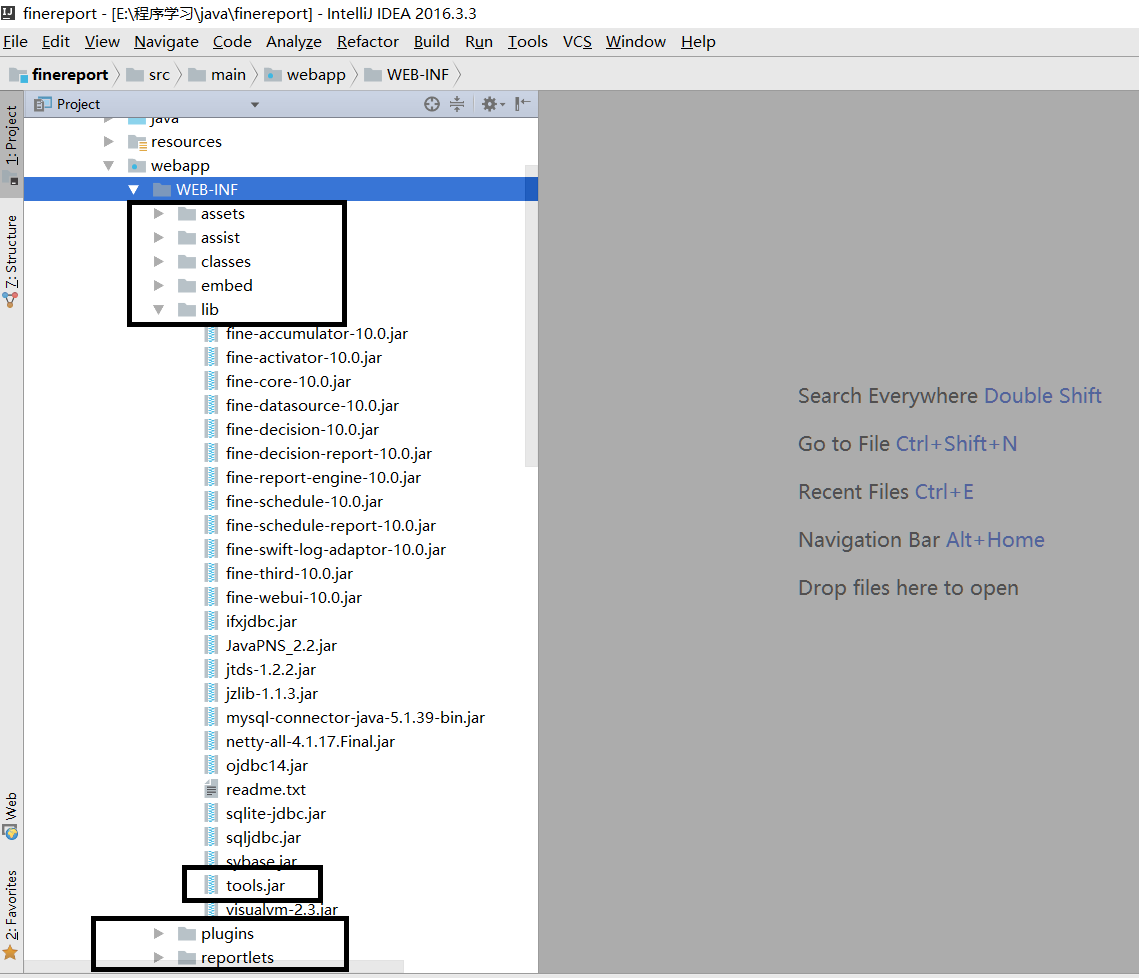
注意,springboot框架默认是不带webapp文件夹以及其子文件夹WEB-INF的,此时需要自己创建这两个文件夹,并将webapp文件夹设置为Web Resource Directory。(通过Project Structure设置)
二、更改SpringBoot的配置(打包方式/启动方式)
1.修改pom文件
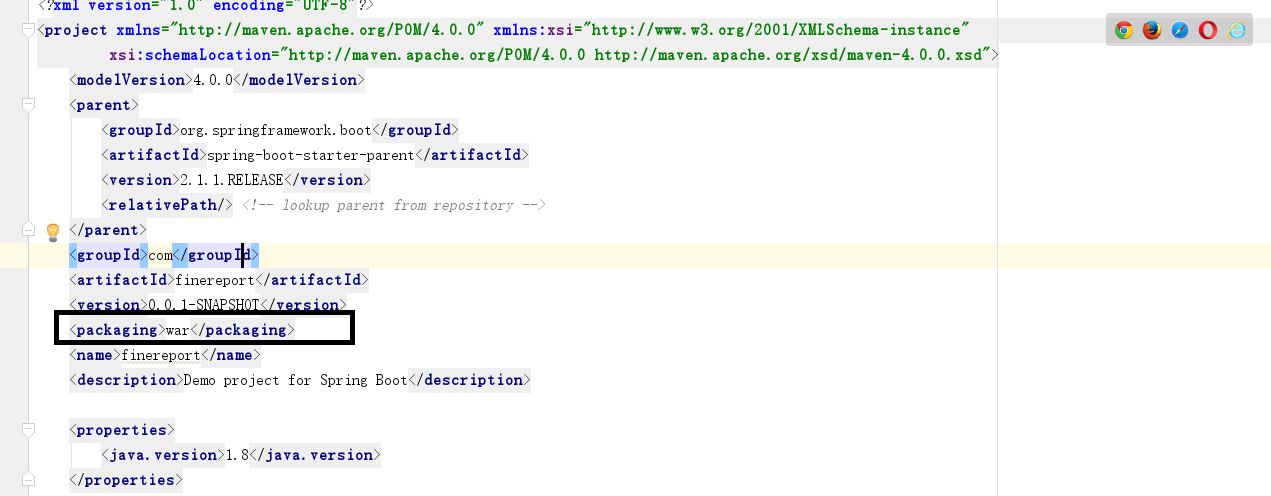
(1)修改打包方式为war
(2)修改pom依赖的包,添加servlet依赖,去掉内嵌Tomcat依赖,添加servlet-api依赖:
     <dependencies>

         <dependency>

             <groupId>org.springframework.boot</groupId>

             <artifactId>spring-boot-starter-web</artifactId>

             <exclusions>

                 <exclusion>

                     <groupId>org.springframework.boot</groupId>

                     <artifactId>spring-boot-starter-tomcat</artifactId>

                 </exclusion>

             </exclusions>

         </dependency>

         <dependency>

             <groupId>javax.servlet</groupId>

             <artifactId>javax.servlet-api</artifactId>

             <version>3.1.0</version>

             <scope>provided</scope>

         </dependency>

     </dependencies>
2.修改启动文件

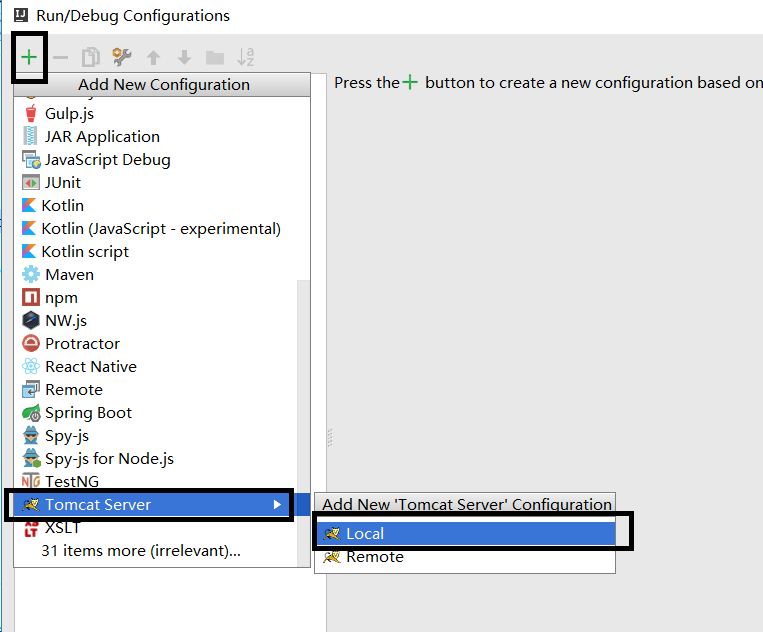
3.在idea中设置项目以tomcat方式启动
(1)
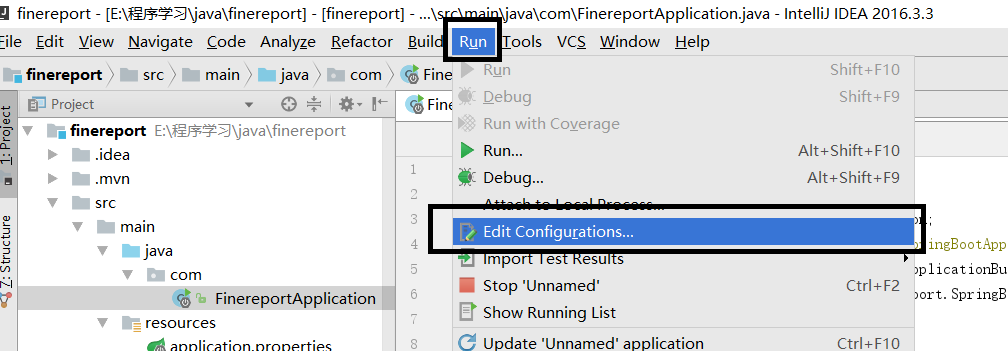
(2)
(3)
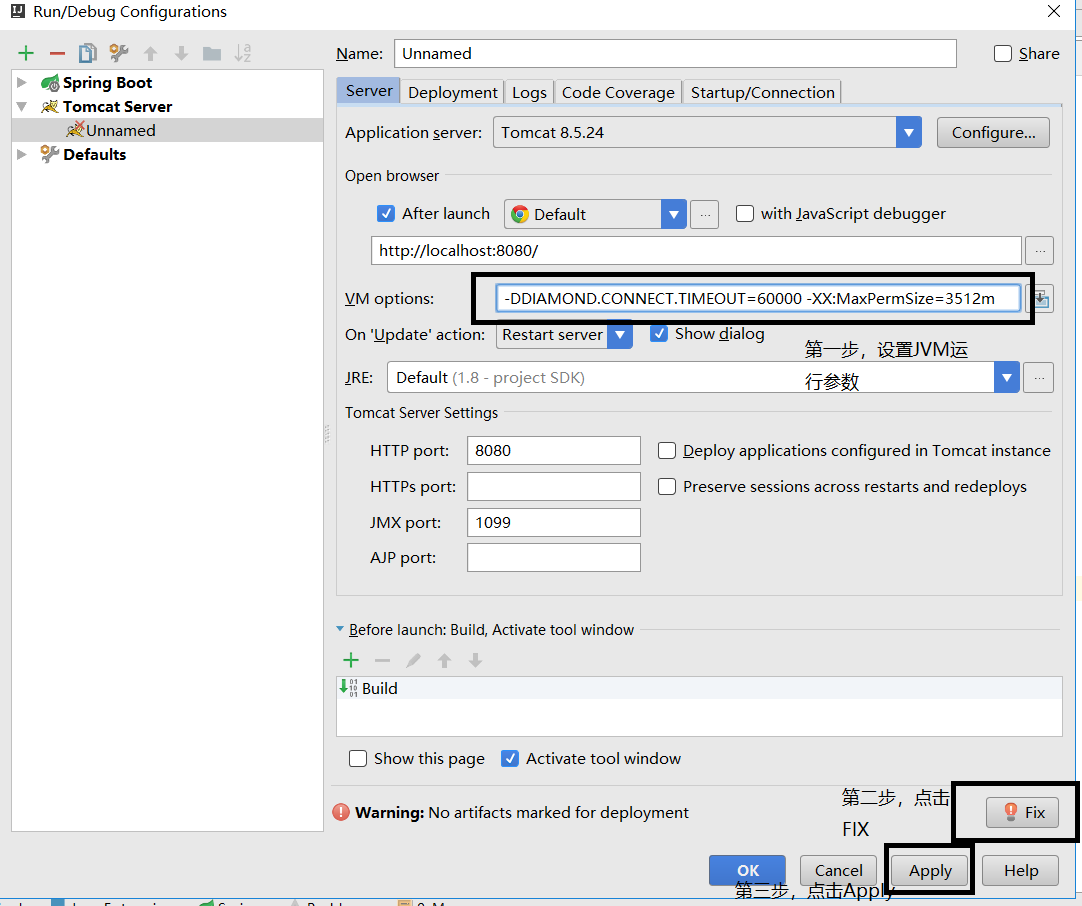
点击Fix时,选择第一个即可。
附一张最后的项目结构图:

三、启动程序
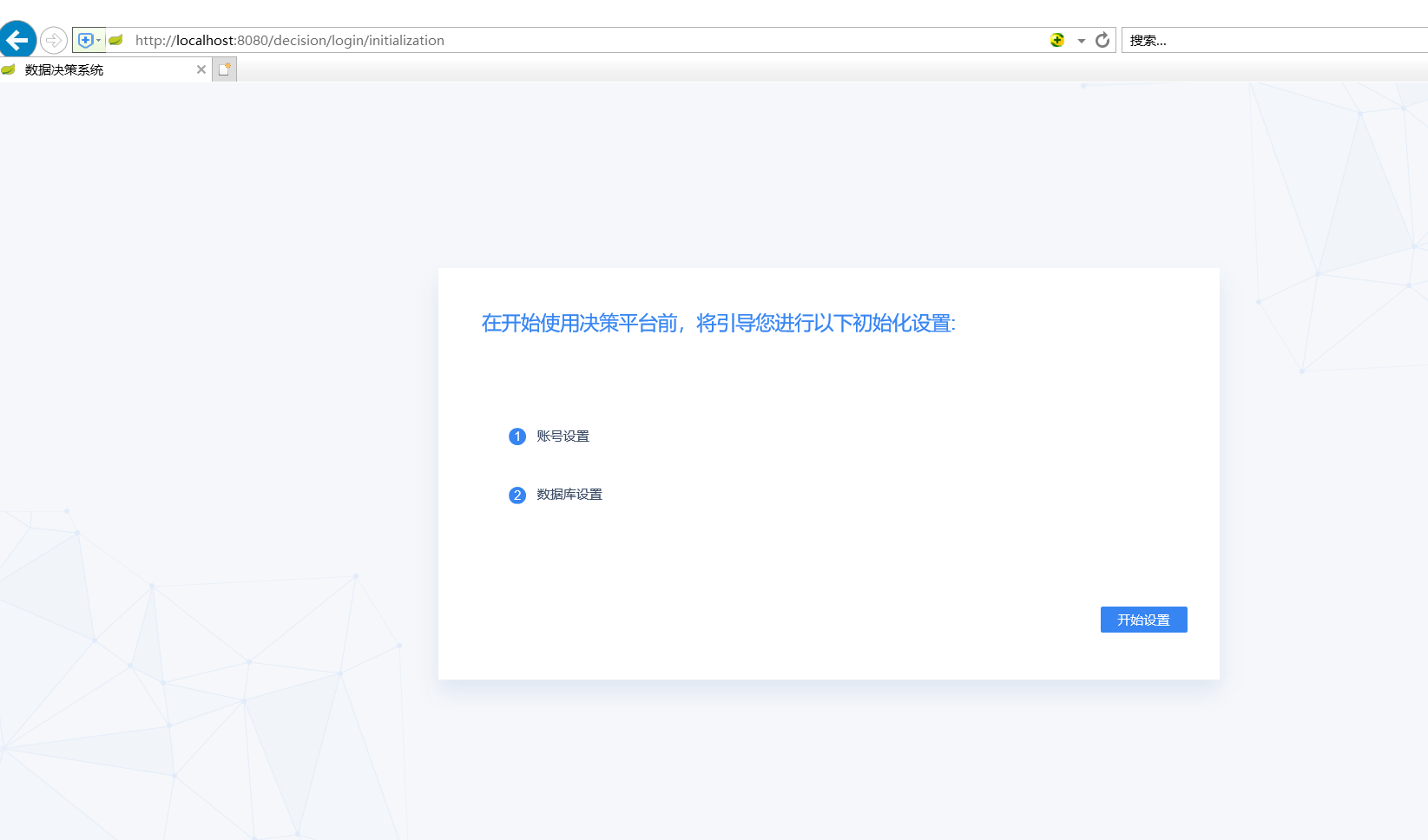
在地址栏中输入http://ip:端口号/项目目录/decision,能成功显示下图页面,则表明SpringBoot集成FineReport成功。
项目源代码链接:
第一部分:https://download.csdn.net/download/weixin_44299969/10894741
第二部分:https://download.csdn.net/download/weixin_44299969/10894769
第三部分:https://download.csdn.net/download/weixin_44299969/10894786
第四部分:https://download.csdn.net/download/weixin_44299969/10894809
四、补充
1.网上的教程中,有很多介绍将finereport的lib文件做成maven repository的,本人试了试,也可以操作成功,具体操作方法为:
(1)新建一个bat文件,并将下列的语句复制进去,注意根据你的实际情况修改finereport的jar包的路径,运行这个bat文件,finereport的jar包就会加载到maven的仓库中
 call mvn install:install-file -Dfile=E:\programfiles\FineReport_10.0\webapps\webroot\WEB-INF\lib\fine-accumulator-10.0.jar -DgroupId=com.fine -DartifactId=fine-accumulator -Dversion=10.0 -Dpackaging=jar

 call mvn install:install-file -Dfile=E:\programfiles\FineReport_10.0\webapps\webroot\WEB-INF\lib\fine-activator-10.0.jar -DgroupId=com.fine -DartifactId=fine-activator -Dversion=10.0 -Dpackaging=jar

 call mvn install:install-file -Dfile=E:\programfiles\FineReport_10.0\webapps\webroot\WEB-INF\lib\fine-core-10.0.jar -DgroupId=com.fine -DartifactId=fine-core -Dversion=10.0 -Dpackaging=jar

 call mvn install:install-file -Dfile=E:\programfiles\FineReport_10.0\webapps\webroot\WEB-INF\lib\fine-datasource-10.0.jar -DgroupId=com.fine -DartifactId=fine-datasource -Dversion=10.0 -Dpackaging=jar

 call mvn install:install-file -Dfile=E:\programfiles\FineReport_10.0\webapps\webroot\WEB-INF\lib\fine-decision-10.0.jar -DgroupId=com.fine -DartifactId=fine-decision -Dversion=10.0 -Dpackaging=jar

 call mvn install:install-file -Dfile=E:\programfiles\FineReport_10.0\webapps\webroot\WEB-INF\lib\fine-decision-report-10.0.jar -DgroupId=com.fine -DartifactId=fine-decision-report -Dversion=10.0 -Dpackaging=jar

 call mvn install:install-file -Dfile=E:\programfiles\FineReport_10.0\webapps\webroot\WEB-INF\lib\fine-report-engine-10.0.jar -DgroupId=com.fine -DartifactId=fine-report-engine -Dversion=10.0 -Dpackaging=jar

 call mvn install:install-file -Dfile=E:\programfiles\FineReport_10.0\webapps\webroot\WEB-INF\lib\fine-schedule-10.0.jar -DgroupId=com.fine -DartifactId=fine-schedule -Dversion=10.0 -Dpackaging=jar

 call mvn install:install-file -Dfile=E:\programfiles\FineReport_10.0\webapps\webroot\WEB-INF\lib\fine-schedule-report-10.0.jar -DgroupId=com.fine -DartifactId=fine-schedule-report -Dversion=10.0 -Dpackaging=jar

 call mvn install:install-file -Dfile=E:\programfiles\FineReport_10.0\webapps\webroot\WEB-INF\lib\fine-swift-log-adaptor-10.0.jar -DgroupId=com.fine -DartifactId=fine-swift-log-adaptor -Dversion=10.0 -Dpackaging=jar

 call mvn install:install-file -Dfile=E:\programfiles\FineReport_10.0\webapps\webroot\WEB-INF\lib\fine-third-10.0.jar -DgroupId=com.fine -DartifactId=fine-third -Dversion=10.0 -Dpackaging=jar

 call mvn install:install-file -Dfile=E:\programfiles\FineReport_10.0\webapps\webroot\WEB-INF\lib\fine-webui-10.0.jar -DgroupId=com.fine -DartifactId=fine-webui -Dversion=10.0 -Dpackaging=jar
(2)在pom文件中,添加以下依赖(正文中的依赖不变)
 <dependency>

             <groupId>com.fine</groupId>

             <artifactId>fine-core</artifactId>

             <version>10.0</version>

         </dependency>

         <dependency>

             <groupId>com.fine</groupId>

             <artifactId>fine-activator</artifactId>

             <version>10.0</version>

         </dependency>

         <dependency>

             <groupId>com.fine</groupId>

             <artifactId>fine-core</artifactId>

             <version>10.0</version>

         </dependency>

         <dependency>

             <groupId>com.fine</groupId>

             <artifactId>fine-datasource</artifactId>

             <version>10.0</version>

         </dependency>

         <dependency>

             <groupId>com.fine</groupId>

             <artifactId>fine-decision</artifactId>

             <version>10.0</version>

         </dependency>

         <dependency>

             <groupId>com.fine</groupId>

             <artifactId>fine-decision-report</artifactId>

             <version>10.0</version>

         </dependency>

         <dependency>

             <groupId>com.fine</groupId>

             <artifactId>fine-report-engine</artifactId>

             <version>10.0</version>

         </dependency>

         <dependency>

             <groupId>com.fine</groupId>

             <artifactId>fine-schedule</artifactId>

             <version>10.0</version>

         </dependency>

         <dependency>

             <groupId>com.fine</groupId>

             <artifactId>fine-schedule-report</artifactId>

             <version>10.0</version>

         </dependency>

         <dependency>

             <groupId>com.fine</groupId>

             <artifactId>fine-swift-log-adaptor</artifactId>

             <version>10.0</version>

         </dependency>

         <dependency>

             <groupId>com.fine</groupId>

             <artifactId>fine-third</artifactId>

             <version>10.0</version>

         </dependency>

         <dependency>

             <groupId>com.fine</groupId>

             <artifactId>fine-webui</artifactId>

             <version>10.0</version>

         </dependency>
(3)此时,正文中第一步的过程中,可以把帆软提供的lib文件中以fine打头的jar包不拷贝到你的项目的webapp中
SpringBoot2.1整合finereport10(帆软报表)的更多相关文章
- 帆软报表和jeecg的进一步整合--ajax给后台传递map类型的参数
下面是页面代码: <%@ page language="java" contentType="text/html; charset=UTF-8" page ...
- 帆软报表FineReport SQLServer数据库连接失败常见解决方案
1. 问题描述 帆软报表FineReport客户端连接SQLServer(2000.2005等),常常会出现如下错误:com.microsoft.sqlserver.jdbc.SQLServerExc ...
- 帆软报表FineReport中数据连接之Weblogic配置JNDI连接
1. 制作报表的原理 在帆软报表FineReport设计器中先用JDBC连接到数据库,建立数据库连接,然后用SQL或者其他方法创建数据集,使用数据集制作报表,然后把建立的数据库连接从JDBC连接改成J ...
- 帆软报表FineReport中数据连接之Jboss配置JNDI连接
使用sqlsever 2000数据库数据源来做实例讲解,帆软报表FineReport数据连接中Jboss配置JNDI大概的过程和WEBSPHERE以及WEBLOGIC基本相同,用JDBC连接数据库制作 ...
- 帆软报表FineReport中数据连接之Websphere配置JNDI连接
以oracle9i数据源制作的模板jndi.cpt为例来说明如何在FineReport中的Websphere配置JNDI连接.由于常用服务器的JNDI驱动过大,帆软报表FineReport中没有自带, ...
- 帆软报表FineReport中数据连接之Tomcat配置JNDI连接
1. 问题描述 在帆软报表FineReport中,通过JNDI方式定义数据连接,首先在Tomcat服务器配置好JNDI,然后在设计器中直接调用JNDI的名字,即可成功使用JNDI连接,连接步骤如下: ...
- 帆软报表FineReport中数据连接的JDBC连接池属性问题
连接池原理 在帆软报表FineReport中,连接池主要由三部分组成:连接池的建立.连接池中连接使用的治理.连接池的关闭.下面就着重讨论这三部分及连接池的配置问题. 1. 连接池原理 连接池技术的核心 ...
- 帆软报表(finereport)单元格中各颜色标识的含义
帆软报表(finereport)单元格中,可根据单元格角标的颜色判断单元格进行的操作 过滤:单元格左下角黄色三角形 条件属性:单元格左上角红色三角形. 控件:单元格右侧中间的各种矩形. 左父格:单 ...
- 帆软报表(finereport)安装/配置
1.首先是安装帆软报表软件 下载地址:http://www.finereport.com/product/download 激活码注册格账号就有了 2.启动软件,新建连接数据库 点 ...
- JEECG与帆软报表集成
将FineReport 集成到自己的web项目中,生成报表,可以方便快捷的和自己的项目融合在一起.简化了利用poi的导出遇到的问题. 1.首先在FR中建立好一个模板 例如:我的这张模板是连接 ...
随机推荐
- 遍历ArcMap已加载数据的属性
import arcpy f = open("D:\workspace\coords.txt","w") with arcpy.da.SearchCursor( ...
- 关于TypeError: strptime() argument 1 must be str, not bytes解析
关于TypeError: strptime() argument 1 must be str, not bytes解析 在使用datetime.strptime(s,fmt)来输出结果日期结果时, ...
- springmvc 简单使用
一.配置(使用)流程 1.新建maven工程,在pom.xml中导入相关包,重要的是springmvc包,servlet包,jstl包 <dependencies> ...
- WinDbg分析Dump常用方法和命令
记录下自己使用WinDbg分析Dump时常用的一些方法和命令 !analyze -v //找出出错的堆 .exrc //找到程序崩溃的位置 !heap //打印出错函数的局部位置 !for_each_ ...
- font-size:0的妙用,用于解决inline或者inline-block造成的间隙
1.图片间的缝隙(图片间的间隙一般是由换行.缩进造成的) <div> <img src="1.jpg"> <img src="2.jpg&q ...
- Toggle组件切换开关,控制开关图片显示与隐藏
UGUI_Image 组件简单笔记 Rect Transform:用于控制 UI 物体的基本属性 Image 基本使用 1.Image 组件是用于显示图片资源的.使用方式有两种:1.显示纯粹的颜色:2 ...
- html5中如何更改、去掉input type默认样式
1.如何去掉input type=date 默认样式 HTML代码: 选择日期:<input type="date" value="2017-06-01" ...
- ELK从5.6.3升级到6.3.0总结
ELK从5.6.3升级到6.3.0总结 由于6.3.0默认有es的监控功能,并且我们现在es总是有各种问题,原有的es开源插件head和HQ的监控都不够详细,所以决定升级es集群.我们目前es有5个n ...
- 反射 XML和JSON
反射: 反射概念:在运行状态中,对于任意一个类都能知道这个类的所有方法和属性:对于任意一个对象,都能调用它的任意一个方法和属性,这种动态获取信息以及动态调用对象的方法的功能称为反射机制.java反射相 ...
- codeforces 1066 B heater
菜鸡只配做水题 思路就很简单嘛:肯定扩展的越靠后边越好了 0 0 1 0 1 1 0 0 假设范围是3 ,第一个1一定要选上,第2.3个肯定选3啦,越靠后边就一定能节省更多的点,没看出来和子问题有什么 ...