
activiti官网实例项目activiti-explorer之获取流程节点
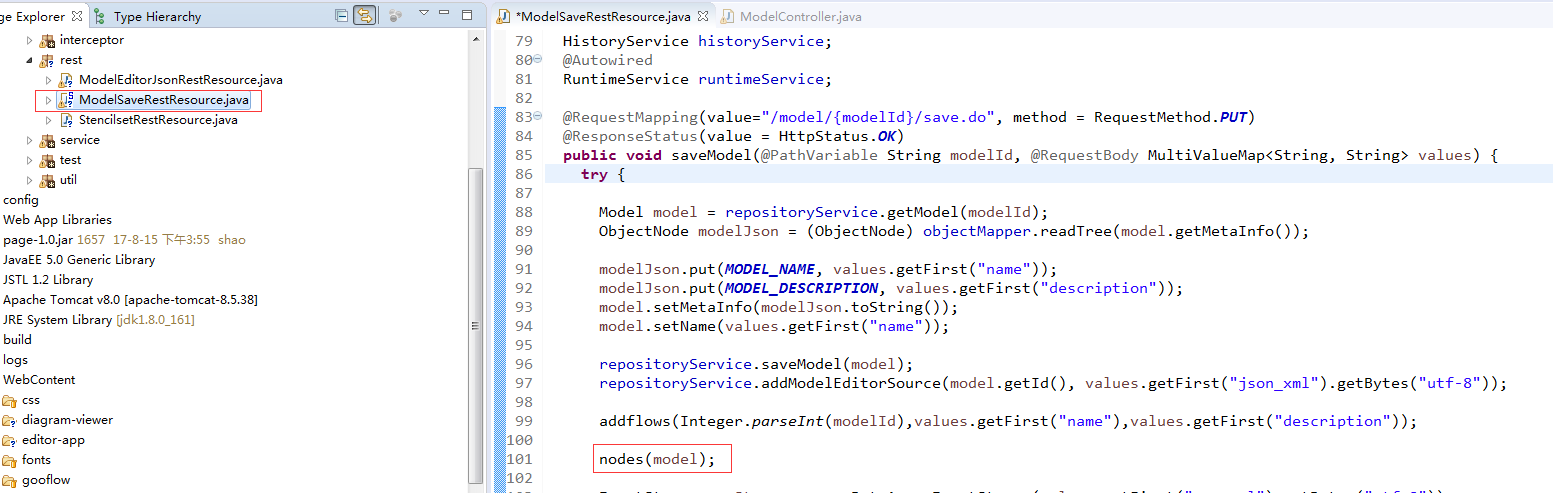
如上图在保存步骤中添加获取节点信息方法nodes();
方法如下:
//获取所有节点
JsonNode modelNode = new ObjectMapper().readTree(repositoryService.getModelEditorSource(model.getId()));
BpmnModel model1 = new BpmnJsonConverter().convertToBpmnModel(modelNode);
if(model1 != null) {
Process process = model1.getProcesses().get(0);//process对象封装了全部的节点、连线、以及关口等信息
Collection<FlowElement> flowElements = process.getFlowElements();//获得所有节点
for(FlowElement flowElement : flowElements) {
if(flowElement instanceof SequenceFlow){return;}//此处判断如果是“连线节点”,则跳过处理。
System.out.println("flowelement id:" + flowElement.getId() + " name:" + flowElement.getName() + " class:" + flowElement.getClass().toString());
if(flowElement instanceof EndEvent){//此处判断是否为结束节点,对应还有StartEvent开始节点
String idd = "";
List<SequenceFlow> alowList = ((org.activiti.bpmn.model.FlowNode) flowElement).getIncomingFlows();//获取入线信息-->获取所有上级节点
List<SequenceFlow> sequenceFlowList = ((org.activiti.bpmn.model.FlowNode) flowElement).getOutgoingFlows();//获取出线信息-->获取所有下级节点
for (SequenceFlow sequenceFlow : alowList) {//循环并可以获得所有上级节点id(父节点id),用于存储本地数据库
sequenceFlow.getSourceRef();//对应父节点和子节点的id
//其余属性可根据自己的需求来进行查看获取
}
activiti官网实例项目activiti-explorer之获取流程节点的更多相关文章
- activiti官网实例项目activiti-explorer之扩展流程节点属性2
情景需求:需要查找activiti-explorer项目中获取流程id的方法,然后根据流程id获取相应字段在节点属性中添加内容. 大致流程:拿取整个流程id获取对应表单属性,在页面节点属性中展示对应表 ...
- activiti官网实例项目activiti-explorer实操详情
参考链接:https://www.xuchuruo.cn/Activiti-modeler%E6%95%B4%E5%90%88%E5%88%B0Spring.html 按照链接文章提示操作完成之后,启 ...
- activiti官网实例项目activiti-explorer之扩展流程节点属性
节点中添加“关联表单”属性 1,stencilset.json中加入如下代码 , { "name" : "approveTypepackage", ...
- activiti官网实例项目activiti-explorer之扩展多选框回显功能
相关参考链接:https://blog.csdn.net/murongxuesheng/article/details/76147380 回显:确认选中属性ng-model,循环属性ng-repeat ...
- Knockout官网实例在MVC下的实现-02,实现计次
本篇使用Knockout在MVC下实现"Hello World",对应的官网实例在这里. 当次数达到3: View视图 页面包含三个部分:1.显示点击按钮的次数2.button按钮 ...
- Knockout官网实例在MVC下的实现-01,实现Hello world
本篇使用Knockout在MVC下实现"Hello World",对应的官网实例在这里. View视图 Knockout的一个特点是:声明式绑定,即Declarative bind ...
- 官网实例详解-目录和实例简介-keras学习笔记四
官网实例详解-目录和实例简介-keras学习笔记四 2018-06-11 10:36:18 wyx100 阅读数 4193更多 分类专栏: 人工智能 python 深度学习 keras 版权声明: ...
- [ActionScript 3.0] Away3D 官网实例
/* Dynamic tree generation and placement in a night-time scene Demonstrates: How to create a height ...
- Android自动化学习笔记之Robotium:学习官网实例
---------------------------------------------------------------------------------------------------- ...
随机推荐
- Android 异步请求通用类
package com.example.demo1; import java.util.EventListener; public interface MyAsyncTaskListener exte ...
- Java创建对象的4种方式
Java创建对象的方式共有四种: 使用new语句实例化一个对象: 通过反射机制创建对象: 通过clone()方法创建一个对象: 通过反序列化的方式创建对象. 一.使用new语句实例化一个对象 new语 ...
- Devexpress gridview cell增加控件
1.根据上图次序,先添加三类控件类型: 2.根据上图次序设置columnEdit 3.点开ColumnEdit , 设置 check 和 uncheck的 value
- LVS中Windows作为真实主机(RealServer)时的设置方法
最近,公司新推了一个电商项目,IIS+ASP.而上面大大规划了要用 LVS 负载均衡集群,在这个技术陈旧的企业,LVS 项目还是去年才真正推行.由于最开始是由我测试的,所以这次的部署又落到了我头上了. ...
- CentOS7.5 安装MySQL8 tar
1.查看是否安装mariadb 执行命令: [root@mysql ~]# rpm -qa | grep mariadb 显示: mariadb-libs-5.5.56-2.el7.x86_64 2. ...
- pycharm 激活码及使用方式
https://www.cnblogs.com/pupilheart/p/9734124.html https://www.cnblogs.com/pupilheart/p/9084127.html ...
- hiero.ui获取实例名的方法
在hiero.ui中经常会通过hiero.ui.windowManager().windows()来获取当前QMainWindow中的QWidget子窗口,而这些子窗口是以实例对象的方式返回的,如果想 ...
- laravel学习资料
http://blog.csdn.net/qq_20873039/article/category/6246852 --laravel核心概念 /Eloquent ORM / laravel bl ...
- BeanUtils使用
1.BeanUtils.populate 可以把一个map中的属性拷贝到实体javaBean,例子: Student: package com.cy.model; import org.apache. ...
- 2018-2019-2 20165312《网络攻防技术》Exp1 PC平台逆向破解
2018-2019-2 20165312<网络攻防技术>Exp1 PC平台逆向破解 一.Exp1.1 直接修改程序机器指令,改变程序执行流程 知识要求:Call指令,EIP寄存器,指令跳转 ...