
在本地局域网 windows server 2008 下安装 Nginx 1.12.1
简介:
Nginx ("engine x") 是高性能 HTTP、反向代理服务器,也是 IMAP/POP3/SMTP 代理服务器。 Nginx 是由 Igor Sysoev 为俄罗斯访问量第二的 Rambler.ru 站点开发的,第一公开版本 0.1.0 发布于 2004 年 10 月 4 日。源代码以BSD-like 许可证的形式发布,因其稳定性、丰富功能集、示例配置文件、低系统资源消耗而闻名。2011 年 6 月 1 日,nginx 1.0.4 发布。
特点:
其特点是:占有内存少、并发能力强。事实上,nginx 的并发能力确实在同类型网页服务器中表现较好,中国大陆使用 nginx 网站用户有:新浪、网易、腾讯等。
安装:
一、首先去官网下载 nginx的Windows版本,官网下载:http://nginx.org/en/download.html
下载到软件包后,解压 nginx-nginx.zip 包到你喜欢的根目录,并将目录名改为nginx。 注意:一定不能放在中文目录下,不然在你start的时候,不能成功!
我直接放在D盘下;
然后,执行下列操作:
cd nginx
start nginx
这样,nginx 服务就启动了。打开任务管理器,查看 nginx.exe 进程,有二个进程会显示,占用系统资源,那是相当的少。然后再打开浏览器,输入http://127.0.0.1/ 就可以看到
nginx的欢迎页面了,非常友好
在 FireFox 或 IE 浏览器中键入 http://localhost/ 或 http://127.0.0.1/ (或服务器 IP 地址);若出现 “Welcome to nginx!” 信息,说明安装成功:
For online documentation and support please refer to nginx.org.
Commercial support is available at nginx.com.
Thank you for using nginx.
结束 Nginx 进程,编辑 Nginx 配置文件:
用记事本打开 x:\Program Files\nginx\conf\nginx.conf 文件,修改相应选项。
【准备工作】
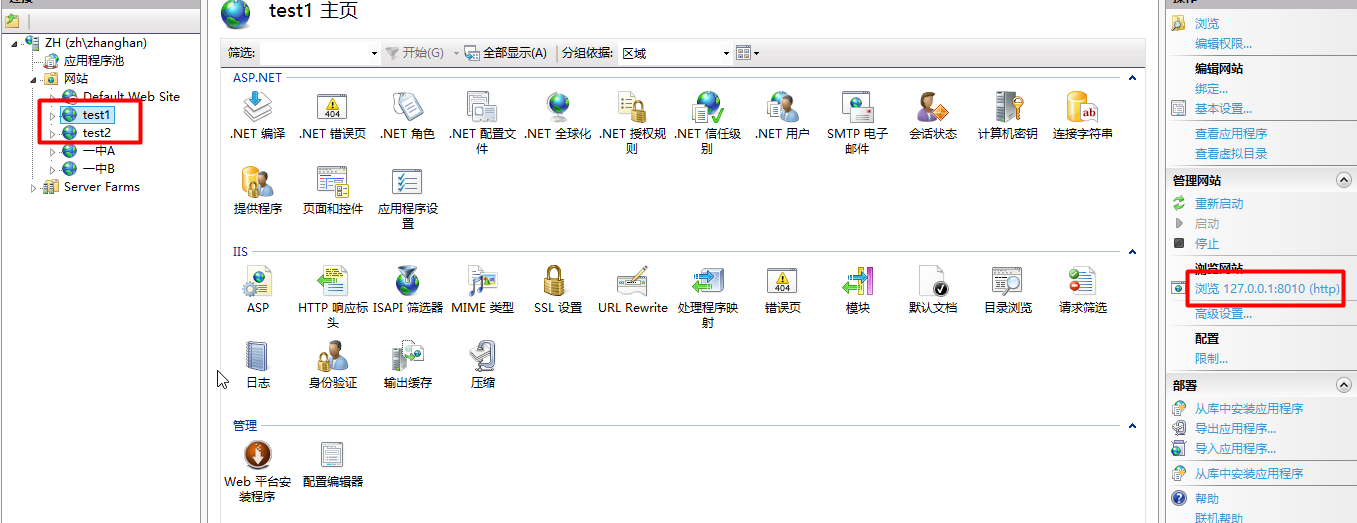
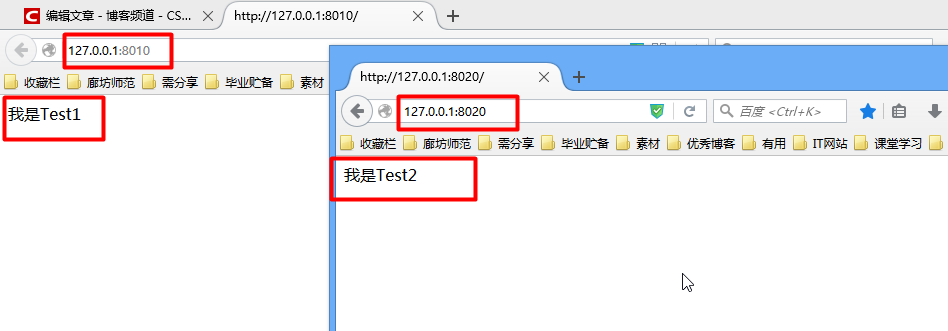
建两个简单网页:在文件夹test1新建一个html页内容为——我是Test1,在文件夹test2新建一个html页内容为——我是Test2)
·将上面建两个网页分别发布在IIS上不同端口号,并测试发布成功(这里以IIS6.2为例,将Test1发布在8010端口上,将Test2发布在8020上)
【配置Nginx】
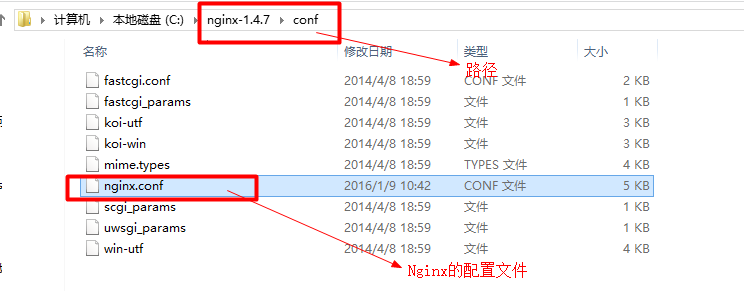
修改后配置如下:
#user  nobody;     #运行用户

worker_processes  ;    #启动进程,通常设置成与 cpu 数量相等

#全局错误日志

error_log  logs/error.log;

error_log  logs/error.log  notice;

error_log  logs/error.log  info;

pid        logs/nginx.pid;    #PID 文件

#工作模式及连接数上限

events {

    worker_connections  ;     #连接数上限

}

http {      #设定 http 服务器,利用它的反向代理功能提供负载均衡支持

    include       mime.types;     #设定 mime 类型,类型由 mime.type 文件定义

    default_type  application/octet-stream;     #默认文件类型

    #设定日志格式

    #log_format  main  '$remote_addr - $remote_user [$time_local] "$request" '

                      '$status $body_bytes_sent "$http_referer" '

                      '"$http_user_agent" "$http_x_forwarded_for"';

    #access_log  logs/access.log  main;

    sendfile        on;     #开启高效文件传输模式,sendfile 指令指定 nginx 是否调用 sendfile 函数来输出文件,对于普通应用设为

on,如果用来进行下载等应用磁盘 IO 重负载应用,可设置为 off,以平衡磁盘与网络 I/O

处理速度,降低系统的负载。注意:如果图片显示不正常把这个改成 off。

    tcp_nopush     on;     #防止网络阻塞

    #keepalive_timeout  ;

    keepalive_timeout  ;    #长连接超时时间,单位为秒

    gzip  on;      #开启 gzip 压缩

    server {      #设定虚拟主机,默认为监听  端口,改成其他端口会出现问题

        listen       ;

        server_name  localhost;

        #charset koi8-r;

        #access_log  logs/host.access.log  main;

        location / {      #默认请求

            root   html;      #定义服务器的默认网站根目录位置;由于 Nginx 在 windows 下不太稳定,建议不作修改

            index  index.html index.htm;    #定义首页索引文件名称

        }

        #error_page                /.html;

        # redirect server error pages to the static page /50x.html

        #

        error_page        /50x.html;    #定义错误提示页面

        location = /50x.html {

            root   html;

        }

        #图片缓存时间设置

        location ~.*/\.(jpg|jpeg|png|gif|swf)$

        {

            expires 30d;

        }

       #JS 和 CSS 缓存时间设置

        location ~.*/\.(js|css)?$

        {

            expires 1h;

        }

        # proxy the PHP scripts to Apache listening on 127.0.0.1:

        #

        #location ~ \.php$ {

        #    proxy_pass   http://127.0.0.1;

        #}

        # pass the PHP scripts to FastCGI server listening on 127.0.0.1:

        #

        #location ~ \.php$ {    #PHP 脚本请求全部转发到 FastCGI 处理. 使用 FastCGI 默认配置

        #    root           html;

        #    fastcgi_pass   127.0.0.1:;

        #    fastcgi_index  index.php;

        #    fastcgi_param  SCRIPT_FILENAME  /scripts$fastcgi_script_name;

        #    include        fastcgi_params;

        #}

        # deny access to .htaccess files, if Apache's document root

        # concurs with nginx's one

        #

        #location ~ /\.ht {    #禁止访问 .htaccess 文件

        #    deny  all;

        #}

    }

    # another virtual host using mix of IP-, name-, and port-based configuration

    #

    #server {

    #    listen       ;

    #    listen       somename:;

    #    server_name  somename  alias  another.alias;

    #    location / {

    #        root   html;

    #        index  index.html index.htm;

    #    }

    #}

    # HTTPS server

    #

    #server {

    #    listen        ssl;

    #    server_name  localhost;

    #    ssl_certificate      cert.pem;

    #    ssl_certificate_key  cert.key;

    #    ssl_session_cache    shared:SSL:1m;

    #    ssl_session_timeout  5m;

    #    ssl_ciphers  HIGH:!aNULL:!MD5;

    #    ssl_prefer_server_ciphers  on;

    #    location / {

    #        root   html;

    #        index  index.html index.htm;

    #    }

    #}

}
我的简单配置如下:
 #设定负载均衡的服务器列表

    upstream mysvr {

      #根据ip计算将请求分配各那个后端tomcat,许多人误认为可以解决session问题,其实并不能。

      #同一机器在多网情况下,路由切换,ip可能不同

      #ip_hash;

      #这里配置你的tomcat  weigth参数表示权值,权值越高被分配到的几率越大

      server localhost: weight=;

      server localhost: weight=;

     }

    server {

        listen       ;

        server_name  localhost;

        #charset koi8-r;

        #access_log  logs/host.access.log  main;

        location / {

            root   html;

            index  index.html index.htm;

            #下面的代理配置必须要

            proxy_connect_timeout ;

            proxy_send_timeout ;

            proxy_read_timeout ;

            proxy_pass http://mysvr;  #请求转向mysvr 定义的服务器列表

        }

        error_page        /50x.html;

        location = /50x.html {

            root   html;

        }

    }
修改Nginx中配置(温馨提示:不要用记事本打开修改否则会乱码)
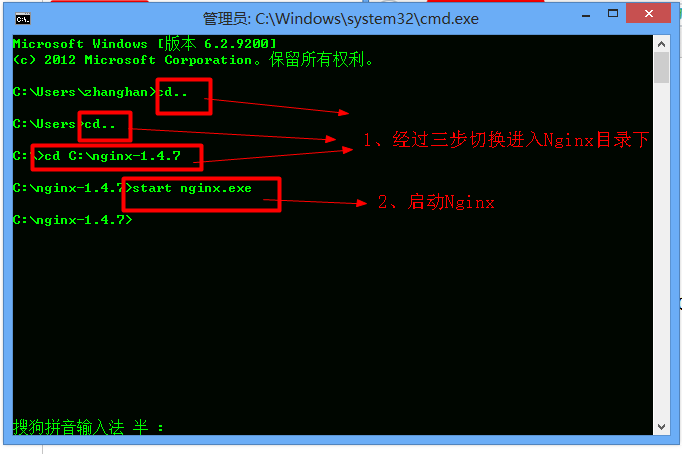
·使用Dos命令进入Nginx文件夹并启动Nginx(这里以将Nginx文件夹放在C盘根目录下为例)
【实现效果】
现在让我们一起见证奇迹吧!打开浏览器,在地址栏中输入刚才在Nginx中设置的代理(这里是127.0.0.1:8090)刷新一下,即可看到效果!!
本文参考 :
http://blog.csdn.net/zhanghan18333611647/article/details/50284629
http://forum.digitser.cn/article-207-1.html
在本地局域网 windows server 2008 下安装 Nginx 1.12.1的更多相关文章
- windows server 2008 下安装openmeetings 2.2.0
经过两天的痛苦经历,终于完成了openmeetings的安装部署.其实步骤都很简单,只是网上的资料都是英文的,而且很多教程都是针对openmeeting之前的版本,导致我在部署的时候走了很多弯路.网上 ...
- Windows Server 2008 下ASP程序连接ORACLE数据库驱动错误
今天开发那边升级.改造系统过程中,在测试服务器碰到关于ASP程序连接ORACLE数据库的小问题,虽然是小问题,但是整起来真要命啊,花了不少时间,主要是ASP程序啊,这种上古神器,哥还是当年毕业的时候弄 ...
- Windows Server 2008中安装IIS7.0
最近由于需求重新部署了一台服务器Windows Server 2008,由于以前都是在Windows Server 2003上操作,因此记录下,供其他同学参考. 下面主要介绍在Windows Se ...
- Windows Server 2012下安装Hyper-V虚拟机
Windows Server 2012下安装Hyper-V虚拟机 Win server 2012系统中Hyper-V 性能进一步提高,广大爱好者都尝试体验它,可是有不少朋友无法正确安装虚拟机,尽管在网 ...
- [转]Win7、Windows Server 2008下无法在Windows Service中打开一个已经存在的Excel 2007文件问题的解决方案
昨天,组里一个小朋友告诉我,他写的报表生成服务中无法打开一个已经存在的Excel 2007文件,他的开发环境是Win7.Visual Studio .Net 2008(Windows Server 2 ...
- windows server 2008见安装IIS方法(解决)
windows server 2008见安装IIS方法(解决) 刚开始有点蒙,后来才知道原来如此.! . 右键点击[我的电脑]--[管理]--[字符]--[加入角色]--仅落后win7像.啊! 版权声 ...
- Windows server 2008 R2安装MySQL 32位ODBC驱动!
在Windows server 2008 R2安装MySQL 32位ODBC驱动,总是提示错误,我安装了DOTNET4的库,同时安装了VC2008.VC2012.VC2013的支持库,怎么还不行呢?M ...
- Windows Server 2008驱动安装全攻略
安装设备驱动程序原本是一件非常简单的事情,很多驱动程序在安装的时候我们只要不停单击“下一步”按钮,就能让驱动程序顺利地在对应计算机系统“落户”;不过,当身边的计算机系统升级为Windows Serve ...
- Windows Server 2008 R2安装WAMPSERVER无法启动的解决方法
其实根本不算什么解决方法,会者不难的事.Windows Server 2008 R2(也包括其他版本的Windows)默认状态下安装WAMPSERVER经常是无法顺利启动WAMPSERVER的,尤其是 ...
随机推荐
- 6.MNIST数据集分类简单版本
import tensorflow as tf from tensorflow.examples.tutorials.mnist import input_data # 载入数据集 mnist = i ...
- C++——子类调用父类方法
原创声明:本文系博主原创文章,转载或引用请注明出处. 1. 如果类B是类A的子类,则在类B的成员方法中调用类A的方法时,可以直接以 A::method(paramlist); 来调用. 2. 若子类B ...
- libusb_bulk_transfer返回值不是0
libusb_bulk_transfer返回值不是0 libusb_bulk_transfer返回值不是0libusb_bulk_transfer返回值不是0 ?????
- JS 循环的两种方式
// 1.for循环 for (var i = 0; i <= 10; ++ i) { console.log(i); } // 2.while循环 var i = 0; while (i &l ...
- mysql索引设计的注意事项
mysql索引设计的注意事项 目录 一.索引的重要性 二.执行计划上的重要关注点 (1).全表扫描,检索行数 (2).key,using index(覆盖索引) (3).通过key_len确定究竟使用 ...
- 微软Blazor组件发布,DevExpress v19.1.8中可用:Charts新功能
点击获取DevExpress v19.2.3最新完整版试用下载 DevExpress UI for Blazor在v19.1.8中可用,此次更新发布包括DevExpress Blazor组件的主要功能 ...
- Codeforces 884E E. Binary Matrix
题 OvO http://codeforces.com/contest/884/problem/E 884e 解 考虑并查集,每个点向上方和左方的点合并,答案即为1的总数减去需要合并的次数 由于只有1 ...
- [人物存档]【AI少女】【捏脸数据】1222今日份的推荐
AISChaF_20191030183624290.png
- abd常用命令
1.adb install -r 包名 ----------安装包,-r 替换原有apk安装 2.adb uninstall -k 包名 ---------------卸载包, ...
- svn版本更新
1.查看当前版本:svn --version 2.配置svn yum源 tee /etc/yum.repos.d/wandisco-svn.repo <<-'EOF' [WandiscoS ...