
ASP.Net模拟用户 System.Security.Principal
一、概述
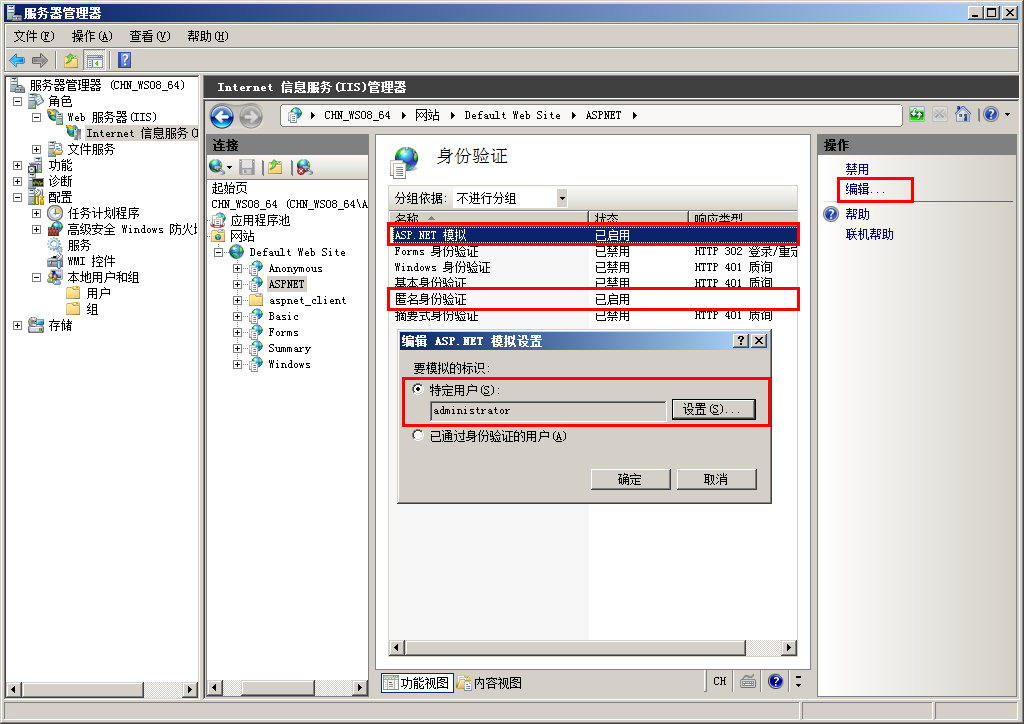
在实际的项目开发中,我们可能会需要调用一些非托管程序,而有些非托管程序需要有更高的身份权限才能正确执行。本文介绍了如何让IIS承载的ASP.NET网站以特定的账户执行,比如Administrator。
默认情况下禁用 ASP.NET 模拟。如果对某 ASP.NET 应用程序启用了模拟,该应用程序将运行在标识上下文中,其访问标记被 IIS 传递给 ASP.NET。
- 该标记可以是已通过身份验证的用户标记(如已登录的 Windows 用户的标记)【IIS上配置“集成Widows身份验证”且不勾选“匿名访问”的情况下】
- 该标记也可以是 IIS 为匿名用户提供的标记(通常为 IUSR_MACHINENAME 标识)。 【IIS上配置勾选“匿名访问”的情况下】
二、读取被模拟用户的标识
注意:可以使用以下代码来确定线程作为哪个用户执行:
WindowsIdentity.GetCurrent().Name
三、模拟 IIS 验证的帐户或用户
若要在收到 ASP.NET 应用程序中每个页的每个请求时模拟 Microsoft Internet 信息服务 (IIS) 身份验证用户,必须在此应用程序的 Web.config 文件中包含 <identity> 标记,并将 impersonate 属性设置为 true。例如:
<identity impersonate="true" />
四、为 ASP.NET 应用程序的所有请求模拟特定用户
若要为 ASP.NET 应用程序的所有页面上的所有请求模拟特定用户,可以在该应用程序的 Web.config 文件的 <identity> 标记中指定 userName 和 password 属性。例如:
<identity impersonate="true" userName="accountname" password="password" />
五、在代码中模拟身份验证用户
若要仅在运行代码的特定部分时模拟身份验证用户 (User.Identity),您可以使用以下代码。此方法要求身份验证用户标识的类型为 WindowsIdentity。
WindowsImpersonationContext impersonationContext =  ((WindowsIdentity)User.Identity).Impersonate();

//Insert your code that runs under the security context of the authenticating user here.

impersonationContext.Undo();
六、在代码中模拟特定用户
若要仅在运行代码的特定部分时模拟特定用户,请使用以下代码(使用Windows API):
<%@ Page Language="C#"%>

<%@ Import Namespace = "System.Web" %>

<%@ Import Namespace = "System.Web.Security" %>

<%@ Import Namespace = "System.Security.Principal" %>

<%@ Import Namespace = "System.Runtime.InteropServices" %>

<script runat=server>

public const int LOGON32_LOGON_INTERACTIVE = ;

public const int LOGON32_PROVIDER_DEFAULT = ;

WindowsImpersonationContext impersonationContext;

[DllImport("advapi32.dll")]

public static extern int LogonUserA(String lpszUserName,

    String lpszDomain,

    String lpszPassword,

    int dwLogonType,

    int dwLogonProvider,

    ref IntPtr phToken);

[DllImport("advapi32.dll", CharSet=CharSet.Auto, SetLastError=true)]

public static extern int DuplicateToken(IntPtr hToken,

    int impersonationLevel,

    ref IntPtr hNewToken);

[DllImport("advapi32.dll", CharSet=CharSet.Auto, SetLastError=true)]

public static extern bool RevertToSelf();

[DllImport("kernel32.dll", CharSet=CharSet.Auto)]

public static extern  bool CloseHandle(IntPtr handle);

public void Page_Load(Object s, EventArgs e)

{

    if(impersonateValidUser("username", "domain", "password"))

    {

        //Insert your code that runs under the security context of a specific user here.

        undoImpersonation();

    }

    else

    {

        //Your impersonation failed. Therefore, include a fail-safe mechanism here.

    }

}

private bool impersonateValidUser(String userName, String domain, String password)

{

    WindowsIdentity tempWindowsIdentity;

    IntPtr token = IntPtr.Zero;

    IntPtr tokenDuplicate = IntPtr.Zero;

    if(RevertToSelf())

    {

        if(LogonUserA(userName, domain, password, LOGON32_LOGON_INTERACTIVE,

            LOGON32_PROVIDER_DEFAULT, ref token) != )

        {

            if(DuplicateToken(token, , ref tokenDuplicate) != )

            {

                tempWindowsIdentity = new WindowsIdentity(tokenDuplicate);

                impersonationContext = tempWindowsIdentity.Impersonate();

                if (impersonationContext != null)

                {

                    CloseHandle(token);

                    CloseHandle(tokenDuplicate);

                    return true;

                }

            }

        }

    }

    if(token!= IntPtr.Zero)

        CloseHandle(token);

    if(tokenDuplicate!=IntPtr.Zero)

        CloseHandle(tokenDuplicate);

    return false;

}

private void undoImpersonation()

{

    impersonationContext.Undo();

}
ASP.Net模拟用户 System.Security.Principal的更多相关文章
- 【windows 访问控制】十二、C#实操 主体 System.Security.Principal 案例
案例1.主体(包含用户和组)和标识(用户名)的使用. PrincipalPolicy枚举:主体类型 分为window主体.未认证的主体和未分配主体GenericPrincipal.GenericIde ...
- 谈 IIS7.5 Asp.Net模拟用户
IIS Asp.模拟用户官方的解释是: 如果要在非默认安全上下文中运行 ASP.NET 应用程序,请使用 ASP.NET 模拟身份验证. 如果您对某个 ASP.NET 应用程序启用了模拟,那么该应用 ...
- 如何在 ASP.NET 应用程序中实现模拟用户身份(在ASP.NET中以管理员身份运行网站)
前言 在实际的项目开发中,我们可能会需要调用一些非托管程序,而有些非托管程序需要有更高的身份权限才能正确执行.本文介绍了如何让IIS承载的ASP.NET网站以特定的账户执行,比如Administrat ...
- identity与ASP.NET 模拟
默认情况下,ASP.NET应用程序以本机的ASPNET帐号运行,该帐号属于普通用户组,权限受到一定的限制,以保障ASP.NET应用程序运行的安全.但是有时需要某个ASP.NET应用程序或者程序中的某段 ...
- (C#)为应用程式设定运行权限(System.Security类下的GenericIdentity,GenericPrincipal,PrincipalPermission)
最近看书<编写高质量代码改善C#程序的157个建议>,知识点备忘: System.Security.Principal.GenericIdentity==>表示一般用户 System ...
- 【windows 访问控制】十一、C# 实操 对象 System.Security.AccessControl 命名空间
AccessControl 命名空间 结构图 解说: DirectorySecurity=目录ACLFileSecurity=文件ACLFileSystemAuditRule=目录和文件中SACL中的 ...
- WebApi 数据保护操作未成功。这可能是由于未为当前线程的用户上下文加载用户配置文件导致的。当线程执行模拟时,可能会出现此情况。","ExceptionType":"System.Security.Cryptography.CryptographicException","StackTrace
在调用System.Security.Cryptography.ProtectedData.Protect方法来保护私密信息时,IIS可能会报以下错误:CryptographicException: ...
- 部署时,出现用户代码未处理 System.Security.Cryptography.CryptographicException 错误解决方法
转载:http://www.cnblogs.com/jys509/p/4499978.html 在调用RSA加密的.pfx密钥时,在本地调试没有问题,可以布署到服务器,就会报以下的错误: 用户代码未处 ...
- ASP.NET MVC 用户登录Login
ASP.NET MVC 用户登录Login一.先来看个框架例子:(这个是网上收集到的) 第一步:创建一个类库ClassLibrary831. 第二步:编写一个类实现IHttpM ...
随机推荐
- 分布式缓存 - hash环/一致性hash
一 引言 当前memcached,redis这类分布式kv缓存已经非常普遍.我们知道memcached的分布式其实是一种"伪分布式",也就是它的服务器节点之间其实是无关联的,之间没 ...
- golang goroutine进行通信 channel
1.channel的读取与声明 //goroutine之间利用channel进行通信 package main import ( "fmt" "time" ) ...
- springboot项目在IDEA根据不同的开发人员读取不同的配置文件
IDEA启动项目打开项目的配置文件,修改Program argument为--spring.profiles.active=developerName启动项目,即可 命令行方式启动项目 java -j ...
- hdu 6375 度度熊学队列 (链表模拟)
度度熊正在学习双端队列,他对其翻转和合并产生了很大的兴趣. 初始时有 N 个空的双端队列(编号为 1 到 N ),你要支持度度熊的 Q 次操作. ①1 u w val 在编号为 u 的队列里加入一个 ...
- Linux自动运维工具Ansible的使用
Linux自动运维工具Ansible的使用 我们熟悉这个工具后, 可以很轻松的安装k8s. 一.介绍 ansible - run a task on a target host(s) Ansible是 ...
- NavigatorOnLine.onLine——判断设备是否可以上网
概述:返回浏览器的联网状态.正常联网(在线)返回true,不正常联网(离线)返回false.一旦浏览器的联网状态发生改变,该属性值也会随之变化. 1.语法 let online = window.na ...
- 在论坛中出现的比较难的sql问题:4(row_number函数+子查询 分组连续编号问题)
原文:在论坛中出现的比较难的sql问题:4(row_number函数+子查询 分组连续编号问题) 所以,觉得有必要记录下来,这样以后再次碰到这类问题,也能从中获取解答的思路. 求一查询语句 http: ...
- 笔记: ASP.NET Core视图组件
视图组件 asp.net core mvc 提供了部分视图的新替代品:视图组件. 视图组件与分布视图的主要区别在于视图组件与控制器不相关.可使用在独立于单个控制器的场景,如:菜单导航.侧边栏.分页栏等 ...
- Vue绑定的table页面在Chrome浏览器左右抖动
现象: 今天Chrome浏览器升级到最新版本(75.0.3770.100),突然发现之前vue页面只要绑定了el-table标签的,都在左右抖动,抖动得眼睛都花了,百度上找半天也没有遇到相同问题的人, ...
- OutOfRangeError的解决办法
自制TFRecord数据集,训练神经网络出现的一个问题,及解决办法. 错误现象: 数据训练完成后,测试数据集正确率时,运行mnist_test.py文件,出现错误代码 问题分析:显示需测试数据10 ...