
ASP.Net模拟用户 System.Security.Principal
一、概述
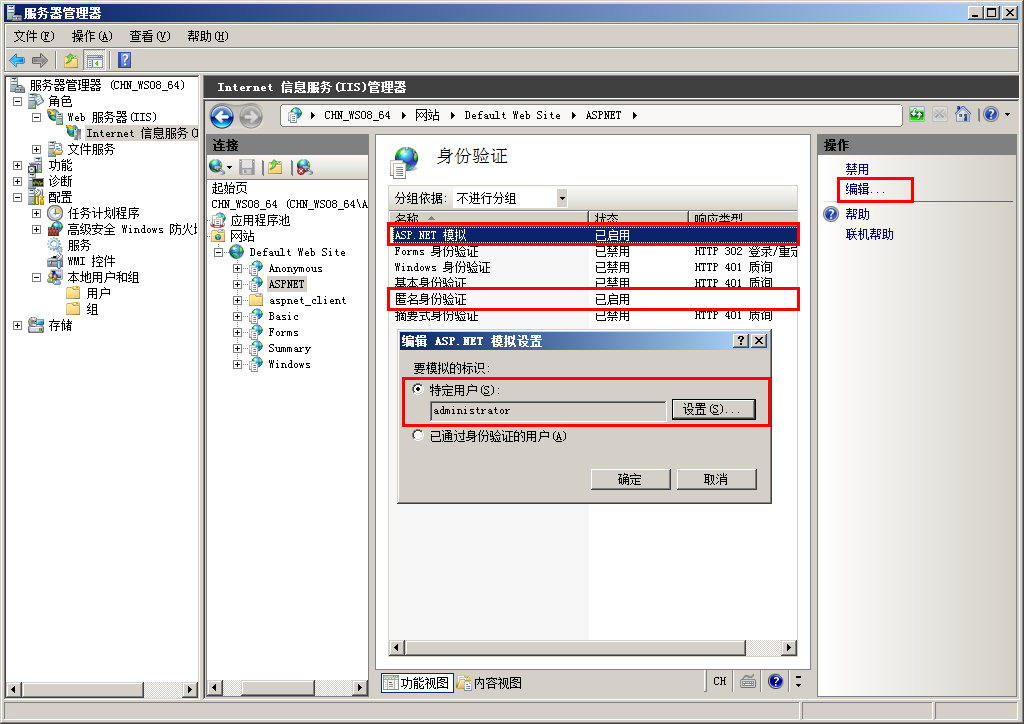
在实际的项目开发中,我们可能会需要调用一些非托管程序,而有些非托管程序需要有更高的身份权限才能正确执行。本文介绍了如何让IIS承载的ASP.NET网站以特定的账户执行,比如Administrator。
默认情况下禁用 ASP.NET 模拟。如果对某 ASP.NET 应用程序启用了模拟,该应用程序将运行在标识上下文中,其访问标记被 IIS 传递给 ASP.NET。
- 该标记可以是已通过身份验证的用户标记(如已登录的 Windows 用户的标记)【IIS上配置“集成Widows身份验证”且不勾选“匿名访问”的情况下】
- 该标记也可以是 IIS 为匿名用户提供的标记(通常为 IUSR_MACHINENAME 标识)。 【IIS上配置勾选“匿名访问”的情况下】
二、读取被模拟用户的标识
注意:可以使用以下代码来确定线程作为哪个用户执行:
WindowsIdentity.GetCurrent().Name
三、模拟 IIS 验证的帐户或用户
若要在收到 ASP.NET 应用程序中每个页的每个请求时模拟 Microsoft Internet 信息服务 (IIS) 身份验证用户,必须在此应用程序的 Web.config 文件中包含 <identity> 标记,并将 impersonate 属性设置为 true。例如:
<identity impersonate="true" />
四、为 ASP.NET 应用程序的所有请求模拟特定用户
若要为 ASP.NET 应用程序的所有页面上的所有请求模拟特定用户,可以在该应用程序的 Web.config 文件的 <identity> 标记中指定 userName 和 password 属性。例如:
<identity impersonate="true" userName="accountname" password="password" />
五、在代码中模拟身份验证用户
若要仅在运行代码的特定部分时模拟身份验证用户 (User.Identity),您可以使用以下代码。此方法要求身份验证用户标识的类型为 WindowsIdentity。
WindowsImpersonationContext impersonationContext =  ((WindowsIdentity)User.Identity).Impersonate();

//Insert your code that runs under the security context of the authenticating user here.

impersonationContext.Undo();
六、在代码中模拟特定用户
若要仅在运行代码的特定部分时模拟特定用户,请使用以下代码(使用Windows API):
<%@ Page Language="C#"%>

<%@ Import Namespace = "System.Web" %>

<%@ Import Namespace = "System.Web.Security" %>

<%@ Import Namespace = "System.Security.Principal" %>

<%@ Import Namespace = "System.Runtime.InteropServices" %>

<script runat=server>

public const int LOGON32_LOGON_INTERACTIVE = ;

public const int LOGON32_PROVIDER_DEFAULT = ;

WindowsImpersonationContext impersonationContext;

[DllImport("advapi32.dll")]

public static extern int LogonUserA(String lpszUserName,

    String lpszDomain,

    String lpszPassword,

    int dwLogonType,

    int dwLogonProvider,

    ref IntPtr phToken);

[DllImport("advapi32.dll", CharSet=CharSet.Auto, SetLastError=true)]

public static extern int DuplicateToken(IntPtr hToken,

    int impersonationLevel,

    ref IntPtr hNewToken);

[DllImport("advapi32.dll", CharSet=CharSet.Auto, SetLastError=true)]

public static extern bool RevertToSelf();

[DllImport("kernel32.dll", CharSet=CharSet.Auto)]

public static extern  bool CloseHandle(IntPtr handle);

public void Page_Load(Object s, EventArgs e)

{

    if(impersonateValidUser("username", "domain", "password"))

    {

        //Insert your code that runs under the security context of a specific user here.

        undoImpersonation();

    }

    else

    {

        //Your impersonation failed. Therefore, include a fail-safe mechanism here.

    }

}

private bool impersonateValidUser(String userName, String domain, String password)

{

    WindowsIdentity tempWindowsIdentity;

    IntPtr token = IntPtr.Zero;

    IntPtr tokenDuplicate = IntPtr.Zero;

    if(RevertToSelf())

    {

        if(LogonUserA(userName, domain, password, LOGON32_LOGON_INTERACTIVE,

            LOGON32_PROVIDER_DEFAULT, ref token) != )

        {

            if(DuplicateToken(token, , ref tokenDuplicate) != )

            {

                tempWindowsIdentity = new WindowsIdentity(tokenDuplicate);

                impersonationContext = tempWindowsIdentity.Impersonate();

                if (impersonationContext != null)

                {

                    CloseHandle(token);

                    CloseHandle(tokenDuplicate);

                    return true;

                }

            }

        }

    }

    if(token!= IntPtr.Zero)

        CloseHandle(token);

    if(tokenDuplicate!=IntPtr.Zero)

        CloseHandle(tokenDuplicate);

    return false;

}

private void undoImpersonation()

{

    impersonationContext.Undo();

}
ASP.Net模拟用户 System.Security.Principal的更多相关文章
- 【windows 访问控制】十二、C#实操 主体 System.Security.Principal 案例
案例1.主体(包含用户和组)和标识(用户名)的使用. PrincipalPolicy枚举:主体类型 分为window主体.未认证的主体和未分配主体GenericPrincipal.GenericIde ...
- 谈 IIS7.5 Asp.Net模拟用户
IIS Asp.模拟用户官方的解释是: 如果要在非默认安全上下文中运行 ASP.NET 应用程序,请使用 ASP.NET 模拟身份验证. 如果您对某个 ASP.NET 应用程序启用了模拟,那么该应用 ...
- 如何在 ASP.NET 应用程序中实现模拟用户身份(在ASP.NET中以管理员身份运行网站)
前言 在实际的项目开发中,我们可能会需要调用一些非托管程序,而有些非托管程序需要有更高的身份权限才能正确执行.本文介绍了如何让IIS承载的ASP.NET网站以特定的账户执行,比如Administrat ...
- identity与ASP.NET 模拟
默认情况下,ASP.NET应用程序以本机的ASPNET帐号运行,该帐号属于普通用户组,权限受到一定的限制,以保障ASP.NET应用程序运行的安全.但是有时需要某个ASP.NET应用程序或者程序中的某段 ...
- (C#)为应用程式设定运行权限(System.Security类下的GenericIdentity,GenericPrincipal,PrincipalPermission)
最近看书<编写高质量代码改善C#程序的157个建议>,知识点备忘: System.Security.Principal.GenericIdentity==>表示一般用户 System ...
- 【windows 访问控制】十一、C# 实操 对象 System.Security.AccessControl 命名空间
AccessControl 命名空间 结构图 解说: DirectorySecurity=目录ACLFileSecurity=文件ACLFileSystemAuditRule=目录和文件中SACL中的 ...
- WebApi 数据保护操作未成功。这可能是由于未为当前线程的用户上下文加载用户配置文件导致的。当线程执行模拟时,可能会出现此情况。","ExceptionType":"System.Security.Cryptography.CryptographicException","StackTrace
在调用System.Security.Cryptography.ProtectedData.Protect方法来保护私密信息时,IIS可能会报以下错误:CryptographicException: ...
- 部署时,出现用户代码未处理 System.Security.Cryptography.CryptographicException 错误解决方法
转载:http://www.cnblogs.com/jys509/p/4499978.html 在调用RSA加密的.pfx密钥时,在本地调试没有问题,可以布署到服务器,就会报以下的错误: 用户代码未处 ...
- ASP.NET MVC 用户登录Login
ASP.NET MVC 用户登录Login一.先来看个框架例子:(这个是网上收集到的) 第一步:创建一个类库ClassLibrary831. 第二步:编写一个类实现IHttpM ...
随机推荐
- RabbitMQ的安装(Windows环境下)
在使用RabbitMQ之前,先知道什么是AMQP,AMQP 即 Advanced Message Queuing Protocol ,又叫高级消息队列协议,是应用层协议的一个开放标准,其主要特征是面向 ...
- MakeFile文件是什么——内容、工作原理、作用、使用
MakeFile文件是什么?它里面包含什么内容.具有什么作用.怎么使用?下面就来具体说说. 什么是makefile?或许很多Winodws的程序员都不知道这个东西,因为那些Windows的IDE都为你 ...
- REDIS scan与sunionstore合并多集合数据
实际业务场景: 现需求要将多个KEY的set集合数据合并到一个总集合中,思路:通过scan分批扫描满足条件的KEY,然后用sunionstore分批合并. 注意闭坑:此种解决方案只适用于待合并的集合K ...
- 阿里三面46题:java高级+数据库+网络+架构设计!含答案大赠送!
阿里一面 自我介绍 链表,数组的优缺点,应用场景,查找元素的复杂度 二叉树怎么实现的 Java中都有哪些锁 可重入锁的设计思路是什么 乐观锁和悲观锁 synchronized机制 hashmap原理, ...
- Oracle常用基础语句(杂)
打开服务 WIN + R services.msc 登录 --方法1 --WIN + R --CMD sqlplus / as sysdba --方法2,常用 --WIN + R --CMD --&q ...
- PHP正则 正向预查&反向预查
了解正向预查&反向预查前,我们先要知道正则的2个函数:preg_match_all . preg_replace preg_match_all 可以看文章:点击查看 preg_replace ...
- Linux下/etc/login.defs文件
/etc/login.defs文件定义了与/etc/password和/etc/shadow配套的用户限制设定.这个文件是需要的,缺失并不会影响系统的使用,但是也许会产生意想不到的错误. 如果/etc ...
- (十五)Activitivi5之多用户任务分配
一.概念 我们在开发的时候,有一种情况是这样的, 我们有一个任务,可以让多个用户中的任何一个人办理即可,比如某个审批任务, 张三,李四,王五他们中的任何一人办理下都行,这时候,我们用到多用户任务分配. ...
- (八)Redis之持久化之AOF方式
一.概念 AOF方式:将以日志,记录每一个操作 优势:安全性相对RDB方式高很多: 劣势:效率相对RDB方式低很多: 二.案例 appendonly no默认关闭aof方式 我们修改成yes 就开启 ...
- VBA术语(三)
在本章中,将介绍常用的Excel VBA术语.这些术语将在很多的模块中使用,因此理解其中的每一个术语都很重要. 模块 模块是编写代码的区域.如下图中,这是一个新的工作簿,因此没有任何模块. 要插入模块 ...