
fatal error C1189: #error: "Oops: min() and/or max() are defined as preprocessor macros. Define NOMINMAX macro before including any system headers!"
1.问题描述
vs2015 使用pg数据库的C++库文件4.0.1版本libpqxx.dll,包含头文件#include "pqxx\pqxx" 出现这个错误:
fatal error C1189: #error: "Oops: min() and/or max() are defined as preprocessor macros. Define NOMINMAX macro before including any system headers!"
2.原因分析
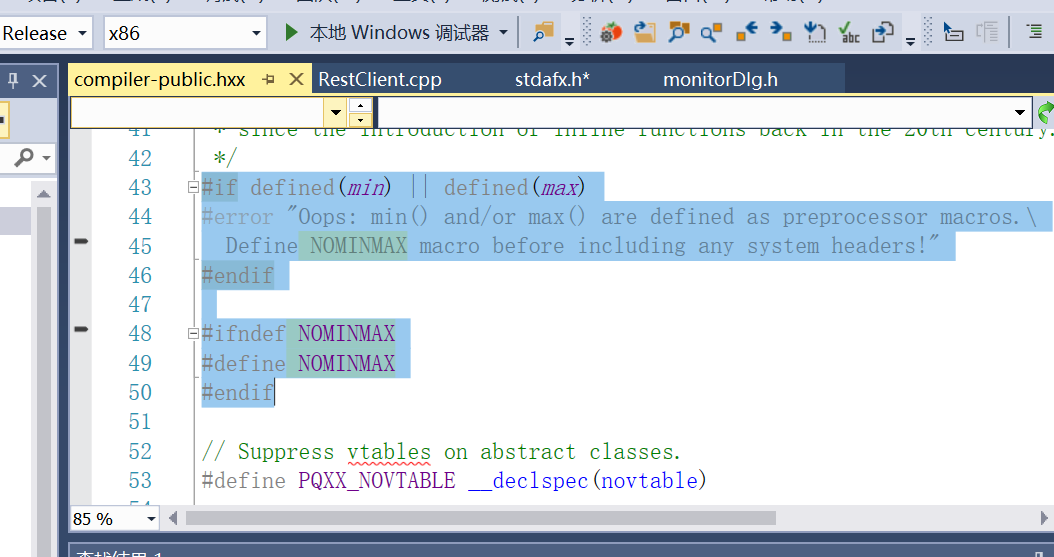
图1 pqxx头文件中的定义
(1)如上图1所示,pqxx的头文件中compiler-public.hxx中有一段,如果定义了min和max,则会抛出错误。系统头文件中定义了这两个宏min和max。所以如果把pqxx包含在系统头文件之后,就会出现这个错误。所以要求吧pqxx包含在系统头文件之前。这样就不会抛出异常。
fatal error C1189: #error: "Oops: min() and/or max() are defined as preprocessor macros. Define NOMINMAX macro before including any system headers!"
pqxx文件定义了一些宏定义,与系统中的系统头文件的宏定义冲突,导致系统头文件编译时抛出错误;
(2)当你把pqxx包含在系统头文件之前又会出现系统头文件中找不到min和max标识符的错误,原因是图1中定义了NOMINMAX宏,使得系统头文件中的min和max无效了。
1>c:\program files (x86)\windows kits\8.1\include\um\GdiplusTypes.h(475): error C3861: “min”: 找不到标识符
1>c:\program files (x86)\windows kits\8.1\include\um\GdiplusTypes.h(476): error C3861: “min”: 找不到标识符
1>c:\program files (x86)\windows kits\8.1\include\um\GdiplusTypes.h(477): error C3861: “max”: 找不到标识符
1>c:\program files (x86)\windows kits\8.1\include\um\GdiplusTypes.h(478): error C3861: “max”: 找不到标识符
1>c:\program files (x86)\windows kits\8.1\include\um\GdiplusTypes.h(499): error C3861: “max”: 找不到标识符
(3)所以pqxx的头文件中没有定义min和max,也不需要min和max宏。和系统头文件中定义了min和max宏,也需要min和max宏。
3.解决办法
在stdafx.h头文件的最前面加上如下,先包含pqxx,放在系统头文件前面,中间取消NOMINMAX的宏定义,使得系统头文件中的min和max宏生效,再包含系统头文件,系统头文件中就可以使用min和max。
#include "pqxx\pqxx"
using namespace pqxx;
#undef NOMINMAX

自己开发了一个股票智能分析软件,功能很强大,需要的点击下面的链接获取:
https://www.cnblogs.com/bclshuai/p/11380657.html
百度云盘下载地址:
链接:https://pan.baidu.com/s/1swkQzCIKI3g3ObcebgpIDg
提取码:mc8l
微信公众号获取最新的软件和视频介绍
QStockView

fatal error C1189: #error: "Oops: min() and/or max() are defined as preprocessor macros. Define NOMINMAX macro before including any system headers!"的更多相关文章
- fatal error C1189: #error : WINDOWS.H already included. MFC apps must not #include <windows.h>
给对话框添加类, 报错 CalibrateMFCDlg.h(6) : error C2504: “CDialog”: 未定义基类 等多个错误 加上 #include "afxwin.h&qu ...
- VS2003转VS2010 fatal error C1189: #error
我自己的mfc的demo要转换编译环境出现以下编译错误: VS2010编译错误:fatal error C1189: #error : This file requires _WIN32_WINNT ...
- 【转】fatal error C1189: #error : missing -D__STDC_CONSTANT_MACROS / #define __STDC_CONSTANT_MACROS
转自:http://blog.csdn.net/friendan/article/details/46576699 fatal error C1189: #error : missing -D__S ...
- fatal error C1189: #error : core.hpp header must be compiled as C++
两次opencv工程需要设置为C++编译:找了一半天的解决方法. I am building a C application that uses OpenCV. when compiling, I g ...
- fatal error C1189: #error : Building MFC application with /MD[d] (CRT dll version) requires MFC
出现如下错误: fatal error C1189: #error : Building MFC application with /MD[d] (CRT dll version) requires ...
- fatal error C1189: #error : Building MFC application with /MD[d] (CRT dll version) requires MFC sha
调试程序时出现以下问题:d:\program files (x86)\microsoft visual studio 10.0\vc\atlmfc\include\afx.h(24): fatal e ...
- error C2065: “CString”: 未声明的标识符 ;fatal error C1189: #error : afxstr.h can only be used in MFC proje
转自VC错误:http://www.vcerror.com/?p=1388 问题描述: error C2065: "CString": 未声明的标识符 fatal error C1 ...
- fatal error C1189: #error : "No Target Architecture" 解决办法一
在编译程序的时候发现报这个错误,在网上看到很多文章,说设置include路径,lib目录等等,都没有解决.最后调整了以下include文件的顺序,问题解决了.例如 从头文件a.h中截取的一段 type ...
- vc/atlmfc/include/afx.h(24) : fatal error C1189: #error : Building MFC application with /MD[d] (CRT
环境:win7,64位,vs2012 1> c:/program files/microsoft visual studio 8/vc/atlmfc/include/afx.h(24) : fa ...
随机推荐
- python 常见内置函数setattr、getattr、delattr、setitem、getitem、delitem
常见内置函数 内置函数:在类的内部,特定时机自动触发的函数 示例1:setattr.getattr.delattr class Person: # def __init__(self, name): ...
- java 将一个正整数翻译成人民币大写的读法
程序如下: import java.lang.StringBuffer; /** 给定一个浮点数,将其装换成人民币大写的读法 88.5:捌十捌元零伍角 */ public class Num2Rmb ...
- 去重复的sql(Oracle)
1.利用group by 去重复 2.可以利用下面的sql去重复,如下 1) select id,name,sex from (select a.*,row_number() over(partiti ...
- JAVA 分布式
什么是分布式系统? 要理解分布式系统,主要需要明白一下2个方面: 1.分布式系统一定是由多个节点组成的系统. 其中,节点指的是计算机服务器,而且这些节点一般不是孤立的,而是互通的. 2.这些连通的节点 ...
- Delphi BuildCommDCBAndTimeouts函数
- (备忘)Nginx中文手册(技术指南第二版)
Nginx 常见应用技术指南[Nginx Tips] 第二版 目 录 一. Nginx 基础知识二. Nginx 安装及调试三. Nginx Rewrite四. Nginx Redirect五. Ng ...
- 微信小程序开发(二)创建一个小程序页面
为了方便讲解,我们将上篇博客创建的小程序除了project.config.json和sitemap.json两个文件保留,其他全部删除(这两个文件存的是小程序的创建信息,删掉会有报错提示). 接下来我 ...
- 代码检查工具sonarqube介绍
SonarQube 是一款用于代码质量管理的开源工具,它主要用于管理源代码的质量.通过插件形式,可以支持众多计算机语言. 比如 java, C#, go,C/C++, PL/SQL,Cobol,Jav ...
- crc32 cpp Makefile可参考
https://github.com/stbrumme/crc32 # simple Makefile CPP = g++ # files PROGRAM = Crc32Test LIBS = -lr ...
- 8080 端口被占用的解决方法 netstat -ano;taskkill (命令行)
8080 端口被占用的解决方法 netstat -ano:taskkill (命令行) (ano 和 aon 都可以) 打开命令行: (1)netstat -ano 可查看端口使用情况,记住 PID ...