
IExtenderProvider,c#组件扩展控件属性
[ProvideProperty("IsEnabled", typeof(LayoutControlItem)), ToolboxItemFilter("System.Windows.Forms"), Description("DevExpress自定义注册控件")]

    public partial class UserContorlEnabledClick : Component, IExtenderProvider

    {

        #region 构造函数

        private Hashtable items;//存放控件设置

        private Hashtable validateItems;

        public UserContorlEnabledClick()

        {

            InitializeComponent();

            items = new Hashtable();

            validateItems = new Hashtable();

        }

        public bool CanExtend(object extendee)

        {

            return true;

        }

        #endregion

        /// <summary>

        /// 显示自定义属性(Visual Studio设计器 IExtenderProvider接口方法)

        /// </summary>

        public RegexContext GetIsEnabled(LayoutControlItem control)

        {

            if (control == null)

            {

                throw new ArgumentNullException("LayoutControlItem");

            }

            RegexContext con = EnsurePropertiesExists(control);

            return con;

        }

        /// <summary>

        /// 设置自定义属性(Visual Studio设计器 IExtenderProvider接口方法)

        /// </summary>

        public void SetIsEnabled(LayoutControlItem control, RegexContext value)

        {

            RegexContext context = EnsurePropertiesExists(control);

            context.IsClick = value.IsClick;

            context.Validate = value.Validate;

            if (context.IsClick)

            {

                control.Click -= item_Click;

                control.Click += item_Click;

            }

        }

        /// <summary>

        /// 确保扩展属性的菜单项在字典中

        /// </summary>

        /// <param name="key">目标菜单项</param>

        /// <returns>扩展属性</returns>

        private RegexContext EnsurePropertiesExists(object key)

        {

            RegexContext p;

            if (items.ContainsKey(key))

            {

                p = (RegexContext)items[key];

            }

            else

            {

                p = new RegexContext();

                items.Add(key, p);

            }

            if (!validateItems.ContainsKey(key))

            {

                validateItems.Add(key, p);

            }

            return p;

        }

        /// <summary>

        /// 点击事件

        /// </summary>

        private void item_Click(object sender, EventArgs e)

        {

            LayoutControlItem item = sender as LayoutControlItem;

            if (item == null) return;

            item.Control.Enabled = GetEnabled(item.Control.Enabled);

        }

        private bool GetEnabled(bool enabled)

        {

            if (enabled)

                return false;

            else

                return true;

        }

        //private void SetFromControl(Control control)

        //{

        //    var regexContext = userDXValidateExtender1.GetError(control);

        //    regexContext.AllowEmpty = !control.Enabled;

        //}

    }

    /// <summary>

    /// 属性

    /// </summary>

    [TypeConverter(typeof(ValidateTypeConverter)), ComVisible(true)]

    public class RegexContext

    {

        /// <summary>

        /// 异常信息

        /// </summary>

        private string _RegexExpression;

        [Category("验证"), DefaultValue(""), Description("设置异常信息")]

        public string RegexExpression

        {

            get { return _RegexExpression; }

            set { _RegexExpression = value; }

        }

        /// <summary>

        /// 是否注册点击事件

        /// </summary>

        private bool _isClick;

        [Category("验证"), DefaultValue(""), Description("设置点击事件enabled")]

        public bool IsClick

        {

            get { return _isClick; }

            set { _isClick = value; }

        }

        /// <summary>

        /// 是否验证控件

        /// </summary>

        private bool _Validate;

        [Category("验证"), DefaultValue(""), Description("设置验证控件不能为空")]

        public bool Validate

        {

            get { return _Validate; }

            set { _Validate = value; }

        }

    }

    public class ValidateTypeConverter : TypeConverter

    {

        public override bool CanConvertTo(ITypeDescriptorContext context, Type destinationType)

        {

            //如果目标类型是字符串,允许将自定义类型转换为字符串

            if (destinationType == typeof(string))

            {

                return true;

            }

            return base.CanConvertTo(context, destinationType);

        }

        public override object ConvertTo(ITypeDescriptorContext context, CultureInfo culture, object value, Type destinationType)

        {

            //如果要转换为自定义类型

            if (destinationType == typeof(string))

            {

                if (value is RegexContext)

                {

                    RegexContext ca = (RegexContext)value;

                    return ca.RegexExpression;

                }

            }

            return base.ConvertTo(context, culture, value, destinationType);

        }

        public override bool CanConvertFrom(ITypeDescriptorContext context, Type sourceType)

        {

            return false;

        }

        public override object ConvertFrom(ITypeDescriptorContext context, CultureInfo culture, object value)

        {

            string strValue = value as string;

            if (strValue != null)

            {

                string text = strValue.Trim();

                if (text.Length == )

                {

                    return null;

                }

                else

                {

                    RegexContext member = new RegexContext();

                    return member;

                }

            }

            return base.ConvertFrom(context, culture, value);

        }

        public override object CreateInstance(ITypeDescriptorContext context, IDictionary propertyValues)

        {

            if (propertyValues == null)

            {

                throw new ArgumentNullException("propertyValues");

            }

            object regexExString = propertyValues["RegexExpression"];

            object IsClick = propertyValues["IsClick"];

            object Validate = propertyValues["Validate"];

            RegexContext member = new RegexContext();

            member.RegexExpression = (string)regexExString;

            member.IsClick = (bool)IsClick;

            member.Validate = (bool)Validate;

            return member;

        }

        public override bool GetCreateInstanceSupported(ITypeDescriptorContext context)

        {

            return true;

        }

        public override PropertyDescriptorCollection GetProperties(ITypeDescriptorContext context, object value,

                                                                   Attribute[] attributes)

        {

            PropertyDescriptorCollection props = TypeDescriptor.GetProperties(typeof(RegexContext), attributes);

            return props.Sort(new string[]

                {

                    "RegexExpression",

                    "IsClick",

                    "Validate"

                });

        }

        public override bool GetPropertiesSupported(ITypeDescriptorContext context)

        {

            return true;

        }

    }

}
1、让UserContorlEnabledClick组件实现System.ComponentModel.IExtenderProvider接口,并继承System.ComponentModel.Component类,同时用ProvidePropertyAttribute特性描述该类。实现IExtenderProvider接口就表明本类是一个【扩展程序提供程序】,MSDN有相关的示例:http://msdn.microsoft.com/zh-cn/library/ms229066(v=vs.80).aspx。那么到底是要给什么类扩展出什么属性呢,这是由ProvideProperty特性定义的,本类的目的是为【UserContorlEnabledClick】类扩展出一个叫【IsEnabled】的属性,
继承Component则是为了让UserContorlEnabledClick像LayoutControlItem那样能拖入到VS组件栏中,这样LayoutControlItem的属性窗格中才会多出一个IsEnabled属性来。、
2、实现一个public string GetIsEnabled(LayoutControlItem control)方法,作用是获取指定控件,这也是第2步中定义容器的原因,没有容器记录下各个控件及其描述属性,这个方法将难以实现。注意该方法的命名必须是Get+ProvideProperty中定义的扩展属性名,即IsEnabled,合起来就是GetIsEnabled。另外,对该方法加DefaultValue特性是必要的,不然当拖入ToolDescribe时,VS会对所有item进行扩展,不管有没有设置某个item的Describe,这点可以从InitializeComponent方法中看出来;
3、实现一个public void SetIsEnabled(LayoutControlItem control, RegexContext value)方法,命名要求同上。该方法的作用注册事件或设置属性和添加到容器里(Hashtable)。
4、自定义属性RegexContext类,及自定ValidateTypeConverter类(这个特性十分重要,可以让属性折叠显示),
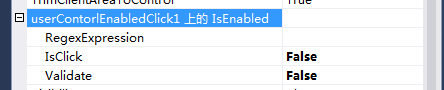
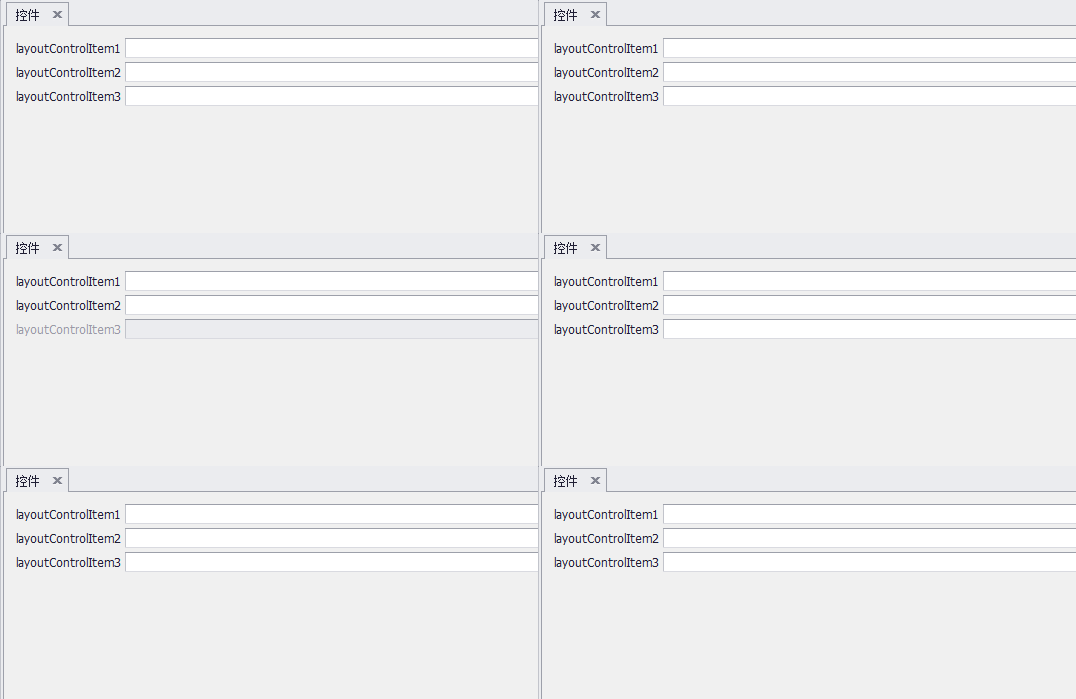
效果图
我是参考大佬的博客https://www.cnblogs.com/ahdung/p/4169724.html,嘻嘻嘻
IExtenderProvider,c#组件扩展控件属性的更多相关文章
- ExtJs控件属性配置详细
序言: 1.本文摘自网络,看控件命名像是4.0以前的版本,但控件属性配置仍然可以借鉴(不足之处,以后项目用到时再续完善). Ext.form.TimeField: 配置项: ...
- Android控件属性大全(转)
http://blog.csdn.net/pku_android/article/details/7365685 LinearLayout 线性布局 子元素任意: Tab ...
- FoxOne---一个快速高效的BS框架--WEB控件属性编辑器
FoxOne---一个快速高效的BS框架--(1) FoxOne---一个快速高效的BS框架--(2) FoxOne---一个快速高效的BS框架--(3) FoxOne---一个快速高效的BS框架-- ...
- Android控件属性大全[整理转载]
控件属性: android属性 Android功能强大,界面华丽,但是众多的布局属性就害苦了开发者,下面这篇文章结合了网上不少资料, 第一类:属性值为true或falseandroid:layout_ ...
- 【转载】Android控件属性大全
控件属性: android属性 Android功能强大,界面华丽,但是众多的布局属性就害苦了开发者,下面这篇文章结合了网上不少资料, 第一类:属性值为true或falseandroid:layout_ ...
- DELPHI控件属性事件说明
常用DELPHI控件属性事件设置说明 常用DELPHI控件属性设置说明目录TForm Class TPanel组件 TToolBar Class TToolButton Class TTimer Cl ...
- 43. ExtJs控件属性配置详细
转自:https://www.cnblogs.com/mannixiang/p/6558225.html 序言: 1.本文摘自网络,看控件命名像是4.0以前的版本,但控件属性配置仍然可以借鉴(不 ...
- 2.C#Panel扩展控件
1.解决方案下添加新建项目新建类库 2. 在项目下添加新建项选择新建组件类 3.先引用,然后导入两个命名空间 4.因为是扩展控件,把继承自Component改成继承自Panel using Syste ...
- 多年前写的文本框扩展控件(有ValueChanging事件等),已放github
本文版权归mephisto和博客园共有,欢迎转载,但须保留此段声明,并给出原文链接,谢谢合作. 文章是哥(mephisto)写的,SourceLink 阅读目录 介绍 起因 代码 使用 GitHub ...
随机推荐
- 网络1911、1912 C语言第0次作业批改总结
网络1911.1912 C语言第0次作业批改总结 题目:C博客作业00--我的第一篇博客 一.评分规则 总分10分,每个问题都务必回答,分值都在问题后面 抄袭 - 0分 博客作业格式不规范,没有用Ma ...
- ReactJS和AngularJS对比
Angular的特点: 优势: AngularJS是一套完整的框架,angular有自带的数据绑定.render渲染.angularUI库,过滤器,$filter,$directive(模板),$se ...
- tensorflow训练时用到的一些“工具”
1.graph和参数的store和restore 2.tensorboard查看 2.1tensorboard根据.meta文件查看图 2.2如何看图
- php判断变量类型
php判断变量类型 一.总结 一句话总结: gettype()函数:gettype(1);返回的是integer is_array():is系列函数 1.PHP empty.isset.isnull的 ...
- JAVA的main方法
在Java中,main()方法是Java应用程序的入口方法,也就是说,程序在运行的时候,第一个执行的方法就是main()方法,这个方法和其他的方 法有很大的不同,比如方法的名字必须是main,方法必须 ...
- ylbtech-SQL-W3School-高级:SQL NOT NULL 约束
ylbtech-SQL-W3School-高级:SQL NOT NULL 约束 1.返回顶部 1. SQL NOT NULL 约束 NOT NULL 约束强制列不接受 NULL 值. NOT NULL ...
- Jetson TK下如何写汇编语言
首先,可以根据http://www.cnblogs.com/zenny-chen/p/3816620.html来安装CUDA工具链.这个工具集里包含了CUDA编译器以及其它必要的工具.然后,我们进入/ ...
- Linux云服务器磁盘不见了?解决方案在这里,云服务器磁盘挂载
用过诸多种云以后,发现有个通病,就是新买的数据盘在机器中找不到.本篇总结一下此类问题的解决方法,望各位点赞,有问题评论区见 一.云服务和物理机一样,你买了云服务器的数据盘以后,就相当于把数据盘直接安装 ...
- 编译bitcoin比特币客户端
我遇到了两个不太容易解决的问题. 问题一: checking for Berkeley DB C++ headers... default configure: error: Found Berkel ...
- nginx使用vhost子目录
在主配置文件http模块最后添加如下一句话 [root@host---- ~]# vi /etc/nginx/nginx.conf include /etc/nginx/conf.d/*.conf; ...