
05: 使用axios/vue-resource发送HTTP请求
1.1 axios 简介与安装
1、axios简介
1. vue本身不支持发送AJAX请求,需要使用vue-resource、axios等插件实现
2. axios是一个基于Promise的HTTP请求客户端,用来发送请求,也是vue2.0官方推荐的,同时不再对vue-resource进行更新和维护
3. 参考:GitHub上搜索axios,查看API文档:https://github.com/axios/axios
2、安装axios
1. npm install axios -S # 也可直接下载axios.min.js文件
2. 下载后即到 C:\Users\tom\node_modules\axios\dist 路径下找到 axios.min.js 文件
1.2 axios 基本用法
1、 axios最基本使用
<!DOCTYPE html>

<html lang="en">

<head>

  <meta charset="UTF-8">

  <title>发送AJAX请求</title>

</head>

<body>

<div id="itany">

  <button @click="sendGet">GET方式发送AJAX请求</button>

</div>

<script src="js/vue.js"></script>

<script src="js/axios.min.js"></script>

<script src="js/qs.js"></script>

<script>

  window.onload=function(){

    new Vue({

      el:'#itany',

      data:{

        uid:''

      },

      methods:{

        sendGet(){

          // 1、发送get请求

          axios({

            url: 'http://127.0.0.1:8000/data/',                 //1、请求地址

            method: 'get',                                        //2、请求方法

            params: {ids: [1,2,3],type: 'admin'},                //3、get请求参数

          })

          // 2、回调函数

          .then(resp => {

            console.log(resp.data);

          })

          // 3、捕获异常

          .catch(err => {

            console.log('请求失败:'+err.status+','+err.statusText);

          });

        }

      }

    });

  }

</script>

</body>

</html>
get: axios最基本get请求参数
<!DOCTYPE html>

<html lang="en">

<head>

  <meta charset="UTF-8">

  <title>发送AJAX请求</title>

</head>

<body>

<div id="itany">

  <button @click="sendPost">POST方式发送AJAX请求</button>

</div>

<script src="js/vue.js"></script>

<script src="js/axios.min.js"></script>

<script src="js/qs.js"></script>

<script>

  window.onload=function(){

    new Vue({

      el:'#itany',

      data:{

        uid:''

      },

      methods:{

        sendPost(){

          // 1、发送post请求

          axios({

            url: 'http://127.0.0.1:8000/data/',             //1、请求地址

            method: 'post',                                  // 2、请求方法

            data: {ids: [1,2,3],type: 'admin'},              //3、提交数据

            transformRequest:[                               //4、在发送请求前可以改变要传的数据

              function(data){

                let params='';

                for(let index in data){

                  params+=index+'='+data[index]+'&';         //5、拼接成:name=alice&age=20& 的字符串

                }

                return params;

              }

            ]

        })

        // 2、回调函数

        .then(resp => {

          console.log(resp.data);

        })

        // 3、捕获异常

        .catch(err => {

          console.log('请求失败:'+err.status+','+err.statusText);

        });

        }

      }

    });

  }

</script>

</body>

</html>
post: axios发送最基本post请求参数
2、axios借助Qs对提交数据进行序列化
axios参考博客:https://www.jianshu.com/p/68d81da4e1ad
https://www.cnblogs.com/yiyi17/p/9409249.html
<!DOCTYPE html>

<html lang="en">

<head>

  <meta charset="UTF-8">

  <title>发送AJAX请求</title>

</head>

<body>

<div id="itany">

  <button @click="sendGet">GET方式发送AJAX请求</button>

</div>

<script src="js/vue.js"></script>

<script src="js/axios.min.js"></script>

<script src="js/qs.js"></script>

<script>

  window.onload=function(){

    new Vue({

      el:'#itany',

      data:{

        uid:''

      },

      methods:{

        sendGet(){

          // 1、发送get请求

          axios({

            url: 'http://127.0.0.1:8000/data/',                 //1、请求地址

            method: 'get',                                        //2、请求方法

            params: {ids: [1,2,3],type: 'admin'},                //3、get请求参数

            paramsSerializer: params => {                          //4、可选函数、序列化`params`

              return Qs.stringify(params, { indices: false })

            },

            responseType: 'json',                                //5、返回默认格式json

            headers: {'authorization': 'xxxtokenidxxxxx'},     //6、认证token

          })

          // 2、回调函数

          .then(resp => {

            console.log(resp.data);

          })

          // 3、捕获异常

          .catch(err => {

            console.log('请求失败:'+err.status+','+err.statusText);

          });

        }

      }

    });

  }

</script>

</body>

</html>
get:axios发送get请求
<!DOCTYPE html>

<html lang="en">

<head>

  <meta charset="UTF-8">

  <title>发送AJAX请求</title>

</head>

<body>

<div id="itany">

  <button @click="sendPost">POST方式发送AJAX请求</button>

</div>

<script src="js/vue.js"></script>

<script src="js/axios.min.js"></script>

<script src="js/qs.js"></script>

<script>

  window.onload=function(){

    new Vue({

      el:'#itany',

      data:{

        uid:''

      },

      methods:{

        sendPost(){

          // 1、发送post请求

          axios({

            url: 'http://127.0.0.1:8000/data/',             //1、请求地址

            method: 'post',                                  // 2、请求方法

            data: Qs.stringify(                               //3、可选函数、序列化`data`

              {ids: [1,2,3],type: 'admin'},                  //4、提交数据

              { indices: false }                             // indices: false

            ),

            responseType: 'json',                           //5、返回默认格式json

            headers: {'authorization': 'xxxtokenidxxxxx'},//6、身份验证token

        })

        // 2、回调函数

        .then(resp => {

          console.log(resp.data);

        })

        // 3、捕获异常

        .catch(err => {

          console.log('请求失败:'+err.status+','+err.statusText);

        });

        }

      }

    });

  }

</script>

</body>

</html>
post: axios发送post请求
def data(request):

    if request.method == 'GET':

        token_id = request.META.get('HTTP_AUTHORIZATION')  # header中的tokenid

        print(request.GET.getlist('ids'))                   # 获取get请求中列表

        data = {

            'id':1,

            'name': 'zhangsan'

        }

        return HttpResponse(json.dumps(data))

    elif request.method == 'POST':

        token_id = request.META.get('HTTP_AUTHORIZATION')  # header中的tokenid

        print(request.POST.getlist('ids'))                  # 获取post请求中的列表

        data = {

            'id':1,

            'name': 'zhangsan',

            'method': 'POST'

        }

        return HttpResponse(json.dumps(data))
views.py后端测试接口
#1、qs用途:  在 axios中,利用QS包装data数据

#2、安 装:    npm install qs -S

#3、常见用法:

'''

import Qs from 'qs';

Qs.stringify(data);

Qs.parse(data)

'''
3、vuejs借助axios发送ajax请求(同级目录下创建以下两个文件)
{

    "id":1001,

    "name":"秋香",

    "age":18

}
user.json
<!DOCTYPE html>

<html lang="en">

<head>

    <meta charset="UTF-8">

    <title>发送AJAX请求</title>

</head>

<body>

    <div id="itany">

        <button @click="send">发送AJAX请求</button>

    </div>

    <script src="js/vue.js"></script>

    <script src="js/axios.min.js"></script>

    <script>

        window.onload=function(){

            new Vue({

                el:'#itany',

                data:{

                    user:{

                        // name:'alice',

                        // age:19

                    },

                    uid:''

                },

                methods:{

                    send(){

                        axios({

                            method:'get',

                            url:'user.json'

                        }).then(function(resp){        // 请求成功调用此函数

                            console.log(resp.data);    // {id: 1001, name: "秋香", age: 18}

                        }).catch(resp => {              // 请求失败调用此函数

                            console.log('请求失败:'+resp.status+','+resp.statusText);

                        })

                    }

                }

            });

        }

    </script>

</body>

</html>
index.html
<!DOCTYPE html>

<html lang="en">

<head>

    <meta charset="UTF-8">

    <title>发送AJAX请求</title>

</head>

<body>

    <div id="itany">

        GitHub ID: <input type="text" v-model="uid">

        <button @click="getUserById(uid)">获取指定GitHub账户信息并显示</button>

        <br>

        姓名:{{user.name}} <br>

        头像:<img :src="user.avatar_url" alt="">

        <hr>

    </div>

    <script src="js/vue.js"></script>

    <script src="js/axios.min.js"></script>

    <script>

        window.onload=function(){

            new Vue({

                el:'#itany',

                data:{

                    user:{

                        name:'alice',

                        age:19

                    },

                    uid:''

                },

                methods:{

                    getUserById(uid){

                        axios.get(`https://api.github.com/users/${uid}`)

                        .then(resp => {

                            // console.log(resp.data);

                            this.user=resp.data;

                        });

                    },

                }

            });

        }

    </script>

</body>

</html>
例2:发送get请求,输入GitHub用户id获取用户名和头像
4、vuejs借助axios发送get请求
<?php

    //获取参数

    $name=$_POST['name'];

    $age=$_POST['age'];

    //响应数据

    echo '姓名:',$name,',年龄:',$age;

?>
server.php
<!DOCTYPE html>

<html lang="en">

<head>

    <meta charset="UTF-8">

    <title>发送AJAX请求</title>

</head>

<body>

    <div id="itany">

        <button @click="sendGet">GET方式发送AJAX请求</button>

    </div>

    <script src="js/vue.js"></script>

    <script src="js/axios.min.js"></script>

    <script>

        window.onload=function(){

            new Vue({

                el:'#itany',

                data:{

                    user:{

                        // name:'alice',

                        // age:19

                    },

                    uid:''

                },

                methods:{

                    sendGet(){                        // axios.get('server.php?name=tom&age=23')

                        axios.get('server.php',{

                            params:{

                                name:'alice',

                                age:19

                            }

                        })

                        .then(resp => {

                            console.log(resp.data);

                        }).catch(err => {

                            console.log('请求失败:'+err.status+','+err.statusText);

                        });

                    },

                }

            });

        }

    </script>

</body>

</html>
index.html
5、vuejs借助axios发送post请求
1. axios默认发送数据时,数据格式是Request Payload,并非我们常用的Form Data格式,
2. 所以参数必须要以键值对形式传递,不能以json形式传参
3. 传参方式:
1. 自己拼接为键值对
2. 使用transformRequest,在请求发送前将请求数据进行转换
3. 如果使用模块化开发,可以使用qs模块进行转换
<?php

    //获取参数

    $name=$_POST['name'];

    $age=$_POST['age'];

    //响应数据

    echo '姓名:',$name,',年龄:',$age;

?>
server.php
<!DOCTYPE html>

<html lang="en">

<head>

    <meta charset="UTF-8">

    <title>发送AJAX请求</title>

</head>

<body>

    <div id="itany">

        <button @click="sendPost">POST方式发送AJAX请求</button>

    </div>

    <script src="js/vue.js"></script>

    <script src="js/axios.min.js"></script>

    <script>

        window.onload=function(){

            new Vue({

                el:'#itany',

                data:{

                    user:{

                        name:'alice',

                        age:19

                    },

                    uid:''

                },

                methods:{

                    sendPost(){

                        // axios.post('server.php',{     // 这个是官方给出的post请求,但是后天无法收到

                        //         name:'alice',

                        //         age:19

                        // })

                        // axios.post('server.php','name=alice&age=20&') //方式1

                        axios.post('server.php',this.user,{

                            transformRequest:[                 // 在发送请求前可以改变要传的数据

                                function(data){

                                    let params='';

                                    for(let index in data){

                                        params+=index+'='+data[index]+'&';   // 拼接成:name=alice&age=20& 的字符串

                                    }

                                    return params;

                                }

                            ]

                        })

                        .then(resp => {

                            console.log(resp.data);

                        })

                        .catch(err => {

                            console.log('请求失败:'+err.status+','+err.statusText);

                        });

                    },

                }

            });

        }

    </script>

</body>

</html>
vuejs借助axios发送post请求
1.3 使用vue-resource发送跨域请求
1、安装vue-resource并引入
1. cnpm install vue-resource -S
2. 参考:GitHub上搜索 vue-resource ,查看API文档:https://github.com/pagekit/vue-resource
2、基本用法
使用this.$http发送请求
this.$http.get(url, [options])
this.$http.head(url, [options])
this.$http.delete(url, [options])
this.$http.jsonp(url, [options])
this.$http.post(url, [body], [options])
this.$http.put(url, [body], [options])
this.$http.patch(url, [body], [options])
3、使用
<!DOCTYPE html>

<html lang="en">

<head>

    <meta charset="UTF-8">

    <title>发送AJAX请求</title>

</head>

<body>

    <div id="itany">

        <button @click="sendJSONP">向360搜索发送JSONP请求</button>

    </div>

    <script src="js/vue.js"></script>

    <script src="js/vue-resource.min.js"></script>

    <script>

        window.onload=function(){

            new Vue({

                el:'#itany',

                data:{

                    user:{

                        name:'alice',

                        age:19

                    },

                    uid:''

                },

                methods:{

                    sendJSONP(){

                        //https://sug.so.360.cn/suggest?callback=suggest_so&encodein=utf-8&encodeout=utf-8&format=json&fields=word&word=a

                        this.$http.jsonp('https://sug.so.360.cn/suggest',{

                            params:{

                                word:'python'            // 要查询的内容

                            }

                        }).then(resp => {

                            console.log(resp.data.s);    // 返回的查询结果

                            // ["python官网", "python视频教程", "python 培训", "python基础教程", "python下载", ]

                        });

                    },

                }

            });

        }

    </script>

</body>

</html>
向360搜索发送JSONP请求
<!DOCTYPE html>

<html lang="en">

<head>

    <meta charset="UTF-8">

    <title>发送AJAX请求</title>

</head>

<body>

    <div id="itany">

        <button @click="sendJSONP2">向百度搜索发送JSONP请求</button>

    </div>

    <script src="js/vue.js"></script>

    <script src="js/vue-resource.min.js"></script>

    <script>

        window.onload=function(){

            new Vue({

                el:'#itany',

                data:{

                    user:{

                        name:'alice',

                        age:19

                    },

                    uid:''

                },

                methods:{

                    sendJSONP2(){

                        //https://sp0.baidu.com/5a1Fazu8AA54nxGko9WTAnF6hhy/su?wd=a&json=1&p=3&sid=1420_21118_17001_21931_23632_22072&req=2&csor=1&cb=jQuery110208075694879886905_1498805938134&_=1498805938138

                        this.$http.jsonp('https://sp0.baidu.com/5a1Fazu8AA54nxGko9WTAnF6hhy/su',{

                            params:{

                                wd:'a'

                            },

                            jsonp:'cb' //百度使用的jsonp参数名为cb,所以需要修改

                        }).then(resp => {

                            console.log(resp.data.s);

                            // ["爱奇艺", "阿黛尔", "艾力绅", "阿里云", "阿里巴巴", "安居客", ]

                        });

                    }

                }

            });

        }

    </script>

</body>

</html>
向百度搜索发送JSONP请求
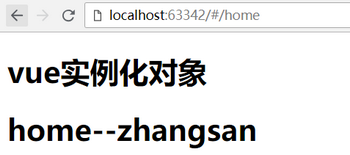
4、发送get请求,并将请求内容添加到插件中
get(url, option)
Url :表示请求地址
Option :表示请求配置
Params :定义query数据
<!DOCTYPE html>

<html lang="en">

<head>

    <meta charset="UTF-8">

    <meta http-equiv="x-ua-compatible" content="IE=edge">

    <meta name="viewport" content="width=device-width, initial-scale=1">

    <title>Title</title>

</head>

<body>

    <div id="app">

        <h1>vue实例化对象</h1>

        <router-view></router-view>        <!--定义渲染容器-->

    </div>

    <script type="text/javascript" src="vue.js"></script>

    <script type="text/javascript" src="vue-router.js"></script>

    <script type="text/javascript" src="vue-resource.min.js"></script>

    <script>

        var Home = {

            template:'<h1>home--{{data}}</h1>',

            data:function () {

                return {

                    data:''

                }

            },

            created:function () {

                this.$http.get('demo.json?123',{

                    params:{

                        color:'red'

                    }

                })

                    .then(function (res) {

                        this.data = res.data.name  //  res.data 是请求获取的内容

                    })

            }

        };

        // 第一步:定义路由规则

        var routes = [

            {

                path:'/home',

                name:'home',

                component:Home

            },

        ];

        // 第二步:实例化路由对象

        var router = new VueRouter({

            routes:routes

        });

        // 第三步:在vue实例化对象中注册路由

        var app = new Vue({

            el:'#app',

            router:router

        })

    </script>

</body>

</html>
发送get请求
5、发送post请求
post(url, data, option)
Url :表示请求地址
Data :表示请求的数据
Option :表示请求的配置
Params :定义query数据
<!DOCTYPE html>

<html lang="en">

<head>

    <meta charset="UTF-8">

    <meta http-equiv="x-ua-compatible" content="IE=edge">

    <meta name="viewport" content="width=device-width, initial-scale=1">

    <title>Title</title>

</head>

<body>

    <div id="app">

        <h1>vue实例化对象</h1>

        <router-view></router-view>        <!--定义渲染容器-->

    </div>

    <script type="text/javascript" src="vue.js"></script>

    <script type="text/javascript" src="vue-router.js"></script>

    <script type="text/javascript" src="vue-resource.min.js"></script>

    <script>

        var Home = {

            template:'<h1>home--{{data}}</h1>',

            data:function () {

                return {

                    data:''

                }

            },

            created:function () {

                this.$http.post('demo.json?123',{'arg1':'price'},{

                    params:{

                        b:200

                    }

                })

                    .then(function (res) {

                        this.data = res.data.name  //  res.data 是请求获取的内容

                    })

            }

        };

        // 第一步:定义路由规则

        var routes = [

            {

                path:'/home',

                name:'home',

                component:Home

            },

        ];

        // 第二步:实例化路由对象

        var router = new VueRouter({

            routes:routes

        });

        // 第三步:在vue实例化对象中注册路由

        var app = new Vue({

            el:'#app',

            router:router

        })

    </script>

</body>

</html>
发送post请求
1.4 封装axios请求
1、初始化环境
vue init webpack deaxios
npm install axios –S
cnpm install vuex -S
2、封装axios(创建 src/api 文件夹)
export default {

  // api请求地址

  // API_URL: 'http://mup.dev.yiducloud.cn/'

  API_URL: 'http://1.1.1.3:8888'

}
config\urls.js 配置全局url变量
import Axios from 'axios'

import URLS from '../../config/urls'

//1、使用自定义配置新建一个 axios 实例

const instance = Axios.create({

  baseURL: URLS.API_URL,

  headers: {

    'Content-Type': 'application/json'

  }

});

//2、添加请求拦截器

instance.interceptors.request.use(

  config => {

    //发送请求前添加认证token

    config.headers.Authorization = sessionStorage.getItem('token')

    // console.log(sessionStorage.getItem('token'),11223344)

    return config

  },

  err => {

    return Promise.reject(err)

  });

//3、添加响应拦截器

instance.interceptors.response.use(function (response) {

  // 对响应数据处理

  if (response.status === 200 || response.status === 201 || response.status === 400) {

    const data = response.data

    if (data.code === 200 || data.code === 201) {

      return data

    }

  }

  return Promise.reject(response)

}, function (error) {

  if (error.response) {

    switch (error.response.status) {

      case 400:

        return Promise.reject(error.response.data)

      case 401:

        window.location.href = '/login'

    }

  }

  // const errorData = error.response.data

  // if (errorData.code === 400) {

  //   return Promise.reject(errorData.desc)

  // }

  // return Promise.reject(errorData)

})

// export const getNodegroups = params => { return instance.get(`${base}/nodegroup/v1/nodegroups/list/`, params).then(res => res.data) }

// export const getNodegroups = params => { return instance.get(`/nodegroup/v1/nodegroups/list/`, params).then(res => res) }

export default instance
src\api\ajax.js
import URLS from '../../config/urls'

import ajax from './ajax'

let base = URLS.API_URL

// 用户相关

export const requestLogin = params => { return ajax.post(`${base}/users/v1/user/login/`, params).then(res => res) }
src\api\api.js
import * as api from './api'

export default api
src\api\index.js
3、使用vuex
import Vue from 'vue'

import Vuex from 'vuex'

import login from './modules/login/login'

Vue.use(Vuex);

export default new Vuex.Store({

  modules:{

    login

  }

});
src\store\index.js
import {

  requestLogin,

} from '../../../api/api'  // 导入封装后的axios请求

const state = {}

const getters = {}

const actions = {

  async loginMethod ({commit}, params) {

    return requestLogin(params).then(response => response)

  },

};

const mutations = {}

export default {

  state,

  getters,

  actions,

  mutations

}
src\store\modules\login\login.js
4、入口
// The Vue build version to load with the `import` command

// (runtime-only or standalone) has been set in webpack.base.conf with an alias.

import Vue from 'vue'

import App from './App'

import router from './router'

import store from './store/index'

Vue.config.productionTip = false

/* eslint-disable no-new */

new Vue({

  el: '#app',

  router,

  store,

  components: { App },

  template: '<App/>'

})
main.js 导入store
<template>

  <div id="app">

    <p @click="handleLogin">点击发送axiso请求</p>

    <router-view/>

  </div>

</template>

<script>

  import { mapActions } from 'vuex'

export default {

  name: 'App',

  methods: {

    ...mapActions(['loginMethod']),

    handleLogin () {

          var loginParams = { username: 'zhangsan', password: '123456' }

          this.loginMethod(loginParams).then(response => {

            // this.logining = false

            sessionStorage.setItem('token', response.data)

            // this.$router.push({ path: '/' })

          }).catch(error => {

            this.loading = false

            this.error(error.desc ? error.desc : '服务器异常')

          })

        }

    },

}

</script>

<style>

#app {

  font-family: 'Avenir', Helvetica, Arial, sans-serif;

  -webkit-font-smoothing: antialiased;

  -moz-osx-font-smoothing: grayscale;

  text-align: center;

  color: #2c3e50;

  margin-top: 60px;

}

</style>
App.vue 组件发送请求

5、封装axios作用
1. 我们在此将此项目所用到的所有接口调用方法都做了定义,这样既方便查看也利于管理。在
2. 我们需要调用接口方法的时候,我们只需要在对应vue文件中的标签里直接import想用的接口方法就行了
例如:import { getOptList,branchList,addOperator } from "../../api/index";
6、使用vuex发送get请求
import Vue from 'vue'

import Vuex from 'vuex'

import meeting from './modules/meeting/meeting'

Vue.use(Vuex)

export default new Vuex.Store({

  strict: process.env.NODE_ENV !== 'production',

  modules: {

    meeting

  }

})
src\store\index.js
import {

  getMeetingList

} from '../../../api/api'

import {getUrl} from "../../../utils/global/geturl";  // 导入封装后的axios请求

const state = {};

const getters = {};

const actions = {

  async getMeetingListMethod ({commit}, params) {

    return getMeetingList(getUrl(params)).then(response => response)

  },

};

const mutations = {};

export default {

  state,

  getters,

  actions,

  mutations

}
src/store/modules/meeting/meeting.js
<template>

</template>

<script>

  import { mapActions } from 'vuex'

  export default {

    data() {

      return {};

    },

    methods: {

      ...mapActions(['getMeetingListMethod']),

      // 获取会议室信息

      requestMeetingListMethod () {

        var parms = {};

        this.getMeetingListMethod(parms).then(response => {

          console.log(123456)

          console.log(response)

          // this.tableData = response.data.data_list

          // this.listQuery.total = response.data.total

          this.loading = false

        }).catch(error => {

          this.loading = false;

          this.error(error.desc ? error.desc : '服务器异常')

        })

      },

    },

    created(){

      this.requestMeetingListMethod();  // 获取会议室信息

    },

  };

</script>

<style scoped>

</style>
src/views/meeting/index.vue
05: 使用axios/vue-resource发送HTTP请求的更多相关文章
- vue resource 携带cookie请求 vue cookie 跨域
vue resource 携带cookie请求 vue cookie 跨域 1.依赖VueResource 确保已安装vue-resource到项目中,找到当前项目,命令行输入: npm instal ...
- Vue中发送ajax请求——axios使用详解
axios 基于 Promise 的 HTTP 请求客户端,可同时在浏览器和 node.js 中使用 功能特性 在浏览器中发送 XMLHttpRequests 请求 在 node.js 中发送 htt ...
- vue使用resource发送ajax请求
<script type="text/javascript"> new Vue({ el:'#app', created:function(){ var url=&qu ...
- vue resource 携带cookie请求 vue cookie 跨域(六)
1.依赖VueResource 确保已安装vue-resource到项目中,找到当前项目,命令行输入: npm install vue-resource --save 在主方法添加 过滤 Vue.h ...
- Vue vue-resource发送Http请求
vue-resource 1.cnpm install vue-resource --save 2.在main.js中import VueResource from 'vue-resource' 3. ...
- Vue.js 第3章 axios&Vue过渡动画
promise 它将我们从回调地狱中解脱出来 创建和使用 var fs = require('fs') // 创建promise // reslove表示执行成功后调用的回调函数 // reject表 ...
- Vue.js使用-http请求
Vue.js使用-ajax使用 1.为什么要使用ajax 前面的例子,使用的是本地模拟数据,通过ajax请求服务器数据. 2.使用jquery的ajax库示例 new Vue({ el: '#app' ...
- Ajax_axios发送ajax请求
Ajax_axios发送ajax请求 这篇笔记主要讲一下axios基本的发送ajax请求的方法 axios在当前的前端行业里面是用的比较热门的一个 下面给大家分享一下它axios的一个基本用法 这段代 ...
- vue 集成 axios 发送post请求 payload导致后台无法接收到数据问题
vue 集成axios之后,发送的post请求默认为payload 方式. 如果想改为正常的方式,需要增加headers头,并且将发送是数据json格式改为 querystring的方式. 安装依赖 ...
随机推荐
- kdeplot(核密度估计图) & distplot
Seaborn是基于matplotlib的Python可视化库. 它提供了一个高级界面来绘制有吸引力的统计图形.Seaborn其实是在matplotlib的基础上进行了更高级的API封装,从而使得作图 ...
- Amber中的一些option设置及名词
详细请见AMBER官方文档第18章第6节(18.6) Amber16.pdf The settings can be summarized as follows: imin=1 Choose a m ...
- git add -A -u . 的区别
git add -u:将文件的修改.文件的删除,添加到暂存区. git add .:将文件的修改,文件的新建,添加到暂存区. git add -A:将文件的修改,文件的删除,文件的新建,添加到暂存区.
- React创建组件的不同方式(ES5 & ES6)
一. 首先缕清楚React.createElement.React.createClass.React.Component之间的关系 1. React.createElement(HTML eleme ...
- Unity shader学习之屏幕后期处理效果之高斯模糊
高斯模糊,见 百度百科. 也使用卷积来实现,每个卷积元素的公式为: 其中б是标准方差,一般取值为1. x和y分别对应当前位置到卷积中心的整数距离. 由于需要对高斯核中的权重进行归一化,即使所有权重相加 ...
- VS 统计整个项目总的代码行数
vs如何快速统计项目总代码行数呢,如下: vs编辑 | 查找和替换 | 在文件中查找 查找选项选 选择正则表达式 ^b*[^:b#/]+.*$ 设置如下: 结果在查找结果的最后一行,如下
- Msfvenom木马使用及TheFatRat工具
msfvenom –platform windows -p windows/x64/shell/reverse_tcp LHOST=192.168.168.111 LPORT=3333 EXITFUN ...
- django admim后台不转义提交的html
autoescape¶ Controls the current auto-escaping behavior. This tag takes either on or off as an argum ...
- html5 手机端 通讯录 touch 效果
不说那么多直接上代码. <html> <head> <meta http-equiv="Content-Type" content="tex ...
- 重建二叉树POJ2255
重建二叉树 给定一棵二叉树的前序遍历和中序遍历的结果,求其后序遍历. 输入输入可能有多组,以EOF结束.每组输入包含两个字符串,分别为树的前序遍历和中序遍历.每个字符串中只包含大写字母且互不重复.输出 ...