
ActiveMQ 配置jdbc主从
使用 jdbc 方式配置主从模式,持久化消息存放在数据库中。
在同一时刻,只有一个 master broker,master 接受客户端的连接,slave 不接受连接。
当 master 因为关机而下线后,其中一个 slave 会提升为 master,然后接受客户端连接。但原来 master 的非持久消息丢失了,而持久消息保存在数据库中。
broker xml 配置:使用 MySQL 数据源
<!--

    Licensed to the Apache Software Foundation (ASF) under one or more

    contributor license agreements.  See the NOTICE file distributed with

    this work for additional information regarding copyright ownership.

    The ASF licenses this file to You under the Apache License, Version 2.0

    (the "License"); you may not use this file except in compliance with

    the License.  You may obtain a copy of the License at

    http://www.apache.org/licenses/LICENSE-2.0

    Unless required by applicable law or agreed to in writing, software

    distributed under the License is distributed on an "AS IS" BASIS,

    WITHOUT WARRANTIES OR CONDITIONS OF ANY KIND, either express or implied.

    See the License for the specific language governing permissions and

    limitations under the License.

-->

<!--

    Use JDBC for message persistence

    For more information, see:

    http://activemq.apache.org/persistence.html

    You need to add Derby database to your classpath in order to make this example work.

    Download it from http://db.apache.org/derby/ and put it in the ${ACTIVEMQ_HOME}/lib/optional/ folder

    Optionally you can configure any other RDBM as shown below

    To run ActiveMQ with this configuration add xbean:conf/activemq-jdbc.xml to your command

    e.g. $ bin/activemq xbean:conf/activemq-jdbc.xml

 -->

<beans

  xmlns="http://www.springframework.org/schema/beans"

  xmlns:xsi="http://www.w3.org/2001/XMLSchema-instance"

  xsi:schemaLocation="http://www.springframework.org/schema/beans http://www.springframework.org/schema/beans/spring-beans-2.0.xsd

  http://activemq.apache.org/schema/core http://activemq.apache.org/schema/core/activemq-core.xsd">

  <broker useJmx="false" brokerName="jdbcBroker" xmlns="http://activemq.apache.org/schema/core">

    <persistenceAdapter>

       <jdbcPersistenceAdapter dataDirectory="${activemq.base}/data" dataSource="#mysql-ds"/>

    </persistenceAdapter>

    <transportConnectors>

       <transportConnector name="default" uri="tcp://0.0.0.0:61616"/>

    </transportConnectors>

  </broker>

  <!-- Embedded Derby DataSource Sample Setup -->

 <!--  <bean id="derby-ds" class="org.apache.derby.jdbc.EmbeddedDataSource">

    <property name="databaseName" value="derbydb"/>

    <property name="createDatabase" value="create"/>

  </bean> -->

  <!-- Postgres DataSource Sample Setup -->

  <!--

  <bean id="postgres-ds" class="org.postgresql.ds.PGPoolingDataSource">

    <property name="serverName" value="localhost"/>

    <property name="databaseName" value="activemq"/>

    <property name="portNumber" value="0"/>

    <property name="user" value="activemq"/>

    <property name="password" value="activemq"/>

    <property name="dataSourceName" value="postgres"/>

    <property name="initialConnections" value="1"/>

    <property name="maxConnections" value="10"/>

  </bean>

  -->

  <!-- MySql DataSource Sample Setup -->

  <bean id="mysql-ds" class="org.apache.commons.dbcp.BasicDataSource" destroy-method="close">

    <property name="driverClassName" value="com.mysql.jdbc.Driver"/>

    <property name="url" value="jdbc:mysql://192.168.40.8:3306/db_zhang?relaxAutoCommit=true"/>

    <property name="username" value="root"/>

    <property name="password" value="root"/>

    <property name="maxActive" value="200"/>

    <property name="poolPreparedStatements" value="true"/>

  </bean>

  <!-- Oracle DataSource Sample Setup -->

  <!--

  <bean id="oracle-ds" class="org.apache.commons.dbcp.BasicDataSource" destroy-method="close">

    <property name="driverClassName" value="oracle.jdbc.driver.OracleDriver"/>

    <property name="url" value="jdbc:oracle:thin:@localhost:1521:AMQDB"/>

    <property name="username" value="scott"/>

    <property name="password" value="tiger"/>

    <property name="maxActive" value="200"/>

    <property name="poolPreparedStatements" value="true"/>

  </bean>

  -->

</beans>
客户端配置,producer 和 consumer 是一样的:
new ActiveMQConnectionFactory("failover:(tcp://localhost:61616,tcp://localhost:61618)");
以 MySQL 数据库为例,启动 broker 后,MySQL 中会创建 3 张表:
ACTIVEMQ_MSGS 存放持久消息
ACTIVEMQ_LOCK 表中只有一条记录,broker 执行 SELECT * FROM ACTIVEMQ_LOCK FOR UPDATE 获取锁,获得锁的 broker 是 master
ACTIVEMQ_ACKS
broker 获取锁的调用栈如下:
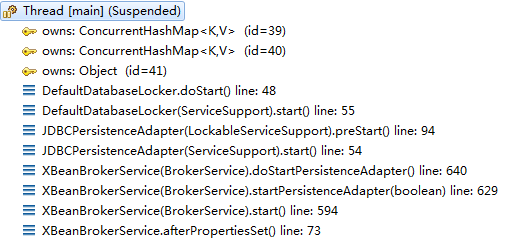
// org.apache.activemq.store.jdbc.DefaultDatabaseLocker

public void doStart() throws Exception {

    LOG.info("Attempting to acquire the exclusive lock to become the Master broker");

    // SELECT * FROM ACTIVEMQ_LOCK FOR UPDATE

    String sql = getStatements().getLockCreateStatement();

    LOG.debug("Locking Query is "+sql);

    while (true) {

        try {

            connection = dataSource.getConnection();

            connection.setAutoCommit(false);

            lockCreateStatement = connection.prepareStatement(sql);

            // 执行 SELECT * FROM ACTIVEMQ_LOCK FOR UPDATE

            // 如果成功,则跳出循环。如果超时,则抛异常

            lockCreateStatement.execute();

            break;

        } catch (Exception e) {

            try {

                if (isStopping()) {

                    throw new Exception(

                            "Cannot start broker as being asked to shut down. "

                                    + "Interrupted attempt to acquire lock: "

                                    + e, e);

                }

                if (exceptionHandler != null) {

                    try {

                        exceptionHandler.handle(e);

                    } catch (Throwable handlerException) {

                        LOG.error( "The exception handler "

                                + exceptionHandler.getClass().getCanonicalName()

                                + " threw this exception: "

                                + handlerException

                                + " while trying to handle this exception: "

                                + e, handlerException);

                    }

                } else {

                    LOG.debug("Lock failure: "+ e, e);

                }

            } finally {

                // Let's make sure the database connection is properly

                // closed when an error occurs so that we're not leaking

                // connections

                if (null != connection) {

                    try {

                        connection.rollback();

                    } catch (SQLException e1) {

                        LOG.debug("Caught exception during rollback on connection: " + e1, e1);

                    }

                    try {

                        connection.close();

                    } catch (SQLException e1) {

                        LOG.debug("Caught exception while closing connection: " + e1, e1);

                    }

                    connection = null;

                }

            }

        } finally {

            if (null != lockCreateStatement) {

                try {

                    lockCreateStatement.close();

                } catch (SQLException e1) {

                    LOG.debug("Caught while closing statement: " + e1, e1);

                }

                lockCreateStatement = null;

            }

        }

        LOG.info("Failed to acquire lock.  Sleeping for " + lockAcquireSleepInterval + " milli(s) before trying again...");

        try {

            Thread.sleep(lockAcquireSleepInterval);

        } catch (InterruptedException ie) {

            LOG.warn("Master lock retry sleep interrupted", ie);

        }

    }

    LOG.info("Becoming the master on dataSource: " + dataSource);

}
broker 执行 SELECT * FROM ACTIVEMQ_LOCK FOR UPDATE 获取锁,获取成功,则成为 master,如果失败,则睡眠一段时间后,继续获取锁。
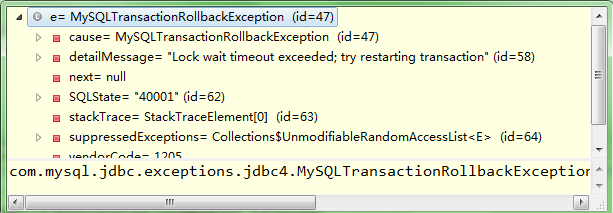
超时而抛出的异常:
ActiveMQ 配置jdbc主从的更多相关文章
- AMQ学习笔记 - 14. 实践方案:基于ZooKeeper + ActiveMQ + replicatedLevelDB的主从部署
概述 基于ZooKeeper + ActiveMQ + replicatedLevelDB,在Windows平台的主从部署方案. 主从部署可以提供数据备份.容错[1]的功能,但是不能提供负载均衡的功能 ...
- ActiveMQ配置详解
原文链接 一.消息目的地策略 在节点destinationPolicy配置策略,可以对单个或者所有的主题和队列进行设置,使用流量监控,当消息达到memoryLimit的时候,ActiveMQ会减慢消息 ...
- 从零开始学 Java - Spring 集成 ActiveMQ 配置(一)
你家小区下面有没有快递柜 近两年来,我们收取快递的方式好像变了,变得我们其实并不需要见到快递小哥也能拿到自己的快递了.对,我说的就是类似快递柜.菜鸟驿站这类的代收点的出现,把我们原来快递小哥必须拿着快 ...
- 从零开始学 Java - Spring 集成 ActiveMQ 配置(二)
从上一篇开始说起 上一篇从零开始学 Java - Spring 集成 ActiveMQ 配置(一)文章中讲了我关于消息队列的思考过程,现在这一篇会讲到 ActivMQ 与 Spring 框架的整合配置 ...
- 使用配置文件来配置JDBC连接数据库
1.管理数据库连接的Class 代码如下: package jdbcTest;import java.sql.Connection;import java.sql.DriverManager;impo ...
- spring中配置jdbc数据源
1.加入jdbc驱动器包,mysql-connector-java.jar 2.加入commons-dbcp.jar配置数据源 3.在classpath下新建文件jdbc.properties,配置j ...
- redis主从配置及主从切换 转
redis主从配置及主从切换 转自 http://blog.sina.com.cn/s/blog_67196ddc0101h8v0.html (2014-04-28 17:48:47) 转载▼ 分 ...
- weblogic配置jdbc数据源
weblogic配置jdbc数据源的过程 方法/步骤 启动weblogic 管理服务器,使用管理用户登录weblogic管理控制台 打开管理控制台后,在左侧的树形域结构中,选择服务->数 ...
- 配置mysql主从步骤
在公司开发中,有时候为了缓解数据库压力,会把读写分开为两个数据库来操作,读为一个数据库,写为一个数据库,然后两个数据库做同步,这样能明显降低数据库的压力,下面给大家介绍如何进行mysql主从数据库配置 ...
随机推荐
- 设置电脑中的某个程序不弹出UAC用户控制提示的方法
有用户发现在电脑开机后总是会弹出UAC用户账户控制窗口,这是因为电脑中的某个程序设置了开机启动,这样就会在开机后启动该程序时出现UAC提示.如果想要省略该提示,可以在电脑中设置该程序不弹出UAC用户控 ...
- SSH KEY 设置 目录在open ~ 根目录下的.ssh 里面
当我们从github或者gitlab上clone项目或者参与项目时,需要证明我们的身份.github.gitlab支持使用SSH协议进行免密登录,而SSH协议采用了RSA算法保证了登录的安全性.我们要 ...
- MD5加密与Hash加密
一.Md5加密 MD5算法具有以下特点: 1.压缩性:任意长度的数据,算出的MD5值长度都是固定的. 2.容易计算:从原数据计算出MD5值很容易. 3.抗修改性:对原数据进行任何改动,哪怕只修改1个字 ...
- Python 注释,类,属性,方法,继承
# coding=utf-8 支持中文 """ 多行注释 声明鸟类 """ class Bird(object): have_feather ...
- Qt532.线程(_beginthread)
1.(20180928)环境:Win7x64.Qt5.3.2 MSVC2010 OpenGL.ms2010 2.测试代码: ZC:我记得 之前在 VC6.vs08 上,还要选择 使用的是哪种 运行时线 ...
- Qt532.QString_填充字符
1.代码: void MainWindow::on_pushButton_clicked() { QString str = "; QString str01 = str.leftJusti ...
- &&并且, ||或 , 的用法 ,区别
&&与运算必须同时都为true才是true,如果左边为false结果肯定为false: ||或运算,只要左边为true结果一定为true,两边都为false结果才是false. 只有当 ...
- leecode第二十三题(合并K个排序链表)
/** * Definition for singly-linked list. * struct ListNode { * int val; * ListNode *next; * ListNode ...
- C++ 实现sqilte创建数据库插入、更新、查询、删除
C/C++ Interface APIs Following are important C/C++ SQLite interface routines, which can suffice your ...
- Python 闭包(Closure)
Python 闭包 (Closure) 这里介绍一下python 的闭包 基本概念 闭包(closure)是函数式编程的重要的语法结构. 函数式编程的一个特点就是,允许把函数本身作为参数传入另一个函 ...