
jQueryPrint 的简单使用
jQueryPrint 的简单使用
一、为什么要使用 jQueryPrint?
1、当然是方便的要死尼,相比于其他的方法。
2、打印整个页面或者局部页面都是非常的可以的,使用很方便。
3、如果要导出页面为 PDF 都是很好的。
4、jQuery 的打印插件很多,你可以任意选,但是要注意 jQuery 的版本以及浏览器的兼容性。
二、jQueryPrint 的简单使用
1、到 jQuery 插件官网进行下载插件。
jQuery 插件官网地址:http://www.jq22.com/,你可以搜索你想要的插件,应该差不多基本都能搜的到吧。
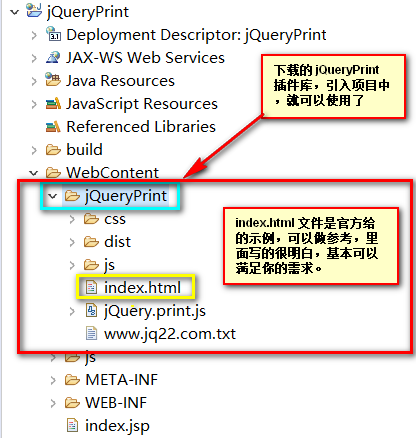
2、下载插件,放入项目中,如图:
3、index.jsp 页面代码:
 <%@ page language="java" contentType="text/html; charset=UTF-8"

     pageEncoding="UTF-8"%>

 <!DOCTYPE html>

 <!--[if lt IE 7]>      <html class="no-js lt-ie9 lt-ie8 lt-ie7"> <![endif]-->

 <!--[if IE 7]>         <html class="no-js lt-ie9 lt-ie8"> <![endif]-->

 <!--[if IE 8]>         <html class="no-js lt-ie9"> <![endif]-->

 <!--[if gt IE 8]><!-->

 <html class="no-js">

 <!--<![endif]-->

 <head>

 <meta charset="utf-8">

 <meta http-equiv="X-UA-Compatible" content="IE=edge,chrome=1">

 <title>jQuery.Print 的用法</title>

 <meta name="description" content="jQuery.print is a plugin for printing specific parts of a page">

 <meta name="viewport" content="width=device-width">

 <link rel="stylesheet" href="${pageContext.request.contextPath}/jQueryPrint/css/normalize.min.css">

 <style type='text/css'>

 .a {

     background: black;

     color: white;

 }

 .b {

     color: #aaa;

 }

 </style>

 <!--[if lt IE 9]>

         <script src="${pageContext.request.contextPath}/jQueryPrint/js/vendor/html5-3.6-respond-1.1.0.min.js"></script>

         <![endif]-->

 <script src="${pageContext.request.contextPath}/js/jquery-2.2.4.min.js"></script>

 <script

     src="${pageContext.request.contextPath}/jQueryPrint/jQuery.print.js"></script>

 </head>

 <body>

     <h3 style="text-align: center;">

         <span> jQuery.print</span>

     </h3>

     <div id="content_holder">

         <div id="ele1" class="a">

             <h3>段落一</h3>

             <p>

                 这是第一个段落,文本输入框的内容也会被打印出来,不信你试试看!!! <input type="text" placeholder="输入框..." />

             </p>

             <p class="no-print">这段文字是不会被打印的,因为它的属性 class 的值中有“no-print”,嘿嘿!!! </p>

             <button class="print-link no-print" onclick="jQuery('#ele1').print()">点击这个按钮进行打印</button>

         </div>

         <div id="ele2" class="b">

             <h3 class='avoid-this'>段落二</h3>

             <p>Some really random text.</p>

             <pre>

                 <code>

                 $("#ele2").find('button').on('click', function() {

                     //Print ele2 with custom options

                     $("#ele2").print({

                         //Use Global styles

                         globalStyles : false,

                         //Add link with attrbute media=print

                         mediaPrint : false,

                         //Custom stylesheet

                         stylesheet : "http://fonts.googleapis.com/css?family=Inconsolata",

                         //Print in a hidden iframe

                         iframe : false,

                         //Don't print this

                         noPrintSelector : ".avoid-this",

                         //Add this at top

                         prepend : "Hello World!!!<br />",

                         //Add this on bottom

                         append : "<br />Buh Bye!",

                         //Log to console when printing is done via a deffered callback

                         deferred: $.Deferred().done(function() { console.log('Printing done', arguments); })

                     });

                 });

                 </code>

             </pre>

             <button class="print-link avoid-this">在新窗口打开</button>

         </div>

         <br />

         <button class="print-link" onclick="jQuery.print()">点击这个按钮进行打印整个页面</button>

     </div>

     <script type='text/javascript'>

         //<![CDATA[

         jQuery(function($) {

             $("#ele2").find('.print-link').on('click', function() {

                 //Print ele2 with default options

                 $.print("#ele2");

             });

             $("#ele2").find('button').on('click', function() {

                 //Print ele2 with custom options

                 $("#ele2").print({

                     //Use Global styles

                     globalStyles : false,

                     //Add link with attrbute media=print

                     mediaPrint : false,

                     //Print in a hidden iframe

                     iframe : false,

                     //Don't print this

                     noPrintSelector : ".avoid-this",

                     //Add this at top

                     prepend : "Hello World!!!<br/>",

                     //Add this on bottom

                     append : "<br/>Buh Bye!",

                     //Log to console when printing is done via a deffered callback

                     deferred : $.Deferred().done(function() {

                         console.log('Printing done', arguments);

                     })

                 });

             });

         });

         //]]>

     </script>

 </body>

 </html>
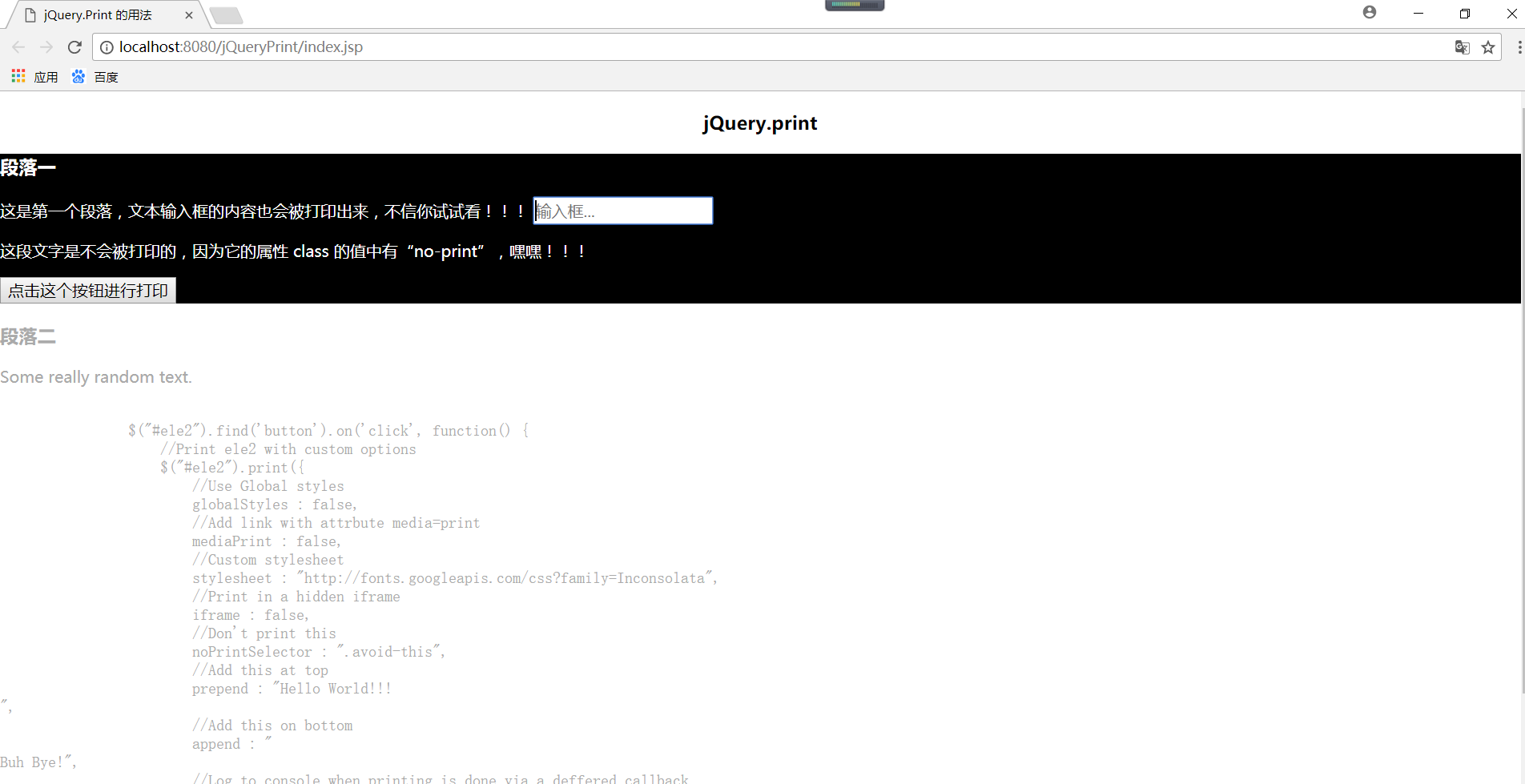
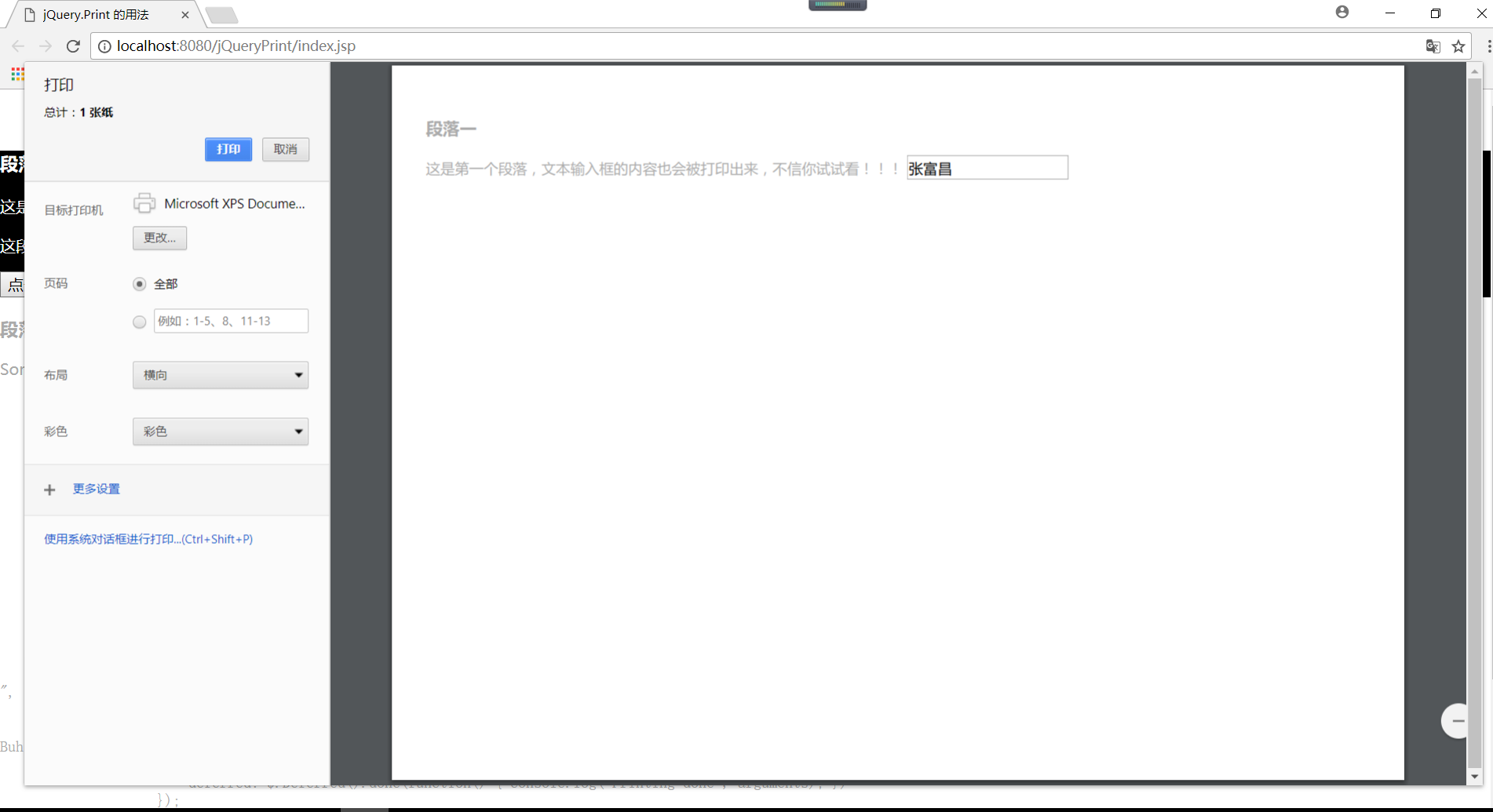
4、运行结果
点击段落一中的按钮
jQueryPrint 的简单使用的更多相关文章
- 【造轮子】打造一个简单的万能Excel读写工具
大家工作或者平时是不是经常遇到要读写一些简单格式的Excel? shit!~很蛋疼,因为之前吹牛,就搞了个这东西,还算是挺实用,和大家分享下. 厌烦了每次搞简单类型的Excel读写?不怕~来,喜欢流式 ...
- Fabio 安装和简单使用
Fabio(Go 语言):https://github.com/eBay/fabio Fabio 是一个快速.现代.zero-conf 负载均衡 HTTP(S) 路由器,用于部署 Consul 管理的 ...
- node.js学习(三)简单的node程序&&模块简单使用&&commonJS规范&&深入理解模块原理
一.一个简单的node程序 1.新建一个txt文件 2.修改后缀 修改之后会弹出这个,点击"是" 3.运行test.js 源文件 使用node.js运行之后的. 如果该路径下没有该 ...
- 哪种缓存效果高?开源一个简单的缓存组件j2cache
背景 现在的web系统已经越来越多的应用缓存技术,而且缓存技术确实是能实足的增强系统性能的.我在项目中也开始接触一些缓存的需求. 开始简单的就用jvm(java托管内存)来做缓存,这样对于单个应用服务 ...
- 在Openfire上弄一个简单的推送系统
推送系统 说是推送系统有点大,其实就是一个消息广播功能吧.作用其实也就是由服务端接收到消息然后推送到订阅的客户端. 思路 对于推送最关键的是服务端向客户端发送数据,客户端向服务端订阅自己想要的消息.这 ...
- 我的MYSQL学习心得(一) 简单语法
我的MYSQL学习心得(一) 简单语法 我的MYSQL学习心得(二) 数据类型宽度 我的MYSQL学习心得(三) 查看字段长度 我的MYSQL学习心得(四) 数据类型 我的MYSQL学习心得(五) 运 ...
- 使用 Nodejs 搭建简单的Web服务器
使用Nodejs搭建Web服务器是学习Node.js比较全面的入门教程,因为要完成一个简单的Web服务器,你需要学习Nodejs中几个比较重要的模块,比如:http协议模块.文件系统.url解析模块. ...
- ASP.NET Aries 入门开发教程2:配置出一个简单的列表页面
前言: 朋友们都期待我稳定地工作,但创业公司若要躺下,也非意念可控. 若人生注定了风雨飘摇,那就雨中前行了. 最机开始看聊新的工作机会,欢迎推荐,创业公司也可! 同时,趁着自由时间,抓紧把这系列教程给 ...
- 简单入门canvas - 通过刮奖效果来学习
一 .前言 一直在做PC端的前端开发,从互联网到行业软件.最近发现移动端已经成为前端必备技能了,真是不能停止学习.HTML5新增的一些东西,canvas是用的比较多也比较复杂的一个,简单的入门了一下, ...
随机推荐
- Django开发笔记四
Django开发笔记一 Django开发笔记二 Django开发笔记三 Django开发笔记四 Django开发笔记五 Django开发笔记六 1.邮箱激活 users app下,models.py: ...
- Jetson tk1 安装OpenNI 1 +Xtion Pro +NiTE
参考: http://blog.csdn.net/xiabodan/article/details/44496871 序: 由于第三方库 NiTE2.0 不支持 arm 架构的处理器,因此需要安装Op ...
- freeRTOS中文实用教程3--中断管理之中断嵌套
1.前言 最新的 FreeRTOS 移植中允许中断嵌套.中断嵌套需要在 FreeRTOSConfig.h 中设置configKERNEL_INTERRUPT_PRIORITY 和configMAX_S ...
- 007_linux显示一个文件的某几行(中间几行)
<1>从第3000行开始,显示1000行.即显示3000~3999行 cat -n filename | tail -n +3000 | head -n 1000 cat -n anaco ...
- day1 diff命令递归比较目录下的文件
一.diff实战 (1)递归比较文件夹下所有的文件及目录的不同 diff --brief -Nr dir1/ dir2/ Reference ...
- nginx转发
1.下载nginx:官网(http://nginx.org)右侧下载,进入下载页,选在需要下载的版本 2.将压缩包解压到指定的目录下 (D:\Environments\nginx-1.8.0) 3.启 ...
- 强大的Js树型控件Dtree使用详解
http://www.lmwlove.com/ac/ID868 在学习文章之前,要学会看官方网站http://destroydrop.com/javascripts/tree.从官方页面你能知道:dt ...
- 容器平台选型的十大模式:Docker、DC/OS、K8S 谁与当先?【转】
网易企业服务2017-10-13 无论是在社区,还是在同客户交流的过程中,总会被问到到底什么时候该用 Docker?什么时候用虚拟机?如果使用容器,应该使用哪个容器平台? 显而易见,我不会直接给大家一 ...
- 简单对比 Libevent、libev、libuv
Libevent.libev.libuv三个网络库,都是c语言实现的异步事件库Asynchronousevent library). 异步事件库本质上是提供异步事件通知(Asynchronous Ev ...
- (无)webservice执行过程深入理解
前面我们搞了1,2个DEMO,基本对webservice服务发布,调用 ,执行 有一定的了解. 今天的话,我们再系统的梳理下webservice执行过程. 首先我们在webservice服务器端开发w ...