
微信小程序学习之for循环
一、使用自定义创建的json数据
1. 创建微信小程序项目后
在wxml文件中增加for循环
<block wx:for="{{posts_key}}" wx:for-item="item" wx:for-index="idx">

    <view class="post-container">

      <view class="post-author-date">

       <image class="post-author" src="{{item.avatar}}"></image>

        <text class="post-date">{{item.date}}</text>

     </view>

      <text class="post-title">{{item.title}}</text>

      <image class="post-image" src="{{item.imgSrc}}"></image>

      <text class="post-content">{{item.content}}</text>

      <view class="post-like">

       <image class="post-like-image" src="../../images/icon/chat.png"></image>

        <text class="post-like-font">{{item.collection}}</text>

        <image class="post-like-image" src="../../images/icon/view.png"></image>

        <text class="post-like-font">{{item.reading}}</text>

      </view>

   </view>

  </block>
posts_key的定义在js文件中
 onLoad: function (options) {

      //页面初始化 options为页面跳转所带来的参数

      var posts_content = [

        {

          date: "Sep 18 2017",

          title: "飞蟹1",

          imgSrc:"/images/post/crab.png",

          avatar:"/images/avatar/1.png",

          content:"现在的飞蟹正好吃。。。。。。",

           reading:"112",

          collection:"96",

        },

        {

          date: "Sep 18 2017",

          title: "飞蟹2",

          imgSrc: "/images/post/bl.png",

          avatar: "/images/avatar/2.png",

          content: "现在的飞蟹正好吃。。。。。。",

          reading: "112",

          collection: "96",

        }

      ]

      this.setData({

        posts_key: posts_content

      })

  },
对应的wxss文件
swiper{

  width: 100%;

  height:600rpx;

}

swiper image{

  width:100%;

  height:600rpx;

}

.post-container{

  display: flex;

  flex-direction: column;

  margin-top: 20rpx;

  margin-bottom: 40rpx;

  background-color: #fff;

  border-bottom: 1px solid #ededed;

  border-top: 1px solid #ededed;

  padding-bottom: 5px;

}

.post-author-date{

 margin:10rpx 0 20rpx 10rpx;

}

.post-author{

  width:60rpx;

  height: 60rpx;

  vertical-align: middle;

}

.post-date{

  margin-left: 20rpx;

  vertical-align: middle;

  font-size: 26rpx;

}

.post-title{

   font-size:34rpx;

   font-weight: 600;

   color: #333;

   margin-bottom: 10px;

   margin-left:10px;

}

.post-image{

  margin-left: 16px;

  width:100%;

  height:340rpx;

  margin: auto 0;

  margin-bottom: 15px;

}

.post-content{

  color:#666;

  font-size: 28rpx;

  margin-bottom: 20rpx;

  margin-left:20rpx;

  letter-spacing: 2rpx;

  line-height: 40rpx;

}

.post-like{

  font-size: 13px;

  display: flex;

  flex-direction: row;

  line-height: 16px;

  margin-left: 10px;

}

.post-like-image{

  height: 16px;

  width: 16px;

  margin-left: 8px;

  vertical-align: middle;

}

.post-like-font{

  vertical-align: middle;

  margin-right: 20px;

}
二、将数据改成到js文件中
创建data/posts-data.js文件
var posts_content = [

  {

    date: "Sep 18 2017",

    title: "飞蟹1",

    imgSrc: "/images/post/crab.png",

    avatar: "/images/avatar/1.png",

    content: "现在的飞蟹正好吃。。。。。。",

    reading: "112",

    collection: "96",

  },

  {

    date: "Sep 18 2017",

    title: "飞蟹2",

    imgSrc: "/images/post/bl.png",

    avatar: "/images/avatar/2.png",

    content: "现在的飞蟹正好吃。。。。。。",

    reading: "112",

    collection: "96",

  }

]

var name = "zhangsan"

module.exports = {

  postList:posts_content,

  exportName:name

}
在posts.js中引用posts-data.js文件
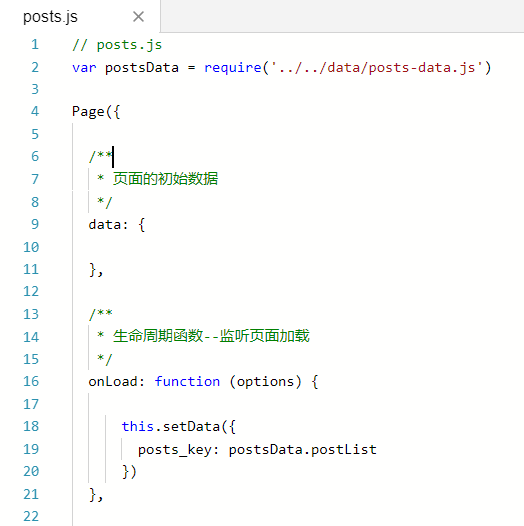
在onLoad函数里, 将data.posts_keys 赋值为postsData.postList
  onLoad: function (options) {

    this.data.posts_key = postsData.postList;

  },
最终效果是一致的。
微信小程序学习之for循环的更多相关文章
- 微信小程序 学习资料
微信小程序 学习资料 资料名称 网址 官方教程 https://developers.weixin.qq.com/miniprogram/dev/index.html?t=18110517
- 【微信小程序学习笔记】入门与了解
[微信小程序学习笔记(一)] IDE 下载安装 下载地址 官方工具:https://mp.weixin.qq.com/debug/w … tml?t=1476434678461 下载可执行文件后,可按 ...
- 微信小程序学习笔记二 数据绑定 + 事件绑定
微信小程序学习笔记二 1. 小程序特点概述 没有DOM 组件化开发: 具备特定功能效果的代码集合 体积小, 单个压缩包体积不能大于2M, 否则无法上线 小程序的四个重要的文件 *js *.wxml - ...
- 微信小程序学习笔记一 小程序介绍 & 前置知识
微信小程序学习笔记一 1. 什么是小程序? 2017年度百度百科十大热词之一 微信小程序, 简称小程序, 英文名 Mini Program, 是一种不需要下载安装即可使用的应用 ( 张小龙对其的定义是 ...
- 微信小程序学习
官方网站 https://mp.weixin.qq.com/debug/wxadoc/dev/index.html 项目结构介绍 -- MINA框架 https://mp.weixin.qq.com/ ...
- 微信小程序学习笔记(阶段一)
一阶段学习过程: (一)看官方文档的简易教程:https://mp.weixin.qq.com/debug/wxadoc/dev/ (二)看小码哥视频:https://chuanke.baidu.co ...
- 微信小程序学习指南
作者:初雪链接:https://www.zhihu.com/question/50907897/answer/128494332来源:知乎著作权归作者所有.商业转载请联系作者获得授权,非商业转载请注明 ...
- 微信小程序学习简介
如何向微信小程序导入DEMO源码: 参考方法 参考学习小程序官方文档 小程序官方文档 小程序目录简介 app.json :设置一些工程全局的量.js : 写一些函数逻辑.wxml: 调用.js中写的函 ...
- 微信小程序学习笔记以及VUE比较
之前只是注册了一下微信小程序AppID,随便玩了玩HelloWorld!(项目起手式),但是最近看微信小程序/小游戏,崛起之势不可阻挡.小程序我来了!(果然,一入前端深似海啊啊啊啊啊~) 编辑器: S ...
随机推荐
- 解决VS2010使用mscomm控件无法接收数据的问题
如果你正在使用2010,并且想用mscomm控件,遇到如下问题,那你可以看看这篇文章: 1. 添加了mscomm控件以及对应的控件变量以后发现以前mscomm的成员函数,类似setsettings() ...
- Metasploit的射频收发器功能 | Metasploit’s RF Transceiver Capabilities
https://community.rapid7.com/community/metasploit/blog/2017/03/21/metasploits-rf-transceiver-capabil ...
- mysql查询锁表语句
processlist命令的输出结果显示了有哪些线程在运行,可以帮助识别出有问题的查询语句,两种方式使用这个命令. 1. 进入mysql/bin目录下输入mysqladmin process ...
- Spring MVC — @RequestMapping原理讲解-1
转载地址 :http://blog.csdn.net/j080624/article/details/56278461 为了降低文章篇幅,使得文章更目标化,简洁化,我们就不例举各种@RequestMa ...
- 百度api--之导航
其实挺简单的,只要知道出发点和终点的经纬度就可以了; 百度webURLAPI : http://lbsyun.baidu.com/index.php?title=uri/api/web 这个是百度的a ...
- IDEA激活
https://blog.csdn.net/qq_34273222/article/details/78810799 目测这个服务器可用:http://idea.iteblog.com/key.php
- ubuntu: firefox+flashplay
更新两步: 1.安装firefox:rm-->下载-->mv-->ln http://www.cnblogs.com/yzsatcnblogs/p/4266985.html 2. f ...
- Ubuntu关闭进入screensaver模式
/********************************************************************************* * Ubuntu关闭进入scree ...
- Samsung_tiny4412(驱动笔记05)----Makefile,open,read,write,lseek,poll,ioctl,fasync
/*********************************************************************************** * * Makefile,op ...
- UDP方式实现广域网的P2P通信
最近在研究P2P通信,希望能够穿透路由器. 当前的做法只是使用TCP协议进行客户端与服务器端通信,使用UDP协议进行客户端之间的打洞操作,UDP的方式的源码在下方. 一直没有实现TCP的打洞,如果有实 ...