
TP条件查询和分页查询
一、条件查询
前端页面
<!doctype html>

<html>

<head>

	<meta charset="utf-8">

	<title></title>

    <link href="../../../../../bootstrap/css/bootstrap.min.css" rel="stylesheet" type="text/css">

</head>

<body>

<div class="panel panel-primary">

    <div class="panel-heading">

        <h3 class="panel-title" style="text-align:center;">汽车详情表</h3>

    </div>

    <div class="panel-body">

	<form action="__ACTION__" method="post" class="form-inline" role="form">

	<div class="form-group">

		<label for="name">请输入关键字:</label>

		<input type="text" class="form-control" placeholder="请输入关键字" name="name"value="{$name}">

		<input type="submit" class="btn btn-primary btn-sm" value="查询"/>

	</div>

		<table class="table" style="width:100%;">

		  <thead>

			<tr>

			  <th>代号</th>

			  <th>名称</th>

			  <th>系列</th>

			  <th>出产时间</th>

			  <th>油耗</th>

			  <th>功率</th>

			  <th>排量</th>

			  <th>价格</th>

			</tr>

		  </thead>

		<foreach name="cars" item="v">

		  <tbody>

			<tr class="danger">

			  <th>{$v.code}</th>

			  <td>{$v.name}</td>

			  <td>{$v.brand}</td>

			  <td>{$v.time}</td>

			  <td>{$v.oil}</td>

			  <td>{$v.powers}</td>

			  <td>{$v.exhaust}</td>

			  <td>{$v.price}</td>

			</tr>

		  </tbody>

		</foreach>

		</table>

	</form>

    </div>

</div>

</body>

</html>
处理页面
<?php

namespace Home\Controller;

use Think\Controller;

class SelectController extends Controller{

    public function select(){

        $db = D("car");

        $tj = " 1=1 ";

        $name = "";//表单中保存查询的关键字

        if(!empty($_POST["name"])){

            $name = $_POST["name"];

            $tj = " name like '%{$name}%' ";

        }

        $arr = $db

            ->where($tj)

            ->select();

        $this->assign("cars",$arr);

        $this->assign("name",$name);//表单中保存查询的关键字

        $this->show();

    }

}

二、条件分页查询
	<div>

		<div>

			<h3 style="text-align:center;">汽车详情表</h3>

		</div>

		<div>

		<form action="__ACTION__" method="get">

		<div>

			<label >请输入关键字:</label>

			<input type="text" placeholder="请输入关键字" name="name" value="{$name}">

			<input type="submit" value="查询"/>

		</div>

			<table  style="width:100%; text-align:center;" border="1" cellpadding="0" cellspacing="0">

			  <thead>

				<tr>

				  <th>代号</th>

				  <th>名称</th>

				  <th>系列</th>

				  <th>出产时间</th>

				  <th>油耗</th>

				  <th>功率</th>

				  <th>排量</th>

				  <th>价格</th>

				</tr>

			  </thead>

			<foreach name="cars" item="v">

			  <tbody>

				<tr class="danger">

				  <th>{$v.code}</th>

				  <td>{$v.name}</td>

				  <td>{$v.brand}</td>

				  <td>{$v.time}</td>

				  <td>{$v.oil}</td>

				  <td>{$v.powers}</td>

				  <td>{$v.exhaust}</td>

				  <td>{$v.price}</td>

				</tr>

			  </tbody>

			</foreach>

			</table>

		</form>

		</div>

	<div>{$pagelist}</div>

</div>
<?php

namespace Home\Controller;

use Think\Controller;

class SelectController extends Controller{

	public function select(){

		$db = D("car");

		$tj = " 1=1 ";

		$name = "";//表单中保存查询的关键字

		if(!empty($_GET["name"])){

			$name = $_GET["name"];

			$tj = " name like '%{$name}%' ";

		}

		$arr = $db

			->where($tj)

			->page($_GET["p"],6)//分页

			->select();

		$zts = $db

			->where($tj)

			->count();//总条数

		$page = new\Think\Page($zts,6);//实例化页数和条数

		$page->setConfig("prev","上一页");//把<<改为上一页

		$page->setConfig("next","下一页");//把>>改为下一页

		$pagelist = $page->show();//分页显示

		$this->assign("pagelist",$pagelist);//往前端传分页数据

		$this->assign("name",$name);//表单中保存查询的关键字

		$this->assign("cars",$arr);

		$this->show();

	}

}
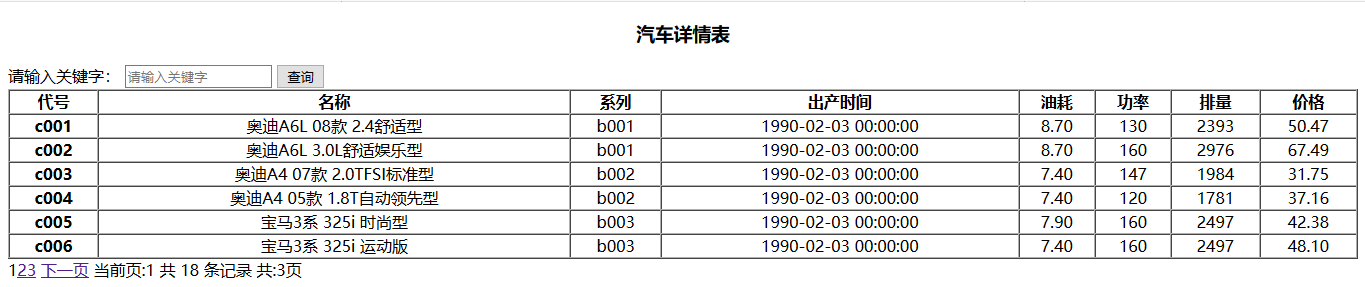
在这里可以修改分页的样式
<?php

// +----------------------------------------------------------------------

// | ThinkPHP [ WE CAN DO IT JUST THINK IT ]

// +----------------------------------------------------------------------

// | Copyright (c) 2006-2014 http://thinkphp.cn All rights reserved.

// +----------------------------------------------------------------------

// | Licensed ( http://www.apache.org/licenses/LICENSE-2.0 )

// +----------------------------------------------------------------------

// | Author: 麦当苗儿 <zuojiazi@vip.qq.com> <http://www.zjzit.cn>

// +----------------------------------------------------------------------

namespace Think;

class Page{

    public $firstRow; // 起始行数

    public $listRows; // 列表每页显示行数

    public $parameter; // 分页跳转时要带的参数

    public $totalRows; // 总行数

    public $totalPages; // 分页总页面数

    public $rollPage   = 11;// 分页栏每页显示的页数

	public $lastSuffix = true; // 最后一页是否显示总页数

    private $p       = 'p'; //分页参数名

    private $url     = ''; //当前链接URL

    private $nowPage = 1;

	// 分页显示定制

    private $config  = array(

        'header' => '<span class="rows">共 %TOTAL_ROW% 条记录</span>',//加css样式可以改变样式

        'prev'   => '<<',

        'next'   => '>>',

        'first'  => '1...',

        'last'   => '...%TOTAL_PAGE%',

        'theme'  => '%FIRST% %UP_PAGE% %LINK_PAGE% %DOWN_PAGE% %END% 当前页:%NOW_PAGE% %HEADER% 共:%TOTAL_PAGE%页',//可以添加分页要显示的东西

    );

    /**

     * 架构函数

     * @param array $totalRows  总的记录数

     * @param array $listRows  每页显示记录数

     * @param array $parameter  分页跳转的参数

     */

    public function __construct($totalRows, $listRows=20, $parameter = array()) {

        C('VAR_PAGE') && $this->p = C('VAR_PAGE'); //设置分页参数名称

        /* 基础设置 */

        $this->totalRows  = $totalRows; //设置总记录数

        $this->listRows   = $listRows;  //设置每页显示行数

        $this->parameter  = empty($parameter) ? $_GET : $parameter;

        $this->nowPage    = empty($_GET[$this->p]) ? 1 : intval($_GET[$this->p]);

        $this->nowPage    = $this->nowPage>0 ? $this->nowPage : 1;

        $this->firstRow   = $this->listRows * ($this->nowPage - 1);

    }

    /**

     * 定制分页链接设置

     * @param string $name  设置名称

     * @param string $value 设置值

     */

    public function setConfig($name,$value) {

        if(isset($this->config[$name])) {

            $this->config[$name] = $value;

        }

    }

    /**

     * 生成链接URL

     * @param  integer $page 页码

     * @return string

     */

    private function url($page){

        return str_replace(urlencode('[PAGE]'), $page, $this->url);

    }

    /**

     * 组装分页链接

     * @return string

     */

    public function show() {

        if(0 == $this->totalRows) return '';

        /* 生成URL */

        $this->parameter[$this->p] = '[PAGE]';

        $this->url = U(ACTION_NAME, $this->parameter);

        /* 计算分页信息 */

        $this->totalPages = ceil($this->totalRows / $this->listRows); //总页数

        if(!empty($this->totalPages) && $this->nowPage > $this->totalPages) {

            $this->nowPage = $this->totalPages;

        }

        /* 计算分页临时变量 */

        $now_cool_page      = $this->rollPage/2;

		$now_cool_page_ceil = ceil($now_cool_page);

		$this->lastSuffix && $this->config['last'] = $this->totalPages;

        //上一页

        $up_row  = $this->nowPage - 1;

        $up_page = $up_row > 0 ? '<a class="prev" href="' . $this->url($up_row) . '">' . $this->config['prev'] . '</a>' : '';

        //下一页

        $down_row  = $this->nowPage + 1;

        $down_page = ($down_row <= $this->totalPages) ? '<a class="next" href="' . $this->url($down_row) . '">' . $this->config['next'] . '</a>' : '';

        //第一页

        $the_first = '';

        if($this->totalPages > $this->rollPage && ($this->nowPage - $now_cool_page) >= 1){

            $the_first = '<a class="first" href="' . $this->url(1) . '">' . $this->config['first'] . '</a>';

        }

        //最后一页

        $the_end = '';

        if($this->totalPages > $this->rollPage && ($this->nowPage + $now_cool_page) < $this->totalPages){

            $the_end = '<a class="end" href="' . $this->url($this->totalPages) . '">' . $this->config['last'] . '</a>';

        }

        //数字连接

        $link_page = "";

        for($i = 1; $i <= $this->rollPage; $i++){

			if(($this->nowPage - $now_cool_page) <= 0 ){

				$page = $i;

			}elseif(($this->nowPage + $now_cool_page - 1) >= $this->totalPages){

				$page = $this->totalPages - $this->rollPage + $i;

			}else{

				$page = $this->nowPage - $now_cool_page_ceil + $i;

			}

            if($page > 0 && $page != $this->nowPage){

                if($page <= $this->totalPages){

                    $link_page .= '<a class="num" href="' . $this->url($page) . '">' . $page . '</a>';

                }else{

                    break;

                }

            }else{

                if($page > 0 && $this->totalPages != 1){

                    $link_page .= '<span class="current">' . $page . '</span>';

                }

            }

        }

        //替换分页内容

        $page_str = str_replace(

            array('%HEADER%', '%NOW_PAGE%', '%UP_PAGE%', '%DOWN_PAGE%', '%FIRST%', '%LINK_PAGE%', '%END%', '%TOTAL_ROW%', '%TOTAL_PAGE%'),//要显示的东西,可以添加到上面

            array($this->config['header'], $this->nowPage, $up_page, $down_page, $the_first, $link_page, $the_end, $this->totalRows, $this->totalPages),

            $this->config['theme']);

        return "<div>{$page_str}</div>";

    }

}
TP条件查询和分页查询的更多相关文章
- MySQL——优化嵌套查询和分页查询
优化嵌套查询 嵌套查询(子查询)可以使用SELECT语句来创建一个单列的查询结果,然后把这个结果作为过滤条件用在另一个查询中.嵌套查询写起来简单,也容易理解.但是,有时候可以被更有效率的连接(JOIN ...
- SQL语句or查询,union all查询,分页查询,分组,AND查询
一.OR查询 1.在AND多个筛选条件和一个or条件时,如果没有括号包裹,or会就近原则包裹之后的所有and条件,也就是同级的多个and条件只能对,or条件的一边起作用 2.如果or条件两边的筛选条件 ...
- SQL Server -- 回忆笔记(四):case函数,索引,子查询,分页查询,视图,存储过程
SQL Server知识点回忆篇(四):case函数,索引,子查询,分页查询,视图,存储过程 1. CASE函数(相当于C#中的Switch) then '未成年人' else '成年人' end f ...
- Linq高级查询,分页查询及查询分页结合
一.高级查询与分页查询 1.以...开头 StartsWith Repeater1.DataSource=con.Users.Where(r=>r.Nickname.StartsWith( ...
- Oracle子查询相关内容(包含TOP-N查询和分页查询)
本节介绍Oracle子查询的相关内容: 实例用到的数据为oracle中scott用户下的emp员工表,dept部门表,数据如下: 一.子查询 1.概念:嵌入在一个查询中的另一个查询语句,也就是说一个查 ...
- mysql-in关键字,分组查询,分页查询
1. in关键字,组查询 # 使用or来查询的化,不方便而且参数一多比较傻 select * from users where id=1 or id=2 or id=4; select * from ...
- Mysql--子查询、分页查询、联合查询
一. 子查询的定义 出现在其他语句中的select语句,称为子查询或者内查询,外部的查询语句称为主查询或者外查询,子查询可以包含普通select可以包含的任何语句. 外部查询:select.inser ...
- 数据库SQL Server2012笔记(四)——多表查询、子查询、分页查询、用查询结果创建新表和外连接
1.多表查询 1)笛卡尔集: select * from 表名1,表名2 select * from 表名1.表名2 where 表名1.字段名=表名2.字段名 注: 若有两张表有同 ...
- DQL---连接查询(内连接、外连接)、子查询、分页查询
一.连接查询 1.连接查询建立在有相互关系的两个表间,进行两个及两个以上的表或视图的查询. 2.对n张表进行查询,至少需要n-1个连接表的条件. 二.笛卡尔积(容易造成数据库宕机) 1.指表中每行元素 ...
随机推荐
- Runloop的再学习之浅析(一)
一,认识RunLoop 我的理解: 1. 在编程的世界里,万物皆对象.所以RunLoop 实际上也是一个对象,这个对象管理了其需要 处理的事件和消息,并提供了一个入口函数来执行上面 Event Loo ...
- Linux and Oracle常用目录详解
目录详解 目录 内容 / 根目录,一切从这里开始 /bin 包含系统启动和运行所必需的二进制文件(程序) /boot 包含Linux内核.最初的RAM磁盘映像(系统启动时,驱动程序会用到),以及启动加 ...
- Appium入门(5)__ Appium测试用例(1)
步骤为:启动AVD.启动Appium.写用例(python).执行 一.启动Android模拟器 二.启动Appium Server 双击appium图标启动,配置 ...
- elastic客户端TransportClient的使用
关于TransportClient,elastic计划在Elasticsearch 7.0中弃用TransportClient,并在8.0中完全删除它.后面,应该使用Java高级REST客户端,它执行 ...
- Java如何循环数组并使用Split
场景: 当写方法时遇到1个参数有3个值, 该参数类型为数组. 例如: aaa|bbb|ccc . 而且需要循环打印,这个时候我们就需要用数组循环输出的方法. 一:feature 示例 Wh ...
- zabbix监控托管主机遇到问题
昨天监控公司的托管主机时发现监控不上,回想起来其实就是个小问题,分分钟能解决的事,排错的过程才是真正耗心费神的. 监控环境: A zabbix server: 192.168.17.110 serve ...
- HTTP协议属于应用层,而SOCKS协议属于传输层
HTTP协议属于应用层,而SOCKS协议属于传输层 SOCKS代理 SOCKS代理能在任何端口,任何协议下运行. SOCKS V4只支持 TCP连接,而SOCKS V5在其基础上增加了安全认证以及对U ...
- 帝国cms修改栏目后文章列表的url错误怎么解决
修改了某个栏目的目录地址,原本是/abc/,现在改成了/ab/,重新生成了栏目页面/ab/和文章页面/ab/*.html,但是栏目页的列表文章url还是/abc/*.html(正确的url应该是/ab ...
- SQL Anywhere .NET
SQL Anywhere .NET 支持 1.ADO.NET 是 Microsoft 的 ODBC.OLE DB 和 ADO 系列中最新的数据访问 API.它是 Microsoft .NET Fram ...
- vue中$set的用法
数组: this.$set(Array,index, newValue) 对象: this.$set(Object, key, value)