
Qt—MVC架构
【1】代理应用示例源码
用代码说事,比较靠谱。
代码目录:三个自定义类,重实现QStyledItemDelegate类。main函数应用示例。
(1)ComboDelegate.h
 #ifndef COMBODELEGATE_H

 #define COMBODELEGATE_H

 #include <QStyledItemDelegate>

 class ComboDelegate : public QStyledItemDelegate

 {

 public:

     ComboDelegate(QObject *parent = NULL);

 protected:

     QWidget *createEditor(QWidget *parent, const QStyleOptionViewItem &option, const QModelIndex &index) const;

     void setEditorData(QWidget *editor, const QModelIndex &index) const;

     void setModelData(QWidget *editor, QAbstractItemModel *model, const QModelIndex &index) const;

     void updateEditorGeometry(QWidget *editor, const QStyleOptionViewItem &option, const QModelIndex &index) const;

 };

 #endif // COMBODELEGATE_H
(2)ComboDelegate.cpp
 #include "ComboDelegate.h"

 #include <QComboBox>

 ComboDelegate::ComboDelegate(QObject *parent)

     : QStyledItemDelegate(parent)

 {}

 QWidget *ComboDelegate::createEditor(QWidget *parent, const QStyleOptionViewItem &option, const QModelIndex &index) const

 {

     Q_UNUSED(option);

     Q_UNUSED(index);

     QStringList list;

     list << "工人" << "农民" << "军人" << "律师";

     QComboBox *pEditor = new QComboBox(parent);

     pEditor->addItems(list);

     pEditor->installEventFilter(const_cast<ComboDelegate*>(this));

     return pEditor;

 }

 void ComboDelegate::setEditorData(QWidget *editor, const QModelIndex &index) const

 {

     QString strText = index.model()->data(index).toString();

     QComboBox *pCombox = NULL;

     pCombox = static_cast<QComboBox*>(editor);

     if (pCombox != NULL)

     {

         int nIndex = pCombox->findText(strText);

         pCombox->setCurrentIndex(nIndex);

     }

 }

 void ComboDelegate::setModelData(QWidget *editor, QAbstractItemModel *model, const QModelIndex &index)const

 {

     QComboBox *pCombox = NULL;

     pCombox = static_cast<QComboBox*>(editor);

     if (pCombox != NULL)

     {

         QString strText = pCombox->currentText();

         model->setData(index, strText);

     }

 }

 void ComboDelegate::updateEditorGeometry(QWidget *editor, const QStyleOptionViewItem &option, const QModelIndex &index)const

 {

     Q_UNUSED(index);

     editor->setGeometry(option.rect);

 }
(3)DateDelegate.h
 #ifndef DATEDELEGATE_H

 #define DATEDELEGATE_H

 #include <QStyledItemDelegate>

 class DateDelegate : public QStyledItemDelegate

 {

 public:

     DateDelegate(QObject *parent = NULL);

 protected:

     QWidget *createEditor(QWidget *parent, const QStyleOptionViewItem &option, const QModelIndex &index) const;

     void setEditorData(QWidget *editor, const QModelIndex &index) const;

     void setModelData(QWidget *editor, QAbstractItemModel *model, const QModelIndex &index) const;

     void updateEditorGeometry(QWidget *editor, const QStyleOptionViewItem &option, const QModelIndex &index) const;

 };

 #endif // DATEDELEGATE_H
(4)DateDelegate.cpp
 #include "DateDelegate.h"

 #include <QDateTimeEdit>

 DateDelegate::DateDelegate(QObject *parent)

     : QStyledItemDelegate(parent)

 {}

 // 首先创建要进行代理的窗体

 QWidget *DateDelegate::createEditor(QWidget *parent, const QStyleOptionViewItem &option, const QModelIndex &index) const

 {

     Q_UNUSED(option);

     Q_UNUSED(index);

     QDateTimeEdit *pEditor = new QDateTimeEdit(parent);      // 一个日历的控件

     pEditor->setDisplayFormat("yyyy-MM-dd");   // 日期时间的显示格式

     pEditor->setCalendarPopup(true);   // 以下拉的方式显示

     pEditor->installEventFilter(const_cast<DateDelegate*>(this));  // 调用这个函数安装事件过滤器,使这个对象可以捕获QDateTimeEdit对象的事件

     return pEditor;

 }

 // 这个是初始化作用,初始化代理控件的数据

 void DateDelegate::setEditorData(QWidget *editor, const QModelIndex &index) const

 {

   // 先用这个index返回这个model然后用这个model得到index对应的数据

   QString strDate = index.model()->data(index).toString();

   QDate date = QDate::fromString(strDate, Qt::ISODate);     // 根据QString类型得到相应的时间类型

   QDateTimeEdit *pEditor = NULL;

   pEditor = static_cast<QDateTimeEdit*>(editor);    // 强转为QDateTimeEdit*类型

   if (pEditor != NULL)

   {

       pEditor->setDate(date);      // 设置代理控件的显示数据

   }

 }

 // 将代理控件里面的数据更新到视图控件中

 // void setModelData(QWidget *editor, QAbstractItemModel *model, const QModelIndex &index) const;

 void DateDelegate::setModelData(QWidget *editor, QAbstractItemModel *model, const QModelIndex &index) const

 {

   QDateTimeEdit *pEditor = NULL;

   pEditor = static_cast<QDateTimeEdit*>(editor);    // 得到时间

   if (pEditor != NULL)

   {

       QDate date = pEditor->date();    // 得到时间

       model->setData(index, QVariant(date.toString(Qt::ISODate)));    // 把值放到相应的index里面

   }

 }

 // 代理中数据的改变放到model中

 // void updateEditorGeometry(QWidget *editor, const QStyleOptionViewItem &option, const QModelIndex &index) const;

 void DateDelegate::updateEditorGeometry(QWidget *editor, const QStyleOptionViewItem &option, const QModelIndex &index) const

 {

     Q_UNUSED(index);

     editor->setGeometry(option.rect);

 }
(5)SpinDelegate.h
 #ifndef SPINDELEGATE_H

 #define SPINDELEGATE_H

 #include <QStyledItemDelegate>

 class SpinDelegate : public QStyledItemDelegate

 {

 public:

     SpinDelegate(QObject *parent = NULL);

 protected:

     QWidget *createEditor(QWidget *parent, const QStyleOptionViewItem &option, const QModelIndex &index) const;

     void setEditorData(QWidget *editor, const QModelIndex &index) const;

     void setModelData(QWidget *editor, QAbstractItemModel *model, const QModelIndex &index) const;

     void updateEditorGeometry(QWidget *editor, const QStyleOptionViewItem &option, const QModelIndex &index) const;

 };

 #endif // SPINDELEGATE_H
(6)SpinDelegate.cpp
 #include "SpinDelegate.h"

 #include <QSpinBox>

 SpinDelegate::SpinDelegate(QObject *parent)

     : QStyledItemDelegate(parent)

 {

 }

 QWidget *SpinDelegate::createEditor(QWidget *parent, const QStyleOptionViewItem &option, const QModelIndex &index) const

 {

     Q_UNUSED(option);

     Q_UNUSED(index);

     QSpinBox *pEditor = new QSpinBox(parent);

     pEditor->setRange(, );

     pEditor->installEventFilter(const_cast<SpinDelegate*>(this));

     return pEditor;

 }

 void SpinDelegate::setEditorData(QWidget *editor, const QModelIndex &index) const

 {

     int value = index.model()->data(index).toInt();

     QSpinBox *pSpinbox = NULL;

     pSpinbox = static_cast<QSpinBox*>(editor);

     if (pSpinbox != NULL)

     {

         pSpinbox->setValue(value);

     }

 }

 void SpinDelegate::setModelData(QWidget *editor, QAbstractItemModel *model, const QModelIndex &index) const

 {

     QSpinBox *pSpinbox = NULL;

     pSpinbox = static_cast<QSpinBox*>(editor);

     if (pSpinbox != NULL)

     {

         int value = pSpinbox->value();

         model->setData(index, value);

     }

 }

 void SpinDelegate::updateEditorGeometry(QWidget *editor, const QStyleOptionViewItem &option, const QModelIndex &index) const

 {

     Q_UNUSED(index);

     editor->setGeometry(option.rect);

 }
(7)main.cpp
 #include <QApplication>

 #include <QFile>

 #include <QDebug>

 #include <QWidget>

 #include <QTableView>

 #include <QTextStream>

 #include <QStandardItemModel>

 #include "DateDelegate.h"

 #include "ComboDelegate.h"

 #include "SpinDelegate.h"

 int main(int argc, char *argv[])

 {

     QApplication a(argc, argv);

     QStandardItemModel model(, );

     model.setHeaderData(, Qt::Horizontal, QLatin1String("Name"));

     model.setHeaderData(, Qt::Horizontal, QLatin1String("Birthday"));

     model.setHeaderData(, Qt::Horizontal, QLatin1String("Job"));

     model.setHeaderData(, Qt::Horizontal, QLatin1String("Income"));

     QFile file(QLatin1String("/mnt/liuy/info"));

     if (!file.open(QIODevice::ReadOnly | QIODevice::Text))

     {

         qDebug() << "open the file failed...";

         return -;

     }

     QTextStream out(&file);

     QString line;

     model.removeRows(, model.rowCount(QModelIndex()), QModelIndex());

     int row = ;

     do

     {

         line = out.readLine();

         if (!line.isEmpty())

         {

             model.insertRows(row, , QModelIndex());

             QStringList pieces = line.split(",", QString::SkipEmptyParts);

             model.setData(model.index(row, , QModelIndex()), pieces.value());

             model.setData(model.index(row, , QModelIndex()), pieces.value());

             model.setData(model.index(row, , QModelIndex()), pieces.value());

             model.setData(model.index(row, , QModelIndex()), pieces.value());

             ++row;

         }

     } while(!line.isEmpty());

     file.close();

     QTableView tableView;

     tableView.setModel(&model); // 绑定Model

     tableView.setWindowTitle(QLatin1String("Delegate"));

     DateDelegate dateDelegate;

     tableView.setItemDelegateForColumn(, &dateDelegate); // 第一列代理

     ComboDelegate comboDelegate;

     tableView.setItemDelegateForColumn(, &comboDelegate);// 第二列代理

     SpinDelegate spinDelegate;

     tableView.setItemDelegateForColumn(, &spinDelegate); // 第三列代理

     tableView.resize(, ); // 重置大小

     tableView.show();

     return a.exec();

 }
备注:此示例运行环境为UBuntu + Qt5.3.2
【2】读取的信息文件
文件info 内容如下(注意:文件格式):
Liu,--,工人,

Wang,--,医生,

Sun,--,军人,

Zhang,--,律师,
【3】运行效果图
运行效果图:
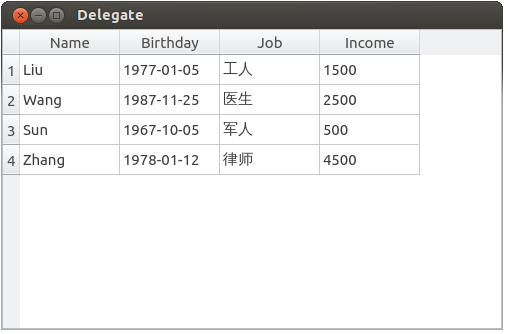
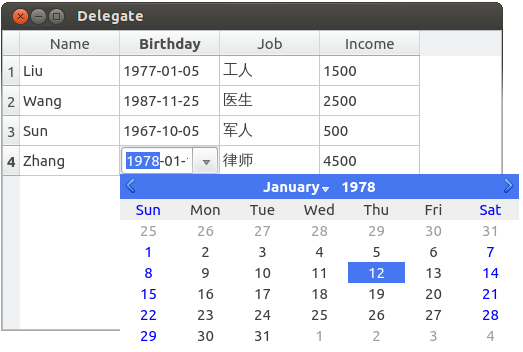
第二列编辑图(时间日期控件):
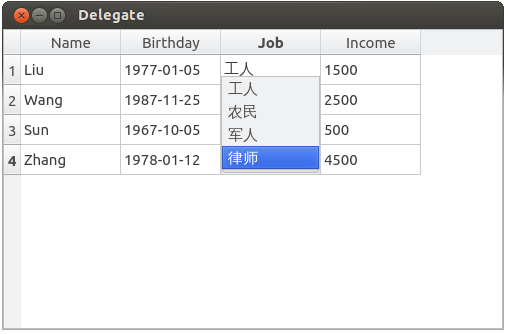
第三列编辑图(下拉框控件):
第四列编辑图(微调框控件):

Good Good Study, Day Day Up.
顺序 选择 循环 总结
Qt—MVC架构的更多相关文章
- MVC架构之delegate
Qt的MVC架构可以实现很多数据显示的功能,本次主要对代理进行一个总结: 重实现QStyledItemDelegate类,实现自定义类. (1)ComboxDelegate.h #ifndef COM ...
- 【JAVA】基于MVC架构Java技术荟萃案例演练
基于JAVA-MVC技术的顾客管理项目案例总结 作者 白宁超 2016年6月9日22:47:08 阅读前瞻:本文源于对javaweb相关技术和资料汇总,涉及大量javaweb基础技术诸如:Servle ...
- Android 四大组件 与 MVC 架构模式
作为一个刚从JAVA转过来的Android程序员总会思考android MVC是什么样的? 首先,我们必须得说Android追寻着MVC架构,那就得先说一下MVC是个啥东西! 总体而来说MVC不能说是 ...
- MVC架构模式分析与设计(一)---简单的mvc架构
首先 我要感谢慕课网的老师提供视频资料 http://www.imooc.com/learn/69 下面我来进行笔记 我们制作一个简单的mvc架构 制作第一个控制器 testController.cl ...
- IntelliMVCCode智能MVC架构的代码助手使用方法
智能代码生成工具,快速帮助开发者提升开发速度,通过工具自动生成MVC架构的大量源代码,节省更多的开发时间. 工具使用的框架:.net4.0,通过工具连接到数据库自动提取数据表或视图中的结构,生成对应的 ...
- 从MVC框架看MVC架构的设计
尽管MVC早已不是什么新鲜话题了,但是从近些年一些优秀MVC框架的设计上,我们还是会发现MVC在架构设计上的一些新亮点.本文将对传统MVC架构中的一些弊病进行解读,了解一些优秀MVC框架是如何化解这些 ...
- 【PHP小项目使用MVC架构】
小项目名称是雇员管理系统. mvc是一种项目的开发模式,中文名称为模式视图控制器,是强制程序员将数据的输入.处理.输出分开的一种开发模式. 在这个小项目中,控制器使用service作为后缀名. 项目u ...
- 一个初学者对于MVC架构的理解
我很早之前就开始接触.NET开发,一直都在2.0的框架下,所以对于MVC这种架构,听说过,但没有具体使用过,近期和外部朋友接触时,有了解到他们公司在使用MVC这种架构,所以自己就找来相关资料了解一下M ...
- java MVC架构-spring mvc,struct2(理解)
MVC架构实现基础: 基于filter或者servlet实现请求地址分析,如果需要控制类处理请求,则调用相应的控制类.调用控制类时,根据配置文件初始化控制类相关的参数.数据库连接可持久化存在.控制类处 ...
随机推荐
- 什么是Docker?(一)
Docker 最初是 dotCloud 公司创始人 Solomon Hykes 在法国期间发起的一个公司内部项目,它是基于 dotCloud 公司多年云服务技术的一次革新,并于 2013 年 3 月以 ...
- 前端 HTML form表单标签 input标签 type属性 checkbox 多选框
多选框 <!DOCTYPE html> <html lang="en"> <head> <meta charset="UTF-8 ...
- what's the python之异常处理
what's the 异常 python程序中会出现异常,即bug.若出现异常程序就报错,异常之后的代码就不会继续往下执行,这是一个正常程序不允许出现的,但是在某些程序交互的时候难免会因为用户输入问题 ...
- 列表选择框:wxSingleChoiceDialog
wxSingleChoiceDialog(wxWindow* parent, const wxString& message, const wxString& caption, int ...
- 桌面图标未读消息(小米,sony,三星手机)
新消息来了,在桌面的Laucher图标上显示新消息数 /** * 应用桌面图标未读消息显示工具类 * 只支持 小米,三星和索尼 */ public class BadgeUtil { final st ...
- 【LeetCode每天一题】Median of Two Sorted Arrays(两数组中的中位数)
There are two sorted arrays nums1 and nums2 of size m and n respectively. Find the median of the tw ...
- 第一弹:超全Python学习资源整理(入门系列)
随着人工智能.大数据的时代到来,学习Python的必要性已经显得不言而喻.我经常逛youtube,发现不仅仅是以编程为职业的程序员,证券交易人员,生物老师,高级秘书......甚至许多自由撰稿人,设计 ...
- CentOS6.5配置MYSQL一主多从详解
一.环境 操作系统 :CentOS 6.5 数据库版本:MySQL 主机A:192.168.1.1 (Master) 从机B:192.168.1.2 (Slave) 从机B:192.168.1.3 ( ...
- android SDK打包app
SDK 软件开发工具包(Software Development Kit) JDK 开发工具包(Java Developer's Kit) 1.搜索java jdk 进入官网 http://www ...
- leetcode34. Find First and Last Position of Element in Sorted Array
二分查找不只是查找,还可以根据需求添加条件进行查找,比如这个题,左端点的条件就是边界点或者小于target,右端点的条件就是!=size()或者大于.根据这个找到查找的条件