
[博客迁移]探索Windows Azure 监控和自动伸缩系列2 - 获取虚拟机的监控定义和监控数据
上一篇博文介绍了如何连接Windows Azure: http://www.cnblogs.com/teld/p/5113063.html
本篇我们继续上次的示例代码,获取虚拟机的监控定义和监控数据。
有人会问,Azure Portal上已经有了监控数据,通过代码获取有意思吗?我们计划基于性能计数器的监控数据来实现应用的自动伸缩,因此可以获取到监控指标定义和监控数据应该是第一步。
在Azure的管理Portal中我们可以看到虚拟机的监控数据,目前,提供的主要有以下监控指标:
CPU Percentage;Disk Read; Disk Write; Network in;NetWork Out。
Azure中监控的Nuget主要是这个:Microsoft Azure Management Libraries
核心的几个namespace有:

我们本篇用的是Metric这个命名空间,核心类MetricClient:
namespace AzureTest

{

    using Microsoft.WindowsAzure;

    using Microsoft.WindowsAzure.Management.Monitoring.Metrics;

    using Microsoft.WindowsAzure.Management.Monitoring.Metrics.Models;

    using Microsoft.WindowsAzure.Management.Monitoring.Utilities;

    /// <summary>

    /// 监控客户端

    /// </summary>

    class MonitorClient

    {

        private SubscriptionCloudCredentials credentials;

        public MonitorClient(SubscriptionCloudCredentials credentials)

        {

            this.credentials = credentials;

        }

        /// <summary>

        /// 获取所有的监控指标

        /// </summary>

        public void GetMetricDefinitions()

        {

            var metricsClient = new MetricsClient(credentials);

            // Build the resource ID string.

            var resourceId = ResourceIdBuilder.BuildVirtualMachineResourceId("cloudServiceName", "deploymentName");

            Console.WriteLine("Resource Id: {0}", resourceId);

            //Get the metric definitions.

            var metricListResponse=

                metricsClient.MetricDefinitions.List(resourceId, null, null);

            MetricDefinitionCollection metricDefinitions = metricListResponse.MetricDefinitionCollection;

            // Display the metric definitions.

            int count = ;

            foreach (MetricDefinition metricDefinition in metricDefinitions.Value)

            {

                Console.WriteLine("MetricDefinitio: " + count++);

                Console.WriteLine("Display Name: " + metricDefinition.DisplayName);

                Console.WriteLine("Metric Name: " + metricDefinition.Name);

                Console.WriteLine("Metric Namespace: " + metricDefinition.Namespace);

                Console.WriteLine("Is Altertable: " + metricDefinition.IsAlertable);

                Console.WriteLine("Min. Altertable Time Window: " + metricDefinition.MinimumAlertableTimeWindow);

                Console.WriteLine();

            }

        }

}

}
使用上一篇我们的Azure 凭据验证器,获取一个令牌凭据TokenCloudCredentials,然后构造一个MonitorClient,获取指定虚拟机的监控数据。
static void Main(string[] args)

{

      var credential = Authorizator.GetCredentials();

      var client = new MonitorClient(credential);

      client.GetMetricDefinitions();

      Console.ReadLine();

}
第一块代码中:
var resourceId = ResourceIdBuilder.BuildVirtualMachineResourceId("cloudServiceName", "deploymentName");
这个地方通ResourceIDBuilder获取虚拟机的资源ID,对应的参数分别为:cloudServiceName和deploymentName,第一个是虚拟机使用的云服务名称,第二个是虚拟机名称即可。
Run...
出错了:
{"ForbiddenError: The server failed to authenticate the request. Verify that the certificate is valid and is associated with this subscription."}
一番Google后未果,咋整,再分析下错误信息:
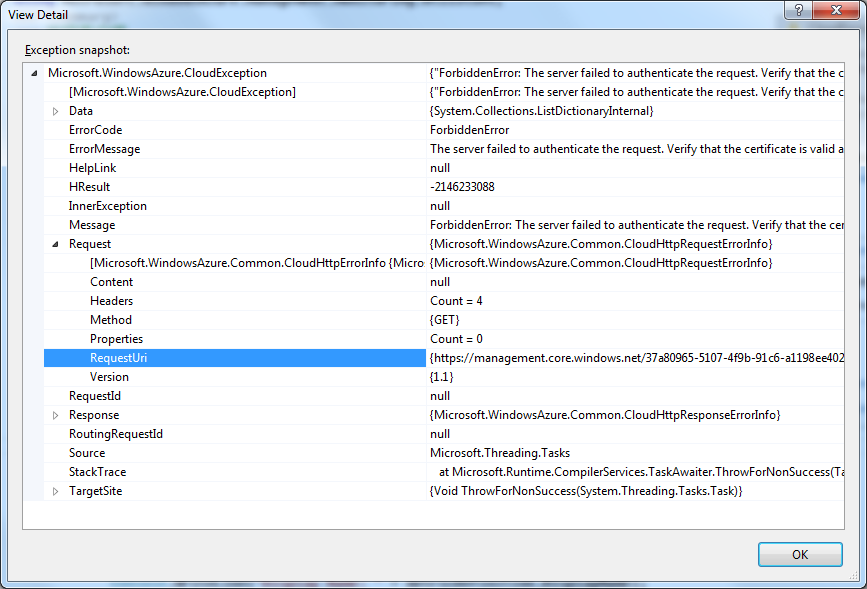
可以看到,请求的Uri:
{https://management.core.windows.net/37*****-5107-*****-*******6/services/monitoring/metricdefinitions/query?&resourceId=%2Fhostedservices%2Fteldptapp%2Fdeployments%2Fteldptapp}
请求又跑到Azure Global那去了。
这个错误困扰了好久,还在StackOverflow上发了英文咨询贴,不知道洋人们如何回答了。在此多谢鞠强老大的指导,想办法将请求的Uri定位到中国区的Azure。
重新分析了代码,找到了Monitor的构造函数中,可以指定Uri,将中国区Azure的Uri指定一下:https://management.core.chinacloudapi.cn
MetricsClient metricsClient = new MetricsClient(credentials, new Uri("https://management.core.chinacloudapi.cn/"));
测试通过,ok。
获取到了监控指标定义,接下来我们获取监控数据:
namespace AzureTest

{

    using Microsoft.WindowsAzure;

    using Microsoft.WindowsAzure.Management.Monitoring.Metrics;

    using Microsoft.WindowsAzure.Management.Monitoring.Metrics.Models;

    using Microsoft.WindowsAzure.Management.Monitoring.Utilities;

    /// <summary>

    /// 监控客户端

    /// </summary>

    class MonitorClient

    {

        private SubscriptionCloudCredentials credentials;

        public MonitorClient(SubscriptionCloudCredentials credentials)

        {

            this.credentials = credentials;

        }

        /// <summary>

        /// 获取所有的监控指标数据

        /// </summary>

        public void GetMetricData()

        {

            var metricsClient = new MetricsClient(credentials, new Uri("https://management.core.chinacloudapi.cn/"));

            // Build the resource ID string.

            var resourceId = ResourceIdBuilder.BuildVirtualMachineResourceId("cloudServiceName", "deploymentName");

            Console.WriteLine("Resource Id: {0}", resourceId);

            //Get the metric definitions.

            var metricListResponse = metricsClient.MetricDefinitions.List(resourceId, null, null);

            MetricDefinitionCollection metricDefinitions = metricListResponse.MetricDefinitionCollection;

            var metricNamespace = "";

            var metricNames = new List<string>();

            // Display the metric definitions.

            int count = ;

            foreach (MetricDefinition metricDefinition in metricDefinitions.Value)

            {

                Console.WriteLine("MetricDefinitio: " + count++);

                Console.WriteLine("Display Name: " + metricDefinition.DisplayName);

                Console.WriteLine("Metric Name: " + metricDefinition.Name);

                if (!metricNames.Contains(metricDefinition.Name))

                    metricNames.Add(metricDefinition.Name);

                Console.WriteLine("Metric Namespace: " + metricDefinition.Namespace);

                metricNamespace = metricDefinition.Namespace;

                Console.WriteLine("Is Altertable: " + metricDefinition.IsAlertable);

                Console.WriteLine("Min. Altertable Time Window: " + metricDefinition.MinimumAlertableTimeWindow);

                Console.WriteLine();

            }

            // timeGrain must be 5, 60 or 720 minutes.

            TimeSpan timeGrain = TimeSpan.FromMinutes();

            DateTime startTime = DateTime.UtcNow.AddHours(-);

            DateTime endTime = DateTime.UtcNow;

            MetricValueListResponse response = metricsClient.MetricValues.List(resourceId, metricNames, metricNamespace, timeGrain, startTime, endTime);

            foreach (MetricValueSet value in response.MetricValueSetCollection.Value)

            {

                String valueName = value.Name;

                Console.WriteLine("MetricValue:{0}", valueName);

                foreach (MetricValue metricValue in value.MetricValues)

                {

                    Console.WriteLine("Maximum:{0}{1}", metricValue.Maximum, value.Unit);

                    Console.WriteLine("Average:{0}{1}", metricValue.Average, value.Unit);

                    Console.WriteLine("Minimum:{0}{1}", metricValue.Minimum, value.Unit);

                }

            }

        }

    }

}
Run...
程序在metricsClient.MetricValues.List(resourceId, metricNames, metricNamespace, timeGrain, startTime, endTime);
出错了:
Additional information: <string xmlns="http://schemas.microsoft.com/2003/10/Serialization/">{"Code":"InvalidRequest","Message":"Could not retrieve metrics."}</string>
为啥不能获取监控指标呢?
这个错误,Google一番依旧未果,咨询了微软的技术工程师,给了如下指导,resouceID必须执行RoleName:
var resourceId = ResourceIdBuilder.BuildVirtualMachineResourceId("cloudService", "deploymentName", "roleName");
修改之后,问题解决。
至此,我们已经可以获取到监控指标和监控数据,下一步我们要获取自定义的性能计数器,基于自定义的性能计数器来实现自动伸缩。
周国庆
2016/3
[博客迁移]探索Windows Azure 监控和自动伸缩系列2 - 获取虚拟机的监控定义和监控数据的更多相关文章
- [博客迁移]探索Windows Azure 监控和自动伸缩系列1 - 连接中国区Azure
最近准备基于Microsoft Azure Management Libraries 实现虚拟机的监控.主要的需求就是获取虚拟机内置的性能计数器数据,基于性能计数器实现后续的监控和自动伸缩. 作为这一 ...
- 探索Windows Azure 监控和自动伸缩系列2 - 获取虚拟机的监控定义和监控数据
上一篇博文介绍了如何连接Windows Azure: http://www.cnblogs.com/teld/p/5113063.html 本篇我们继续上次的示例代码,获取虚拟机的监控定义和监控数据. ...
- [博客迁移]探索Windows Azure 监控和自动伸缩系列3 - 启用Azure监控扩展收集自定义监控数据
上一篇我们介绍了获取Azure的监控指标和监控数据: http://www.cnblogs.com/teld/p/5113376.html 本篇我们继续:监控虚拟机的自定义性能计数器. 随着我们应用规 ...
- 探索Windows Azure 监控和自动伸缩系列1 - 连接中国区Azure
最近准备基于Microsoft Azure Management Libraries 实现虚拟机的监控.主要的需求就是获取虚拟机内置的性能计数器数据,基于性能计数器实现后续的监控和自动伸缩. 作为这一 ...
- 探索Windows Azure 监控和自动伸缩系列3 - 启用Azure监控扩展收集自定义监控数据
上一篇我们介绍了获取Azure的监控指标和监控数据: http://www.cnblogs.com/teld/p/5113376.html 本篇我们继续:监控虚拟机的自定义性能计数器. 随着我们应用规 ...
- 探索 Windows Azure 网站中的自动伸缩功能
去年10月,我们发布了若干针对 WindowsAzure平台的更新,其中一项更新是添加了基于日期的自动伸缩调度支持(在不同的日期设置不同的规则). 在这篇博客文章中,我们将了解自动伸缩的概念,并 ...
- 将 Java Spring Framework 应用程序迁移到 Windows Azure
我们刚刚发布了一个新教程和示例代码,以阐述如何在Windows Azure中使用 Java 相关技术.在该指南中,我们提供了分步教程,说明如何将 Java Spring Framework 应用程序( ...
- 博客迁移至http://www.maxzhang.com,欢迎访问!
博客迁移至http://www.maxzhang.com,欢迎访问!
- 告示:CSDN博客通道支持Windows Live Writer写blog离线好友
尊敬的各位CSDN用户: 您好! 为了更好的服务客户.CSDN已经支持Windows Live Writer离线写博客啦.Windows Live Writer于2014年5月29日正式上线啦!欢迎大 ...
随机推荐
- Win10系统桌面右键新建没有内容怎么恢复
Win10系统桌面右键新建没有内容怎么恢复 添加txt文本文档 运行->regedit,打开注册表编辑器 展开HKEY_CLASSES_ROOT 找到.txt 选中.txt,修改右侧窗格的“默认 ...
- Java+selenium 如何下拉移动滚动条【实战】
一.场景:在编写脚本过程中需要定位的元素,在界面的底部,需要拖拽下拉滚动条,再进行定位元素. 实现思路:用Selenium 里面的 scrollTo 方法实现 二.脚本示例: 1. 用例设计 @The ...
- TZOJ:最大连续子序列
描述 给定K个整数的序列{ N1, N2, ..., NK },其任意连续子序列可表示为{ Ni, Ni+1, ..., Nj },其中 1 <= i <= j <= K.最大连续子 ...
- struts2 中的 addActionError 、addFieldError、addActionMessage的方法【转】
一.addActionError("错误内容"): Action级别的错误消息this.addActionError("错误信息1");this.addAct ...
- SHOW STATUS 查看各种类型SQL执行的频率
通过 SHOW STATUS 可以提供服务器状态信息,也可以使用 mysqladmin extendedstatus 命令获得.SHOW STATUS 可以根据需要显示 session 级别的统计结果 ...
- MySQL安装失败解决的方法
一..msi版的MySQL安装包在最后执行的时候到第三步就死掉了,直接未响应 watermark/2/text/aHR0cDovL2Jsb2cuY3Nkbi5uZXQvd19iYXNrZXRib3ky ...
- PixelRatio使用
export default class PixelRatioView extends Component { render() { return ( <View style={styles.c ...
- 报错解决——uwsgi错误invalid request block size
uwsgi错误invalid request block size 使用uwsgi启动django代码,然后打开浏览器输入http://localhost:8000/admin.后台出现下面错误 in ...
- C# List去重的三种方法
三种去重的方法 1.List中的元素实现IEquatabe接口,并提供Equals方法和GetHashCode方法. 2.使用表达式 users.Where((x,i)=>users.FindI ...
- 晨枫U盘启动盘制作工具V4.0-安装原版XP的方法
[1]进入第一个PE后找到我们事先准备好的xp光盘iso镜像,右键点击加载虚拟磁盘(也可以利用虚拟光驱来加载或者直接用右键里的RAR解压到本地硬盘分区) [2]打开桌面上的windows安装工具,wi ...