
006.Delphi插件之QPlugins,多服务演示
演示效果如下
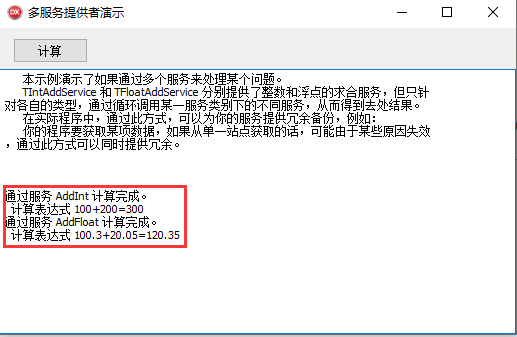
演示工程,全部就一个文件,代码如下
unit Frm_Main;

interface

uses

  Winapi.Windows,

  Winapi.Messages,

  System.SysUtils,

  System.Variants,

  System.Classes,

  Vcl.Graphics,

  System.Rtti,

  Vcl.Controls,

  Vcl.Forms,

  Vcl.Dialogs,

  Vcl.StdCtrls,

  qstring,

  QPlugins,

  qplugins_base,

  qplugins_params,

  Vcl.ExtCtrls;

type

  TForm_Main = class(TForm)

    Panel1: TPanel;

    Button1: TButton;

    Memo1: TMemo;

    procedure FormCreate(Sender: TObject);

    procedure Button1Click(Sender: TObject);

  private

    {Private declarations}

  public

    {Public declarations}

  end;

  // 继承自TQService服务

  TIntAddService = class(TQService)

  public

    function Execute(AParams: IQParams; AResult: IQParams): Boolean; override; stdcall;

  end;

  // 继承自TQService服务

  TFloatAddService = class(TQService)

  public

    function Execute(AParams: IQParams; AResult: IQParams): Boolean; override; stdcall;

  end;

var

  Form_Main: TForm_Main;

implementation

{$R *.dfm}

// 判断参数类型

function IsIntType(AType: TQParamType): Boolean;

begin

  Result := AType in [ptInt8, ptInt16, ptInt32, ptInt64, ptUInt8, ptUInt16,

    ptUInt32, ptUInt64];

end;

// 判断参数类型

function IsFloatType(AType: TQParamType): Boolean;

begin

  Result := AType in [ptFloat4, ptFloat8];

end;

{TFloatAddService}

function TFloatAddService.Execute(AParams, AResult: IQParams): Boolean;

begin

  // 判断参数类型都是浮点型

  if IsFloatType(AParams[].ParamType) and IsFloatType(AParams[].ParamType)

  then

  begin

    // 两个参数相加

    AResult.Add('Result', ptFloat8).AsFloat := AParams[].AsFloat +

      AParams[].AsFloat;

    Result := True;

  end

  else

    Result := False;

end;

{TIntAddService}

function TIntAddService.Execute(AParams, AResult: IQParams): Boolean;

begin

  // 判断参数类型都是整数型

  if IsIntType(AParams[].ParamType) and IsIntType(AParams[].ParamType) then

  begin

    // 两个参数相加

    AResult.Add('Result', ptInt64).AsInt64 := AParams[].AsInt64 +

      AParams[].AsInt64;

    Result := True;

  end

  else

  begin

    Result := False;

  end;

end;

procedure TForm_Main.Button1Click(Sender: TObject);

var

  AServices:        IQServices;

  AParams, AResult: IQParams;

  procedure Calc;

  var

    I: Integer;

  begin

    // 注册2个服务,名字分别为TIntAddService和TFloatAddService

    for I :=  to AServices.Count -  do

    begin

      if AServices[I].Execute(AParams, AResult) then

      begin

        Memo1.Lines.Add('通过服务 ' + AServices[I].Name + ' 计算完成。');

        Break;

      end;

    end;

  end;

begin

  // 创建2个参数

  AParams := TQParams.Create;

  AResult := TQParams.Create;

  // 调用两个整数型相加

  AServices := PluginsManager.ByPath('Services/Adds') as IQServices;

  AParams.Add('X', ptUInt8).AsInteger := ;

  AParams.Add('Y', ptUInt8).AsInteger := ;

  Calc;

  Memo1.Lines.Add('  计算表达式 100+200=' + IntToStr(AResult[].AsInt64));

  AParams.Clear;

  AResult.Clear;

  // 调用两个浮点型相加

  AParams.Add('X', ptFloat8).AsFloat := 100.3;

  AParams.Add('Y', ptFloat8).AsFloat := 20.05;

  Calc;

  Memo1.Lines.Add('  计算表达式 100.3+20.05=' + FloatToStr(AResult[].AsFloat));

end;

// 创建

procedure TForm_Main.FormCreate(Sender: TObject);

begin

  ReportMemoryLeaksOnShutdown := True;

  // 注册2个服务,名字分别为TIntAddService和TFloatAddService

  RegisterServices('/Services/Adds', [TIntAddService.Create(NewId, 'AddInt'), TFloatAddService.Create

    (NewId, 'AddFloat')]);

end;

end.
006.Delphi插件之QPlugins,多服务演示的更多相关文章
- 009.Delphi插件之QPlugins,服务的热插拔
这个DEMO用来演示服务的替换,用起来总是怪怪的感觉,效果图如下 代码如下 unit Frm_Main; interface uses Winapi.Windows, Winapi.Messages, ...
- 008.Delphi插件之QPlugins,服务的两种调用方法
这个QPlugins自带的DEMO,大概的意思就是,创建2个服务类,程序启动的时候注册这2个服务类.点击不同的按钮,使用不同的方法来调用这个服务. 效果界面如下 unit Frm_Main; inte ...
- 010.Delphi插件之QPlugins,遍历服务接口
这个DEMO注意是用来看一个DLL所拥有的全部服务接口 演示效果如下 代码如下: unit Frm_Main; interface uses Winapi.Windows, Winapi.Messag ...
- 012.Delphi插件之QPlugins,多实例内嵌窗口服务
这个DEMO中主要是在DLL中建立了一个IDockableControl类,并在DLL的子类中写了具体的实现方法. 在主程序exe中,找到这个服务,然后调用DLL的内嵌方法,把DLL插件窗口内嵌到主程 ...
- 011.Delphi插件之QPlugins,延时加载服务
这个DEMO是是把DLL插件的相关信息做成了一个配置文件,主程序加载这个配置文件,从而起到延时加载的作用 主程序代码如下 unit Frm_Main; interface uses Winapi.Wi ...
- 013.Delphi插件之QPlugins,模块化代码示例
这个DEMO的是一个定义了一个窗体插件接口,把其他窗口注册到这个窗体插件接口中.主程序运行起来,就遍历一下窗体插件接口,把每个窗体内嵌到对话框中 运行效果如下 主窗口代码如下 unit Frm_Mai ...
- 005.Delphi插件之QPlugins,IQNotify通知
演示的界面如下,拖动滚动条,百分比圆和进度条也是会跟着动的 主程序的代码如下 unit Frm_Main; interface uses Winapi.Windows, Winapi.Messages ...
- 004.Delphi插件之QPlugins,参数传递
界面如下 插件框架中大量使用了接口的东西,看的眼花缭乱,很多地方只做了申明,具体的实现是在另外的子类. DLL的代码如下 unit ParamTest; interface uses classes, ...
- 015.Delphi插件之QPlugins,FMX插件窗口
内嵌FMX的插件窗口,效果还是很可以的.退出时,会报错,很诡异啊. 主窗口代码如下 unit Frm_Main; interface uses Winapi.Windows, Winapi.Messa ...
随机推荐
- PAT T1005 Programming Pattern
建立后缀数组,遍历height数组找到连续大于len的最长子序列~ #include<bits/stdc++.h> using namespace std; ; char s[maxn]; ...
- 【转】issue management in your test project
What is Issue Management? Issue Management is the process to make others aware of the problem and th ...
- Java基础 -4.2
Switch分支语句 switch是一个开关语句,它主要是根据内容来进行判断的,需要注意的是switch中可以判断的只能够是数据(int.char.枚举.String)而不能够使用逻辑判断 publi ...
- 3_01_MSSQL课程_Ado.Net_连接数据库
1. Ado.Net 是一组微软的c#操作数据库的类库. 2.开发人员将界面上的数据(用户的操作和输入的数据)存储到数据库当中.. 3.数据库访问的驱动.即:应用程序和数据库的桥梁. 4.驱动层. S ...
- bfc作用
作用 1.清浮动 2.不被浮动元素覆盖 3.阻止父子margin传递 触发条件: 1.float不为none 2.position不为static或relative 3.display:inline- ...
- Linux--如何实现虚拟机与主机之间的文件传输无需第三方,即可轻松设置共享文件夹(适合所有人群)
无需第三方插件,设置共享文件夹 第一步:虚拟机->设置 第二步:选项->共享文件夹->总是启用->添加 第三步:点击下一步 第四步:浏览(选择主机路径)->下一步 第五步 ...
- 编写安全 PHP 应用程序的七个习惯
编写安全 PHP 应用程序的七个习惯 在提及安全性问题时,需要注意,除了实际的平台和操作系统安全性问题之外,您还需要确保编写安全的应用程序.在编写 PHP 应用程序时,请应用下面的七个习惯以确保应 ...
- rundll32.exe文件详解
平时很常听到有些朋友说:呀,我系统的注册表启动项目有rundll32.exe,系统进程也有rundll32.exe,是不是病毒呀?这是对rundll32.exe接口不了解,其实其原理非常简单,了解并掌 ...
- stringstream常见用法介绍
1 概述 <sstream> 定义了三个类:istringstream.ostringstream 和 stringstream,分别用来进行流的输入.输出和输入输出操作.本文以 stri ...
- [c#]如何访问 JArray 的元素
JArray 格式文件. public void TestJson() { var jsonString = @"{""trends"": [ { & ...