
angular 接入 IdentityServer4
angular 接入 IdentityServer4
Intro
最近把活动室预约的项目做了一个升级,预约活动室需要登录才能预约,并用 IdentityServer4 做了一个统一的登录注册中心,这样以后就可以把其他的需要用户操作的应用统一到 IdentityServer 这里,这样就不需要在每个应用里都做一套用户的机制,接入 IdentityServer 就可以了。
目前活动室预约的服务器端和基于 angular 的客户端已经完成了 IdentityServer 的接入,并增加了用户的相关的一些功能,比如用户可以查看自己的预约记录并且可以取消自己未开始的预约,
还有一个小程序版的客户端暂时还未完成接入,所以小程序版目前暂时是不能够预约的
为什么要写这篇文章
目前在网上看到很多都是基于 implicit 模式接入 IdentityServer,这样实现起来很简单,但是现在 OAuth 已经不推荐这样做了,OAuth 推荐使用 code 模式来代替 implicit
implicit 模式会有一些安全风险,implicit 模式会将 accessToken 直接返回到客户端,而 code 模式只是会返回一个 code,accessToken 和 code 的分离的两步,implicit 模式很有可能会将 token 泄露出去
详细可以参考 StackOverflow 上的这个问答
除此之外,还有一个小原因,大多是直接基于 oidc-client 的 一个 npm 包来实现的,我是用了一个针对 angular 封装的一个库 angular-oauth2-oidc,如果你在用 angular ,建议你可以尝试一下,针对 angular 做了一些封装和优化,对 angular 更友好一些
准备接入吧
API 配置
预约系统的 API 和网站管理系统是在一起的,针对需要登录才能访问的 API 单独设置了的 policy 访问
services.AddAuthentication()

    .AddIdentityServerAuthentication(IdentityServerAuthenticationDefaults.AuthenticationScheme, options =>

    {

        options.Authority = Configuration["Authorization:Authority"];

        options.RequireHttpsMetadata = false;

        options.NameClaimType = "name";

        options.RoleClaimType = "role";

    })

    ;

services.AddAuthorization(options =>

{

    options.AddPolicy("ReservationApi", builder => builder

        .AddAuthenticationSchemes(IdentityServerAuthenticationDefaults.AuthenticationScheme)

        .RequireAuthenticatedUser()

        .RequireScope("ReservationApi")

    );

});
需要授权才能访问的接口设置 Authorize 并指定 Policy 为 ReservationApi
[Authorize(Policy = "ReservationApi")]

[HttpPost]

public async Task<IActionResult> MakeReservation([FromBody] ReservationViewModel model)
IdentityServer Client 配置
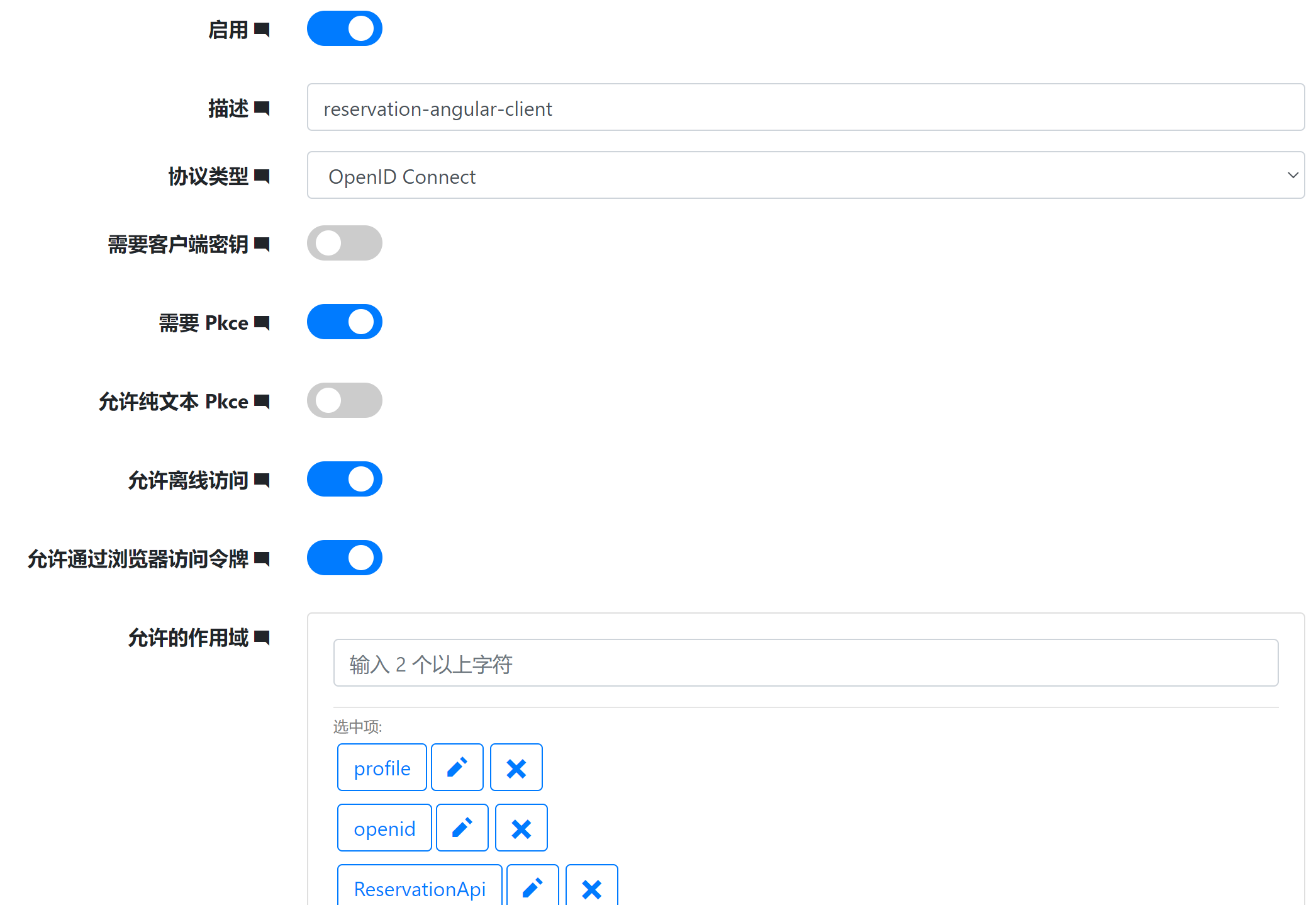
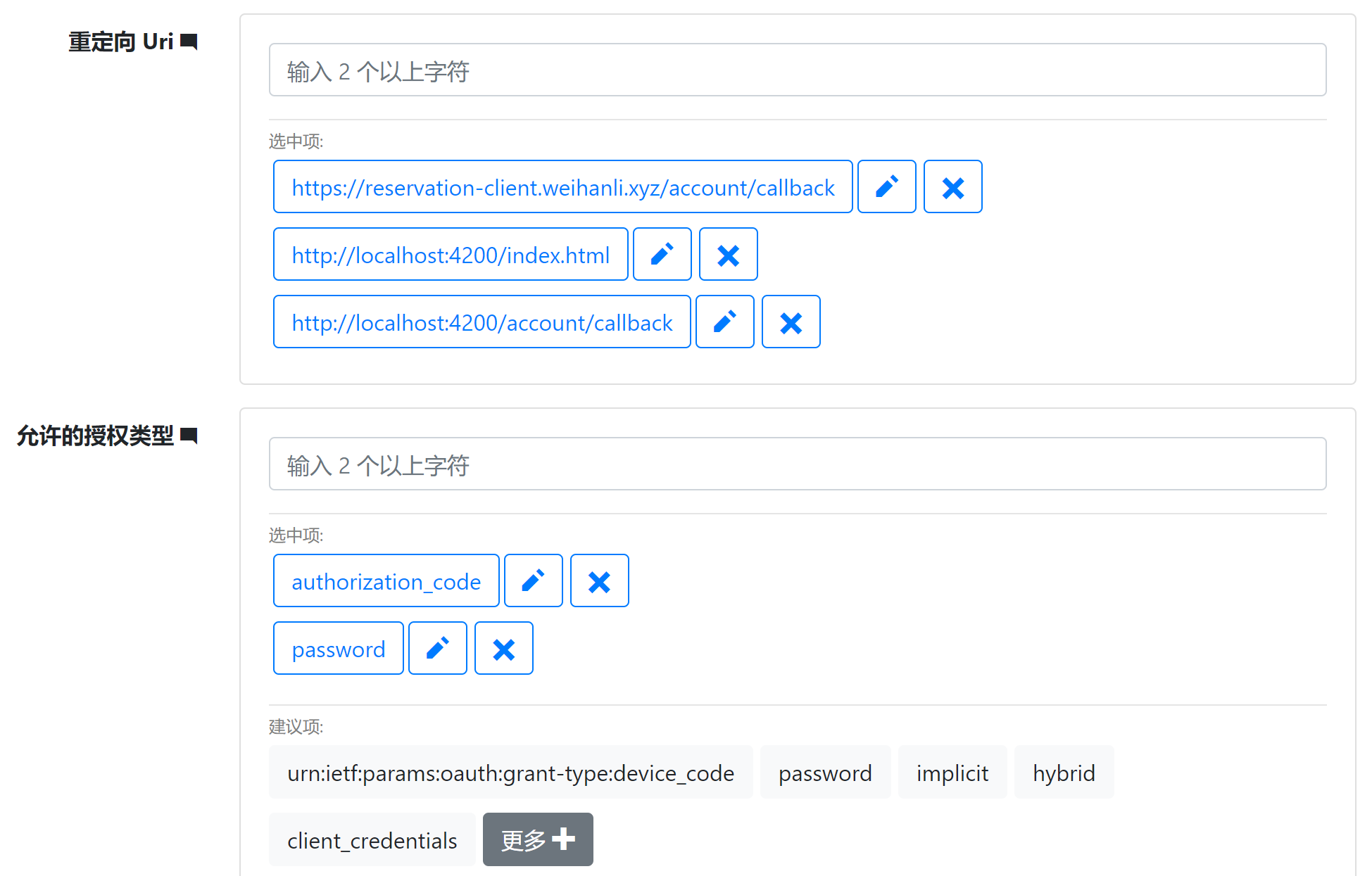
首先我们需要在 IdentityServer 这边添加一个客户端,因为我们要使用 code 模式,所以授权类型需要配置 authorization-code 模式,不使用 implicit 模式
允许的作用域(scope) 是客户端允许访问的 api 资源和用户的信息资源,openid 必选,profile 是默认的用户基本信息的集合,根据自己客户端的需要进行配置,ReservationApi 是访问 API 需要的 scope,其他的 scope 根据客户端需要进行配置
angular 客户端配置
安装 angular-oauth2-oidc npm 包,我现在使用的是 9.2.0 版本
添加 oidc 配置:
export const authCodeFlowConfig: AuthConfig = {

  issuer: 'https://id.weihanli.xyz',

  // URL of the SPA to redirect the user to after login

  redirectUri: window.location.origin + '/account/callback',

  clientId: 'reservation-angular-client',

  dummyClientSecret: 'f6f1f917-0899-ef36-63c8-84728f411e7c',

  responseType: 'code',

  scope: 'openid profile ReservationApi offline_access',

  useSilentRefresh: false,

  showDebugInformation: true,

  sessionChecksEnabled: true,

  timeoutFactor: 0.01,

  // disablePKCI: true,

  clearHashAfterLogin: false

};
在 app.module 引入 oauth 配置
  imports: [

    BrowserModule,

    AppRoutingModule,

    AppMaterialModule,

    HttpClientModule,

    FormsModule,

    ReactiveFormsModule,

    BrowserAnimationsModule,

    OAuthModule.forRoot({

      resourceServer: {

        allowedUrls: ['https://reservation.weihanli.xyz/api'],

        sendAccessToken: true

      }

    })

  ]
OAuthModule 里 resourceServer 中的 allowedUrls 是配置的资源的地址,访问的资源符合这个地址时就会自动发送 accessToken,这样就不需要自己实现一个 interceptor 来实现自动在请求头中设置 accessToken 了
在 AppComponment 的构造器中初始化 oauth 配置,并加载 ids 的发现文档
export class AppComponent {

  constructor(

        private oauth: OAuthService

    ) {

    this.oauth.configure(authConfig.authCodeFlowConfig);

    this.oauth.loadDiscoveryDocument();

    }

    // ...

}
添加一个 AuthGuard,路由守卫,需要登录才能访问的页面自动跳转到 /account/login 自动登录
AuthGuard:
import { Injectable } from '@angular/core';

import { CanActivate, Router } from '@angular/router';

import { OAuthService } from 'angular-oauth2-oidc';

@Injectable({

  providedIn: 'root'

})

export class AuthGuard implements CanActivate {

  constructor(private router: Router, private oauthService: OAuthService) {}

  canActivate() {

    if (this.oauthService.hasValidAccessToken()) {

      return true;

    } else {

      this.router.navigate(['/account/login']);

      return false;

    }

  }

}
路由配置:
import { NgModule } from '@angular/core';

import { Routes, RouterModule } from '@angular/router';

import { ReservationListComponent } from './reservation/reservation-list/reservation-list.component';

import { NoticeListComponent } from './notice/notice-list/notice-list.component';

import { NoticeDetailComponent } from './notice/notice-detail/notice-detail.component';

import { AboutComponent } from './about/about.component';

import { NewReservationComponent } from './reservation/new-reservation/new-reservation.component';

import { LoginComponent } from './account/login/login.component';

import { AuthGuard } from './shared/auth.guard';

import { AuthCallbackComponent } from './account/auth-callback/auth-callback.component';

import { MyReservationComponent } from './account/my-reservation/my-reservation.component';

const routes: Routes = [

  { path: '', component: ReservationListComponent },

  { path: 'reservations/new', component:NewReservationComponent, canActivate: [AuthGuard] },

  { path: 'reservations', component: ReservationListComponent },

  { path: 'notice', component: NoticeListComponent },

  { path: 'notice/:noticePath', component: NoticeDetailComponent },

  { path: 'about', component: AboutComponent },

  { path: 'account/login', component: LoginComponent },

  { path: 'account/callback', component: AuthCallbackComponent },

  { path: 'account/reservations', component: MyReservationComponent, canActivate: [AuthGuard] },

  { path: '**', redirectTo: '/'}

];

@NgModule({

  imports: [RouterModule.forRoot(routes)],

  exports: [RouterModule]

})

export class AppRoutingModule { }
AccountLogin 会将用户引导到 ids 进行登录,登录之后会跳转到配置的重定向 url,我配置的是 account/callback
import { Component, OnInit } from '@angular/core';

import { OAuthService } from 'angular-oauth2-oidc';

@Component({

  selector: 'app-login',

  templateUrl: './login.component.html',

  styleUrls: ['./login.component.less']

})

export class LoginComponent implements OnInit {

  constructor(private oauthService: OAuthService) {

  }

  ngOnInit(): void {

    // 登录

    this.oauthService.initLoginFlow();

  }

}
Auth-Callback
import { Component, OnInit } from '@angular/core';

import { OAuthService } from 'angular-oauth2-oidc';

import { Router } from '@angular/router';

@Component({

  selector: 'app-auth-callback',

  templateUrl: './auth-callback.component.html',

  styleUrls: ['./auth-callback.component.less']

})

export class AuthCallbackComponent implements OnInit {

  constructor(private oauthService: OAuthService, private router:Router) {

  }

  ngOnInit(): void {

    this.oauthService.loadDiscoveryDocumentAndTryLogin()

    .then(_=> {

      this.oauthService.loadUserProfile().then(x=>{

        this.router.navigate(['/reservations/new']);

      });

    });

  }

}
More
当前实现还不太完善,重定向现在始终是跳转到的新预约的页面,应当在跳转登录之前记录一下当前的地址保存在 storage 中,在 auth-callback 里登录成功之后跳转到 storage 中之前的地址
Reference
- https://sunnycoding.cn/2020/03/14/angular-spa-auth-with-ocelot-and-ids4-part3/#i-2
- https://github.com/OpenReservation/angular-client
- https://github.com/manfredsteyer/angular-oauth2-oidc/
- https://github.com/OpenReservation/ReservationServer
angular 接入 IdentityServer4的更多相关文章
- ASP.NET Core Swagger接入使用IdentityServer4 的 WebApi
写在前面 是这样的,我们现在接口使用了Ocelot做网关,Ocelot里面集成了基于IdentityServer4开发的授权中心用于对Api资源的保护.问题来了,我们的Api用了SwaggerUI做接 ...
- Angular SPA基于Ocelot API网关与IdentityServer4的身份认证与授权(一)
好吧,这个题目我也想了很久,不知道如何用最简单的几个字来概括这篇文章,原本打算取名<Angular单页面应用基于Ocelot API网关与IdentityServer4+ASP.NET Iden ...
- 每周.NET前沿技术文章摘要(2017-06-21)
汇总国外.NET社区相关文章,覆盖.NET ,ASP.NET等内容: .NET .NET Core Magic: Develop on one OS, run on another 链接:https: ...
- 每周.NET前沿技术文章摘要(2017-05-10)
汇总国内外.NET社区相关文章,覆盖.NET ,ASP.NET和Docker容器三个方面的内容: .NET Debugging .NET core with SOS everywhere 链接:htt ...
- Ocelot(四)- 认证与授权
Ocelot(四)- 认证与授权 作者:markjiang7m2 原文地址:https://www.cnblogs.com/markjiang7m2/p/10932805.html 源码地址:http ...
- .NETCore微服务探寻(二) - 认证与授权
前言 一直以来对于.NETCore微服务相关的技术栈都处于一个浅尝辄止的了解阶段,在现实工作中也对于微服务也一直没有使用的业务环境,所以一直也没有整合过一个完整的基于.NETCore技术栈的微服务项目 ...
- IdentityServer4密码模式接入现有用户数据表
具体接入identityserver请看文档,这里只简单列举部分步骤 1.创建一个web项目,引入Identityserver4的nuget包 2.新建一个类,实现IResourceOwnerPass ...
- Angular SPA基于Ocelot API网关与IdentityServer4的身份认证与授权(四)
在上一讲中,我们已经完成了一个完整的案例,在这个案例中,我们可以通过Angular单页面应用(SPA)进行登录,然后通过后端的Ocelot API网关整合IdentityServer4完成身份认证.在 ...
- Angular SPA基于Ocelot API网关与IdentityServer4的身份认证与授权(二)
上文已经介绍了Identity Service的实现过程.今天我们继续,实现一个简单的Weather API和一个基于Ocelot的API网关. 回顾 <Angular SPA基于Ocelot ...
随机推荐
- 机器学习pdf资源
<深度学习>(Deep Learning)中文版pdf, 百度网盘: https://pan.baidu.com/s/1jHDiQTg <机器学习导论>(Introductio ...
- java方式实现堆排序
一.堆排序和堆相关概念描述 堆排序是指利用堆这种数据结构所设计的一种排序算法.堆是一个近似完全二叉树的结构,并同时满足堆的性质:即子结点的值总是小于(或者大于)它的父节点,若子结点的值总是小于它的父节 ...
- 50个SQL语句(MySQL版) 问题十四
--------------------------表结构-------------------------- student(StuId,StuName,StuAge,StuSex) 学生表 tea ...
- jQuery-stop方法
1.stop()方法解析 停止所有在指定元素上正在运行的动画 stop(clearQueue,gotoEnd) 这个两个参数可选值是布尔值 stop(flase,flase):不请空动画队列,不立即跳 ...
- 【zookeeper】安装教程文档需下载
请查看文件https://download.csdn.net/download/qq_42158942/11846847 zookeeper的作用 • ZooKeeper 是一个开源的分布式协调服务, ...
- (Java实现) 活动选择
活动选择的类似问题都可以这么写 import java.util.ArrayList; public class huodongxuanze { /** * //算法导论中活动选择问题动态规划求解 * ...
- Java实现 LeetCode 665 非递减数列(暴力)
665. 非递减数列 给你一个长度为 n 的整数数组,请你判断在 最多 改变 1 个元素的情况下,该数组能否变成一个非递减数列. 我们是这样定义一个非递减数列的: 对于数组中所有的 i (1 < ...
- Java实现 LeetCode 417 太平洋大西洋水流问题
417. 太平洋大西洋水流问题 给定一个 m x n 的非负整数矩阵来表示一片大陆上各个单元格的高度."太平洋"处于大陆的左边界和上边界,而"大西洋"处于大陆的 ...
- Java中输入时IO包与Scanner的区别
最常用的一个IO控制台输入的 import java.io.BufferedReader; import java.io.IOException; import java.io.InputStream ...
- Java实现 洛谷 P1149 火柴棒等式
import java.util.HashMap; import java.util.Iterator; import java.util.LinkedList; import java.util.S ...