
JAVA高级编程数据源datasource
数据源
通过jdbc连接数据库,多建立几条连接放在数据源里面。可以设置数据源的最大连接数,同时活跃的连接数,最少空闲的连接数,能够同时接收处理的连接数等等。
dbcp数据源
需要的jar包:
commons-dbcp.jar;

commons-pool.jar

mysql-connector-java.jar
前两个jar包到阿帕奇官网下载。第三个jar包到mysql官网下载。
他是对jdbc的封装。底层还是要通过jdbc连接数据库的。实现了java.sql.DataSource接口的类有BasicDataSourceFactory和BasicDataSource。
这两个类是启动database的。


其中BasicDataSourceFactory底层实际上是先创建了BasicDataSource的对象,然后给BasicDataSource对象
进行分钟相关属性的赋值。比如username,password,url,driverClassName等等。BasicDataSource则是直接通过set方法对这些属性直接赋值。
通过getConnection方法获取数据库连接(Connection接口)。之后的操作就和jdbc一样了。
C3P0数据源
需要的jar包
c3p0-0.9.5.2.jar

mchange-commons-java-0.2.11.jar

mysql-connector-java-5.1.40-bin.jar
这些资源网上很多一找一大片。
(一)这个类(ComboPooledDataSource)是启动datadase数据源的
   ComboPooledDataSource source = new ComboPooledDataSource();

    source.setDriverClass("com.mysql.jdbc.Driver");

     source.setUser("root");

     source.setPassword("1213265442");

     source.setJdbcUrl("jdbc:mysql://localhost:3306/user");
通过set方法即可设置数据池的相关参数(最大连接数,同时活跃的连接数,最少空闲的连接数,能够同时接收处理的连接数等等)
(二)ComboPooledDataSource source = new ComboPooledDataSource("intergalactoApp");
编写c3p0-config.xml文件放在src目录下面。内容如下(注意加黑的部分)
 <c3p0-config>

   <!-- This app is massive! -->

   <named-config name="intergalactoApp">

     <property name="acquireIncrement">50</property>       <!--连接池在无空闲连接可用时一次性创建的新数据库连接数 -->

     <property name="initialPoolSize">100</property>           <!--连接池初始化时创建的连接数-->

     <property name="minPoolSize">50</property>               <!--连接池最少保持的可用连接数->

     <property name="maxPoolSize">1000</property>           <!--连接池最多保持的可用连接数->

       <property name="user">root</property>

       <property name="password">1213265442</property>

       <property name="driverClassName">com.mysql.jdbc.Driver</property>

       <property name="jdbcUrl">jdbc:mysql://localhost:3306/user</property>

   </named-config>

 </c3p0-config>
通过source.getConnection()的方法就可以得到Connection接口对象。剩下的就是jdbc的操作了。
通过hibernate和datasource连接
我使用的是hibernate4.3当前稳定的最高版本。查看project/etc/hibernate.proterties文件,这个文件是hibernate所有的的配置了。
查看可知
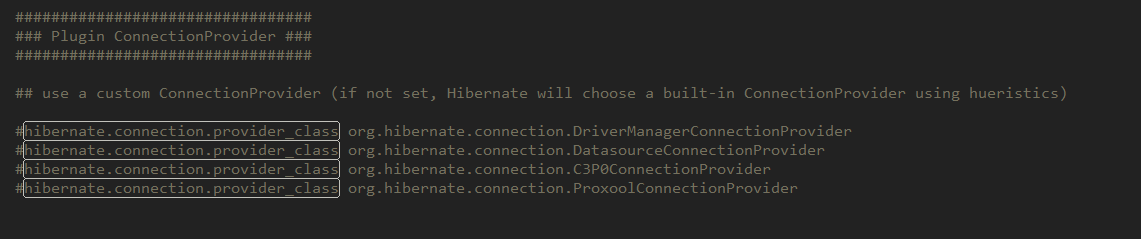
hibernate支持C3P0ConnectionProvider,ProxoolConnectionProvider,DatasourceConnectionProvider,DriverManagerConnectionProvider这四种jdbc连接池
并不包括dbcp,但是支持c3p0。下面我们来给hibernate配置C3P0.
需要的jar包
c3p0-0.9.2.2.jar

mchange-commons-java-0.2.11.jar

mysql-connector-java-5.1.40-bin.jar

hibernate-c3p0-4.3.5.Final
还有一些hibernate的必须包,在required文件夹下面。
hibernate.cfg.xml配置文件中加入
<property name="hibernate.connection.provider_class">org.hibernate.connection.C3P0ConnectionProvider</property>
这就代表了不使用hibernate自己的连接池,而是使用我们自己的C3P0连接池
使用hibernate和c3p0做数据库的数据源前面都要加上“hibernate.c3p0”
<property name="hibernate.c3p0.idle_test_period">3000</property>
有关于jdcb的连接还是按照hibernate的jdbc连接。而有关c3p0数据源的属性配置比如启动多少个connection连接,属性前面都要加上“hibernate.c3p0”就像这样

其他的就跟正常的hibernate配置一样了。其实我们就是把hibernate自带的数据池换成了我们自己的。其他都一样。
1、 Install Your JDBC Driver
Use of the JDBC Data Sources JNDI Resource Factory requires that you make an appropriate JDBC driver available to both Tomcat internal classes and to your web application. This is most easily accomplished by installing the driver’s JAR file(s) into the $CATALINA_HOME/lib directory, which makes the driver available both to the resource factory and to your application.
2、Declare Your Resource Requirements
Next, modify the web application deployment descriptor (/WEB-INF/web.xml) to declare the JNDI name under which you will look up preconfigured data source. By convention, all such names should resolve to the jdbc subcontext (relative to the standard java:comp/env naming context that is the root of all provided resource factories. A typical web.xmlentry might look like this:
 <resource-ref>

   <description>

     Resource reference to a factory for java.sql.Connection

     instances that may be used for talking to a particular

     database that is configured in the <Context>

     configuration for the web application.

   </description>

   <res-ref-name>

     jdbc/EmployeeDB

   </res-ref-name>

   <res-type>

     javax.sql.DataSource

   </res-type>

   <res-auth>

     Container

   </res-auth>

 </resource-ref>
3、 Code Your Application’s Use Of This Resource
     Context initCtx = new InitialContext();

     Context envCtx = (Context) initCtx.lookup("java:comp/env");

     DataSource ds = (DataSource)

       envCtx.lookup("jdbc/EmployeeDB");

     Connection conn = ds.getConnection();

     use this connection to access the database ...

     conn.close();
4、To configure Tomcat’s resource factory, add an element like this to the <Context>element for the web application.
 <Context >

   <Resource name="jdbc/EmployeeDB"

             auth="Container"

             type="javax.sql.DataSource"

             username="dbusername"

             password="dbpassword"

             driverClassName="org.hsql.jdbcDriver"

             url="jdbc:HypersonicSQL:database"

             maxTotal="8"

             maxIdle="4"/>

 </Context>
JAVA高级编程数据源datasource的更多相关文章
- java高级编程笔记(四)
java的Object类: 1.Object 类位于 java.lang 包中,编译时会自动导入:Java 的所有类都继承了 Object,子类可以使用 Object 的所有方法. 2.Object ...
- JAVA高级编程(数据源datasource)
数据源:通过jdbc连接数据库,多建立几条连接放在数据源里面.可以设置数据源的最大连接数,同时活跃的连接数,最少空闲的连接数,能够同时接收处理的连接数等等. dbcp数据源 需要的jar包: comm ...
- java高级编程-使用反射强制给private字段赋值
转自:http://blog.csdn.net/yaerfeng/article/details/7103397 今天项目中遇到了一个问题,要调用一个类,并获取这个类的属性进行赋值然后将这个类传递到方 ...
- 【java高级编程】JDK和CGLIB动态代理区别
转载:https://blog.csdn.net/yhl_jxy/article/details/80635012 前言 JDK动态代理实现原理(jdk8):https://blog.csdn.net ...
- 【java高级编程】jdk自带事件模型编程接口
事件类 java.util.EventObject java.beans.PropertyChangeEvent 事件监听接口 java.util.EventListener java.beans.P ...
- java高级编程技巧
1. boolean a= b==null;这句话很亮. public class Test { public static void main(String[] args) { String b=& ...
- Java学习进阶—高级编程
当你已经熟练的掌握了面向对象中的各种概念后,是否会对这些知识是如何使用的产生浓厚的兴趣?本课程主要针对于已经掌握了JAVA核心开发技术的读者准备,讲解了JAVA多线程.常用类库.IO编程.网络编程.类 ...
- 对java高级程序员有益的十本书
英文原文:http://www.programcreek.com/2013/08/top-books-for-advanced-level-java-developers/ java语言是当今最受欢迎 ...
- 2018.6.19 Java核心API与高级编程实践复习总结
Java 核心编程API与高级编程实践 第一章 异常 1.1 异常概述 在程序运行中,经常会出现一些意外情况,这些意外会导致程序出错或者崩溃而影响程序的正常执行,在java语言中,将这些程序意外称为异 ...
随机推荐
- 微服务介绍和springCloud组件
微服务架构模式是:将整个web服务 组织成一系列小的web 服务,这些小的web服务可以进行独立的编译和部署,并通过各自暴露的API接口 进行相互通信,他们相互协作,作为一个整体,为客户提供服务功 ...
- Javascript模块化编程之CommonJS,AMD,CMD,UMD模块加载规范详解
JavaSript模块化 在了解AMD,CMD规范前,还是需要先来简单地了解下什么是模块化,模块化开发? 模块化是指在解决某一个复杂问题或者一系列的杂糅问题时,依照一种分类的思维把问 题进行系 ...
- 定义列属性:null,default,PK,auto_increment
*定义列属性* 1.列属性NULL: 是否为空,规定一个字段的值是否可以是null: null|not null 2.默认值属性:default value 默认值,在没有为该字段设置值时启用:而且 ...
- 【C语言】判断学生成绩等级
方法一:if-else #include<stdio.h> int main() { printf("请输入成绩:\n"); float score; scanf_s( ...
- 自己写了一个mysql连接的工具类【java】
要用的话,包名自己可以改一下: package com.usa3v.dreamcenter.util; import java.sql.Connection; import java.sql.Driv ...
- Redis安装及局域网访问配置CentOS
1.安装gcc,用来编译reids 通过命令 sudo yum install gcc 2.安装redis $ wget http://download.redis.io/releases/redis ...
- Java 倒入文章显示前n个单词频率
package com_1; import java.io.FileNotFoundException; import java.io.FileReader; import java.io.IOExc ...
- 【代码学习】PYTHON装饰器
一.装饰器 对原代码不修改的基础上完善代码 写代码要遵循开放封闭原则,虽然在这个原则是用的面向对象开发,但是也适用于函数式编程,简单来说,它规定已经实现的功能代码不允许被修改,但可以被扩展,即: 封闭 ...
- Tomcat,Jboss,Weblogic通过jndi连接数据库
1. Tomcat配置Jndi数据源 1.1在tomcat服务器的lib目录下加入数据库连接的驱动jar包 1.2修改tomcat服务器的conf目录下server.xml配置文件 编辑server ...
- mysql学习笔记(三):unsigned理解以及特殊情况
UNSIGNED UNSIGNED属性就是将数字类型无符号化,与C.C++这些程序语言中的unsigned含义相同.例如,INT的类型范围是-2 147 483 648 - 2 147 483 647 ...