
Dynamics CRM - Plug-in Class 和 Workflow Class 的用法与区别
在 Dynamics CRM 开发中,我们可以使用 JavaScript 在前端对 Entity Form 进行数据操作,与此同时,我们也可以使用 C# 写后台插件,其中就包括了 Plug-in Class 和 Workflow Class,如下图所示,这里也简单阐述下两者在使用上的区别:
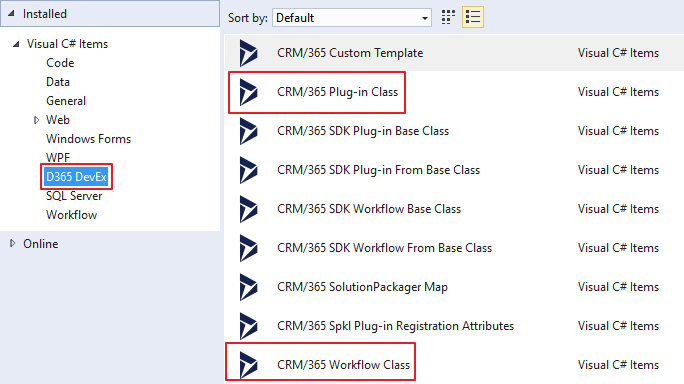
图1 Plug-in Class 和 Workflow Class
一、调用范围:
Plug-in Class 是在对 Entity 的创建(Create)和更新(Update)时进行调用,而 Workflow Class 是在 Business Process Flow (BPF) 的 workflow 组件里进行调用。
二、使用方式:
Plug-in Class:
编写程序 -> 编译程序集,得到 dll -> 打开 PluginRegistration.exe(路径:SDK 安装目录 > Tools > PluginRegistration)-> 连接 CRM Server -> 选择要部署的 Organization -> 注册 Assembly -> 注册 Step(Create/Update -> Pre-operation/Post-operation) -> 注册 Image(可选,PreImage/PostImage)
完成以上注册后就可以在 CRM 上被调用了。
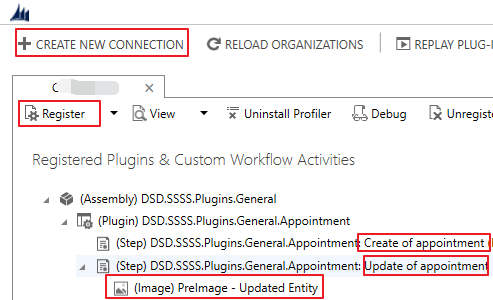
图2.1 注册 Plug-in 程序集
Workflow Class:
编写程序 -> 编译程序集,得到 dll -> 打开 PluginRegistration.exe -> 连接 CRM Server -> 选择要部署的 Organization -> 注册 Assembly
在注册完 Workflow 程序集后,将 dll 包装在 workflow 组件中,提供给 BPF 调用。
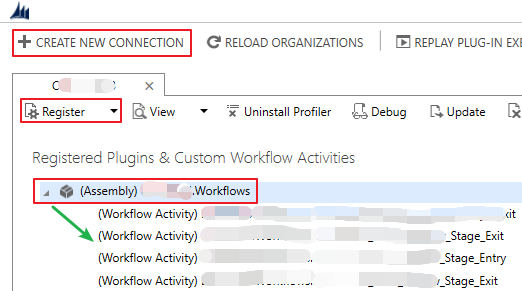
图2.2 注册 Workflow 程序集
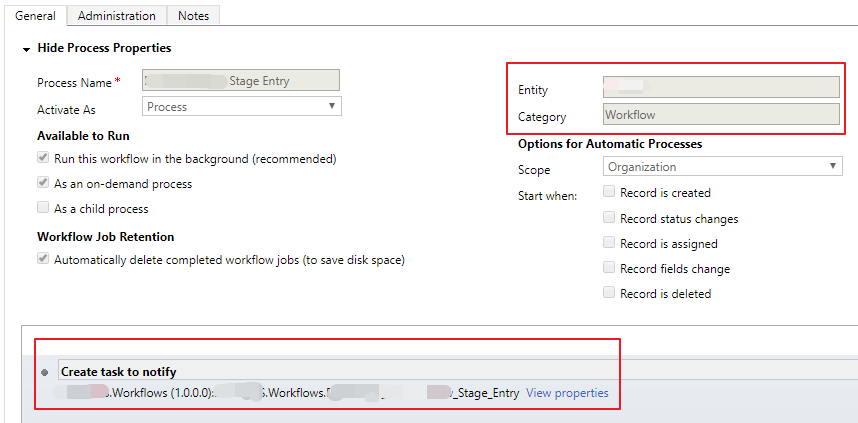
图2.3 创建 workflow 组件
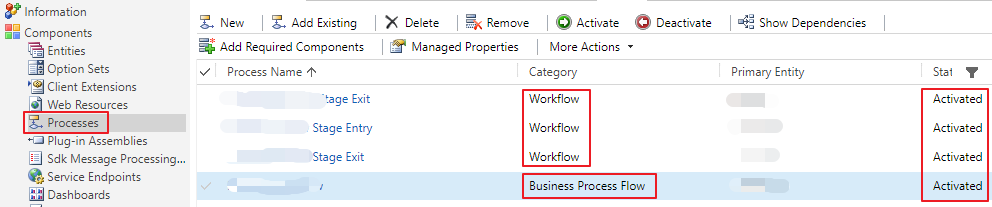
图2.4 workflow 组件与 BPF

图2.5 在 BPF 中使用 workflow 组件
三、获取 Entity 对象的方式:
Plug-in Class:
Entity entity = (Entity)context.InputParameters["Target"];
Workflow Class:
Entity entity = service.Retrieve(context.PrimaryEntityName, context.PrimaryEntityId, new Microsoft.Xrm.Sdk.Query.ColumnSet(true));
四、代码示例:
Plug-in Class:
using Microsoft.Xrm.Sdk;

using Microsoft.Xrm.Sdk.Query;

using System;

namespace CRMPluginProject_Test

{

    public class PluginClass2 : IPlugin

    {

        #region Secure/Unsecure Configuration Setup

        private string _secureConfig = null;

        private string _unsecureConfig = null;

        public PluginClass2(string unsecureConfig, string secureConfig)

        {

            _secureConfig = secureConfig;

            _unsecureConfig = unsecureConfig;

        }

        #endregion

        public void Execute(IServiceProvider serviceProvider)

        {

            ITracingService tracer = (ITracingService)serviceProvider.GetService(typeof(ITracingService));

            IPluginExecutionContext context = (IPluginExecutionContext)serviceProvider.GetService(typeof(IPluginExecutionContext));

            IOrganizationServiceFactory factory = (IOrganizationServiceFactory)serviceProvider.GetService(typeof(IOrganizationServiceFactory));

            IOrganizationService service = factory.CreateOrganizationService(context.UserId);

            try

            {

                //TODO: Do stuff

                #region 自定义代码

                if (context.MessageName.Equals("Create"))

                {

                    switch (context.Stage)

                    {

                        case ://创建 plugin step 的时候设置 create Pre-operation

                            CreatePreAction(tracer, context, service, factory);

                            break;

                        case ://创建 plugin step 的时候设置 create Post-operation

                            CreatePostAction(tracer, context, service, factory);

                            break;

                        default:

                            break;

                    }

                }

                else if (context.MessageName.Equals("Update"))

                {

                    switch (context.Stage)

                    {

                        case ://创建 plugin step 的时候设置 update Pre-operation

                            UpdatePreAction(tracer, context, service, factory);

                            break;

                        case ://创建 plugin step 的时候设置 update Post-operation

                            UpdatePostAction(tracer, context, service, factory);

                            break;

                        default:

                            break;

                    }

                }

                #endregion

            }

            catch (Exception e)

            {

                throw new InvalidPluginExecutionException(e.Message);

            }

        }

        #region 自定义函数

        private void CreatePreAction(ITracingService tracer, IPluginExecutionContext context, IOrganizationService service, IOrganizationServiceFactory factory)

        {

            //创建当前 entity 时,在存到数据库之前调用

            Entity entity = (Entity)context.InputParameters["Target"];

        }

        private void CreatePostAction(ITracingService tracer, IPluginExecutionContext context, IOrganizationService service, IOrganizationServiceFactory factory)

        {

            //创建当前 entity 时,在存到数据库之后调用

        }

        private void UpdatePreAction(ITracingService tracer, IPluginExecutionContext context, IOrganizationService service, IOrganizationServiceFactory factory)

        {

            //更新当前 entity 时,在存到数据库之前调用

        }

        private void UpdatePostAction(ITracingService tracer, IPluginExecutionContext context, IOrganizationService service, IOrganizationServiceFactory factory)

        {

            //更新当前 entity 时,在存到数据库之后调用

        }

        #endregion

    }

}
Workflow Class:
using Microsoft.Xrm.Sdk;

using Microsoft.Xrm.Sdk.Workflow;

using System;

using System.Activities;

namespace CRMPluginProject_Test

{

    public class WorkflowClass1 : CodeActivity

    {

        protected override void Execute(CodeActivityContext executionContext)

        {

            ITracingService tracer = executionContext.GetExtension<ITracingService>();

            IWorkflowContext context = executionContext.GetExtension<IWorkflowContext>();

            IOrganizationServiceFactory serviceFactory = executionContext.GetExtension<IOrganizationServiceFactory>();

            IOrganizationService service = serviceFactory.CreateOrganizationService(context.UserId);

            try

            {

                Entity entity = service.Retrieve(context.PrimaryEntityName, context.PrimaryEntityId, new Microsoft.Xrm.Sdk.Query.ColumnSet(true));

                //TODO: Do stuff

                #region 自定义代码

                //通过 workflow 创建一个 task

                tracer.Trace("Start to create Task");

                if (string.IsNullOrEmpty(entity["new_name"].ToString()))

                {

                    Entities.Task task = new Entities.Task();

                    task.Subject = "task: " + entity["new_name"].ToString();

                    task.Description = "try to ceate a task";

                    task.RegardingObjectId = new EntityReference(entity.LogicalName, entity.Id);

                    service.Create(task);

                }

                #endregion

            }

            catch (Exception e)

            {

                throw new InvalidPluginExecutionException(e.Message);

            }

        }

    }

}
Dynamics CRM - Plug-in Class 和 Workflow Class 的用法与区别的更多相关文章
- 创建一个dynamics CRM workflow (一) - Introduction to Custom Workflows
Workflow: Use this process to model and automate real world business processes. These processes can ...
- Step by step Dynamics CRM 2011升级到Dynamics CRM 2013
原创地址:http://www.cnblogs.com/jfzhu/p/4018153.html 转载请注明出处 (一)检查Customizations 从2011升级到2013有一些legacy f ...
- 一、Microsoft Dynamics CRM 4.0 SDK概述
Chapter 1. Microsoft Dynamics CRM 4.0 SDK Overview(SDK概述) You are probably reading this book because ...
- Dynamics CRM 2013 初体验(3):新增加的功能
新系统除了修补系统历史漏洞外当然还会添加些比较有意思的新功能,至于这些新功能是否好用那就得看它是否能经过咱们这些使用者的考验了.Dynamics CRM 2013系统将不再支持Dynamics CRM ...
- How to set up Dynamics CRM 2011 development environment
Recently I have been starting to learn Microsoft Dynamics CRM 2011 about implement plugin and workfl ...
- Dynamics CRM中一个查找字段引发的【血案】
摘要: 本人微信和易信公众号: 微软动态CRM专家罗勇 ,回复267或者20180311可方便获取本文,同时可以在第一间得到我发布的最新的博文信息,follow me!我的网站是 www.luoyon ...
- Step by Step 开发dynamics CRM
这里是作为开发贴的总结. 现在plugin和workflow系列已经终结. 希望这些教程能给想入坑的小伙伴一些帮忙. CRM中文教材不多, 我会不断努力为大家提供更优质的教程. Plugin 开发系列 ...
- Dynamics CRM 2016 Web API 消息列表
Function Name Description CalculateTotalTimeIncident Function Calculates the total time, in minutes, ...
- 定制Dynamics CRM标准导出功能:不能导出指定列的值
关注本人微信和易信公众号: 微软动态CRM专家罗勇 ,回复239或者20161203可方便获取本文,同时可以在第一间得到我发布的最新的博文信息,follow me!我的网站是 www.luoyong. ...
随机推荐
- oracle获取排序第一的数据
一:按照某字段排序(时间,总数等),获取第一条 select a.* FROM ( select * from ( select t.*,row_number() over(partition by ...
- 【LeetCode】509. 斐波那契数
题目 斐波那契数,通常用 F(n) 表示,形成的序列称为斐波那契数列.该数列由 0 和 1 开始,后面的每一项数字都是前面两项数字的和.也就是: F(0) = 0, F(1) = 1 F(N) = ...
- 外部 Storage Provider【转】
如果 Kubernetes 部署在诸如 AWS.GCE.Azure 等公有云上,可以直接使用云硬盘作为 Volume,下面是 AWS Elastic Block Store 的例子: 要在 Pod 中 ...
- tableau-参数
tableau参数可用在计算字段.筛选器和参考线中替换常量值得动态值. 三种方式:1.在计算字段中使用筛选器 案例动态替换计算字段中设定的目标值. 创建参数 以参数值创建计算字段 2.筛选器中使用参数 ...
- mysql行级锁和表级锁的区别
表级锁:开销小,加锁快:不会出现死锁:锁定粒度大,发生锁冲突的概率最高,并发度最低:行级锁:开销大,加锁慢:会出现死锁:锁定粒度最小,发生锁冲突的概率最低,并发度也最高:
- NCRE Java二级备考方案
一 配合大纲梳理基本知识点 二 多在233网校刷题
- i春秋-web-爆破3
首先,是PHP代码审计,看懂就能解出来题. <?php error_reporting(0); session_start(); require('./flag.php'); if(!isset ...
- 51nod1414 冰雕(暴力枚举)
题目是这样的: 1414 冰雕 白兰大学正在准备庆祝成立256周年.特别任命副校长来准备校园的装扮. 校园的中心竖立着n个冰雕.这些雕像被排在一个等分圆上,因此他们形成了一个正n多边形.这些冰雕被顺针 ...
- Flink与Spark Streaming在与kafka结合的区别!
本文主要是想聊聊flink与kafka结合.当然,单纯的介绍flink与kafka的结合呢,比较单调,也没有可对比性,所以的准备顺便帮大家简单回顾一下Spark Streaming与kafka的结合. ...
- DP背包问题学习笔记及系列练习题
01 背包: 01背包:在M件物品中取出若干件物品放到背包中,每件物品对应的体积v1,v2,v3,....对应的价值为w1,w2,w3,,,,,每件物品最多拿一件. 和很多DP题一样,对于每一个物品, ...