
Spring Cloud 系列之 Stream 消息驱动(二)
本篇文章为系列文章,未读第一集的同学请猛戳这里:Spring Cloud 系列之 Stream 消息驱动(一)
本篇文章讲解 Stream 如何实现消息分组和消息分区。
消息分组
点击链接观看:Stream 消息分组视频(获取更多请关注公众号「哈喽沃德先生」)
如果有多个消息消费者,那么消息生产者发送的消息会被多个消费者都接收到,这种情况在某些实际场景下是有很大问题的,比如在如下场景中,订单系统做集群部署,都会从 RabbitMQ 中获取订单信息,如果一个订单消息同时被两个服务消费,系统肯定会出现问题。为了避免这种情况,Stream 提供了消息分组来解决该问题。
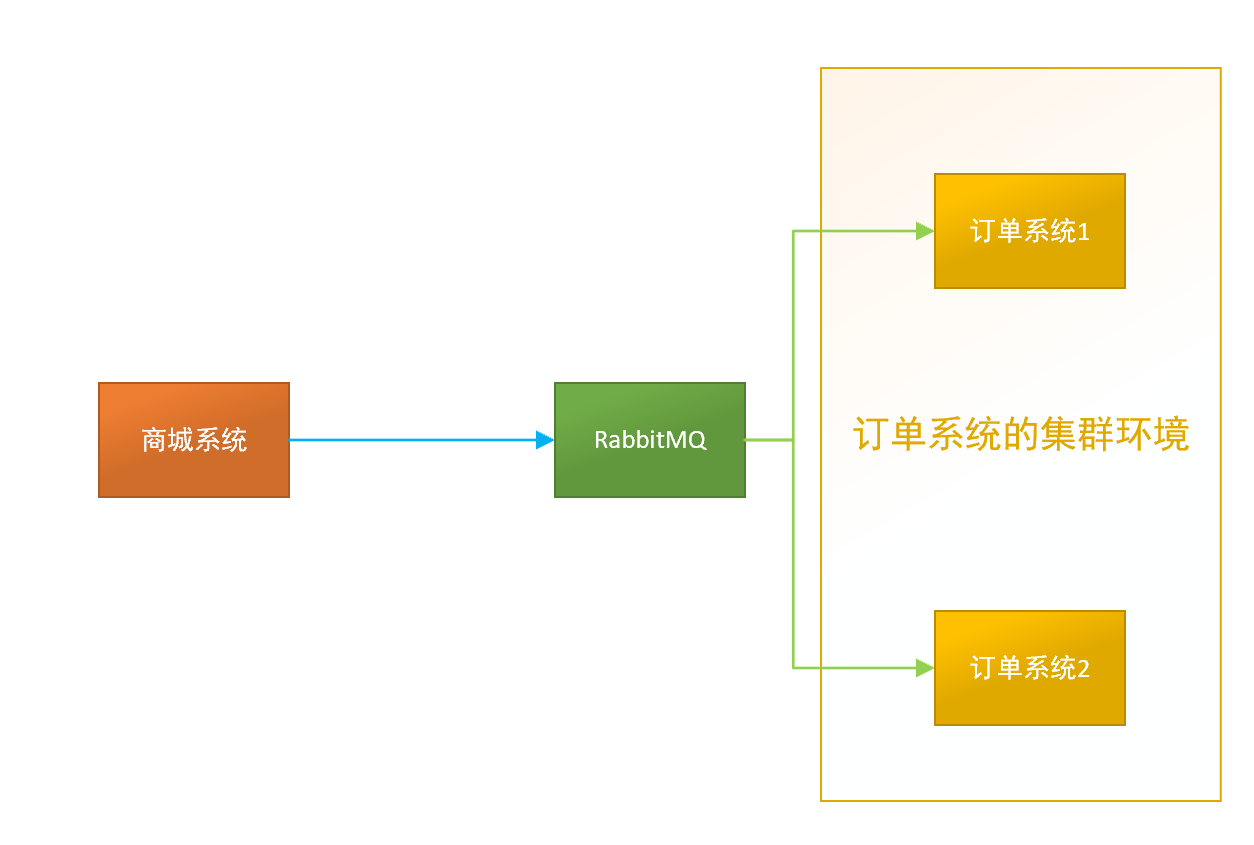
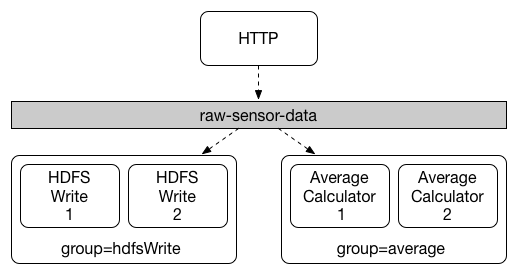
在 Stream 中处于同一个 group 中的多个消费者是竞争关系,能够保证消息只会被其中一个应用消费。不同的组是可以消费的,同一个组会发生竞争关系,只有其中一个可以消费。通过 spring.cloud.stream.bindings.<bindingName>.group 属性指定组名。
问题演示
在 stream-demo 项目下创建 stream-consumer02 子项目。
项目代码使用入门案例中消息消费者的代码。
单元测试代码如下:
package com.example;

import com.example.producer.MessageProducer;

import org.junit.jupiter.api.Test;

import org.springframework.beans.factory.annotation.Autowired;

import org.springframework.boot.test.context.SpringBootTest;

@SpringBootTest(classes = {StreamProducerApplication.class})

public class MessageProducerTest {

    @Autowired

    private MessageProducer messageProducer;

    @Test

    public void testSend() {

        messageProducer.send("hello spring cloud stream");

    }

}
测试
运行单元测试发送消息,两个消息消费者控制台打印结果如下:
stream-consumer 的控制台:
message = hello spring cloud stream
stream-consumer02 的控制台:
message = hello spring cloud stream
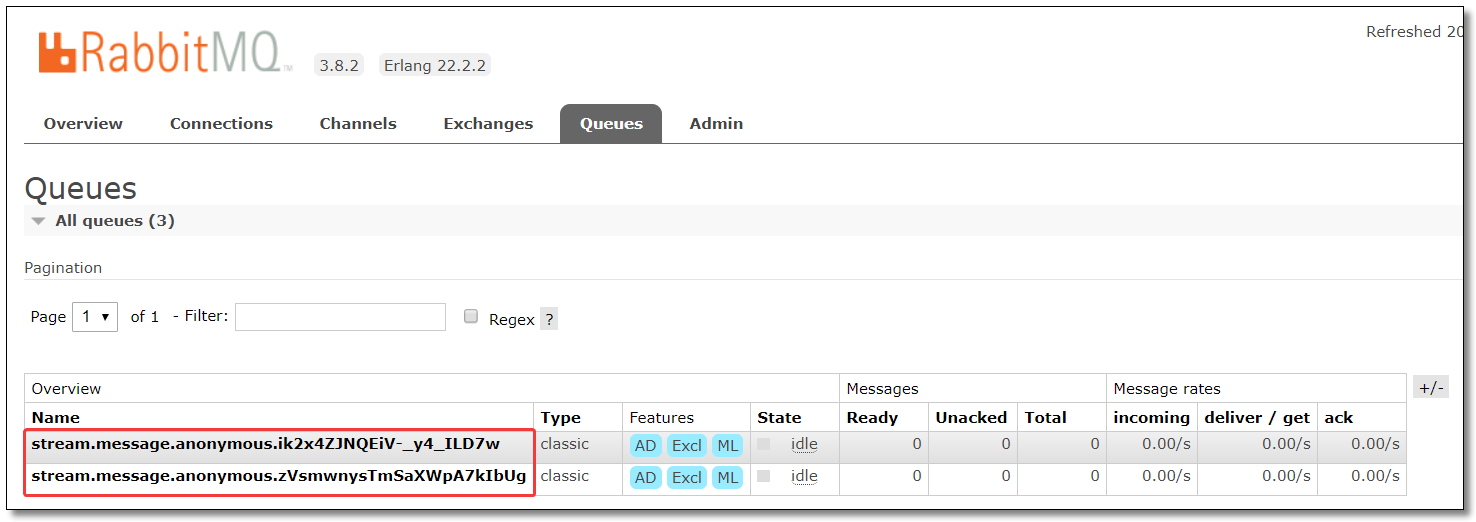
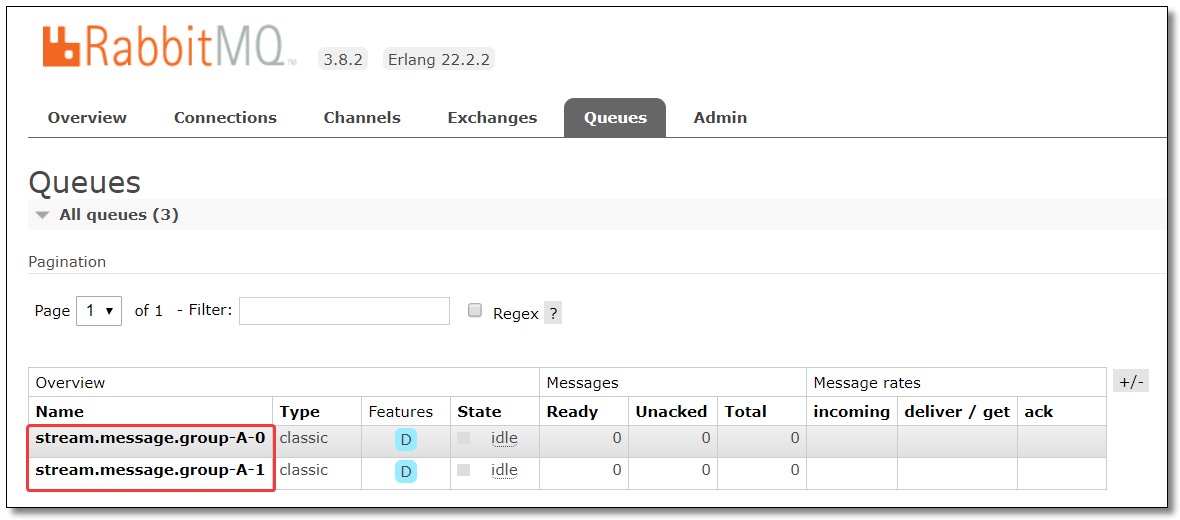
通过结果可以看到消息被两个消费者同时消费了,原因是因为它们属于不同的分组,默认情况下分组名称是随机生成的,通过 RabbitMQ 也可以得知:
配置分组
stream-consumer 的分组配置为:group-A。
server:

  port: 8002 # 端口

spring:

  application:

    name: stream-consumer # 应用名称

  rabbitmq:

    host: 192.168.10.101  # 服务器 IP

    port: 5672            # 服务器端口

    username: guest       # 用户名

    password: guest       # 密码

    virtual-host: /       # 虚拟主机地址

  cloud:

    stream:

      bindings:

        # 消息接收通道

        # 与 org.springframework.cloud.stream.messaging.Sink 中的 @Input("input") 注解的 value 相同

        input:

          destination: stream.message # 绑定的交换机名称

          group: group-A
stream-consumer02 的分组配置为:group-A。
server:

  port: 8003 # 端口

spring:

  application:

    name: stream-consumer # 应用名称

  rabbitmq:

    host: 192.168.10.101  # 服务器 IP

    port: 5672            # 服务器端口

    username: guest       # 用户名

    password: guest       # 密码

    virtual-host: /       # 虚拟主机地址

  cloud:

    stream:

      bindings:

        # 消息接收通道

        # 与 org.springframework.cloud.stream.messaging.Sink 中的 @Input("input") 注解的 value 相同

        input:

          destination: stream.message # 绑定的交换机名称

          group: group-A
测试
运行单元测试发送消息,此时多个消息消费者只有其中一个可以消费。RabbitMQ 结果如下:

消息分区
点击链接观看:Stream 消息分区视频(获取更多请关注公众号「哈喽沃德先生」)
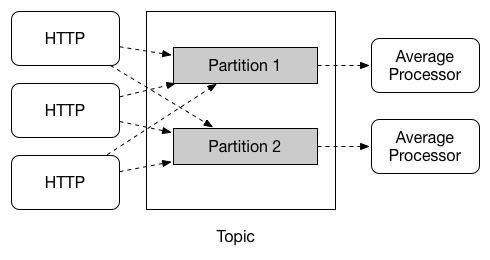
通过消息分组可以解决消息被重复消费的问题,但在某些场景下分组还不能满足我们的需求。比如,同时有多条同一个用户的数据发送过来,我们需要根据用户统计,但是消息被分散到了不同的集群节点上了,这时我们就可以考虑使用消息分区了。
当生产者将消息发送给多个消费者时,保证同一消息始终由同一个消费者实例接收和处理。消息分区是对消息分组的一种补充。
问题演示
先给大家演示一下消息未分区的效果,单元测试代码如下:
package com.example;

import com.example.producer.MessageProducer;

import org.junit.jupiter.api.Test;

import org.springframework.beans.factory.annotation.Autowired;

import org.springframework.boot.test.context.SpringBootTest;

@SpringBootTest(classes = {StreamProducerApplication.class})

public class MessageProducerTest {

    @Autowired

    private MessageProducer messageProducer;

    @Test

    public void testSend() {

        for (int i = 1; i <= 10; i++) {

            messageProducer.send("hello spring cloud stream");

        }

    }

}
测试
运行单元测试发送消息,两个消息消费者控制台打印结果如下:
stream-consumer 的控制台:
message = hello spring cloud stream

message = hello spring cloud stream

message = hello spring cloud stream

message = hello spring cloud stream

message = hello spring cloud stream
stream-consumer02 的控制台:
message = hello spring cloud stream

message = hello spring cloud stream

message = hello spring cloud stream

message = hello spring cloud stream

message = hello spring cloud stream
假设这 10 条消息都来自同一个用户,正确的方式应该都由一个消费者消费所有消息,否则系统肯定会出现问题。为了避免这种情况,Stream 提供了消息分区来解决该问题。
配置分区
消息生产者配置分区键的表达式规则和消息分区的数量。
server:

  port: 8001 # 端口

spring:

  application:

    name: stream-producer # 应用名称

  rabbitmq:

    host: 192.168.10.101  # 服务器 IP

    port: 5672            # 服务器端口

    username: guest       # 用户名

    password: guest       # 密码

    virtual-host: /       # 虚拟主机地址

  cloud:

    stream:

      bindings:

        # 消息发送通道

        # 与 org.springframework.cloud.stream.messaging.Source 中的 @Output("output") 注解的 value 相同

        output:

          destination: stream.message # 绑定的交换机名称

          producer:

            partition-key-expression: payload # 配置分区键的表达式规则

            partition-count: 2 # 配置消息分区的数量
通过 partition-key-expression 参数指定分区键的表达式规则,用于区分每个消息被发送至对应分区的输出 channel。
该表达式作用于传递给 MessageChannel 的 send 方法的参数,该参数实现 org.springframework.messaging.Message 接口的 GenericMessage 类。
源码 MessageChannel.java
package org.springframework.messaging;

@FunctionalInterface

public interface MessageChannel {

    long INDEFINITE_TIMEOUT = -1L;

    default boolean send(Message<?> message) {

        return this.send(message, -1L);

    }

    boolean send(Message<?> var1, long var2);

}
源码 GenericMessage.java
package org.springframework.messaging.support;

import java.io.Serializable;

import java.util.Map;

import org.springframework.lang.Nullable;

import org.springframework.messaging.Message;

import org.springframework.messaging.MessageHeaders;

import org.springframework.util.Assert;

import org.springframework.util.ObjectUtils;

public class GenericMessage<T> implements Message<T>, Serializable {

    private static final long serialVersionUID = 4268801052358035098L;

    private final T payload;

    private final MessageHeaders headers;

    ...

}
如果 partition-key-expression 的值是 payload,将会使用所有放在 GenericMessage 中的数据作为分区数据。payload 是消息的实体类型,可以为自定义类型比如 User,Role 等等。
如果 partition-key-expression 的值是 headers["xxx"],将由 MessageBuilder 类的 setHeader() 方法完成赋值,比如:
package com.example.producer;

import org.springframework.beans.factory.annotation.Autowired;

import org.springframework.cloud.stream.annotation.EnableBinding;

import org.springframework.cloud.stream.messaging.Source;

import org.springframework.messaging.support.MessageBuilder;

import org.springframework.stereotype.Component;

/**

 * 消息生产者

 */

@Component

@EnableBinding(Source.class)

public class MessageProducer {

    @Autowired

    private Source source;

    /**

     * 发送消息

     *

     * @param message

     */

    public void send(String message) {

        source.output().send(MessageBuilder.withPayload(message).setHeader("xxx", 0).build());

    }

}
消息消费者配置消费者总数和当前消费者的索引并开启分区支持。
stream-consumer 的 application.yml
server:

  port: 8002 # 端口

spring:

  application:

    name: stream-consumer # 应用名称

  rabbitmq:

    host: 192.168.10.101  # 服务器 IP

    port: 5672            # 服务器端口

    username: guest       # 用户名

    password: guest       # 密码

    virtual-host: /       # 虚拟主机地址

  cloud:

    stream:

      instance-count: 2 # 消费者总数

      instance-index: 0 # 当前消费者的索引

      bindings:

        # 消息接收通道

        # 与 org.springframework.cloud.stream.messaging.Sink 中的 @Input("input") 注解的 value 相同

        input:

          destination: stream.message # 绑定的交换机名称

          group: group-A

          consumer:

            partitioned: true # 开启分区支持
stream-consumer02 的 application.yml
server:

  port: 8003 # 端口

spring:

  application:

    name: stream-consumer # 应用名称

  rabbitmq:

    host: 192.168.10.101  # 服务器 IP

    port: 5672            # 服务器端口

    username: guest       # 用户名

    password: guest       # 密码

    virtual-host: /       # 虚拟主机地址

  cloud:

    stream:

      instance-count: 2 # 消费者总数

      instance-index: 1 # 当前消费者的索引

      bindings:

        # 消息接收通道

        # 与 org.springframework.cloud.stream.messaging.Sink 中的 @Input("input") 注解的 value 相同

        input:

          destination: stream.message # 绑定的交换机名称

          group: group-A

          consumer:

            partitioned: true # 开启分区支持
测试
运行单元测试发送消息,此时多个消息消费者只有其中一个可以消费所有消息。RabbitMQ 结果如下:
至此 Stream 消息驱动所有的知识点就讲解结束了。
本文采用 知识共享「署名-非商业性使用-禁止演绎 4.0 国际」许可协议。
大家可以通过 分类 查看更多关于 Spring Cloud 的文章。
Spring Cloud 系列之 Stream 消息驱动(二)的更多相关文章
- Spring Cloud 系列之 Stream 消息驱动(一)
在实际开发过程中,服务与服务之间通信经常会使用到消息中间件,消息中间件解决了应用解耦.异步处理.流量削锋等问题,实现高性能,高可用,可伸缩和最终一致性架构. 不同中间件内部实现方式是不一样的,这些中间 ...
- Spring Cloud 系列之 Bus 消息总线
什么是消息总线 消息代理中间件构建一个共用的消息主题让所有微服务实例订阅,当该消息主题产生消息时会被所有微服务实例监听和消费. 消息代理又是什么?消息代理是一个消息验证.传输.路由的架构模式,主要用来 ...
- Spring Cloud 系列之 Consul 配置中心
前面我们已经学习过 Spring Cloud Config 了: Spring Cloud 系列之 Config 配置中心(一) Spring Cloud 系列之 Config 配置中心(二) Spr ...
- spring cloud 2.x版本 Spring Cloud Stream消息驱动组件基础教程(kafaka篇)
本文采用Spring cloud本文为2.1.8RELEASE,version=Greenwich.SR3 本文基于前两篇文章eureka-server.eureka-client.eureka-ri ...
- Spring Cloud系列(二) 介绍
Spring Cloud系列(一) 介绍 Spring Cloud是基于Spring Boot实现的微服务架构开发工具.它为微服务架构中涉及的配置管理.服务治理.断路器.智能路由.微代理.控制总线.全 ...
- Spring Cloud 系列之 Spring Cloud Stream
Spring Cloud Stream 是消息中间件组件,它集成了 kafka 和 rabbitmq .本篇文章以 Rabbit MQ 为消息中间件系统为基础,介绍 Spring Cloud Stre ...
- Spring Cloud 系列之 Sleuth 链路追踪(二)
本篇文章为系列文章,未读第一集的同学请猛戳这里:Spring Cloud 系列之 Sleuth 链路追踪(一) 本篇文章讲解 Sleuth 基于 Zipkin 存储链路追踪数据至 MySQL,Elas ...
- Spring Cloud 系列之 Consul 注册中心(二)
本篇文章为系列文章,未读第一集的同学请猛戳这里:Spring Cloud 系列之 Consul 注册中心(一) 本篇文章讲解 Consul 集群环境的搭建. Consul 集群 上图是一个简单的 Co ...
- Spring Cloud 系列之 Gateway 服务网关(二)
本篇文章为系列文章,未读第一集的同学请猛戳这里:Spring Cloud 系列之 Gateway 服务网关(一) 本篇文章讲解 Gateway 网关的多种路由规则.动态路由规则(配合服务发现的路由规则 ...
随机推荐
- Java并发基础10:原子性操作类的使用
在 java5 以后,我们接触到了线程原子性操作,也就是在修改时我们只需要保证它的那个瞬间是安全的即可,经过相应的包装后可以再处理对象的并发修改,本文总结一下Atomic系列的类的使用方法,其中包含: ...
- 玩转控件:对Dev的GridControl控件扩展
缘由 一切实现来源于需求,目的在于不盲目造轮子,有小伙伴儿在看了<玩转控件:对Dev中GridControl控件的封装和扩展>文章后,私信作者说,因公司业务逻辑比较复杂,展示字段比较多,尤 ...
- JS/Jquery遍历JSON对象、JSON数组、JSON数组字符串、JSON对象字符串
JS遍历JSON对象 JS遍历JSON对象 <script> var obj = { "goodsid": "01001", "goods ...
- Serverless无服务器云函数入门唠叨
B站录了个视频: https://www.bilibili.com/video/av59020925/
- split(" {1,}") 含义
将字符串按照括号内的内容分割成字符数组 这里括号内是正则表达式,X{m,n}代表X至少重复m次,至多重复n次 这里x为空格,至少重复1次,就是将字符串以一个或多个空格分割 如"1 2 ab ...
- JSR303完成validate校验并编写BeanValidator工具类
一.引入pom依赖 <!-- validator --> <dependency> <groupId>javax.validation</groupId> ...
- 算法竞赛 从c到c++3
const 常指针,指向固定位置,不能再次修改指向的位置,需要初始化,const 加在“*”号后面,名称前面,例如 int *const p: 指向常量的指针,不能修改指向地址的内容,相当于常引用,c ...
- python基础:如何使用python pandas将DataFrame转换为dict
之前在知乎上看到有网友提问,如何将DataFrame转换为dict,专门研究了一下,pandas在0.21.0版本中是提供了这个方法的.下面一起学习一下,通过调用help方法,该方法只需传入一个参数, ...
- python成语接龙小游戏
上一篇讲了小游戏的坑现在把源码放出来 #coding:utf-8 import string import pypinyin import sys import random print(" ...
- linux通过进程名查看其占用端口
1.先查看进程pid ps -ef | grep 进程名 2.通过pid查看占用端口 netstat -nap | grep 进程pid 参考: https://blog.csdn.net/sinat ...