
一,View中引用自定义Dialog组件
需求: 在项目中,有时候可能在不同画面需要完成同一功能,比如示例文件列表查看功能,系统上传文件,需要查看文件列表,以及文件历史记录
话不多说,上图
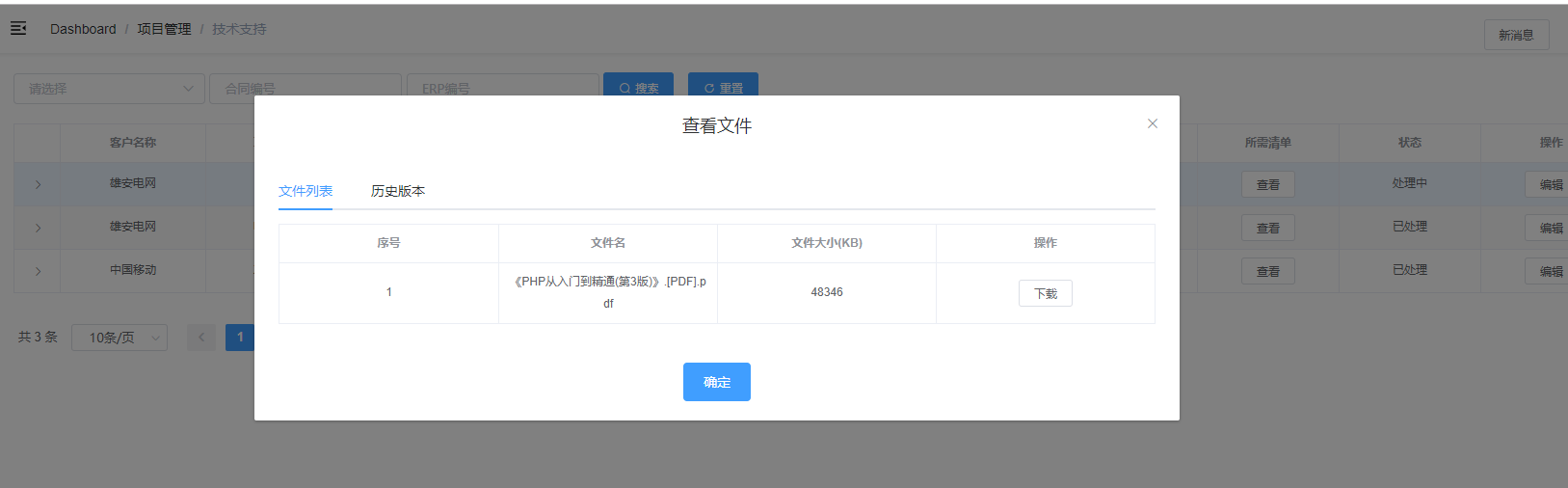
这个查看文件的Dialog需要在系统中的很多地方调用,开发过程中不可能在每个地方都定义一遍,那么,我们可能使用自定义控件形式,代码如下
<template>

  <el-dialog title="查看文件" :visible.sync="innerVisible" class="form-dialog" center @closed="onClosed">

    <el-tabs v-model="activeName" @tab-click="handleClick">

      <el-tab-pane label="文件列表" name="fileList">

        <el-table

          v-loading="listLoading"

          size="small"

          :data="list"

          style="width: 100%"

          element-loading-text="Loading"

          border

          stripe

          fit

          highlight-current-row

        >

          <el-table-column label="序号" align="center">

            <template slot-scope="scope">

              {{ scope.$index + 1 }}

            </template>

          </el-table-column>

          <el-table-column label="文件名" align="center">

            <template slot-scope="scope">

              {{ scope.row.name }}

            </template>

          </el-table-column>

          <el-table-column label="文件大小(KB)" align="center">

            <template slot-scope="scope">

              <span>{{ scope.row.size }}</span>

            </template>

          </el-table-column>

          <el-table-column label="操作" align="center">

            <template slot-scope="scope">

              <el-button size="mini" @click="downLoadFile(scope.row)">下载</el-button>

            </template>

          </el-table-column>

        </el-table>

      </el-tab-pane>

      <el-tab-pane label="历史版本" name="history">

        <el-table

          v-loading="historyListLoading"

          size="small"

          :data="historyList"

          style="width: 100%"

          element-loading-text="Loading"

          border

          stripe

          fit

          highlight-current-row

        >

          <el-table-column label="序号" align="center">

            <template slot-scope="scope">

              {{ scope.$index + 1 }}

            </template>

          </el-table-column>

          <el-table-column label="时间" align="center">

            <template slot-scope="scope">

              {{ scope.row.Date | parseTime('{y}-{m}-{d} {h}:{i}') }}

            </template>

          </el-table-column>

          <el-table-column label="备注" align="center">

            <template slot-scope="scope">

              <span>{{ scope.row.Remark }}</span>

            </template>

          </el-table-column>

          <el-table-column label="操作" align="center">

            <template slot-scope="scope">

              <el-button size="mini" @click="downLoadVersionFile(scope.row)">下载</el-button>

            </template>

          </el-table-column>

        </el-table>

      </el-tab-pane>

    </el-tabs>

    <div slot="footer" class="dialog-footer">

      <el-button type="primary" @click="innerVisible = false">确定</el-button>

    </div>

  </el-dialog>

</template>

<script>

import { fileDownload, getFileList, getFileHistoryList, versionFileDownload } from '@/api/common/common'

import { getToken } from '@/utils/auth'

import { parseTime, downloadFile } from '@/utils'

export default {

  name: 'FileListDialog',

  filters: {

    parseTime(time, cFormat) {

      return parseTime(time, cFormat)

    }

  },

  components: {

  },

  props: {

    visible: {

      type: Boolean,

      default: false

    },

    url: {

      type: String,

      default: ''

    }

  },

  data() {

    return {

      token: getToken(),

      list: null,

      historyList: null,

      listLoading: true,

      historyListLoading: true,

      innerVisible: this.visible,

      sURL: '',

      activeName: 'fileList'

    }

  },

  watch: {

    visible(val, oldVal) {

      if (val === oldVal) {

        return

      }

      this.innerVisible = val

    },

    innerVisible(val, oldVal) {

      if (val === oldVal) {

        return

      }

      this.$emit('update:visible', val)

    },

    sURL(val, oldVal) {

      if (val === oldVal) {

        return

      }

      this.activeName = 'fileList'

      // 获取数据

      this.getList()

    }

  },

  mounted() {},

  updated() {

    this.sURL = this.url

    this.dVisible = this.dialogFormVisible

  },

  methods: {

    handleClick(tab, event) {

      switch (tab.name) {

        case 'fileList':

          this.getList()

          break

        case 'history':

          this.getHistory()

          break

      }

    },

    getList() {

      this.listLoading = true

      var param = {

        url: this.sURL,

        token: getToken()

      }

      getFileList(param).then(response => {

        this.list = response.data

        this.listLoading = false

      })

    },

    getHistory() {

      this.historyListLoading = true

      var param = {

        url: this.sURL,

        token: getToken()

      }

      getFileHistoryList(param).then(response => {

        this.historyList = response.data

        this.historyListLoading = false

      })

    },

    onClosed() {

      this.sId = ''

    },

    downLoadFile(row) {

      var param = {

        token: getToken(),

        url: row.url

      }

      fileDownload(param).then(res => {

        if (res.code === 20000) {

          downloadFile(res.data.name, res.data.dataStr)

        }

      })

    },

    downLoadVersionFile(row) {

      var param = {

        token: getToken(),

        url: row.URL,

        versionNo: row.VersionNo

      }

      versionFileDownload(param).then(res => {

        if (res.code === 20000) {

          downloadFile(res.data.name, res.data.dataStr)

        }

      })

    }

  }

}

</script>

<style></style>
其中,Dialog控制显隐的关键部分是watch函数部分
    visible(val, oldVal) {

      if (val === oldVal) {

        return

      }

      this.innerVisible = val

    },

    innerVisible(val, oldVal) {

      if (val === oldVal) {

        return

      }

      this.$emit('update:visible', val)

    }
visible和innerVisible分别对应控件的属性以及Data,防止多次修改属性问题。
sURL(val, oldVal) {

      if (val === oldVal) {

        return

      }

      this.activeName = 'fileList'

      // 获取数据

      this.getList()

    }
该部分是控制Dialog显示数据用
父画面调用:
<template>

  <div class="app-container">

    <div class="filter-container">

      <el-button v-waves size="small" class="filter-item" type="primary" icon="el-icon-search" @click="handleFilter">搜索</el-button>

    </div>

    <el-table

      v-loading="listLoading"

      size="small"

      :data="list"

      style="width: 100%"

      element-loading-text="Loading"

      border

      stripe

      fit

      highlight-current-row

    >

      <el-table-column label="技术协议" align="center">

        <template slot-scope="scope">

          <el-button size="mini" @click="viewFile(scope.row)">查看</el-button>

        </template>

      </el-table-column>

    </el-table>

    <Pagination v-show="total > 0" size="small" :total="total" :page.sync="listQuery.page" :limit.sync="listQuery.limit" @pagination="getList" />

    <FileListDialog :url="fileURL" :visible.sync="fileListDialogVisible" />

  </div>

</template>

<script>

import FileListDialog from './dialog/fileListDialog.vue'

export default {

  components: {

    FileListDialog

  },

  data() {

    return {

      fileURL: '',

      fileListDialogVisible: false

    }

  },

  methods: {

    viewFile(row, type) {

      if (stringIsNullOrEmpty(row.Path)) return

      this.fileListDialogVisible = true

      this.fileURL = row.Path // URL地址

  }

 }

}

</script>
一,View中引用自定义Dialog组件的更多相关文章
- Android中制作自定义dialog对话框的实例
http://www.jb51.net/article/83319.htm 这篇文章主要介绍了Android中制作自定义dialog对话框的实例分享,安卓自带的Dialog显然不够用,因而我们要继 ...
- [asp.net mvc 奇淫巧技] 01 - 封装上下文 - 在View中获取自定义的上下文
我们在asp.net 开发中已经封装了最强大的HttpContext,我们可以在HttpContext中可以获取到几乎任何想获取的东西,也可以在HttpContext写入需要返回客户端的信息.但是这些 ...
- C程序中引用自定义的C函数模块
原文:C程序中引用自定义的C函数模块 我们知道,刚开始接触C语言编程,一般都是在一个.c或者.cpp(以下只说.c)的文件中编写代码,其中一定会有一个入口函数, 也就是main()函数,你可以将程序代 ...
- (vue.js)vue中引用了别的组件 ,如何使this指向Vue对象
Vue中引用了别的组件 ,如何使this指向Vue对象 今天学习Vue组件传值, 通过创建Vue实例, 广播和监听实现传值, 但是传值之后无法直接将得到的值应用到Vue对象, 因为这相当于引用改了别的 ...
- Android XML中引用自定义内部类view的四个why
今天碰到了在XML中应用以内部类形式定义的自定义view,结果遇到了一些坑.虽然通过看了一些前辈写的文章解决了这个问题,但是我看到的几篇都没有完整说清楚why,于是决定做这个总结. 使用自定义内部类v ...
- 在ASP.NET中引用自定义提示框
在html网页中自定义提示框 正文: 在一般的B/S架构中项目,与用户的交互信息是非常重要的.在一般的情况下,设计人员都在把用户信息呈现在html中,用div和span去弹出相关信息.对于一般的情况而 ...
- YII中引用自定义类
如果通过actions方法引用其他自定义类时 <?php class LoginController extends Controller { public function actionInd ...
- 检索COM 类工厂中CLSID 为{00024500-0000-0000-C000-000000000046}组件时失败
检索 COM 类工厂中 CLSID 为{00024500-0000-0000-C000-000000000046} 的组件时失败,原因是出现以下错误: 80070005 当在ASP.NET应用程序中引 ...
- vue中引用vux
官网看不懂,网上搜了下,以备不时之需 这是官网说明文档,看不懂的啊. Vux使用教程: 1,在项目里安装vux cnpm install vux --save 2,在项目里安装vux-loader(这 ...
随机推荐
- confluence+jira
/opt/atlassian/confluence/confluence/WEB-INF/lib mysql-connector-java-5.1.7-bin.jar atlassian-extras ...
- (转)logback配置详解
找到一篇很详细的关于logback配置的介绍: 贴上原文链接:logback使用配置详解 1.介绍 Logback是由log4j创始人设计的另一个开源日志组件,它当前分为下面下个模块: logback ...
- Unity(GameObject)
####1. 这个方法用于发送一个数据到指定的方法中,第三个参数是是否强制接收 以下三种方法发送消息的形式,各有不同的效果,可以通过第一个参数指定要发送的方法名名,第二个是发送的参数值,第三个参数是是 ...
- Vs Code在Vue项目中v-for指令提示错误的解决办法
最近在做一个Vue项目,在其中用到v-for指令时,发现Vs Code报错,如下图(代码是没有任何问题的),在网上找了一下解决办法,希望能帮助到更多人. 解决方法: 打开 文件-首选项-设置 将 ...
- log4j MDC NDC详解
NDC ( Nested Diagnostic Context )和 MDC ( Mapped Diagnostic Context )是 log4j 种非常有用的两个类,它们用于存储应用程序的上下文 ...
- .NET Micro Framework 4.2 beta 源码探析
.NET Micro Framework 4.2 beta发布已经有一段时间了,一直没有腾出时间研究,昨天因为LWIP协议栈的原因(感觉上一个版本有点问题)刚 下了代码,所以抽空研究了一下. ...
- 代码,绘画,设计常用的颜色名称-16进制HEX编码-RGB编码 对照一览表
排列方式,英文名称的字典序 颜色名 HEX16进制编码 RGB编码 AliceBlue F0F8FF 240,248,255 AntiqueWhite FAEBD7 250,235,215 Aqua ...
- lintcode 826电脑维修
826,一个n * m矩阵代表一个电脑的阵列,给你一个list< Point >代表坏掉的电脑坐标.现在我们从(0,0)出发修电脑,要求: 1.必须修完当前行所有坏掉的电脑才能走向下一 ...
- 两个命令把 Vim 打造成 Python IDE
运行下面两个命令,即可把 Vim(含插件)配置成 Python IDE.目前支持 MAC 和 Ubuntu. Shell curl -O https://raw.githubusercontent ...
- .NET Core技术研究-通过Roslyn代码分析技术规范提升代码质量
随着团队越来越多,越来越大,需求更迭越来越快,每天提交的代码变更由原先的2位数,暴涨到3位数,每天几百次代码Check In,补丁提交,大量的代码审查消耗了大量的资源投入. 如何确保提交代码的质量和提 ...