
pip install .whl文件时is not a supported wheel on this platform.解决方法
首先,在python中输入import pip和print(pip.pep425tags.get_supported()),从而获取pip支持的文件名和版本。
somnus@somnus-HP-Pavilion-Notebook:~$ python

Python 2.7.15rc1 (default, Nov 12 2018, 14:31:15)

[GCC 7.3.0] on linux2

Type "help", "copyright", "credits" or "license" for more information.

>>> import pip

>>> print(pip.pep425tags.get_supported())

[('cp27', 'cp27mu', 'manylinux1_x86_64'), ('cp27', 'cp27mu', 'linux_x86_64'), ('cp27', 'none', 'manylinux1_x86_64'), ('cp27', 'none', 'linux_x86_64'), ('py2', 'none', 'manylinux1_x86_64'), ('py2', 'none', 'linux_x86_64'), ('cp27', 'none', 'any'), ('cp2', 'none', 'any'), ('py27', 'none', 'any'), ('py2', 'none', 'any'), ('py26', 'none', 'any'), ('py25', 'none', 'any'), ('py24', 'none', 'any'), ('py23', 'none', 'any'), ('py22', 'none', 'any'), ('py21', 'none', 'any'), ('py20', 'none', 'any')]
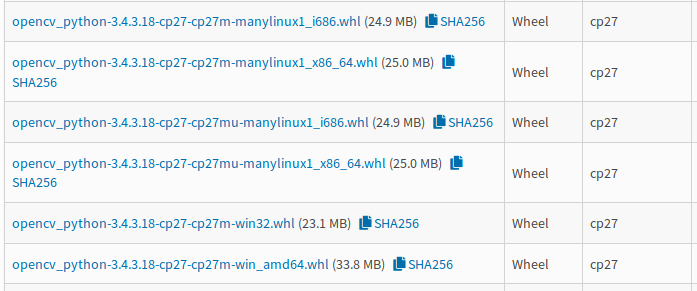
然后,选择支持的.whl文件下载即可,如下图,由于支持('cp27', 'cp27mu', 'manylinux1_x86_64'),所以可下载opencv_python-3.4.3.18-cp27-cp27mu-manylinux1_x86_64.whl。
PS:上述方法有时会报错:
>>> import pip

>>> print(pip.pep425tags.get_supported())

Traceback (most recent call last):

  File "<stdin>", line 1, in <module>

AttributeError: 'module' object has no attribute 'pep425tags'
此时,对于python2.7,可采用:
>>> import wheel.pep425tags

>>> print(wheel.pep425tags.get_supported())
解决方案参考:https://stackoverflow.com/questions/50248524/module-pip-has-no-attribute-pep425tags
pip install .whl文件时is not a supported wheel on this platform.解决方法的更多相关文章
- 安装Tensorflow过程pip安装报错:is not a supported wheel on this platform
安装Tensorflow过程pip安装报错:is not a supported wheel on this platform 通过pip安装wheel镜像时,安装指令为: pip install - ...
- Python——pip安装报错:is not a supported wheel on this platform
pip安装报错:is not a supported wheel on this platform 可能的原因1:安装的不是对应python版本的库,下载的库名中cp35代表python3.5,其它同 ...
- whl is not a supported wheel on this platform解决办法
有些时候,我们用pip install *** 难免发生意外,可以采用安装whl的方法,不过... 有时候出现如: whl is not a supported wheel on this platf ...
- 查看whl包名是否满足系统的条件的命令,以此解决whl包出现“is not a supported wheel on this platform”错误提示的问题
在Ubuntu系统中,使用pip安装whl包时,常常会报如下错误: tensorflow_gpu-1.11.0-cp35-cp35m-manylinux1_x86_64.whl is not a su ...
- pip安装报错:is not a supported wheel on this platform
可能的原因1:安装的不是对应python版本的库,下载的库名中cp27代表python2.7,其它同理. 可能的原因2:这个是我遇到的情况(下载的是对应版本的库,然后仍然提示不支持当前平台) 我下载到 ...
- linux python3安装whl包时报错解决:is not a supported wheel on this platform
原因1 你下载安装的包不是当前平台所支持的 原因2 你下载的包,不符合你所在的平台的安装whl的名称规范,所以出错.比如当前我要安装的包是:pymssql-2.1.5-cp36-cp36m-manyl ...
- Python3.x:pip install pymssql安装时出错
Python3.x:pip install pymssql安装时出错 一.错误日志 error: Microsoft Visual C++ 14.0 is required. Get it with ...
- windows下安装easy_install, pip 及whl文件安装方法
转:http://www.cnblogs.com/wu-wenmin/p/4250330.html 写在前面的话 最近在看"Computer Vision with Python" ...
- python安装whl包时出现的问题解决:is not a supported wheel on this platform
@ 目录 一.问题 二.查找问题 三.问题解决 一.问题 1.下载一个twisted包 安装Twisted,进入https://www.lfd.uci.edu/~gohlke/pythonlibs 下 ...
随机推荐
- cmake 环境安装与使用
CMake是一个跨平台的安装(编译)工具,可以用简单的语句来描述所有平台的安装(编译过程).他能够输出各种各样的makefile或者project文件,能测试编译器所支持的C++特性,类似UNIX下的 ...
- 「CF383C Propagating tree」
这应该属于一个比较麻烦的数据结构处理树上问题. 题目大意 给出一颗根节点编号为 \(1\) 的树,对于一个节点修改时在它的子树中对于深度奇偶性相同的节点加上这个权值,不同则减去这个值,单点查询. 分析 ...
- 什么是SOA架构
什么是SOA架构 SOA是Service-Oriented Architecture的首字母简称,它是一种支持面向服务的架构样式.从服务.基于服务开发和服务的结果来看,面向服务是一种思考方式.其实SO ...
- CSS三列自适应布局(两边宽度固定,中间自适应)
https://blog.csdn.net/cinderella_hou/article/details/52156333 https://blog.csdn.net/wangchengiii/art ...
- 牛客网Sql
牛客网Sql: 1.查询最晚入职的员工信息 select * from employees where hire_date =(select max(hire_date) from employee ...
- 如何安装部署和优化Tomcat?(Tomcat部署和优化与压测,虚拟主机配置,Tomcat处理请求的过程)
文章目录 前言 一:Tomcat安装部署 1.1:Tomcat简介 1.2:Tomcat核心组件 1.3:Tomcat处理请求的过程 1.3.1:请求过程基本解释 1.3.2:请求过程详细解释 1.4 ...
- js 字符串相关函数
https://www.jb51.net/article/74614.htm
- 二十一 Struts的数据校验两种方式:手动编码和xml校验
数据的校验: 一.前台校验:JS校验 JS的校验不是必须的,JS可以被绕行,可以提升用户体验 二.后台校验:编码校验 必须的校验 三.校验的方式: 手动编码(不建议使用) 配置文件(支持) 手动编码的 ...
- Java基础 -4.2
Switch分支语句 switch是一个开关语句,它主要是根据内容来进行判断的,需要注意的是switch中可以判断的只能够是数据(int.char.枚举.String)而不能够使用逻辑判断 publi ...
- Eth合约攻击
前言 Ethernaut是一个类似于CTF的智能合约平台,集成了不少的智能合约相关的安全问题,这对于安全审计人员来说是一个很不错的学习平台,本篇文章将通过该平台来学习智能合约相关的各种安全问题,由于关 ...