
WebDriver基本操作入门及UI自动化练手页面
在这里集中了我们在做UI自动化时常见的一些控件操作。希望能对新手有帮助。
下载地址:http://files.cnblogs.com/zhangfei/demo.rar
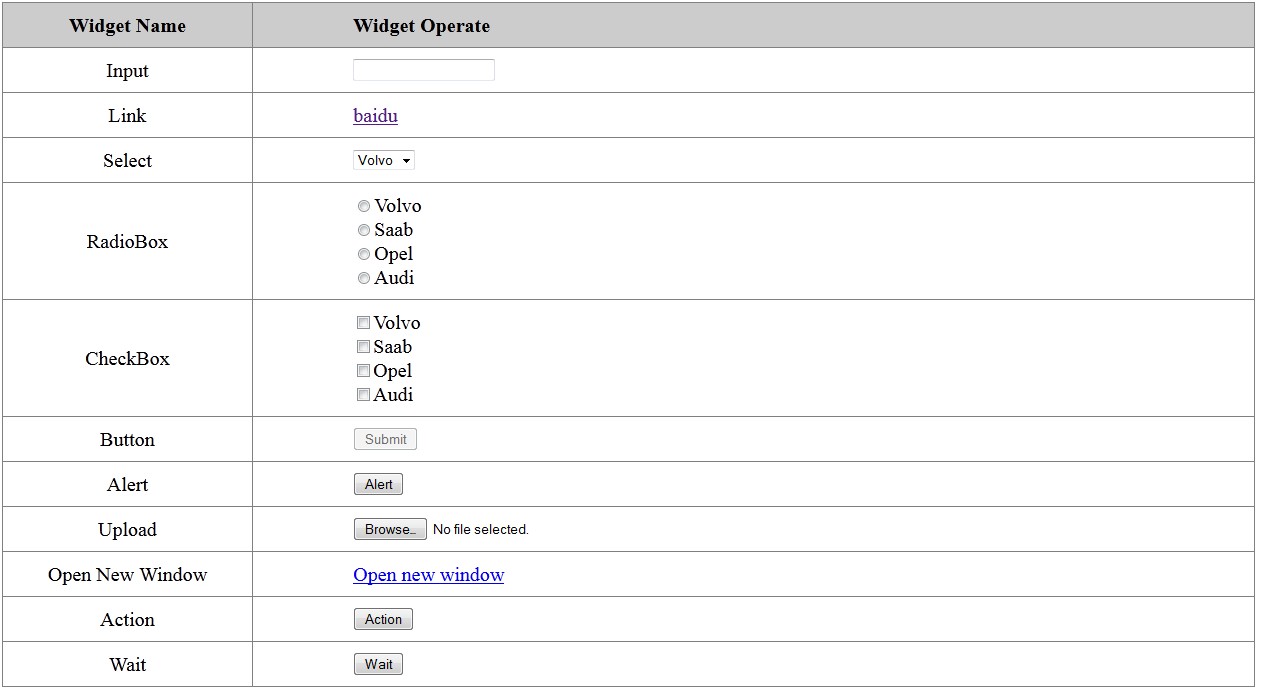
package com.test;

import java.util.List;

import java.util.Set;

import org.openqa.selenium.Alert;

import org.openqa.selenium.By;

import org.openqa.selenium.JavascriptExecutor;

import org.openqa.selenium.WebDriver;

import org.openqa.selenium.WebElement;

import org.openqa.selenium.firefox.FirefoxDriver;

import org.openqa.selenium.interactions.Actions;

import org.openqa.selenium.support.ui.ExpectedCondition;

import org.openqa.selenium.support.ui.Select;

import org.openqa.selenium.support.ui.WebDriverWait;

public class Demo {

    public WebDriver driver;

    public Demo() {

        // ProfilesIni allProfiles = new ProfilesIni();

        // FirefoxProfile profile = allProfiles.getProfile("default");

        // driver = new FirefoxDriver(profile);

        driver = new FirefoxDriver();

    }

    public void testBaidu() {

        WebDriver driver = new FirefoxDriver();

        driver.navigate().to("http://www.baidu.com");

        driver.quit();

    }

    public void testGoTo(String url) {

        driver.navigate().to(url);

        driver.manage().window().maximize();

    }

    public void testQuit() {

        // driver.close();

        driver.quit();

    }

    public void testInput(String value) {

        WebElement element = driver.findElement(By.id("user"));

        element.sendKeys(value);

        element.clear();

        element.sendKeys(value);

        String text = element.getAttribute("value");

        System.out.println(text);

    }

    public void testLink() {

        WebElement element = driver.findElement(By.className("baidu"));

        String href = element.getAttribute("href");

        System.out.println(href);

        String text = element.getText();

        System.out.println(text);

        element.click();

        driver.navigate().back();

    }

    public void testSelect(String value) {

        WebElement element = driver.findElement(By.name("select"));

        Select select = new Select(element);

        select.selectByValue(value);

        String text = select.getFirstSelectedOption().getText();

        System.out.println(text);

    }

    public void testRadioBox(int index) {

        List<WebElement> elements = driver.findElements(By.name("identity"));

        elements.get(index).click();

        boolean select = elements.get(index).isSelected();

        System.out.println(select);

    }

    public void testCheckBox(int index) {

        List<WebElement> elements = driver.findElements(By

                .xpath("//div[@id='checkbox']/input"));

        WebElement element = elements.get(index);

        element.click();

        boolean check = element.isSelected();

        System.out.println(check);

    }

    public void testButton() {

        WebElement element = driver.findElement(By.className("button"));

        element.click();

        boolean button = element.isEnabled();

        System.out.println(button);

    }

    public void testAlert() {

        WebElement element = driver.findElement(By.className("alert"));

        Actions action = new Actions(driver);

        action.click(element).perform();

        Alert alert = driver.switchTo().alert();

        String text = alert.getText();

        System.out.println(text);

        alert.accept();

    }

    public void testUpload(String filePath) {

        WebElement element = driver.findElement(By.id("load"));

        element.sendKeys(filePath);

    }

    public void testJavaScript(){

        JavascriptExecutor j = (JavascriptExecutor)driver;

        j.executeScript("alert('hellow rold!')");

        Alert alert = driver.switchTo().alert();

        String text = alert.getText();

        System.out.println(text);

        alert.accept();

    }

    public void testMultiWindow() {

        WebElement element = driver.findElement(By.className("open"));

        element.click();

        Set<String> handles = driver.getWindowHandles();

        String handle = driver.getWindowHandle();

        handles.remove(driver.getWindowHandle());

        WebDriver d = driver.switchTo().window(handles.iterator().next());

        d.close();

        driver.switchTo().window(handle);

    }

    public void testAction() {

        WebElement element = driver.findElement(By.className("over"));

        Actions action = new Actions(driver);

        action.moveToElement(element).perform();

        String text = driver.findElement(By.id("over")).getText();

        System.out.println(text);

    }

    public void testWait() {

        WebElement element = driver.findElement(By.className("wait"));

        element.click();

//        driver.manage().timeouts().implicitlyWait(12, TimeUnit.SECONDS);

        boolean wait = new WebDriverWait(driver, 10)

                .until(new ExpectedCondition<Boolean>() {

                    public Boolean apply(WebDriver d) {

                        return d.findElement(By.className("red")).isDisplayed();

                    }

                });

        System.out.println(wait);

        System.out.println(driver.findElement(By.className("red")).getText());

    }

    public static void main(String[] args) {

        Demo d = new Demo();

        d.testGoTo("http://ip/demo.html");

        d.testInput("hello");

        d.testLink();

        d.testRadioBox(2);

        d.testSelect("opel");

        d.testCheckBox(2);

        d.testButton();

        d.testUpload("c:\\test.txt");

        d.testAlert();

        d.testAction();

        d.testJavaScript();

        d.testWait();

        d.testQuit();

    }

}
WebDriver基本操作入门及UI自动化练手页面的更多相关文章
- 使用selenium的WebDriver和ChromeDriver实现UI自动化
下载chromedriver chromedriver与chrome的对应关系表:http://blog.csdn.net/huilan_same/article/details/51896672 下 ...
- UI自动化--PageObjects(页面对象)
核心的核心:减少了重复代码的数量,减少变更涉及面:做到如果UI发生更改,则只需在一个位置应用此修复程序. PageObject:将页面作为一个对象,进行封装,包括元素定位,封装获取各元素.操作的方法: ...
- 推荐:一个适合于Python新手的入门练手项目
随着人工智能的兴起,国内掀起了一股Python学习热潮,入门级编程语言,大多选择Python,有经验的程序员,也开始学习Python,正所谓是人生苦短,我用Python 有个Python入门练手项目, ...
- 基于Selenium2+Java的UI自动化(4) - WebDriver API简单介绍
1. 启动浏览器 前边有详细介绍启动三种浏览器的方式(IE.Chrome.Firefox): private WebDriver driver = null; private String chrom ...
- Python入门、练手、视频资源汇总,拿走别客气!
摘要:为方便朋友,重新整理汇总,内容包括长期必备.入门教程.练手项目.学习视频. 一.长期必备. 1. StackOverflow,是疑难解答.bug排除必备网站,任何编程问题请第一时间到此网站查找. ...
- 微信小程序初体验,入门练手项目--通讯录,部署上线(二)
接上一篇<微信小程序初体验,入门练手项目--通讯录,后台是阿里云服务器>:https://www.cnblogs.com/chengxs/p/9898670.html 开发微信小程序最尴尬 ...
- 微信小程序初体验,入门练手项目--通讯录,后台是阿里云服务器(一)
内容: 一.前言 二.相关概念 三.开始工作 四.启动项目起来 五.项目结构 六.设计理念 七.路由 八.部署线上后端服务 同步交流学习社区: https://www.mwcxs.top/page/4 ...
- Xamarin入门,开发一个简单的练手APP
之前周末用Xamarin练手做了个简单APP,没有啥逻辑基本就是个界面架子,MVVM的简单使用,还有Binding,Command的简单使用,还有一个稍微复杂点两个界面交互处理(子页面新增后关闭,父页 ...
- UI自动化,你值得拥有
去年春节联欢晚会,为了那张“敬业福”,全家都卯足了劲儿“咻一咻”,连节目都顾不上看了.当时我就想,要是能自动化该多好,不停点击屏幕,屏幕不疼手还疼呢,何况还不好分心,生怕错过了“敬业福”.玩“咻一咻” ...
随机推荐
- 【ElasticSearch】ElasticSearch-SQL插件
ElasticSearch-SQL插件 image2017-10-27_11-10-53.png (1067×738) elastic SQL_百度搜索 Druid SQL 解析器的解析过程 - be ...
- 如何实现Linux+Windows双系统启动
设置你的计算机根据需要启动 Windows 10 或 Ubuntu 18.04. 尽管 Linux 是一个有着广泛的硬件和软件支持的操作系统,但事实上有时你仍需要使用 Windows,也许是因为有些不 ...
- (转)HLSL,函数列表
中文列表 函数名 说明 abs 计算输入值的绝对值. acos 返回输入值反余弦值. all 测试非0值. any 测试输入值中的任何非零值. asin 返回输入值的反正弦值. atan 返回输入值的 ...
- Mysql写入中文出错
本地调试好像正常,服务器运行报错: UnicodeEncodeError: 'latin-1' codec can't encode character u'\u5206' in position 2 ...
- Docker Inspect
1.Inspect结果详细信息 docker inspect 7988f914a122 其中7988f914a122是某一容器进程的id { "Id": "7988f91 ...
- IDEA 之 “There is no configured/running web-servers found!...”
首次配置 IDEA 2017.1.1 与 Tomcat9.0 的 java 开发环境. 在配置成功并创建第一个 Web Application(3.1) 项目后,运行或调试正常运行. 直接在 jsp ...
- Ganglia监控Hadoop集群的安装部署
一. 安装环境 Ubuntu server 12.04 安装gmetad的机器:192.168.52.105 安装gmond的机器:192.168.52.31,192.168.52.32,192.16 ...
- vCenter Single Sign On 5.1 best practices
http://www.virtualizationteam.com/virtualization-vmware/vsphere-virtualization-vmware/vcenter-single ...
- VMware vCloud Director network ports diagram
see:http://kb.vmware.com/selfservice/microsites/search.do?language=en_US&cmd=displayKC&exter ...
- SqlServer2012自增主键跳跃增长的问题解决方案
1.问题:SqlServer2012自增主键插入几条数据,然后重启服务,然后再插入几条数据,发现重启后插入的记录ID出现跳跃. 2.解决方案: Open SQLServer configuration ...