
一款基于jquery和css3的头像恶搞特效
今天给大家分享一款基于jquery和css3的头像恶搞特效。这款实例中,一个头像在画面中跳舞,头像还有可爱的帽子,单击下面的按钮可以为头像切换不同的帽子。效果图如下:
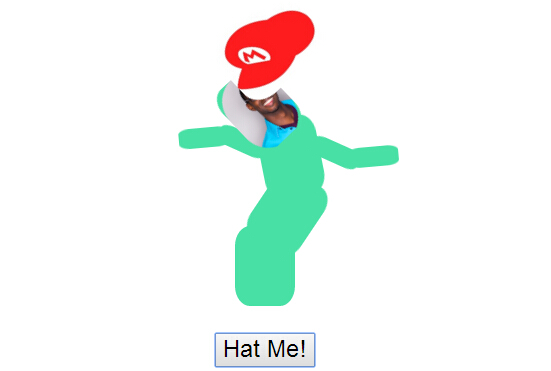
实现的代码。
html代码:
- <div class="wwiaftm-container">
- <div class="base wwiaftm">
- <div class="body-1 wwiaftm">
- <div class="body-2 wwiaftm">
- <div class="hat wwiaftm" style="background-image: url(Mini_Sombrero.png)">
- </div>
- <div class="head wwiaftm">
- <div class="profile">
- <img src="head.png">
- </div>
- </div>
- <div class="wwiaftm arm-1 left">
- <div class="wwiaftm arm-2 left">
- <div class="wwiaftm fingers">
- </div>
- </div>
- </div>
- <div class="wwiaftm arm-1 right">
- <div class="wwiaftm arm-2 right">
- <div class="wwiaftm fingers">
- </div>
- </div>
- </div>
- </div>
- </div>
- </div>
- </div>
- <div class="switch-container">
- <button id="hat-switch">
- Hat Me!</button>
- </div>
- <script src='jquery.min.js'></script>
- <script> var hats = Array(
- 'Mini_Sombrero.png', 'med.png',
- 'svg.med.png',
- 'cartoon-cowboy-8.gif',
- '1313955-witch-hat-002_92007.gif',
- 'hat_mario_101401.jpg',
- 'vector-hat-design1.jpg'
- );
- $('#hat-switch').on('click', function (e) {
- e.preventDefault();
- var hat = hats[Math.floor(Math.random() * hats.length)];
- $('.hat').css('background-image', 'url(' + hat + ')');
- });
- //@ sourceURL=pen.js
- </script>
css3代码:
- .wwiaftm-container {
- position: relative;
- width: 200px;
- height: 275px;
- margin: auto;
- padding-top: 100px;
- }
- .profile {
- border-radius: 100px;
- overflow: hidden;
- }
- .wwiaftm {
- background: #48e0a4;
- position: absolute;
- margin: auto;
- border-radius: 25%;
- }
- .body-1 {
- background-repeat: no-repeat;
- background-position: center;
- background-size: 70%;
- }
- .base {
- width: 60px;
- height: 80px;
- bottom: 0;
- left: 0;
- right: 0;
- }
- .hat {
- top: -120px;
- height: 80px;
- width: 100px;
- -webkit-transform-origin: 50% 100%;
- transform-origin: 50% 100%;
- -webkit-transform: rotate3d(0,0,1,0deg);
- transform: rotate3d(0,0,1,0deg);
- background-repeat: no-repeat;
- background-position: center;
- transparent;
- background-size: 100%;
- z-index: 10 !important;
- }
- .body-1, .body-2, .head {
- top: -60px;
- height: 80px;
- width: 60px;
- -webkit-transform-origin: 50% 100%;
- transform-origin: 50% 100%;
- -webkit-transform: rotate3d(0,0,1,0deg);
- transform: rotate3d(0,0,1,0deg);
- }
- .body-1 {
- -webkit-animation: flail 4s linear infinite;
- animation: flail 4s linear infinite;
- }
- .body-2 {
- -webkit-animation: flail 3s linear infinite;
- animation: flail 3s linear infinite;
- }
- .head, .hat {
- -webkit-animation: flail 2s linear infinite;
- animation: flail 2s linear infinite;
- z-index: 1;
- }
- .head .eye, .head .mouth {
- height: 20%;
- width: 15%;
- background: black;
- position: absolute;
- top: 25%;
- }
- .head .eye.right {
- right: 20%;
- }
- .head .eye.left {
- left: 20%;
- }
- .head .mouth {
- width: 70%;
- top: 60%;
- height: 5%;
- left: 0;
- right: 0;
- margin: auto;
- }
- .arm-1, .arm-2 {
- position: absolute;
- width: 50px;
- height: 20px;
- right: 90%;
- top: 25%;
- -webkit-animation: flail 1s linear infinite;
- animation: flail 1s linear infinite;
- -webkit-transform-origin: 100% 50%;
- transform-origin: 100% 50%;
- }
- .arm-1.right, .arm-2.right {
- left: 90%;
- -webkit-transform-origin: 0% 50%;
- transform-origin: 0% 50%;
- }
- .arm-1 .arm-2 {
- -webkit-animation: flail .5s linear infinite;
- animation: flail .5s linear infinite;
- right: 80%;
- top: auto;
- }
- .arm-1 .arm-2.right {
- left: 80%;
- right: auto;
- }
- @-webkit-keyframes flail {
- 0% {
- -webkit-transform: rotate3d(0,0,1,0deg);
- }
- 25% {
- -webkit-transform: rotate3d(0,0,1,50deg);
- }
- 50% {
- -webkit-transform: rotate3d(0,0,1,0deg);
- }
- 75% {
- -webkit-transform: rotate3d(0,0,1,-50deg);
- }
- 100% {
- -webkit-transform: rotate3d(0,0,1,0deg);
- }
- }
- @keyframes flail {
- 0% {
- transform: rotate3d(0,0,1,0deg);
- }
- 25% {
- transform: rotate3d(0,0,1,50deg);
- }
- 50% {
- transform: rotate3d(0,0,1,0deg);
- }
- 75% {
- transform: rotate3d(0,0,1,-50deg);
- }
- 100% {
- transform: rotate3d(0,0,1,0deg);
- }
- }
- .switch-container {
- text-align: center;
- margin-top: 25px;
- }
- #hat-switch {
- text-align: center;
- font-size: 24px;
- cursor: pointer;
- }
一款基于jquery和css3的头像恶搞特效的更多相关文章
- 一款基于jquery和css3的响应式二级导航菜单
今天给大家分享一款基于jquery和css3的响应式二级导航菜单,这款导航是传统的基于顶部,鼠标经过的时候显示二级导航,还采用了当前流行的响应式设计.效果图如下: 在线预览 源码下载 实现的代码. ...
- 一款基于jquery和css3实现的摩天轮式分享按钮
之前分享了很多css3实现的按钮.今天要给大家带来一款基于jquery和css3实现的摩天轮式分享按钮.这款分享按钮页面底部有一个toggle按钮,单击该按钮,摩天轮按钮以动画的形式出现,各个分享按钮 ...
- 一款基于jquery的鼠标经过图片列表特效
今天要给大家推荐一款基于jquery的鼠标经过图片列表特效.当鼠标经过列表图片的时候,图片放大,且有一个半透明的遮罩层随之移动.效果图如下: 在线预览 源码下载 实现的代码 html代码: < ...
- 一款基于jquery超炫的图片切换特效
今天为给大家介绍一款基于jquery超炫的图片切换特效.由百叶窗飞入显示图片.图片消息的时候也是百叶窗渐行渐远.用于图片展示,效果还是非常好,我们一起看下效果图: 在线预览 源码下载 来看下实现的 ...
- 一款基于jQuery和CSS3炫酷3D旋转画廊特效插件
这是一款效果炫酷的jQuery和CSS3 3D旋转画廊特效插件.该3D画廊插件可以通过前后导航按钮来切换图片,效果就像旋转木马一样.它还带有点击放大图片,显示图片标题和用键盘操作等功能. 在线预览 ...
- 4款基于jquery的列表图标动画切换特效
网页中列表图标随处可见,特别是移动网页上,基本上的导航都采用了列表图标.今天给大家分享4款基于juqery的列表图标和关闭图标的动画切换特效.喜欢的网友赶紧收藏吧. 在线预览 源码下载 实现的代码 ...
- 10款基于jquery的web前端动画特效
1.jQuery横向手风琴图片切换动画 之前我们为大家分享过很多款基于jQuery和CSS3的手风琴菜单和手风琴焦点图插件,比如CSS3响应式垂直手风琴菜单和jQuery横向手风琴图片展示插件.今天要 ...
- 基于jQuery 3D旋转明星人物展示特效
分享一款基于jQuery 3D旋转明星人物展示特效.这是一款来自百度换肤活动的明星旋转展示效果.效果图如下: 在线预览 源码下载 实现的代码. html代码: <div class=&quo ...
- 30款基于 jQuery & CSS3 的加载动画和进度条插件
我们所生活每一天看到的新技术或新设计潮流的兴起,Web 开发正处在上升的时代.HTML5 & CSS3 技术的发展让 Web 端可以实现的功能越来越强大. 加载动画和进度条使网站更具吸引力.该 ...
随机推荐
- 近观ArcGIS 10.3.1
ArcGIS 10.3.1公布了是有很多增强和改变.接下来我们重点内容一睹为快. 一.三维内容制作.公布及分享 ArcGIS 10.3.1能够实现三维内容制作.公布及分享.公布流程: 须要的软件环境 ...
- 转【Python】同时向控制台和文件输出日志logging
#-*- coding:utf-8 -*-import logging # 配置日志信息logging.basicConfig(level=logging.DEBUG, format='%(ascti ...
- mui做的苹果app生成ipa后放到自己的网站上让人下载安装
苹果的APP不通过app store的话就只能是要那个$299的企业签名证书了.这个我还不会搞,没有搞过!!! 别人已经帮忙签名好的ipa,自己再传到自己的服务器上让人下载安装,步骤如下: Hbuid ...
- Atitit 找人软福利建设 技术团队建设大概流程
Atitit 找人软福利建设 技术团队建设大概流程 火车公司有免费车座,餐馆有免费饭吃.. 软件公司嘛,就是软件资源,知识了...技术... 培训体系 大概的知识库体系..让他知道来到我们团队有着很高 ...
- 【Unity】4.5 树木创建器
分类:Unity.C#.VS2015 创建日期:2016-04-11 一.简介 在地形编辑器一节中,已经告诉了你如何使用已经创建好的树来形成大片树林.这一节告诉你在 Unity 5.3.4中如何利用[ ...
- Socket网络编程--Libev库学习(2)
这一小节讲各个观察器(Watcher) 在libev下面watcher相当于EventHandler这么一个概念,通常里面会绑定fd回调函数以及我们需要关注的事件. 然后一旦触发事件之后会触发我们使用 ...
- socket.io笔记一
//服务端代码 var server = require('http').createServer(app); var io = require('socket.io')(server,{path:' ...
- .NET+MVC+Alipay的Sdk版单笔转账到支付宝账户接口
public class AliPayController : Controller { // GET: AliPay public ActionResult Index() { return Red ...
- [Windows Azure] How to use the Windows Azure Blob Storage Service in .NET
How to use the Windows Azure Blob Storage Service in .NET version 1.7 version 2.0 This guide will de ...
- 添加Fragment报已有父view,需先移除的错
错误LOG: 12-13 17:05:28.754: E/AndroidRuntime(8344): FATAL EXCEPTION: main 12-13 17:05:28.754: E/Andro ...