
Anglarjs 工具方法
Angularjs 常用方法
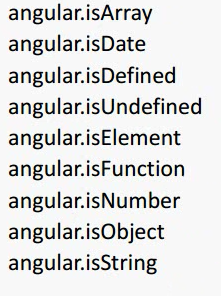
1. isArray使用
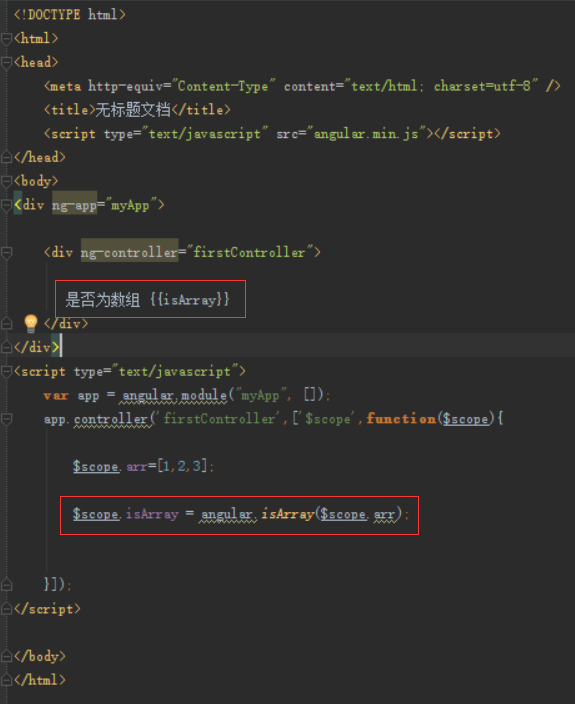
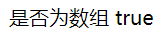
效果图如下,结果为true
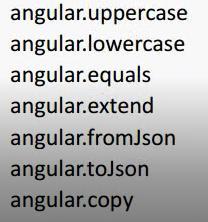
2.uppercase使用
$scope.name = "zhangsan";
$scope.name = angular.uppercase( $scope.name );
htmle中
zhangsan 转为大写 {{name}}

结果为:zhangsan 转为大写 ZHANGSAN

3. toJson方法

将json转为字符串
var  json = {"name":"hello", "age":"20"};
var jsonstr = angular.toJson(json);
console.log(jsonstr);

打印结果
{"name":"hello","age":"20"}

4. formJson方法
将string转为json
var jsonstr = '{"name":"hello", "age":"20"}';
var json = angular.fromJson(jsonstr);
console.log(json);
打印效果

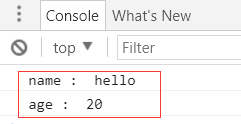
5. forEach使用
var json = {"name":"hello", "age":"20"};
angular.forEach(json,function(val, key){
console.log(key + " : " + val);
});
效果:
加入第三个参数results
var json = {"name":"hello", "age":"20"};
var results=[];
angular.forEach(json,function(val, key){
this.push(key + " : " + val);
}, results);
console.log(results);
显示结果

7. 模块依赖
<!DOCTYPE html>

<html>

<head>

    <meta http-equiv="Content-Type" content="text/html; charset=utf-8" />

    <title>无标题文档</title>

    <script type="text/javascript" src="angular.min.js"></script>

    <script type="text/javascript" src="module02.js"></script>

</head>

<body ng-app="myApp">

<div>

    <div ng-controller="firstController">

       {{name}}

    </div>

    <div ng-controller="secondController">

        {{name}}

    </div>

    <div ng-controller="thirdController">

        {{name}}

    </div>

</div>

<script type="text/javascript">

    var app = angular.module("myApp", ['myApp2']);

    app.controller('firstController',['$scope',function($scope){

        $scope.name = "张三";

    }]);

</script>

</body>

</html>
module02.js文件
var app2 = angular.module("myApp2", []);

app2.controller('secondController',function($scope){

    $scope.name='李四';

});

app2.controller('thirdController',function($scope){

    $scope.name='王五';

});
显示效果

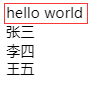
8. Jquery的使用
<!DOCTYPE html>

<html>

<head>

    <meta http-equiv="Content-Type" content="text/html; charset=utf-8" />

    <title>无标题文档</title>

    <script type="text/javascript" src="jquery-1.11.1.js"></script>

    <script type="text/javascript" src="angular.min.js"></script>

    <script type="text/javascript" src="module02.js"></script>

</head>

<body ng-app="myApp">

<div>

    <div ng-controller="firstController">

        <div id="main"></div>

       {{name}}

    </div>

    <div ng-controller="secondController">

        {{name}}

    </div>

    <div ng-controller="thirdController">

        {{name}}

    </div>

</div>

<script type="text/javascript">

    var app = angular.module("myApp", ['myApp2']);

    app.controller('firstController',['$scope',function($scope){

        $scope.name = "张三";

        $('#main').html('<span>hello world</span>');

    }]);

</script>

</body>

</html>
显示结果
9 angular.element的使用
 var main = document.getElementById('main');

angular.element(main).html("hello man");
参考 https://www.angular.cn
Anglarjs 工具方法的更多相关文章
- JQuery操作类数组的工具方法
JQuery学习之操作类数组的工具方法 在很多时候,JQuery的$()函数都返回一个类似数据的JQuery对象,例如$('div')将返回div里面的所有div元素包装的JQuery对象.在这中情况 ...
- jQuery工具方法
目录 常用工具方法 判断数据类型的方法 Ajax操作 $.ajax 简便写法 Ajax事件 返回值 JSONP 文件上传 参考链接 jQuery函数库提供了一个jQuery对象(简写为$),这个对象本 ...
- jQuery晦涩的底层工具方法们
这里整理的是jQuery源码中一些比较晦涩难懂的.内部的.最底层的工具方法,它们多为jQuery的上层api方法服务,目前包括: jQuery.access jQuery.access: functi ...
- angular的工具方法笔记(equals, HashKey)
分别是angular脏值检测的工具方法equals和 类HashKey的使用方法 <!DOCTYPE html PUBLIC "-//W3C//DTD XHTML 1.0 Transi ...
- zepto源码学习-02 工具方法-详细解读
上一篇:地址 先解决上次留下的疑问,开始看到zepto.z[0]这个东西的时候,我很是不爽,看着它都不顺眼,怎么一个zepto的实例对象var test1=$('#items'); test__pr ...
- jQuery源代码 解析一 工具方法
1. 外层沙箱以及命名空间$ 几乎稍微有点经验前端人员都这么做,为了避免声明了一些全局变量而污染,把代码放在一个"沙箱执行",然后在暴露出命名空间(可以为API,函数,对象): 2 ...
- Underscore.js 常用类型判断以及一些有用的工具方法
1. 常用类型判断以及一些有用的工具方法 underscore.js 中一些 JavaScript 常用类型检查方法,以及一些工具类的判断方法. 首先我们先来谈一谈数组类型的判断.先贴出我自己封装好的 ...
- 秒味课堂Angular js笔记------Angular js中的工具方法
Angular js中的工具方法 angular.isArray angular.isDate angular.isDefined angular.isUndefined angular.isFunc ...
- javascript 的工具方法 --- 类型判断
Javascript中常见类型对象有: Boolean, Number, String, Function, Array, Date, RegExp, Object, Error, Symbol等等. ...
随机推荐
- IOS UI-Button按钮
#import "ViewController.h" @interface ViewController () { UILabel *lable; BOOL moveFlag; N ...
- oracle11g中SQL优化(SQL TUNING)新特性之Adaptive Cursor Sharing (ACS)
1. ACS简介 Oracle Database 11g提供了Adaptive Cursor Sharing (ACS)功能,以克服以往不该共享的游标被共享的可能性.ACS使用两个新指标:sens ...
- Win10取消密码
- IIS6.0发布后对路径“D:\xxx\xxxx\web.config”的访问被拒绝问题的解决方法
原来我本机发布后还是可以直接通过浏览器访问,这几天不知道怎么就不行,终于在网上找到解决方法 IIS发布后访问xxx/xxx/web.config路径被拒绝的问题截图如下: 解决方法: 1.在本地或服务 ...
- [译].Net 4.5 的五项强大新特性
本文原文:Five Great .NET Framework 4.5 Features 译者:冰河魔法师 目录 介绍 特性一:async和await 特性二:Zip压缩 特性三:正则表达式执行超时 特 ...
- jenkins+git+docker实验环境的搭建
持续集成(c/i)的实验环境 git/harbor服务器 ip 192.168.200.132 docker服务器 ip 192.168.200.149 Jenkins服务器 ...
- Python Django 之 MVT
一.Django的MVT模式 M: Model, 模型 与MVC中的M相同,负责对数据的处理 V: View, 视图 与MVC中的C类似,负责处理用户请求,调用M和T,响应请求 T: Template ...
- 在电脑用Chrome运行安卓apk程序[ARC Welder]
chrome好用,但要FQ. 为了某些特别有意思的功能,FQ也要实现它. 这个就是:在chrome中使用android APP 一:系统需求: chrome浏览器 梯子(就是FQ,因为我们要去goog ...
- 【转】Linux编程之UDP SOCKET全攻略
转自:http://www.cnblogs.com/skyfsm/p/6287787.html?utm_source=itdadao&utm_medium=referral 这篇文章将对lin ...
- sql server 的变量
对于占用关键字等不符合规则的命名,可使用中括号[ ]括起来. 局部变量: 局部变量名必须以@开头,作用范围仅为程序内部. 常用用途: 1.作为计数器计算循环执行的次数或控制循环执行的次数 2.保存数据 ...