
nodejs(三)Buffer module & Byte Order
一。目录
➤ Understanding why you need buffers in Node
➤ Creating a buffer from a string
➤ Converting a buffer to a string
➤ Manipulating the bytes in a buffer
➤ Slicing and copying a buffer
二。Understanding why you need buffers in Node
JavaScript is good at handling strings, but because it was initially designed to manipulate HTML documents, it is not very good at
handling binary data. JavaScript doesn’t have a byte type — it just has numbers — or structured types, or even byte arrays: It just
has strings.
Because Node is based on JavaScript, Node can handle text protocols like HTTP, but you can also use it to talk to databases,
manipulate images, and handle fi le uploads. As you can imagine, doing this using only strings is very difficult. In the early days,
Node handled binary data by encoding each byte inside a text character, but that proved to be wasteful, slow,unreliable, and hard
to manipulate.
To make these types of binary-handling tasks easier, Node includes a binary buffer implementation, which is exposed as a JavaScript
API under the Buffer pseudo-class. A buffer length is specified in bytes, and you can randomly set and get bytes from a buffer.
Another thing that is special about this buffer class is that the memory where the data sits is allocated outside of the JavaScript VM
memory heap. This means that these objects will not be moved around by the garbage-collection algorithm: It will sit in this permanent
memory address without changing, which saves CPU cycles that would be wasted making memory copies of the buffer contents.
三。GETTING AND SETTING BYTES IN A BUFFER
After you create or receive a buffer, you might want to inspect and change its contents. You can access the byte value on any
position of a buffer by using the [] operator like this:
var buf = new Buffer('my buffer content');

// accessing the 10th position of buf

console.log(buf[10]); // -> 99
//You can also manipulate the content of any position:
buf[20] = 125; // set the 21th byte to 125
四。注意
NOTE When you create an initialized buffer, keep in mind that it will contain random bytes, not zeros.
var buf = new Buffer(1024);

console.log(buf[100]); // -> 5 (some random number)
NOTE In certain cases, some buffer operations will not yield an error. For instance:
➤ If you set any position of the buffer to a number greater than 255, that position will be assigned the 256 modulo value.
➤ If you assign the number 256 to a buffer position, you will actually be assigning the value 0.
➤ If you assign a fractional number like 100.7 to a buffer position, the buffer position will store the integer part — 100 in this case.
➤ If you try to assign a position that is out of bounds, the assignment will fail and the buffer will remain unaltered.
五。字节序
又称端序,尾序(英语:ByteOrder, or Endianness)。现代的计算机系统一般采用字节( 8 bit Byte)作为逻辑寻址单位。当物理单位的长度大于
1个字节时,就要区分字节顺序。典型的情况是整数在内存中的存放方式和网络传输的传输顺序。目前在各种体系的计算机中通常采用的字节存储机制主要
有两种:big-edian和little-endian。
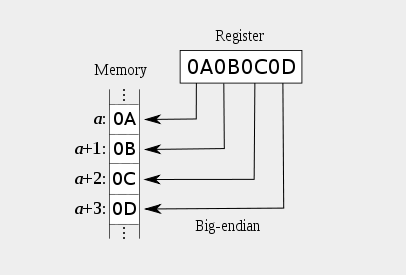
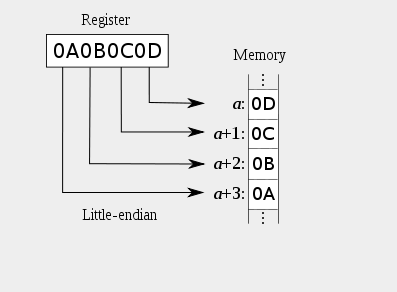
六。字节序示例
 var b = new Buffer('123456789');

 console.log(b.length);           //9

 console.log(b);          //<Buffer 31 32 33 34 35 36 37 38 39>

 var b2 = new Buffer(4);

 b2.writeInt32LE(123456789,0);

 console.log(b2.length);      //4

 console.log(b2);          //<Buffer b5 e5 39 07>
nodejs(三)Buffer module & Byte Order的更多相关文章
- 字节顺序标记——BOM,Byte Order Mark
定义 BOM(Byte Order Mark),字节顺序标记,出现在文本文件头部,Unicode编码标准中用于标识文件是采用哪种格式的编码. 介绍 UTF-8 不需要 BOM,尽管 Unico ...
- LITTLE-ENDIAN(小字节序、低字节序) BOM——Byte Order Mark 字节序标记 数据在内存中的存放顺序
总结: 1. endian 字节存放次序 字节序,顾名思义字节的顺序,再多说两句就是大于一个字节类型的数据在内存中的存放顺序(一个字节的数据当然就无需谈顺序的问题了). 2. LITTLE-ENDIA ...
- UTF-8文件的Unicode签名BOM(Byte Order Mark)问题记录(EF BB BF)
背景 楼主测试的批量发送信息功能上线之后,后台发现存在少量的ERROR日志,日志内容为手机号码格式不正确. 此前测试过程中没有出现过此类问题,从运营人员拿到的发送列表的TXT,号码是符合规则的,且格式 ...
- StreamWriter结合UTF-8编码使用不当,会造成BOM(Byte Order Mark )问题生成乱码(转载)
问: I was using HttpWebRequest to try a rest api in ASP.NET Core MVC.Here is my HttpWebRequest client ...
- nodejs里的module.exports和exports的关系
关于node里面的module.exports和exports的异同,网上已经有很多的资料,很多的文章,很多的博客,看了很多,好像懂了,又好像不懂,过几天又不懂了...大致总结是这样的: //下面这种 ...
- nodejs: 理解Buffer
学习nodejs中buffer这一章,有一段写到buffer的拼接,其中一段源码非常优美,特拿来与大家共享. var chunks = []; var size = 0; res.on('data', ...
- 字节序(byte order)和位序(bit order)
字节序(byte order)和位序(bit order) 在网络编程中经常会提到网络字节序和主机序,也就是说当一个对象由多个字节组成的时候需要注意对象的多个字节在内存中的顺序. 以前我也基本只了 ...
- 编程-Byte order & Bit order
https://mp.weixin.qq.com/s/B9rKps4YsLiDTBkRks8rmQ 看到比特序和字节序放在一起被提及,想必就已经填补了概念拼图里面缺失的那一块了,这一块正是比特序. 一 ...
- 大熊君大话NodeJS之------Buffer模块
一,开篇分析 所谓缓冲区Buffer,就是 "临时存贮区" 的意思,是暂时存放输入输出数据的一段内存. JS语言自身只有字符串数据类型,没有二进制数据类型,因此NodeJS提供了一 ...
随机推荐
- Selenium 动作链
Selenium 模拟浏览器操作,有一些操作,它们没有特定的执行对象,比如鼠标拖曳.键盘按键等,这些动作用另一种方式来执行,那就是动作链 更多动作链参考官网:https://selenium-pyth ...
- Android--Led_Demo_APK控制LED灯
下面代码主要实现接口定义,实现从.so库文件接口函数在JAVA里面的声明:package com.friendlyarm.AndroidSDK; import android.util.Log; pu ...
- 使用jquery的 $.grep实现es6的filter效果
现在es6是趋势,习惯了es6会方便的多,但是有时候由于项目的限制,会限制es6的使用,在处理数组的时候,往往会想将一个数组进行过滤产生另一个新数组,如es6的filter 如下,我又一个数组,[1, ...
- iOS 事件的产生、传递、响应
一.事件的产生和传递 1.1.事件的产生 发生触摸事件后,系统会将该事件加入到一个由UIApplication管理的事件队列中为什么是队列而不是栈?因为队列的特定是先进先出,先产生的事件先处理才符合常 ...
- 用layer插件实现tp3.2的分页
主要需要用到 /layer/layer.js 这个, 现在一个tp前端视图/article/index.html <!DOCTYPE html> <html lang=" ...
- 【easyswoole】 解决安装报错
在使用swoole 创建项目时候,报错 创建命令 composer create-project easyswoole/app easyswoole 错误信息: 解决办法,切换composer 源 镜 ...
- linux ntp时间服务器配置
Network Time Protocol (NTP) 也是RHCE新增的考试要求. 学习的时候也顺便复习了一下如何设置Linux的时间,现在拿出来和大家分享 设置NTP服务器不难但是NTP本身是一个 ...
- WinDbg远程调试unable to initialize target machine information win32 error 0n87
Debugging Target:Windows XP SP3 32-bit Debugging Host:Windows Server 2012 64-bit 当附加到目标服务器某个进程后,WinD ...
- 记录一下gitlab通过CAS登录慢的问题
测试反应说gitlab通过CAS登录比较慢,第一次登录的时候需要大概30秒才能登录进去 gitlab的日志中有处理每一个请求所用的时间,看了一下日志,每个有记录的请求都是在50毫秒内返回的,所以应该不 ...
- linux中守护进程启停工具start-stop-daemon
1.功能作用 启动和停止系统守护程序 2.位置 /sbin/start-stop-daemon 3.主要参数 Commands: -S|--start -- <argument> ... ...