
[RN] 03 - Resource Collection & AWS Auth
那些资源
一、三个例子

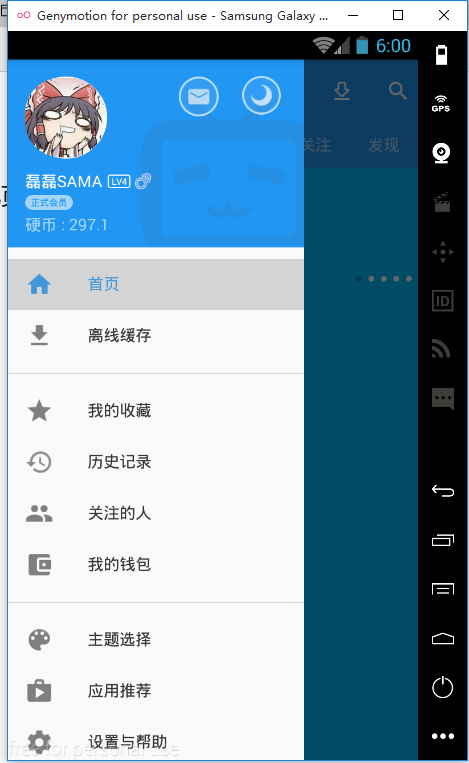
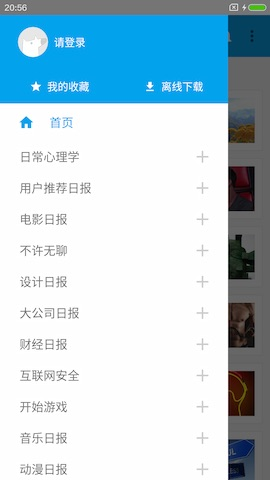
二、IM 例子
1. React Native Socket.io Example
2. A simple messaging app with React Native and Socket.io
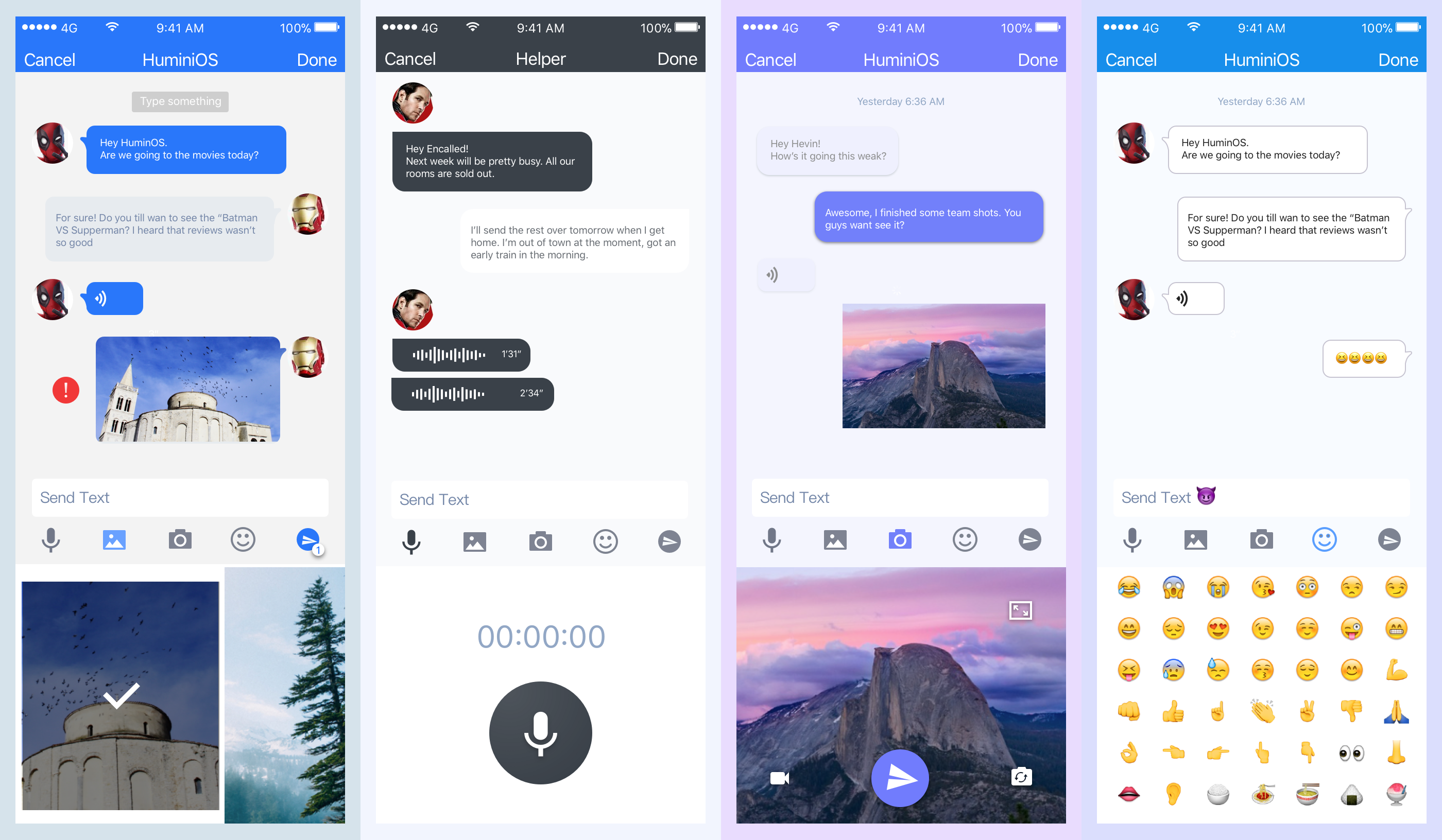
4. 一个基于 react-native + mobx + socket.io + node 的仿微信 JS-Wechat

三、业内良心
Goto: React Native Community【相对权威】
Goto: react-native-open-project 【工程】
Goto: Useful-Open-Source-React-Native 【控件】
Goto: react-native-starter-kit 【网页+RN】
Goto: 30-days-of-react-native 【30个demo】
Goto: aws-samples/aws-mobile-react-native-starter 【serverless】
Goto: https://github.com/wangdicoder【可用方案】
四、国外良心
Ref: https://github.com/jondot/awesome-react-native 【UI,App资源极为丰富】
五、运行例子
运行ZhiHuDaily报错,以及处理办法。
可能出现的错误,可惜没彻底解决:
(1) 先用Android Studio打开工程,否则直接npm install会报错。

(2) Gradle 'app' project refresh failed.
Error:Unsupported method: BaseConfig.getApplicationIdSuffix().

The version of Gradle you connect to does not support that method.

To resolve the problem you can change/upgrade the target version of Gradle you connect to.

Alternatively, you can ignore this exception and read other information from the model.

Consult IDE log for more details (Help | Show Log)
(3) 在ZhiHuDaily-React-Native/android/gradle/wrapper/gradle-wrapper.properties中升级到4.1。
distributionUrl=https\://services.gradle.org/distributions/gradle-4.1-all.zip
From: Unsupported method: BaseConfig.getApplicationIdSuffix()
- Open build.gradle and change the gradle version to the recommended version:
classpath 'com.android.tools.build:gradle:1.3.0'toclasspath 'com.android.tools.build:gradle:2.3.2' - Hit
'Try Again' - In the messages box it'll say
'Fix Gradle Wrapper and re-import project'Click that, since the minimum gradle version is3.3 - A new error will popup and say
The SDK Build Tools revision (23.0.1) is too low for project ':app'. Minimum required is 25.0.0- HitUpdate Build Tools version and sync project - A window may popup that says
Android Gradle Plugin Update recommended, just update from there.
Now the project should be runnable now on any of your android virtual devices.
(4) 继续报错
gradle project sync failed. basic functionality will not work properly android studio
让我们从AWS登录开始
登录: aws-samples/aws-mobile-react-native-starter 【serverless】
--> 侧边栏 --> 按钮列表、路由
台湾哥们的好文,收之:使用 REACT NATIVE 與 AMAZON COGNITO 實作 GOOGLE & FACEBOOK 登入的功能
一、React or React Native
Adding authentication to your React or React Native app is as easy as wrapping your app's main component with our withAuthenticator higher order component.
AWS Amplify will provide you customizable UI for common use cases such as user registration and login.
import { withAuthenticator } from 'aws-amplify-react-native';

export default withAuthenticator(App);
二、React Native apps with [AWS Amplify]
Ref: 官方开发指导
- 一些概念
CLI support: AWS 命令行界面
AWS Mobile Hub: 创建AWS资源、相关用户、安全机制等
awsmobile-cli: It provides utilities for managing your backend, without visiting AWS Mobile Hub console.
- 用户登录
As an example, in you React Native app, you can use a Higher-Order Components to provide a sign-in/sign-out experience for your app simply by wrapping your app’s main component:
export default withAuthenticator(App);
一行代码搞定登录前端。
- 用户检测
Monitoring your users’ interaction with your app.
AWS Amplify provides analytics, push notifications and targeted messaging capabilities out-of-the-box.
Analytics.record('albumVisit', { genre: 'jazz', artist: 'Miles Davis' });
- 动手实践
参见:[RN] 01 - Init: Try a little bit of React Native
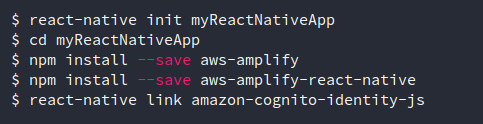
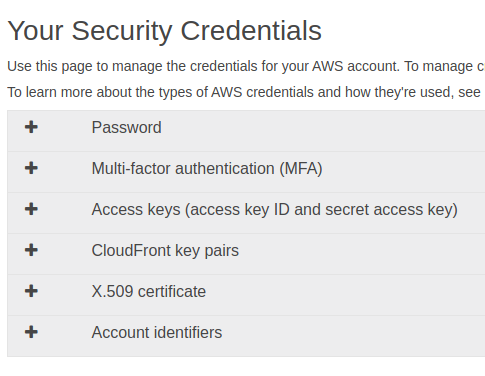
(1) 打开Access keys,然后 “Create New Access Key”。
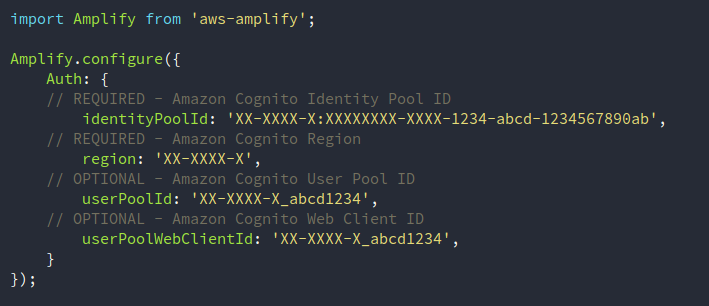
(2) 手动配置后端
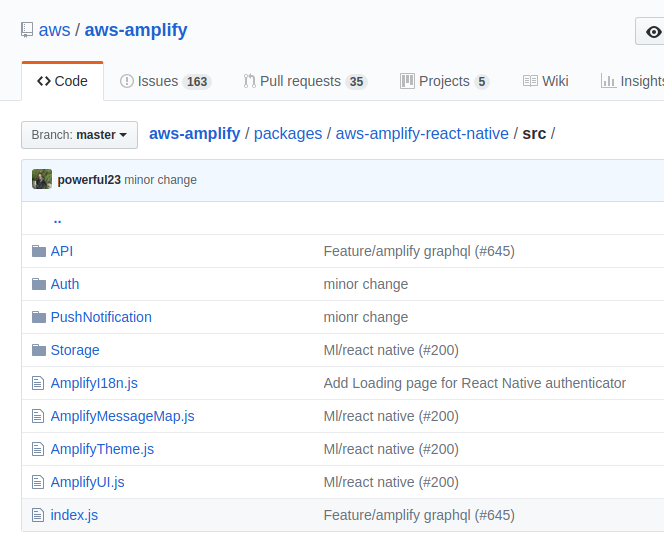
官方代码中应该有实例: aws-amplify/packages/aws-amplify-react-native/
RN for AWS AUTH
官方的不够良心,这个才是真爱:Expo - React Native Authentication with Expo, AWS Amplify, & Cognito
对应的代码:dabit3/expo-user-authentication
一、安装
代码需安装:
npm install aws-amplify

npm install react-navigation
【五星级教程笔记】
二、AWS Mobile Hub *
Ref: react-community/create-react-native-app
小心Ubuntu的yarn带来的歧义: ERROR: There are no scenarios; must have at least one.#2821
create-react-native-app RNExpoAuthProject

cd RNExpoAuthProject/

sudo npm i -g awsmobile-cli

awsmobile init  #相关后端配置
Please tell us about your project:

? Where is your project's source directory:  .

? Where is your project's distribution directory that stores build artifacts:  build

? What is your project's build command:  npm run-script build

? What is your project's start command for local test run:  npm run-script start

? What awsmobile project name would you like to use:  RNExpoAuthProject

Successfully created AWS Mobile Hub project: RNExpoAuthProject

retrieving the latest backend awsmobile project information

awsmobile project's details logged at:

    awsmobilejs/#current-backend-info/backend-details.json

awsmobile project's specifications logged at:

    awsmobilejs/#current-backend-info/mobile-hub-project.yml

awsmobile project's access information logged at:

    awsmobilejs/#current-backend-info/aws-exports.js

awsmobile project's access information copied to:

    aws-exports.js

contents in #current-backend-info/ is synchronized with the latest in the aws cloud

Executing yarn add aws-amplify ...

ERROR: [Errno 2] No such file or directory: 'add'

yarn add aws-amplify returned 1

Executing yarn add aws-amplify-react-native ...

ERROR: [Errno 2] No such file or directory: 'add'

yarn add aws-amplify-react-native returned 1

Success! your project is now initialized with awsmobilejs

   awsmobilejs/.awsmobile

     is the workspace of awsmobile-cli, please do not modify its contents

   awsmobilejs/#current-backend-info

     contains information of the backend awsmobile project from the last

     synchronization with the cloud

   awsmobilejs/backend

     is where you develop the codebase of the backend awsmobile project

   awsmobile console

     opens the web console of the backend awsmobile project

   awsmobile run

     pushes the latest development of the backend awsmobile project to the cloud,

     and runs the frontend application locally

   awsmobile publish

     pushes the latest development of the backend awsmobile project to the cloud,

     and publishes the frontend application to aws S3 for hosting

Happy coding with awsmobile!
配置日志记录
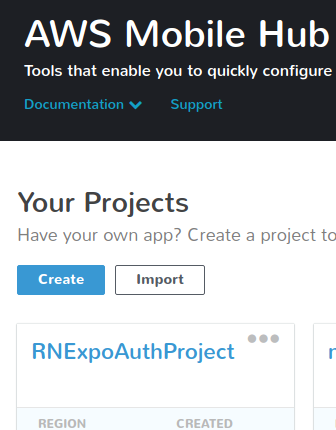
后台效果:有了新添加的项目 RNExpoAuthProject 。
三、添加登录模块
awsmobile user-signin add

awsmobile user-signin enable

awsmobile push
后台呈现效果:后端添加了User Sign-in
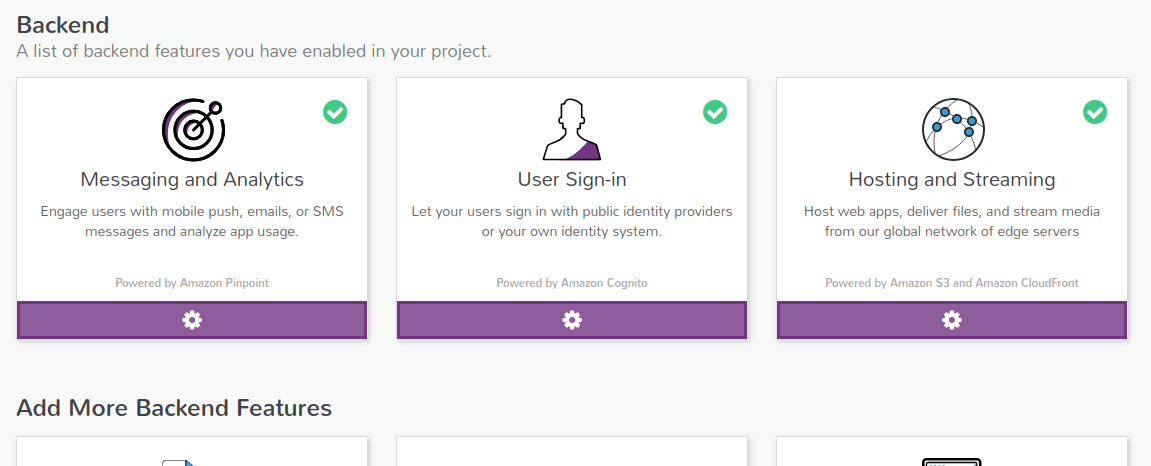
Cognito也出现了一个自动生成的User Pool:

$ npm install aws-amplify 添加Amplify模块
  "dependencies": {

    "aws-amplify": "^0.4.1",

    "expo": "^27.0.1",

    "react": "16.3.1",

    "react-native": "~0.55.2"

  }
四、登录界面实现
运行 npm run android 的前提是首先打开模拟器,也就是需要先搭建好基本的android代码,让模拟器跑起来。
【就是给expo代码添加原生代码,貌似没啥必要,在此只是记录下】
lolo@lolo-UX303UB$ react-native init RNExpoAuthProject

prompt: Directory RNExpoAuthProject already exists. Continue?:  (no) yes

This will walk you through creating a new React Native project in /media/unsw/CloudStorage/Linux-pan/ExtendedTmpSpace/Android-Workplace/android-and-ml/React-Native/demo-auth/RNExpoAuthProject

Cannot parse yarn version: 0.10

Installing react-native...

Consider installing yarn to make this faster: https://yarnpkg.com

npm WARN react-native@0.55.4 requires a peer of react@16.3.1 but none is installed. You must install peer dependencies yourself.

npm WARN eslint-plugin-react-native@3.2.1 requires a peer of eslint@^3.17.0 || ^4.0.0 but none is installed. You must install peer dependencies yourself.

npm WARN optional SKIPPING OPTIONAL DEPENDENCY: fsevents@1.2.4 (node_modules/fsevents):

npm WARN notsup SKIPPING OPTIONAL DEPENDENCY: Unsupported platform for fsevents@1.2.4: wanted {"os":"darwin","arch":"any"} (current: {"os":"linux","arch":"x64"})

+ react-native@0.55.4

added 15 packages, removed 598 packages, updated 13 packages and moved 1 package in 46.424s

Setting up new React Native app in /media/unsw/CloudStorage/Linux-pan/ExtendedTmpSpace/Android-Workplace/android-and-ml/React-Native/demo-auth/RNExpoAuthProject

Cannot parse yarn version: 0.10

Installing React...

npm WARN eslint-plugin-react-native@3.2.1 requires a peer of eslint@^3.17.0 || ^4.0.0 but none is installed. You must install peer dependencies yourself.

npm WARN optional SKIPPING OPTIONAL DEPENDENCY: fsevents@1.2.4 (node_modules/fsevents):

npm WARN notsup SKIPPING OPTIONAL DEPENDENCY: Unsupported platform for fsevents@1.2.4: wanted {"os":"darwin","arch":"any"} (current: {"os":"linux","arch":"x64"})

+ react@16.3.1

added 1 package in 4.464s

Installing Jest...

npm WARN eslint-plugin-react-native@3.2.1 requires a peer of eslint@^3.17.0 || ^4.0.0 but none is installed. You must install peer dependencies yourself.

npm WARN optional SKIPPING OPTIONAL DEPENDENCY: fsevents@1.2.4 (node_modules/fsevents):

npm WARN notsup SKIPPING OPTIONAL DEPENDENCY: Unsupported platform for fsevents@1.2.4: wanted {"os":"darwin","arch":"any"} (current: {"os":"linux","arch":"x64"})

+ babel-preset-react-native@4.0.0

+ babel-jest@23.0.0

+ react-test-renderer@16.3.1

+ jest@23.0.0

added 279 packages and updated 1 package in 12.787s

To run your app on iOS:

   cd /media/unsw/CloudStorage/Linux-pan/ExtendedTmpSpace/Android-Workplace/android-and-ml/React-Native/demo-auth/RNExpoAuthProject

   react-native run-ios

   - or -

   Open ios/RNExpoAuthProject.xcodeproj in Xcode

   Hit the Run button

To run your app on Android:

   cd /media/unsw/CloudStorage/Linux-pan/ExtendedTmpSpace/Android-Workplace/android-and-ml/React-Native/demo-auth/RNExpoAuthProject

   Have an Android emulator running (quickest way to get started), or a device connected

   react-native run-android
有区别么?看上去貌似是一样的效果。
npm run android
Once you've set these up, you can launch your app on an Android Virtual Device by running npm run android.
react-native run-android
GO TO your project’s folder and initiate react-native run-android command and your project will be automatically run into Real Android Device.
五、代码示范
- 申请注册
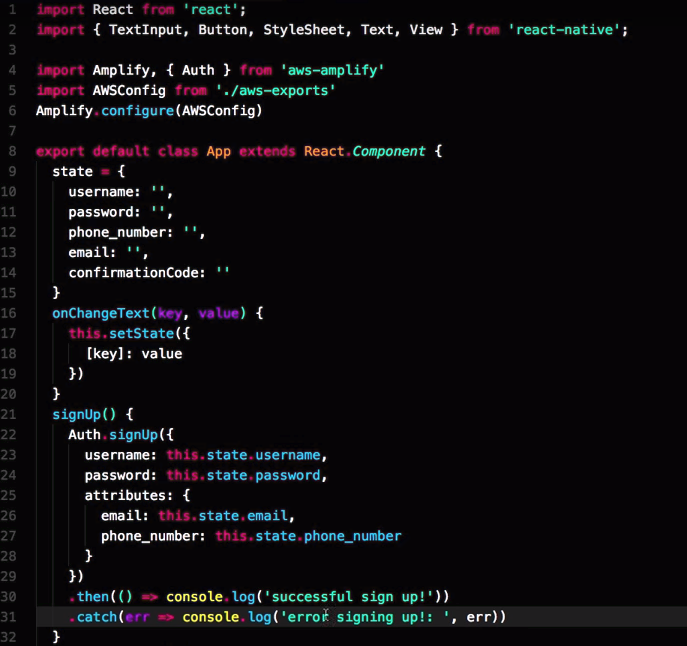
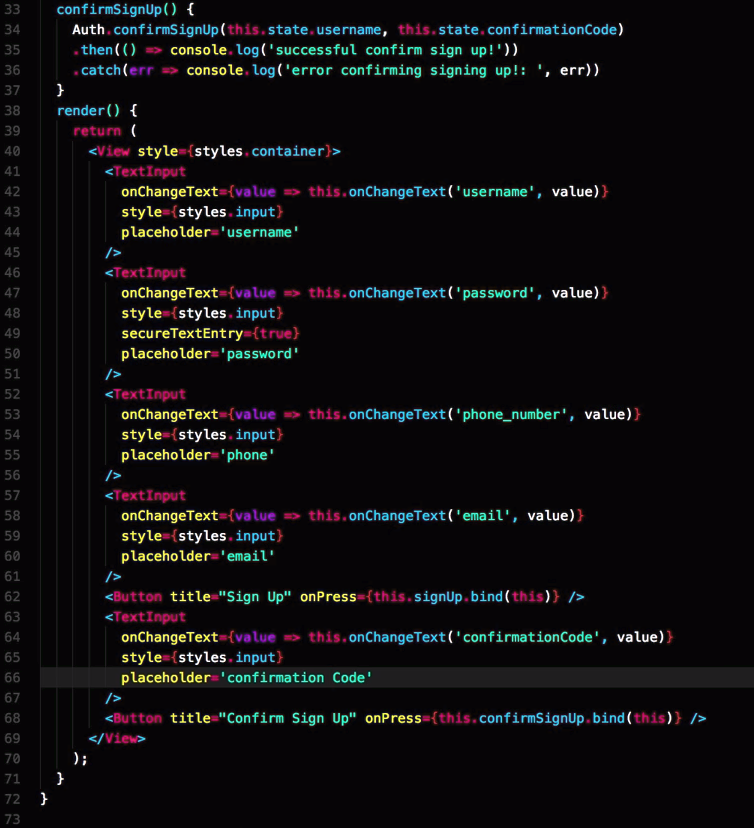
- 注册验证
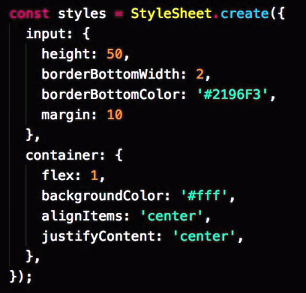
- 样式代码
六、效果预览
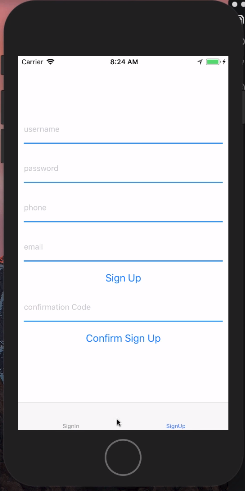
进一步了解 AWS Mobile Hub
Ref: Authentication 【React Native Training 五星级资源】
Ref: AWS Mobile Hub 【React Native Training 五星级资源】
本篇内容为以下的四篇学习笔记:
- 1. AWSMobile CLI - Getting Started
- 2. Adding Analytics to a React Native Application
- 3. Expo - React Native Authentication with Expo, AWS Amplify, & Cognito【之前已阅】
- 4. Adding Analytics to an Expo Project
- 5. React Native iOS Push Notifications with AWS & Amazon Pinpoint
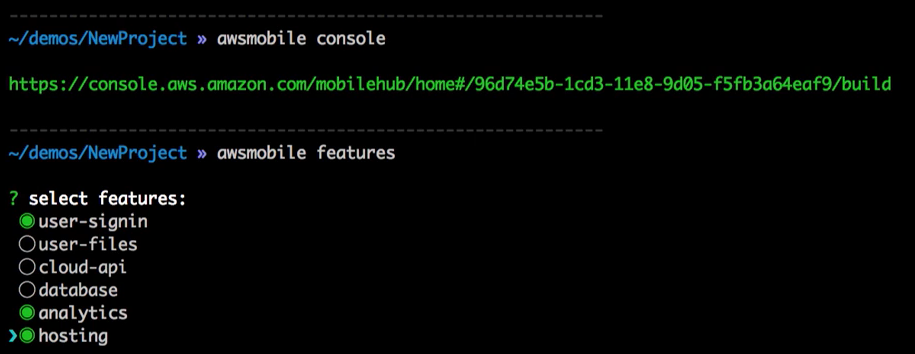
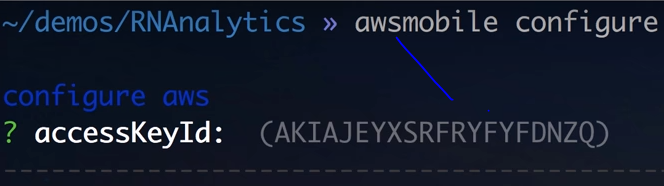
一、 AWSMobile CLI 自动配置
二、IAM
(1) 添加用户到组。

(2) 添加一个组,这个组需要给予适当的权限,比如admin。
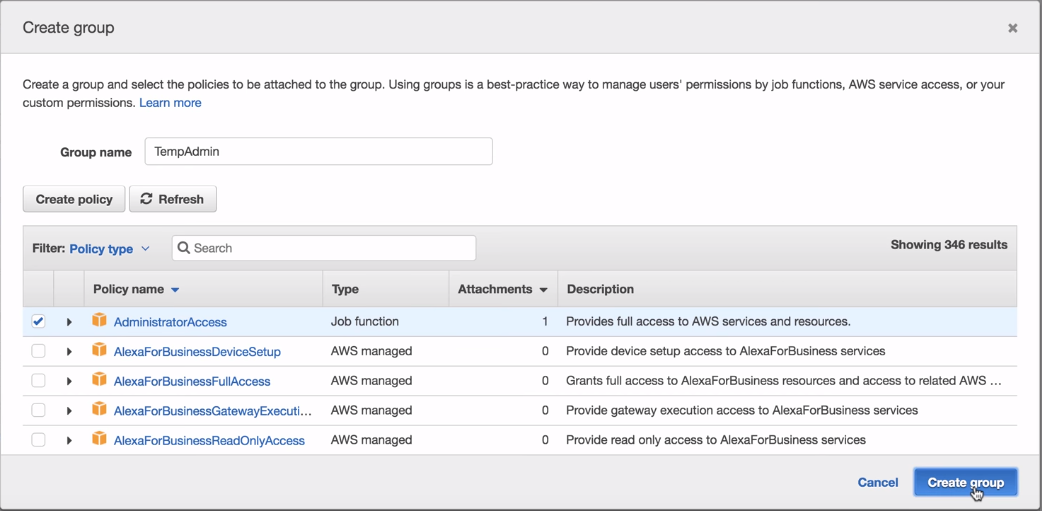
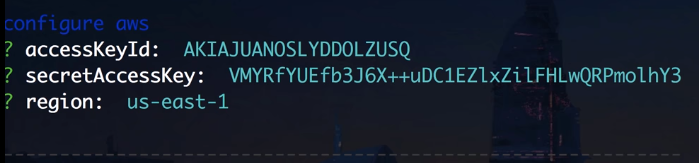
(3) 然后获得两个key,运行awsmobile configure时有用到。

【这里有提及密钥】
三、amazon-cognito-identify-js
还是自动化配置后端那一套。
貌似是与Amplify取得联系。
react-native link amazon-cognito-identify-js
加载app到模拟器。
npm start              # kick off the package

react-native run-ios
四、两个疑问?
secretAccessKey怎么一会儿需要,一会儿又不需要?
[RN] 03 - Resource Collection & AWS Auth的更多相关文章
- Java基础知识强化之集合框架笔记03:Collection集合的功能概述
1. Collection功能概述:Collection是集合的顶层接口,它子体系有重复的,有唯一性,有有序的,无序的. (1)添加功能 boolean add(Object obj):添加一个元素 ...
- [转]iOS hacking resource collection
Link:http://www.securitylearn.net/tag/apple-ios-hacking-slides/ A collection of iOS research present ...
- [Full-stack] 跨平台大框架 - RN
前言 React-Redux的大全栈代码复用理论有点意思,给出一个具体的例子:[React] 15 - Redux: practice IM 因为与react内容天然地部分重合,故这里将重点放在了对c ...
- REST Representational state transfer REST Resource Naming Guide Never use CRUD function names in URIs
怎样用通俗的语言解释什么叫 REST,以及什么是 RESTful? - 知乎 https://www.zhihu.com/question/28557115 大家都知道"古代"网 ...
- AWS S3 对象存储服务
虽然亚马逊云非常牛逼,虽然亚马逊云财大气粗,虽然亚马逊用的人也非常多,可是这个文档我简直无法接受,特别是客服,令人发指的回复速度,瞬间让人无语,可是毕竟牛逼.忍了,躺一次坑而已 1.图片上传 1.1 ...
- 将SSRF升级为RCE(AWS环境)
原文:https://generaleg0x01.com/2019/03/10/escalating-ssrf-to-rce/ 查找域名范围: 在枚举客户端的子域名时.找到了子域名[docs] 打开这 ...
- AWS EKS 添加IAM用户角色
作者:SRE运维博客 博客地址: https://www.cnsre.cn/ 文章地址:https://www.cnsre.cn/posts/211203931498/ 相关话题:https://ww ...
- AWS的SysOps认证考试样题解析
刚考过了AWS的developer认证,顺手做了一下SysOps的样题.以下是题目和答案. When working with Amazon RDS, by default AWS is respon ...
- AWS S3 CLI的权限bug
使用AWS CLI在S3上创建了一个bucket,上传文件的时候报以下错误: A client error (AccessDenied) occurred when calling the Creat ...
随机推荐
- MQ调研梳理
1.架构 主项 子项 rabbitMQ rocketMQ Kafka Hippo Tube 高可用 1:镜像队列. 2:集群.master/slave机制. HA 同步双写和异步复制均支持 (同maf ...
- 全国地区的省份、城市、区县 最新Sql脚本
IF (EXISTS(SELECT * FROM sys.objects WHERE object_id = OBJECT_ID(N'[dbo].[TB_Province]') AND type =' ...
- SpringCloudConfig与SpringCloudEureka 注册中心与配置中心高可用的意义
所有的配置会缓存在本地,远程配置中心DOWN机,不影响本地使用,只是无法重新请求服务端获取配置的更新. 不管是注册中心的高可用,还是配置中心的高可用.本质上都是保证服务能注册上去或者能从配置中心获取配 ...
- oracle的启动和停用
1.开始-运行-cmd-确定 2.cmd页面,输入set ORACLE_SID=(你的数据库实例名),回车,执行 3.继续输入‘sqlplus/nolog’,敲击回车键 4.sql输入栏,输入‘con ...
- 关于很怂地退回SDK,ndk,gradle版本这件事。。。(降版本fix项目异常)
前言:说明一下,这篇文章对别人应该是没什么用的,单作为自己的记录吧,方便以后查询 电脑重装后没有再使用之前的studio2.3,而是直接下载了最新版的v3.1.2,同时升级了所有SDK(28),NDK ...
- ubantu linux的bash shell初接触
本人是Linux初习者,同时也刚刚开始学习,将我的学习成长记录下来,来和大家一同分享! 我用的系统是Ubuntu 12.04,脚本编辑器用的是VIM,觉得很顺手!Shell语言用的是Bash Shel ...
- Mysql 配置文件和目录的合理分配
记得给权限呀, 权限呀, 都是泪 多实例 单实例 配置文件 [client] port = 3301 socket = /data/mysql3301/data/mysqld3301.sock [my ...
- soapui-groovy脚本中文乱码及符号乱码、响应乱码解决方案
groovy脚本中文乱码及符号乱码,解决方案: 响应乱码解决方案:
- Android Error: This attribute must be localized.
在android中使用mmm命令编译程序是出现错误. 这种问题一般情况是因为在res/xml文件夹下的中, 或者在res/layout下的文件中出现了没有多语言话的文本例. 解决方法: 不直接在布局文 ...
- e778. 在JList中加入和删除项
The default model for a list does not allow the addition and removal of items. The list must be crea ...