
KVO的使用
KVO的使用

KVO是一种设计模式,名为观察者.
addObserver:forKeyPath:options:context:
通知其他对象的方法,这个方法在NSObject中就已经申明了,也就是说任何继承自NSObject的对象都可以使用KVO.
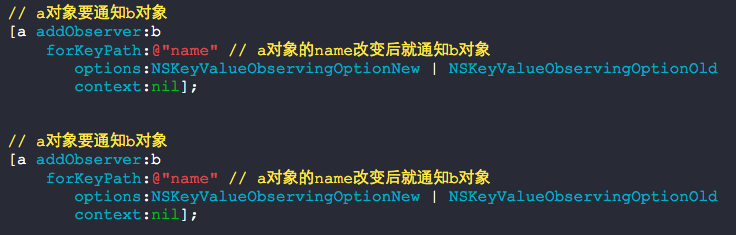
我们来实现一个对象a值改变的时候去通知对象b.
新建两个ModelA ModelB 类.
ModelA.h + ModelA.m
#import <Foundation/Foundation.h>

@interface ModelA : NSObject

@property (nonatomic, strong) NSString *name;

@end
#import "ModelA.h"

@implementation ModelA

@end
ModelB.h + ModelB.m
#import <Foundation/Foundation.h>

@interface ModelB : NSObject

@property (nonatomic, strong) NSString *sex;

@end
#import "ModelB.h"

@implementation ModelB

-(void)observeValueForKeyPath:(NSString *)keyPath

                     ofObject:(id)object

                       change:(NSDictionary *)change

                      context:(void *)context

{

    self.sex = @"female";

}

@end
请将如下延时执行的代码添加进工程当中
- (void)delay:(int64_t)delta execute:(dispatch_block_t)block

{

    dispatch_after(dispatch_time(DISPATCH_TIME_NOW, delta * NSEC_PER_SEC),

                   dispatch_get_main_queue(), block);

}
然后再写如下的代码:

执行结果如下:
2014-05-06 17:40:35.346 FileManager[20208:60b] Application windows are expected to have a root view controller at the end of application launch
2014-05-06 17:40:37.347 FileManager[20208:60b] female
如果注释掉ModelB中的方法observeValueForKeyPath:ofObject:change:context:,运行时会导致崩溃:

如果重复移除了两次,也会导致崩溃-_-!!!!

也就是这么一层关系:
A对象要通知B对象,B对象必须实现监听的方法,否则一旦有消息发送就会导致崩溃.
A对象不想通知B对象了,需要从B对象身上移除掉通知.
要想程序不出现问题,我们需要实现3步.
(主动添加B的通知) A -------> B(不实现一个方法就崩溃)
(主动移除B的通知) A ---X--> B
(重复移除B的通知) A ---X--> B(崩溃)
用起来很恶性,还好,我们可以重复添加B的通知而不崩溃......
问题:在ARC中我们需要移除KVO的observer么?
You should explicitly remove the observer even you use ARC. Create a dealloc method and remove there..
-(void)dealloc {[[NSNotificationCenter defaultCenter] removeObserver:self];}If you see the method you don't need to call [super dealloc]; here, only the method without super dealloc needed.
你需要非常明确的移除你的通知者,即使是在ARC中.创建一个dealloc方法然后在方法里面移除.
ARC中你不需要调用[super dealloc].
问题:ARC给一个对象添加了observer有可能会导致循环应用什么的么?
You need to call removeObserver, ARC only automates retain counts. removeObserver does not impact the retain count.
你需要调用removeObserver,ARC只是自动管理了retain counts,removeObserver并不影响retain count.(这一点我不确定,有待验证)
问题:当要通知的对象已经nil了,这个通知会自动移除吗?
Observers are not removed automatically. From the NSNotificationCenter Class Reference:
观察者不会自动移除,请查看NSNotificationCenter类的原文引述:
Important: The notification center does not retain its observers, therefore, you must ensure that you unregister observers (using removeObserver: or removeObserver:name:object:) before they are deallocated. (If you don't, you will generate a runtime error if the center sends a message to a freed object.)
很重要:通知中心并不会retain他的观察者,所以,你必须确保你那些对象销毁之前注销掉观察者,否则就会出现错误.
You should therefore call
[[NSNotificationCenter defaultCenter] removeObserver:self];in your dealloc method if you are not 100% sure that the observer was not removed previously.
addObserver:forKeyPath:options:context:
Registers anObserver to receive KVO notifications for the specified key-path relative to the receiver.
Parameters
- anObserver
-
The object to register for KVO notifications. The observer must implement the key-value observing method
observeValueForKeyPath:ofObject:change:context:. - keyPath
-
The key path, relative to the receiver, of the property to observe. This value must not be
nil. - options
-
A combination of the
NSKeyValueObservingOptionsvalues that specifies what is included in observation notifications. For possible values, see “NSKeyValueObservingOptions.” - context
-
Arbitrary data that is passed to anObserver in observeValueForKeyPath:ofObject:change:context:.
Discussion
Neither the receiver, nor anObserver, are retained.
KVO的使用的更多相关文章
- iOS---观察者模式之--->KVO
文章结构如下: Why? (为什么要用KVO) What? (KVO是什么) How? ( KVO怎么用) More (更多细节) 原理 自己实现KVO 在我的上一篇文章浅谈 iOS Notifica ...
- Objective-C之KVC、KVO
1,KVC(键值编码) Key Value Coding 1.1在C#中,可以通过字符串反射来获取对象,从而对对象的属性进行读写,Object-C中有同样的实现,通过字符串(属性名词)对对象的属性进 ...
- OS 如何选择delegate、notification、KVO?
原文链接:http://blog.csdn.net/dqjyong/article/details/7685933 前面分别讲了delegate.notification和KVO的实现原理,以及实际使 ...
- KVC 和 KVO
KVC 键值编码 全称是Key-value coding,翻译成键值编码.它提供了一种使用字符串而不是访问器方法去访问一个对象实例变量的机制. 1.通过key(成员变量的名称)设置 ...
- 11. KVC And KVO
1. KVC And KVO 的认识 KVC/KVO是观察者模式的一种实现 KVC全称是Key-value coding,翻译成键值编码.顾名思义,在某种程度上跟map的关系匪浅.它提供了一种使用 ...
- KVO __ 浅谈
KVO :Key-Value Observing 它提供一种机制,当指定的对象的属性被修改后,则对象就会接受到通知.简单的说就是每次指定的被观察的对象的属性被修改后,KVO就会自动通知相应的观察者了. ...
- iOS开发系列--Objective-C之KVC、KVO
概述 由于ObjC主要基于Smalltalk进行设计,因此它有很多类似于Ruby.Python的动态特性,例如动态类型.动态加载.动态绑定等.今天我们着重介绍ObjC中的键值编码(KVC).键值监听( ...
- delegate、notification、KVO场景差别
delegate: 编译器会给出没有实现代理方法的警告 一对一 使用weak而不是assign,或者vc消失时置为nil 可以传递参数,还可以接收返回值 notification: 编译期无法排错 一 ...
- IOS学习之初识KVO
什么是KVO? KVO(Key-Value Observing)键值观察,是一种通过对对象的某一个属性添加观察者,一旦这个属性值发生变化,就会通知当前观察者的一种机制. 该如何使用? 1.注册,指定被 ...
- KVC & KVO
KVC和KVO看上去又是两个挺牛的单词简写,KVC是Key-Value Coding的简写,是键值编码的意思.KVO是Key-Value Observing的简写,是键值观察的意思.那么我们能拿KV ...
随机推荐
- 使用C语言描述静态链表和动态链表
静态链表和动态链表是线性表链式存储结构的两种不同的表示方式. 静态链表的初始长度一般是固定的,在做插入和删除操作时不需要移动元素,仅需修改指针,故仍具有链式存储结构的主要优点. 动态链表是相对于静态链 ...
- [转载]逐步建设企业DevOps能力
当软件行业进入互联网时代,市场对软件产品和服务的交付提出了更高的要求:不仅要快速实现需求,而且要快速发布上线,并且必须保证业务可靠.高效运行.为了满足这些要求,IT组织需要强有力的流程.技术和人员作为 ...
- 一个关于explain出来为all的说明及优化
explain sql语句一个语句,得到如下结果,为什么已经创建了t_bill_invests.bid_id的索引,但却没有显示using index,而是显示all扫描方式呢,原来这还与select ...
- 2015 Multi-University Training Contest 1 - 10010 Y sequence
Y sequence Problem's Link: http://acm.hdu.edu.cn/showproblem.php?pid=5297 Mean: 有连续数列A={1,2,3,4,5,6, ...
- C语言字符串匹配函数
C语言字符串匹配函数,保存有需要时可以用: #include <stdio.h> #include <stdlib.h> #include <string.h> # ...
- C#调用NPOI组件读取excel表格数据转为datatable写入word表格中并向word中插入图片/文字/书签 获得书签列表
调用word的com组件将400条数据导入word表格中耗时10分钟简直不能忍受,使用NPOI组件耗时4秒钟.但是NPOI中替换书签内容的功能不知道是不支持还是没找到. 辅助类 Excel表格数据与D ...
- Python记录-Pip安装
1.第一步 下载py文件:https://bootstrap.pypa.io/ez_setup.py #!/usr/bin/env python """ Setuptoo ...
- 如何实现两个Activity 之间如何通讯
<转> 今天主要学习了Activity 组件,在这里作一下总结 1,学习如何创建Activity 创建 Activity 要点: (1) 一个Activity就是一个类,并且这个类要继承A ...
- SDK Build Tools revision (19.0.3) is too low for project Min
SDK Build Tools revision (19.0.3) is too low for project Min(转) 如果你正在使用Android Studio工具进行开发,且将 ...
- linux实现rdp访问
远程访问linux系统,我们常用的有终端ssh.图形界面VNC,但是VNC安全性不够,并且不够流畅.相比之下,我认为rdp更好,并且还能利用windows的远程桌面访问,非常方便. 1. 安装xRDP ...