在上个例子中我们演示了如何使用Spring JMS来向ActiveMQ发送消息和接收消息。但是这个例子需要先从控制台使用ActiveMQ提供的命令行功能启动一个Message Broker,然后才能运行示例。这个Message Broker就相当于一个server,无论是发送方还是接收方都可以连接到这个Server进行消息的处理。在某些情况下,让Message Broker和consumer启动在同一个JVM里面,通信效率肯定会高不少。

ActiveMQ提供了很多方式来创建内置的broker。这篇文章主要介绍使用Spring及XBean来创建一个内置的broker。

首先需要在项目中引入xbean-spring依赖项。

pom.xml
1
2
3
4
5
      <dependency>
<groupId>org.apache.xbean</groupId>
<artifactId>xbean-spring</artifactId>
<version>3.16</version>
</dependency>

然后在Spring配置文件中加入以下代码:

1
2
3
4
5
    <amq:broker id="activeMQBroker">
<amq:transportConnectors>
<amq:transportConnector uri="${jms.broker.url}" />
</amq:transportConnectors>
</amq:broker>

注意在Spring配置文件中还要加入Namespace的定义。

1
2
3
4
5
6
7
8
9
10
11
<beans xmlns="http://www.springframework.org/schema/beans"
xmlns:xsi="http://www.w3.org/2001/XMLSchema-instance"
xmlns:amq="http://activemq.apache.org/schema/core"
xsi:schemaLocation="http://www.springframework.org/schema/beans http://www.springframework.org/schema/beans/spring-beans.xsd
http://activemq.apache.org/schema/core http://activemq.apache.org/schema/core/activemq-core-5.8.0.xsd"> ...
...
... </beans>

完整的Spring配置如下。

embedBroker.xml
1
2
3
4
5
6
7
8
9
10
11
12
13
14
15
16
17
18
19
20
21
22
23
24
25
26
27
28
29
30
31
32
33
34
35
36
37
38
39
40
41
42
43
44
45
46
47
48
49
50
51
52
53
54
55
56
57
<?xml version="1.0" encoding="UTF-8"?>
<beans xmlns="http://www.springframework.org/schema/beans"
xmlns:xsi="http://www.w3.org/2001/XMLSchema-instance"
xmlns:amq="http://activemq.apache.org/schema/core"
xsi:schemaLocation="http://www.springframework.org/schema/beans http://www.springframework.org/schema/beans/spring-beans.xsd
http://activemq.apache.org/schema/core http://activemq.apache.org/schema/core/activemq-core-5.8.0.xsd"> <bean class="org.springframework.beans.factory.config.PropertyPlaceholderConfigurer">
<property name="location">
<value>application.properties</value>
</property>
</bean> <!-- Activemq connection factory -->
<bean id="amqConnectionFactory" class="org.apache.activemq.ActiveMQConnectionFactory">
<!--<property name="brokerURL" value="${jms.broker.url}"/>-->
<constructor-arg index="0" value="${jms.broker.url}"/>
<property name="useAsyncSend" value="true"/>
</bean> <amq:broker id="activeMQBroker">
<amq:transportConnectors>
<amq:transportConnector uri="${jms.broker.url}" />
</amq:transportConnectors>
</amq:broker> <!-- ConnectionFactory Definition -->
<bean id="connectionFactory" class="org.springframework.jms.connection.CachingConnectionFactory">
<constructor-arg ref="amqConnectionFactory"/>
</bean> <!-- Default Destination Queue Definition-->
<bean id="defaultDestination" class="org.apache.activemq.command.ActiveMQQueue">
<constructor-arg index="0" value="${jms.queue.name}"/>
</bean> <!-- JmsTemplate Definition -->
<bean id="jmsTemplate" class="org.springframework.jms.core.JmsTemplate">
<property name="connectionFactory" ref="connectionFactory"/>
<property name="defaultDestination" ref="defaultDestination"/>
</bean> <!-- Message Sender Definition -->
<bean id="messageSender" class="huangbowen.net.jms.MessageSender">
<constructor-arg index="0" ref="jmsTemplate"/>
</bean> <!-- Message Receiver Definition -->
<bean id="messageReceiver" class="huangbowen.net.jms.MessageReceiver">
</bean>
<bean class="org.springframework.jms.listener.SimpleMessageListenerContainer">
<property name="connectionFactory" ref="connectionFactory"/>
<property name="destinationName" value="${jms.queue.name}"/>
<property name="messageListener" ref="messageReceiver"/>
</bean> </beans>

示例项目中我新加了一个Main方法来进行测试。可以运行EmbedBrokerApp中的Main方法来进行测试。
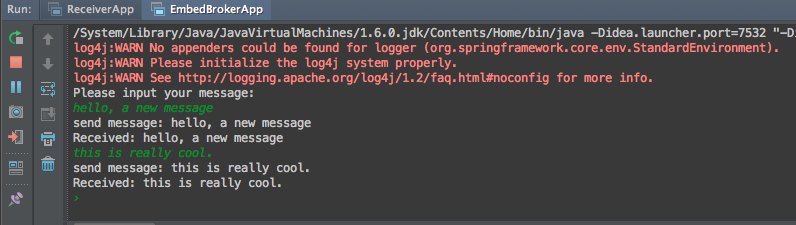
如果客户端和broker在相同的JVM进程中,客户端连接时可以使用broker url为“vm://localhost:61616”,进程外连接则需要使用”tcp://localhost:61616”。如果有多个broker的话可以给每个broker起个名字。

1
2
3
4
5
6
7
8
9
10
11
    <amq:broker brokerName="broker1">
<amq:transportConnectors>
<amq:transportConnector uri="tcp://localhost:61616" />
</amq:transportConnectors>
</amq:broker> <amq:broker brokerName="broker2">
<amq:transportConnectors>
<amq:transportConnector uri="tcp://localhost:61617" />
</amq:transportConnectors>
</amq:broker>

客户端连接时候可以直接使用broker名称连接,比如使用”vm://broker1”来使用第一个broker。

本章中的完整源码可从完整代码可从https://github.com/huangbowen521/SpringJMSSample下载。

ActiveMQ第三弹:在Spring中使用内置的Message Broker的更多相关文章

  1. 正确停止线程的方式三 使用Thread类中的内置的中断标记位-----------不熟悉

    package charpter10; public class Processor implements Runnable { @Override public void run() { for ( ...

  2. 三十、SAP中的内置图标

    一.选择[编辑]->[模式] 二.选中写入模式 三.选中图标 四.选择我们需要的图标 五.选中图标后,选择复制 六.点击之后,会回到代码界面,如下 七.执行结果如下,显示出了一个神奇的图标

  3. javascript中的内置对象

    2015.12.1 javascript中的内置对象 复习: 1.js中的内置函数 alert prompt write parseInt parseFloat eval isNaN document ...

  4. 秒懂ASP.NET中的内置对象

    上篇博客,小编主要简单的介绍了一下ASP.NET中的控件,这篇博客,小编主要简单总结一下ASP.NET中的内置对象,七个内置对象分别是:Request.Response.Application.Coo ...

  5. Android ROM开发(三)——精简官方ROM并且内置ROOT权限,开启Romer之路

    Android ROM开发(三)--精简官方ROM并且内置ROOT权限,开启Romer之路 相信ROM的相关信息大家通过前几篇的学习都是有所了解了,这里就不在一一提示了,这里我们下载一个官方包,我们还 ...

  6. [Learn AF3]第六章 App Framework 3.0中的内置矢量图标

    AF3的内置矢量图标 介绍:要使用af3中的图标,必须首先引入icon.css,由于文件中已经内置了字体文件数据,因此不需要引入字体文件支持. <link rel="styleshee ...

  7. 转】SparkSQL中的内置函数

    原博文来自于: http://blog.csdn.net/u012297062/article/details/52207934    感谢! 使用Spark SQL中的内置函数对数据进行分析,Spa ...

  8. Spring Cloud Alibaba学习笔记(16) - Spring Cloud Gateway 内置的路由谓词工厂

    Spring Cloud Gateway路由配置的两种形式 Spring Cloud Gateway的路由配置有两种形式,分别是路由到指定的URL以及路由到指定的微服务,在上文博客的示例中我们就已经使 ...

  9. Kettle中JavaScript内置函数说明

    本文链接:https://blog.csdn.net/u010192145/article/details/102220563 我们在使用JavaScript组件的时候,在左侧核心树对象栏中可以看到K ...

随机推荐

  1. JavaScript中的Map

    1.首先,在新版本的浏览器中,已经实现了对Map的原生支持:https://developer.mozilla.org/en-US/docs/Web/JavaScript/Reference/Glob ...

  2. xfire配置(java中的webservice)

    开发时需要在src中新建META-INF=>xfire=>services.xml 这样编译出来就在classes文件夹下. services.xml配置 <?xml version ...

  3. flex 导出Excel功能实现

    方法一: 1.Excel导出主要代码: try   {    var bytes: ByteArray = new ByteArray();    bytes.writeMultiByte(DataG ...

  4. 在Eclipse上操作Hive-0.13.1-JDBC端口

    fesh个人实践,欢迎经验交流!本文Blog地址:http://www.cnblogs.com/fesh/p/3877740.html 完成<在Hadoop-2.2.0集群上安装 Hive-0. ...

  5. construction of tuples containing 0 or 1 items

    [construction of tuples containing 0 or 1 items] the syntax has some extra quirks to accommodate the ...

  6. Codeforces Round #325 垫底纪念

    A. Alena's Schedule 间隔0长度为1被记录  1被记录  其余不记录 #include <iostream> #include <cstring> #incl ...

  7. Maven重复类的解决

    1. 设置仓库,我的Settings里设置使用了公司的Nexus <?xml version="1.0"?> <settings xmlns="http ...

  8. C# 从excel里面复制的1万6千多条记录粘贴到FCKeditor里面,点保存的时候,保存不了,页面没有反应

    客户那边添加公告,是直接从excel里面复制的,有1万6千多条记录,excel文件有6M多. 编辑器用的FCKeditor,也能粘贴上,就是点保存的时候,执行了一段时间就没有反映了,保存不了. 想着可 ...

  9. 移动端布局,div按比例布局,宽度为百分比,高度和宽度一样,即让div为正方形

    http://codepen.io/airen/details/XbVBZo <div><span>1</span></div> <div> ...

  10. Spring+MyBatis多数据源配置实现

    最近用到了MyBatis配置多数据源,原以为简单配置下就行了,实际操作后发现还是要费些事的,这里记录下,以作备忘 不多废话,直接上代码,后面会有简单的实现介绍 jdbc和log4j的配置 #定义输出格 ...