
WPF中模板选择和DataContext的一些使用
如图样:
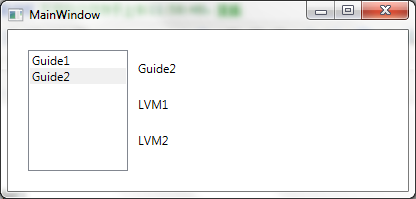
View结构
MainView(MainViewModel)
|---Guide1View(Guide1ViewModel)
|---Guide2View(Guide2ViewModel)
|---Guide2_1View1(Guide2_1ViewModel)
|---Guide2_1View2(Guide2_1ViewModel)
ViewModel实例结构
Main(ViewModelViewModel)
|---CurrentViewModel(GuidePageViewModelBase)
|---PageViewModelList(ObservableCollection<GuidePageViewModelBase>)
|---Guide1(Guide1ViewModel)
|---Guide2(Guide2ViewModel)
|---LVM1(LViewModel)
|---LVM2(LViewModel)
1、通过ContentControl显示选中的视图模型对应的视图:
<ContentControl Content="{Binding CurrentViewModel}">

    <ContentControl.Resources>

        <DataTemplate DataType="{x:Type viewmodel:Guide1ViewModel}">

            <view:Guide1View/>

        </DataTemplate>

        <DataTemplate DataType="{x:Type viewmodel:Guide2ViewModel}">

            <view:Guide2View/>

        </DataTemplate>

    </ContentControl.Resources>

</ContentControl>
2、Guide2_1View作为一个多次使用的控件,对应一个LViewModel,设置自己的DataContext(这里的背景是该视图的使用个数确定的。当然也可以用ListBox代替):
<view:Guide2_1View DataContext="{Binding Path=DataContext.LVM1,RelativeSource={RelativeSource AncestorType={x:Type UserControl}}}" />

<view:Guide2_1View DataContext="{Binding Path=DataContext.LVM2,RelativeSource={RelativeSource AncestorType={x:Type UserControl}}}" />
完整代码:
ViewModel:
using GalaSoft.MvvmLight;

namespace WPF_NestedVMAndView.ViewModel

{

    public class MainViewModel : ViewModelBase

    {

        public MainViewModel()

        {

            PageViewModelList = new ObservableCollection<GuidePageViewModelBase>()

            {

                new Guide1ViewModel(),

                new Guide2ViewModel(),

            };

            CurrentViewModel = PageViewModelList[];

        }

        public const string CurrentViewModelPropertyName = "CurrentViewModel";

        private GuidePageViewModelBase _currentViewModel;

        public GuidePageViewModelBase CurrentViewModel

        {

            get

            {

                return _currentViewModel;

            }

            set

            {

                if (_currentViewModel == value)

                    return;

                _currentViewModel = value;

                RaisePropertyChanged(CurrentViewModelPropertyName);

            }

        }

        public const string PageViewModelListPropertyName = "PageViewModelList";

        private ObservableCollection<GuidePageViewModelBase> _pageViewModelList;

        public ObservableCollection<GuidePageViewModelBase> PageViewModelList

        {

            get

            {

                return _pageViewModelList;

            }

            set

            {

                if (_pageViewModelList == value)

                    return;

                _pageViewModelList = value;

                RaisePropertyChanged(PageViewModelListPropertyName);

            }

        }

    }

    public class GuidePageViewModelBase : ViewModelBase

    {

        public GuidePageViewModelBase(string name)

        {

            Name = name;

        }

        public const string NamePropertyName = "Name";

        private string _name;

        public string Name

        {

            get

            {

                return _name;

            }

            set

            {

                if (_name == value)

                    return;

                _name = value;

                RaisePropertyChanged(NamePropertyName);

            }

        }

    }

    public class Guide1ViewModel : GuidePageViewModelBase

    {

        public Guide1ViewModel()

            : base("Guide1")

        {

        }

    }

    public class Guide2ViewModel : GuidePageViewModelBase

    {

        public Guide2ViewModel() : base("Guide2")

        {

            LVM1 = new LViewModel()

            {

                Text = "LVM1",

            };

            LVM2 = new LViewModel()

            {

                Text = "LVM2",

            };

        }

        public const string LVM1PropertyName = "LVM1";

        private LViewModel _lvm1;

        public LViewModel LVM1

        {

            get

            {

                return _lvm1;

            }

            set

            {

                if (_lvm1 == value)

                    return;

                _lvm1 = value;

                RaisePropertyChanged(LVM1PropertyName);

            }

        }

        public const string LVM2PropertyName = "LVM2";

        private LViewModel _lvm2;

        public LViewModel LVM2

        {

            get

            {

                return _lvm2;

            }

            set

            {

                if (_lvm2 == value)

                    return;

                _lvm2 = value;

                RaisePropertyChanged(LVM2PropertyName);

            }

        }

    }

    public class LViewModel : ViewModelBase

    {

        public const string TextPropertyName = "Text";

        private string _text;

        public string Text

        {

            get

            {

                return _text;

            }

            set

            {

                if (_text == value)

                    return;

                _text = value;

                RaisePropertyChanged(TextPropertyName);

            }

        }

    }

}
MainView:
<Window x:Class="WPF_NestedVMAndView.MainWindow"

        xmlns="http://schemas.microsoft.com/winfx/2006/xaml/presentation"

        xmlns:x="http://schemas.microsoft.com/winfx/2006/xaml"

        xmlns:view="clr-namespace:WPF_NestedVMAndView.View"

        xmlns:viewmodel="clr-namespace:WPF_NestedVMAndView.ViewModel"

        Title="MainWindow" Height="350" Width="525"

        DataContext="{Binding Main,Source={StaticResource Locator}}">

    <DockPanel Margin="20">

        <ListBox ItemsSource="{Binding PageViewModelList}" DisplayMemberPath="Name" SelectedItem="{Binding CurrentViewModel}" DockPanel.Dock="Left" Width="100"/>

        <ContentControl Content="{Binding CurrentViewModel}">

            <ContentControl.Resources>

                <DataTemplate DataType="{x:Type viewmodel:Guide1ViewModel}">

                    <view:Guide1View/>

                </DataTemplate>

                <DataTemplate DataType="{x:Type viewmodel:Guide2ViewModel}">

                    <view:Guide2View/>

                </DataTemplate>

            </ContentControl.Resources>

        </ContentControl>

    </DockPanel>

</Window>
Guide1View:
<UserControl x:Class="WPF_NestedVMAndView.View.Guide1View"

             xmlns="http://schemas.microsoft.com/winfx/2006/xaml/presentation"

             xmlns:x="http://schemas.microsoft.com/winfx/2006/xaml"

             xmlns:mc="http://schemas.openxmlformats.org/markup-compatibility/2006"

             xmlns:d="http://schemas.microsoft.com/expression/blend/2008"

             mc:Ignorable="d"

             Background="White"

             >

    <Grid>

        <TextBlock Text="{Binding Name}" Margin="10"/>

    </Grid>

</UserControl>
Guide2View:
<UserControl x:Class="WPF_NestedVMAndView.View.Guide2View"

             xmlns="http://schemas.microsoft.com/winfx/2006/xaml/presentation"

             xmlns:x="http://schemas.microsoft.com/winfx/2006/xaml"

             xmlns:mc="http://schemas.openxmlformats.org/markup-compatibility/2006"

             xmlns:d="http://schemas.microsoft.com/expression/blend/2008"

             xmlns:view="clr-namespace:WPF_NestedVMAndView.View"

             mc:Ignorable="d"

             Background="White">

    <DockPanel>

        <TextBlock Text="{Binding Name}" Margin="10" DockPanel.Dock="Top"/>

        <view:Guide2_1View DataContext="{Binding Path=DataContext.LVM1,RelativeSource={RelativeSource AncestorType={x:Type UserControl}}}" DockPanel.Dock="Top"/>

        <view:Guide2_1View DataContext="{Binding Path=DataContext.LVM2,RelativeSource={RelativeSource AncestorType={x:Type UserControl}}}" DockPanel.Dock="Top"/>

    </DockPanel>

</UserControl>
Guide2_1View:
<UserControl x:Class="WPF_NestedVMAndView.View.Guide2_1View"

             xmlns="http://schemas.microsoft.com/winfx/2006/xaml/presentation"

             xmlns:x="http://schemas.microsoft.com/winfx/2006/xaml"

             xmlns:mc="http://schemas.openxmlformats.org/markup-compatibility/2006"

             xmlns:d="http://schemas.microsoft.com/expression/blend/2008"

             mc:Ignorable="d"

             Background="White">

    <Grid>

        <TextBlock Text="{Binding Text}" Margin="10"/>

    </Grid>

</UserControl>
。
WPF中模板选择和DataContext的一些使用的更多相关文章
- WPF中如何选择合适的元数据标记?(英文)
原文:WPF中如何选择合适的元数据标记?(英文) FrameworkPropertyMetadataOptions Enumeration:Specifies the types of framewo ...
- 总结:WPF中模板需要绑定父级别的ViewModel该如何处理
原文:总结:WPF中模板需要绑定父级别的ViewModel该如何处理 <ListBox ItemsSource="{Binding ClassCollection}"> ...
- WPF动态模板选择的两种实现
前言 .net开发工作了六年,看了大量的博客,现在想开始自己写博客,这是我的第一篇博客,试试水,就从自己最常使用的WPF开始. 今天我来给大家分享可用户动态选择控件模板的两种实现方式:DataTrig ...
- WPF中 ItemsSource 和DataContext不同点
此段为原文翻译而来,原文地址 WPF 中 数据绑定 ItemSource和 DataContext的不同点: 1.DataContext 一般是一个非集合性质的对象,而ItemSource 更期望数据 ...
- WPF中的数据模板使用方式之一:ContentControl、ContentTemplate和TemplateSelector的使用
在WPF中,数据模板是非常强大的工具,他是一块定义如何显示绑定的对象的XAML标记.有两种类型的控件支持数据模板:(1)内容控件通过ContentTemplate属性支持数据模板:(2)列表控件通过I ...
- wpf 获取datagrid中模板中控件
//获取name为datagrid中第三列第一行模板的控件 FrameworkElement item = dataGrid.Columns[].GetCellContent(dataGrid.Ite ...
- 关于WPF中ItemsControl系列控件中Item不能继承父级的DataContext的解决办法
WPF中所有的集合类控件,子项都不能继承父级的DataContext,需要手动将绑定的数据源指向到父级控件才可以. <DataGridTemplateColumn Header="操作 ...
- WPF 中获取DataGrid 模板列中控件的对像
WPF 中获取DataGrid 模板列中控件的对像 #region 当前选定行的TextBox获得焦点 /// <summary> /// 当前选定行的TextBox获得焦点 /// &l ...
- 在WPF中使用文件夹选择对话框
开发中有时会想实现"选择某个文件夹"的效果: 在WPF中,使用Microsoft.Win32.OpenFileDialog只能选择文件,FolderBrowserDialog只能用 ...
随机推荐
- Leetcode 290 Word Pattern STL
Leetcode 205 Isomorphic Strings的进阶版 这次是词组字符串和匹配字符串相比较是否一致 请使用map来完成模式统计 class Solution { public: boo ...
- Tomcat日志输出在linux和windows差异
tomca日志保存在${catalina}/logs目录下: 主要包括五类文件,开发测试常使用的日志主要保存在catalina.localhost日志中,且每天生成独立日志文件,结尾以日期命名,方便查 ...
- Perl语言——简单说明
Perl语言——简单说明 一.简单说明 Perl语言全称:实用摘录与报表语言|病态折中式垃圾列表器.Perl名称并不是缩写词,而是个溯写字. Perl语言历史:Larry Wall(拉里·沃尔)20世 ...
- android: 从相册中选择照片
虽然调用摄像头拍照既方便又快捷,但并不是每一次我们都需要去当场拍一张照片的. 因为每个人的手机相册里应该都会存有许许多多张照片,直接从相册里选取一张现有的照 片会比打开相机拍一张照片更加常用.一个优秀 ...
- HDU 1711 Number Sequence (KMP)
白书说这个是MP,没有对f 数组优化过,所以说KMP有点不准确 #include <stdio.h> int a,b; int T[1000010],P[10010];//从0开始存 in ...
- 使用Gulp和Browserify来搭建React应用程序
对React有一定了解之后,我们知道,需要把JSX文件转换成JS文件,组件需要导入导出.本篇就体验使用Gulp把JSX文件转换成JS文件,使用Browserify来把组件捆绑到一个文件并理顺组件之间的 ...
- asp.net 操作excel的一系列问题(未完待续)
最近在处理exel的一些东西,遇到了很多问题,现在就在此将问题和网上找到的解决办法 1.外部表不是预期格式错误 错误经过:在读取Excel时,出现外部表不是预期的格式 错误原因1: 由于Excel 9 ...
- easyui中 在子tabs中 添加新的tabs
function addToParentTab(title, url) { self.parent.addTabIgnoreExist(title, url, 'icon-cha ...
- .NET分布式事务--TransactionScop
一.开启DTC服务 方式一 计算机—管理—服务—Distributed Transaction Coordinator—属性—开启 方式二 CMD命令子界面输入:net start msdtc 二.设 ...
- SecureCRT的快捷键
快捷键,有时比笨拙的方式,要效率高很多,近期经常和Linux打交道,用到SecureCRT,这里就从网上找到部分快捷方式,作为日后查看,以防经常查找. Alt + Enter -- 全屏Alt + B ...