
HTML调用servlet(一)
1.页面的数据表单
在使用Servlet处理用户请求之前,先准备一个页面,该页面用来提供数据表单。数据表单就是HTML中的<form>...</form>部分,当用户单击Submit按钮提交表单之后,表单中包含的一些变量(或者成为字段)将会被发送到服务器端进行处理。下面编写一个HTML文件,文件代码如下:
add.html

<!DOCTYPE HTML PUBLIC "-//W3C//DTD HTML 4.01 Transitional//EN">

<html>

  <head>

    <title>add.html</title>

    <meta http-equiv="keywords" content="keyword1,keyword2,keyword3">

    <meta http-equiv="description" content="this is my page">

    <meta http-equiv="content-type" content="text/html; charset=GB2312">

    <!--<link rel="stylesheet" type="text/css" href="./styles.css">-->

  </head>

  <body>

    <form action="/jdbc_servlet/servlet/addServlet" method="post">

      <label>请输入部门信息:</label><br><br>

      <label>部门号:</label><br>

      <input type="text" name="id"/><br>

      <label>部门名:</label><br>

      <input type="text" name="name"/><br>

      <label>部门人数:</label><br>

      <input type="text" name="num"/><br>

      <label>地址:</label><br>

      <input type="text" name="address"/><br><br>

      <input type="submit" value="提交"/><br>

    </form>

  </body>

</html>
2.添加数据
Servlet的好处之一就是可以简单地获得表单中的数据。在Servlet中使用JDBC技术实现添加的代码如下:
addServlet.java
package com.cn.add;

import java.io.IOException;

import java.io.PrintWriter;

import java.sql.Connection;

import java.sql.DriverManager;

import java.sql.PreparedStatement;

import java.sql.SQLException;

import javax.servlet.ServletException;

import javax.servlet.http.HttpServlet;

import javax.servlet.http.HttpServletRequest;

import javax.servlet.http.HttpServletResponse;

public class addServlet extends HttpServlet {

    /**

     * Constructor of the object.

     */

    public addServlet() {

        super();

    }

    /**

     * Destruction of the servlet. <br>

     */

    public void destroy() {

        super.destroy(); // Just puts "destroy" string in log

        // Put your code here

    }

    /**

     * The doGet method of the servlet. <br>

     *

     * This method is called when a form has its tag value method equals to get.

     *

     * @param request the request send by the client to the server

     * @param response the response send by the server to the client

     * @throws ServletException if an error occurred

     * @throws IOException if an error occurred

     */

    public void doGet(HttpServletRequest request, HttpServletResponse response)

            throws ServletException, IOException {

        response.setContentType("text/html;charset=gb2312");

        PrintWriter out = response.getWriter();

        this.doPost(request, response);

        out.flush();

        out.close();

    }

    /**

     * The doPost method of the servlet. <br>

     *

     * This method is called when a form has its tag value method equals to post.

     *

     * @param request the request send by the client to the server

     * @param response the response send by the server to the client

     * @throws ServletException if an error occurred

     * @throws IOException if an error occurred

     */

    public void doPost(HttpServletRequest request, HttpServletResponse response)

            throws ServletException, IOException {

        System.out.println("到了Servlet!!!");

        response.setContentType("text/html;charset=gb2312");

        request.setCharacterEncoding("gb2312");

        PrintWriter out = response.getWriter();

        String id = request.getParameter("id");   //获取部门编号

        String name = request.getParameter("name");    //获取部门名称

        String address = request.getParameter("address"); //获取部门所在地址

        int num = Integer.parseInt(request.getParameter("num")); //获取部门人数

        Connection conn = null; //声明一个Connection对象,用来连接数据库

        PreparedStatement pstmt = null; //声明PreparedStatement对象,用来向数据库插入数据条数据

        try {

            //连接到MySQL数据库中的bank数据库模式

            Class.forName("com.mysql.jdbc.Driver");

            System.out.println("创建驱动成功!");

            //连接数据库

            conn = DriverManager.getConnection("jdbc:mysql://localhost:3306/bank", "root", "1234");

            System.out.println("连接数据库成功!");

            //插入数据的SQL语句

            String sql = "INSERT INTO dept(id,d_name,address,empnumber) VALUES(?,?,?,?)";

            pstmt = conn.prepareStatement(sql);

            //设置插入数据的顺序

            pstmt.setString(1, id);

            pstmt.setString(2, name);

            pstmt.setString(3, address);

            pstmt.setInt(4, num);

            int result = pstmt.executeUpdate();

            //判断执行结果

            if (result == 1) {

                out.print("插入数据成功!");

            }else {

                out.print("插入数据失败!请重新插入!");

            }

        } catch (ClassNotFoundException e) {

            // TODO Auto-generated catch block

            e.printStackTrace();

        } catch (SQLException e) {

            // TODO Auto-generated catch block

            e.printStackTrace();

        }

        out.flush();

        out.close();

    }

    /**

     * Initialization of the servlet. <br>

     *

     * @throws ServletException if an error occurs

     */

    public void init() throws ServletException {

        // Put your code here

    }

}
web.xml
<?xml version="1.0" encoding="UTF-8"?>

<web-app version="2.5"

    xmlns="http://java.sun.com/xml/ns/javaee"

    xmlns:xsi="http://www.w3.org/2001/XMLSchema-instance"

    xsi:schemaLocation="http://java.sun.com/xml/ns/javaee

    http://java.sun.com/xml/ns/javaee/web-app_2_5.xsd">

  <servlet>

    <description>This is the description of my J2EE component</description>

    <display-name>This is the display name of my J2EE component</display-name>

    <servlet-name>addServlet</servlet-name>

    <servlet-class>com.cn.add.addServlet</servlet-class>

  </servlet>

  <servlet-mapping>

    <servlet-name>addServlet</servlet-name>

    <url-pattern>/servlet/addServlet</url-pattern>

  </servlet-mapping>

  <welcome-file-list>

    <welcome-file>index.jsp</welcome-file>

  </welcome-file-list>

</web-app>
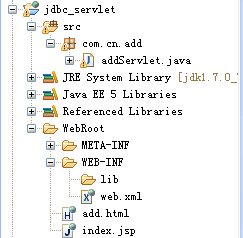
文件整体框架如下:
3.查看单条数据
一般一条数据的id是唯一的,查看单条记录的时候,可以根据id来查询。HTML页面的代码如下:
showById.html
<!DOCTYPE HTML PUBLIC "-//W3C//DTD HTML 4.01 Transitional//EN">

<html>

  <head>

    <title>showById.html</title>

    <meta http-equiv="keywords" content="keyword1,keyword2,keyword3">

    <meta http-equiv="description" content="this is my page">

    <meta http-equiv="content-type" content="text/html; charset=gb2312">

    <!--<link rel="stylesheet" type="text/css" href="./styles.css">-->

  </head>

  <body>

    <form name="f1" id="f1" action="/jdbc_servlet/servlet/SearchEmployee" method="post">

      <table border="0">

        <tr>

          <td>请输入部门编号:</td><tr/><tr/>

          <td><input type="text" name="id"></td>

        </tr>

        <tr>

          <td colspan="2" align="left"><input type="submit" value="查找"></td>

        </tr>

      </table>

    </form>

  </body>

</html>
在该页面中输如id号,点击查找按钮时会进入查询的Servlet,在Servlet中处理根据id查询的操作。根据id查询的Servlet代码如下:
SearchEmployee.java
package com.cn.query;

import java.io.IOException;

import java.io.PrintWriter;

import java.sql.Connection;

import java.sql.DriverManager;

import java.sql.PreparedStatement;

import java.sql.ResultSet;

import java.sql.SQLException;

import javax.servlet.ServletException;

import javax.servlet.http.HttpServlet;

import javax.servlet.http.HttpServletRequest;

import javax.servlet.http.HttpServletResponse;

public class SearchEmployee extends HttpServlet {

    /**

     * Destruction of the servlet. <br>

     */

    public void destroy() {

        super.destroy(); // Just puts "destroy" string in log

        // Put your code here

    }

    /**

     * The doGet method of the servlet. <br>

     *

     * This method is called when a form has its tag value method equals to get.

     *

     * @param request the request send by the client to the server

     * @param response the response send by the server to the client

     * @throws ServletException if an error occurred

     * @throws IOException if an error occurred

     */

    public void doGet(HttpServletRequest request, HttpServletResponse response)

            throws ServletException, IOException {

        response.setContentType("text/html;charset=gb2312");

        request.setCharacterEncoding("gb2312");

        PrintWriter out = response.getWriter();

        String id = request.getParameter("id"); //获取部门编号

        Connection conn = null;  //声明一个Connection对象,用来连接数据库

        PreparedStatement pstmt = null;

        ResultSet rs = null;

        try {

            Class.forName("com.mysql.jdbc.Driver");

            System.out.println("创建驱动成功!");

            //连接数据库

            conn = DriverManager.getConnection("jdbc:mysql://localhost:3306/bank", "root", "1234");

            System.out.println("连接数据库成功!");

            String sql = "SELECT * FROM dept WHERE id = ?";

            pstmt = conn.prepareStatement(sql);

            pstmt.setString(1, id);

            rs = pstmt.executeQuery();

        } catch (ClassNotFoundException e) {

            // TODO Auto-generated catch block

            e.printStackTrace();

        } catch (SQLException e) {

            // TODO Auto-generated catch block

            e.printStackTrace();

        }

        try {

            while(rs.next()){

                out.print("部门编号:"+rs.getString(1)+"\n");

                out.print("部门名称:"+rs.getString(2)+"\n");

                out.print("部门地址:"+rs.getString(3)+"\n");

                out.print("部门人数:"+rs.getString(4)+"\n");

            }

        } catch (SQLException e) {

            // TODO Auto-generated catch block

            e.printStackTrace();

        }

        out.flush();

        out.close();

    }

    /**

     * The doPost method of the servlet. <br>

     *

     * This method is called when a form has its tag value method equals to post.

     *

     * @param request the request send by the client to the server

     * @param response the response send by the server to the client

     * @throws ServletException if an error occurred

     * @throws IOException if an error occurred

     */

    public void doPost(HttpServletRequest request, HttpServletResponse response)

            throws ServletException, IOException {

        response.setContentType("text/html;charset=gb2312");

        request.setCharacterEncoding("gb2312");

        PrintWriter out = response.getWriter();

        this.doGet(request, response);

        out.flush();

        out.close();

    }

    /**

     * Initialization of the servlet. <br>

     *

     * @throws ServletException if an error occurs

     */

    public void init() throws ServletException {

        // Put your code here

    }

}
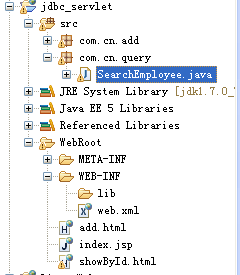
目录结构如下:
4.显示一张表中的全部数据
显示表中全部数据信息的Servlet代码如下:
DeptList.java
package com.cn.query;

import java.io.IOException;

import java.io.PrintWriter;

import java.sql.Connection;

import java.sql.DriverManager;

import java.sql.ResultSet;

import java.sql.SQLException;

import java.sql.Statement;

import javax.servlet.ServletException;

import javax.servlet.http.HttpServlet;

import javax.servlet.http.HttpServletRequest;

import javax.servlet.http.HttpServletResponse;

public class DeptList extends HttpServlet {

    /**

     * The doGet method of the servlet. <br>

     *

     * This method is called when a form has its tag value method equals to get.

     *

     * @param request the request send by the client to the server

     * @param response the response send by the server to the client

     * @throws ServletException if an error occurred

     * @throws IOException if an error occurred

     */

    public void doGet(HttpServletRequest request, HttpServletResponse response)

            throws ServletException, IOException {

        response.setContentType("text/html;charset=gb2312");

        request.setCharacterEncoding("gb2312");

        PrintWriter out = response.getWriter();

        Connection conn = null;

        Statement stmt = null;

        ResultSet rs = null;

        try {

            Class.forName("com.mysql.jdbc.Driver");

            conn = DriverManager.getConnection("jdbc:mysql://localhost:3306/bank", "root", "1234");

            stmt = conn.createStatement();

            rs = stmt.executeQuery("SELECT * FROM dept");

            //在页面中显示表中的所有信息

            out.println(

                    "<html>"+

                    "<head><title>部门表信息</title></head>"+

                    "<body>");

            out.println("<h1>部门表信息:</h1><br><br>");

            //循环遍历输出查询结果

            while(rs.next()){

                out.print("部门编号:");

                out.print(rs.getString(1)+"\t");

                out.print("部门名称:");

                out.print(rs.getString(2)+"\t");

                out.print("部门地址:");

                out.print(rs.getString(3)+"\t");

                out.print("部门人数:");

                out.print(rs.getString(4)+"\t");

                out.print("<br>");

            }

            out.print("</body></html>");

            out.close();

        } catch (ClassNotFoundException e) {

            // TODO Auto-generated catch block

            e.printStackTrace();

        } catch (SQLException e) {

            // TODO Auto-generated catch block

            e.printStackTrace();

        }

    }

    public void init() throws ServletException {

        // Put your code here

    }

}
HTML调用servlet(一)的更多相关文章
- Servlet主要相关类核心类 容器调用的过程浅析 servlet解读 怎么调用 Servlet是什么 工作机制
WEB简介 Web项目 是 B/S结构 浏览器/服务器模式的 浏览器发起请求,服务器作出响应 请求的发起和响应使用HTTP协议进行通讯 所谓协议也就是一种固定格式 而Socket是应用 ...
- html文件form表单action调用servlet连接mysql数据库实例
web.xml文件 <?xml version="1.0" encoding="UTF-8"?> <web-app xmlns:xsi=&qu ...
- JAVA-JSP内置对象之page对象调用Servlet
相关资料:<21天学通Java Web开发> page对象1.page对象代表JSP转译后的Servlet.2.通过page对象可以非常方便地调用Servlet类中定义的方法. pageD ...
- [C#/Java] C#中调用Servlet示例
需求 通用消息接口使用servlet作为服务器端服务接口,第三方应用程序通过http post的方式调用servlet,实现与通用消息接口的调用连接. 参数说明如下: msgTitle:消息标题,描述 ...
- JSP在页面加载时调用servlet的方法
方法:先在JS里面写一个调用servlet的事件(可以利用ajax),然后利用<body>标签的onload调用这个事件. 代码如下: jsp文件代码如下: <%@ page lan ...
- web服务器调用Servlet的过程
Servlet程序是由WEB服务器调用,web服务器收到客户端的Servlet访问请求后: Web服务器首先检查是否已经装载并创建了该Servlet的实例对象.如果是,则直接执行第④步,否则,执行第② ...
- 调用servlet报The requested resource is not available.
调用servlet的时候经常有这种报错,一般来说我直到现在遇到的情况大致有以下几类: 1.参数写错了 在新创建的servlet文件中有这么一行代码,“/LoginCheck”这个一定要和form表单中 ...
- JQuery调用Servlet实现文件下载
jsp页面上的txt附件,点击后浏览器默认直接打开,结果是乱码. 因为用户上传的txt文件可能是ANSI.Unicode.UTF-8编码的任意一种,上传时后台获取文件内容重写一遍保证浏览器打开正常太过 ...
- Apache.Tomcat 调用Servlet原理之Class类的反射机制,用orc类解释
有一个兽人类 package com.swift.servlet; public class OrcDemo { private int hp; private int mp; private int ...
- struts2动态调用+Servlet过滤器+struts2拦截器
周末真的是懒到心慌...... 本文是在完整s2sh项目基础上添加的,不太了解s2sh项目构建的朋友可以先参考一下这几篇文章: eclipse环境下基于tomcat-7.0.82构建struts2项目 ...
随机推荐
- faker image
$faker->image http://placehold.it http://placekitten.com/g/200/300 带文字 https://placeholdit.imgix. ...
- QTSingleApplication使用笔记
http://www.cnblogs.com/kevinzhwl/archive/2012/08/27/2658839.html QTSingleApplication,是Qt官方提供的,用于实现只启 ...
- PTA实验第一次作业
- 【nodejs】使用Node.js实现REST Client调用REST API
最近在产品中开发基于REST的API接口,结合自己最近对Node.js的研究,想基于它开发一个REST Client做测试之用. 通过初步研究,Node.js开发HTTP Client还是挺方便的. ...
- 关于c语言二维数组与指针的个人理解及处理办法。
相信大家在学习C语言时,对一维数组和指针的理解应该是自信的,但是,我在学习过程中,看到网上一些博文,发现即便是参加工作的一些专业编程人员,突然碰到二维数组和指针的问题时,也可能会遇到难以处理的诡异问题 ...
- 【Java 基础篇】【第八课】package包
学习Java以来,第一次感觉稍微有点不好理解的,下面说说吧. 存在意义: 包的存在就是为更好的组织结构 包的创建: 只要在程序的最前面加入 Package ******,就可以了,一般都喜欢写 com ...
- ActiveMQ持久化消息
ActiveMQ的另一个问题就是只要是软件就有可能挂掉,挂掉不可怕,怕的是挂掉之后把信息给丢了,所以本节分析一下几种持久化方式: 一.持久化为文件 ActiveMQ默认就支持这种方式,只要在发消息时设 ...
- 使用多种客户端消费WCF RestFul服务(四)——Jquery篇
Jquery篇 互联网开发中少不了各类前端开发框架,其中JQUERY就是最流行之一,本篇我们就采用JQUERY来消费WCF RestFul服务,其中用到JSON基础知识,如果有想了解的朋友,请访问:& ...
- 再谈CocoaPods
1. 简介 java语言的第三方库管理工具是Maven,Node.js的第三方库管理工具是npm,而ios的第三方库管理工具是CocoaPods. CocoaPods 的原理是将所有的依赖库都放到名为 ...
- CENTOS安装vnc
先直接进入命令模式,如果是服务器则可以使用putty连接进入命令行模式. 现在知道的centos下的vnc是:tigervnc,由于是服务端所以我们只安装tigervnc-server即可: yum ...